Open facebook.com in your phone's browser, then turn on Desktop site in Chrome on Android or tap Request Desktop Website in Safari on iPhone.
The steps below cover Chrome and Safari, how to make the desktop view permanent, how to switch back, and what to do when Facebook keeps loading the mobile layout or will not open on a computer.
How to open Facebook desktop site version on mobile
The option lives in your browser, not in the Facebook app, so start in the browser. Go to facebook.com, sign in if you are asked, then use the row for your phone.
| Your phone and browser | Where to tap | How long it lasts |
|---|---|---|
| Android with Chrome | More (next to the address bar) > Desktop site | Saved for that site as an exception |
| iPhone with Safari | Page Menu button (left of the search field) > Request Desktop Website | Applies to the website you are viewing |
| iPhone or iPad with Chrome | More > Settings > Content settings > Default site view > Desktop > Done | Every site, until you change it back |
How to view Facebook desktop site in Chrome on Android
Chrome normally picks a layout from your screen size and memory, so a phone usually gets the mobile page. This route overrides that choice for Facebook only.
- Open Chrome on your Android phone.
- Type
facebook.comin the address bar and go to the page. - Tap More on the right of the address bar.
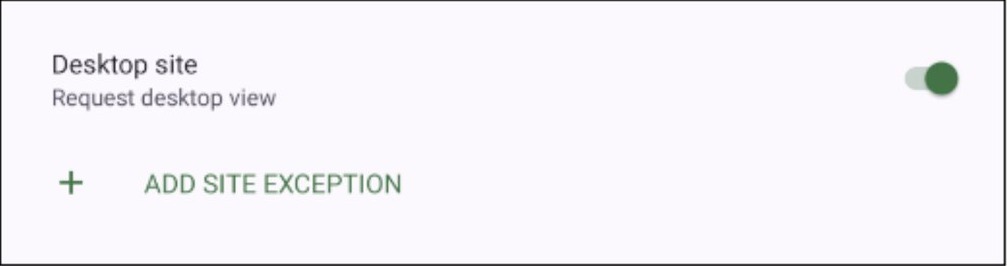
- Tap Desktop site so the option is turned on.
- Refresh the page if the layout does not change on its own.
How to request Facebook desktop website in Safari on iPhone
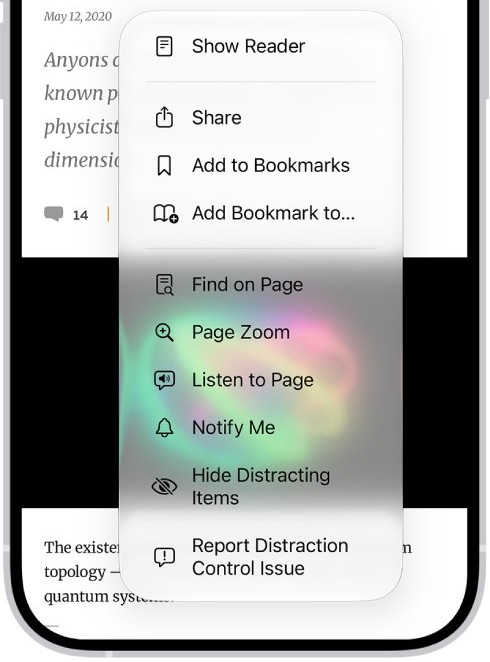
Apple describes this control as a way to see what a webpage looks like on a desktop computer. It may not appear on every page, so load Facebook fully before you open the menu.
- Open the Safari app on your iPhone.
- Enter
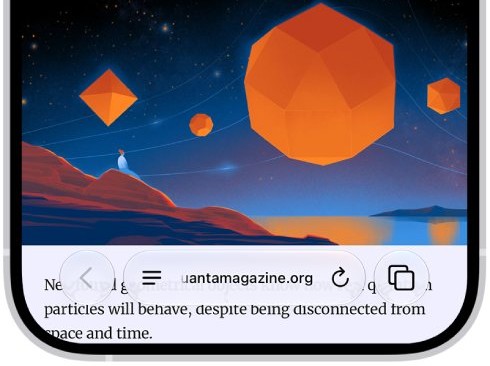
facebook.comin the search field and open the page. - Tap the Page Menu button on the left side of the search field.
- Tap Request Desktop Website.
- Wait for the page to reload, then pinch to zoom or turn the phone to landscape for a wider view.
How to open Facebook desktop site in Chrome on iPhone
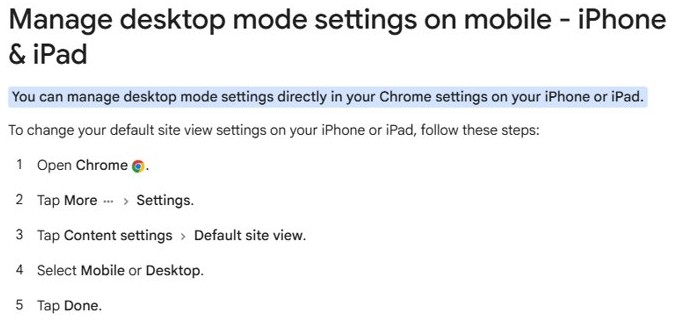
Chrome on iPhone and iPad sets a default view for all sites from its settings. Use this route when you want every site, Facebook included, to load the computer layout.
- Open Chrome on your iPhone or iPad.
- Tap More, then tap Settings.
- Tap Content settings, then Default site view.
- Select Desktop, then tap Done.
- Go to
facebook.comand refresh the page if it is already open.
How to always open Facebook desktop site on Android
A site exception keeps Facebook on the computer layout while every other site stays mobile. Chrome also has a global switch if you want all sites in desktop mode.
- Open Chrome and tap More on the right of the address bar.
- Tap Settings.
- Under Advanced, select Site settings, then Desktop site.
- Tap + ADD SITE EXCEPTION and enter
facebook.com. - To apply desktop mode everywhere instead, select the Desktop site default on the same page.
The Default view setting lets Chrome choose. Automatic desktop selection needs 8 GB of RAM, so phones with less memory default to mobile pages.
Why opt for the Facebook desktop site on mobile?
| Reason | What it gets you | What to expect |
|---|---|---|
| Following computer instructions | Facebook's Help Centre splits many articles into Computer help and Mobile Browser Help, so computer steps match what you see | Tap targets are smaller than on the mobile page |
| Skipping the app | Full access from a browser with nothing to install | You stay signed in only in that browser |
| Using a large screen | Chrome on Android gives a desktop browser experience when connected to a large screen | Automatic desktop view needs 8 GB of RAM |
| Checking how a page looks | The same layout people see on a computer | Text is small until you zoom |
Once you are on the computer layout, you can also enable Facebook dark mode on desktop.
Facebook full site desktop link and mobile site address
Facebook publishes different addresses for different devices. An m. address opens the mobile site, so check it first when a phone keeps showing the small layout.
| Address or app | What it is | Best for |
|---|---|---|
facebook.com |
The address Facebook gives for computers and current mobile browsers | Requesting the desktop layout on a phone |
m.facebook.com |
The Facebook mobile site, which works with most mobile browsers | Normal phone browsing |
| Facebook app | The Android and iOS app | Everyday use on a phone |
| Facebook Lite app | A lighter Android app | Android phones on a slow connection |
On a very slow connection, the basic Facebook version may suit you better than the full site.
How to tell if Facebook is in desktop mode on your phone
- Look at the address bar and check that it shows
facebook.com, notm.facebook.com. - In Chrome on Android, tap More and check that Desktop site is turned on.
- In Chrome on iPhone, open Settings > Content settings > Default site view and check that Desktop is selected.
- Look at the page itself: it should fit a computer-width layout, with text you need to zoom to read.
How to switch Facebook back to the mobile site
- In Chrome on Android, tap More and turn off Desktop site.
- If you added a site exception, go to Settings > Site settings > Desktop site and remove
facebook.com. - In Chrome on iPhone or iPad, go to Settings > Content settings > Default site view, select Mobile, then tap Done.
- In Safari on iPhone, open the Page Menu again and switch back to the mobile website.
- Enter
m.facebook.comto go straight to the mobile site in any browser.
Facebook desktop site not working on mobile
Facebook still shows the mobile layout
The setting has not applied to the open page, or the address still points at the mobile site.
- Change the address to
facebook.comif it starts withm.. - Tap More in Chrome and confirm Desktop site is on.
- Refresh the page, because a changed setting only appears after a reload.
Request Desktop Website is missing in Safari
Apple lists this option as available only on some pages.
- Let the Facebook page finish loading.
- Open the Page Menu button again.
- Try Chrome if the option still does not appear.
Facebook features are missing in an older mobile browser
Facebook is removing features from facebook.com on older mobile browsers.
- Update your browser from your phone's app store.
- Check that it meets Facebook's minimums: Chrome 49, Firefox 48, Samsung Internet 11, Safari 12, or any version of Edge.
- Reopen
facebook.com.
The desktop page is too small to read
The computer layout is wider than a phone screen.
- Turn your phone to landscape.
- In Safari, tap the Page Menu button, then Page Zoom, then the large A.
Why can't I open Facebook on my desktop?
Connection and loading errors usually come from device settings, a browser problem or a network fault, so work from the simplest check down.
Facebook will not open on my computer or laptop
Google lists airplane mode, the router, cookies, extensions and site downtime as common causes.
- Check the address reads
facebook.com, then reload with F5. - Check your internet connection and turn off airplane mode.
- Update and restart Chrome.
- Open Facebook in an Incognito window to rule out extensions.
- Delete browsing data if Incognito works.
- Check whether your firewall or antivirus software is blocking the connection.
Facebook opens but the login fails
The page is loading normally and the problem is with your sign-in details.
- Go to
facebook.com. - Enter your email address, confirmed phone number or username.
- Enter your password and click Log in.
- Use Facebook's password reset or account recovery help if this fails.
How to put Facebook on your desktop
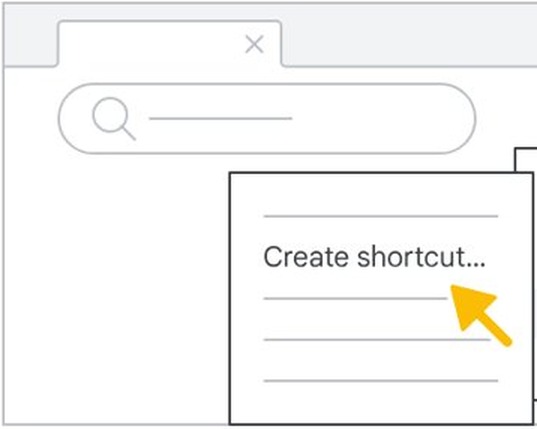
A shortcut opens Facebook from your computer's desktop in one click. These steps use Chrome on a Windows PC or laptop.
- Open Chrome on your computer and go to
facebook.com. - Select More at the top right.
- Select Cast, save, and share, then Create shortcut.
- Keep the name or type a new one.
- Select Create.
How to full screen Facebook in laptop
- Open
facebook.comin Chrome. - Press F11 on Windows, or Fn + f on a Mac.
- Press the same keys again to leave full screen, or hold Esc.
Facebook desktop site on mobile FAQ
How do I open Facebook desktop site on mobile?
Open facebook.com in your phone's browser. In Chrome on Android, tap More and turn on Desktop site. In Safari on iPhone, tap the Page Menu button and choose Request Desktop Website. These options belong to the browser, so open the browser rather than the Facebook app.
How to open Facebook in laptop?
Open any current browser on your laptop and go to facebook.com. Enter your email address, phone number or username, add your password, and click Log in. A laptop gets the full site by default, so no extra setting is needed.
What is the Facebook full site desktop link?
The address is facebook.com, which Facebook gives for computers and current mobile browsers. The mobile site sits at m.facebook.com. On a phone, the address alone may not change the layout, so turn on your browser's desktop option as well.
How to get Facebook app on desktop?
Facebook's browser help lists its apps for Android and iOS and sends computer users to facebook.com. For app-style access on a PC, create a Chrome shortcut from More, then Cast, save, and share, then Create shortcut.
How to have Facebook on my desktop?
Create a shortcut in Chrome while Facebook is open. Select More, choose Cast, save, and share, select Create shortcut, then select Create. The shortcut opens the Facebook site in one click, and you stay signed in as long as that browser keeps your session.
Why won't Facebook open on my laptop?
The usual causes are a lost connection, airplane mode, a browser extension, stale browsing data or a firewall. Reload the page, check your connection, update and restart Chrome, try an Incognito window, then delete browsing data if Incognito works.
Can I use the Facebook desktop site without the app?
Yes. The desktop layout runs entirely in your phone's browser, so you can use it without installing the Facebook app. Facebook lists Chrome 49, Firefox 48, Samsung Internet 11, Safari 12 and any Edge version as browsers that work with facebook.com.