The PlayStation 5 Pro launched on November 7, 2024, and has cost $899.99 in the US since Sony's April 2, 2026 price increase.
Below are its full specs, regional prices, what it improves over the standard PS5, the 8K and 120Hz requirements, and a clear verdict on who should buy one in 2026.
PS5 Pro overview and market positioning
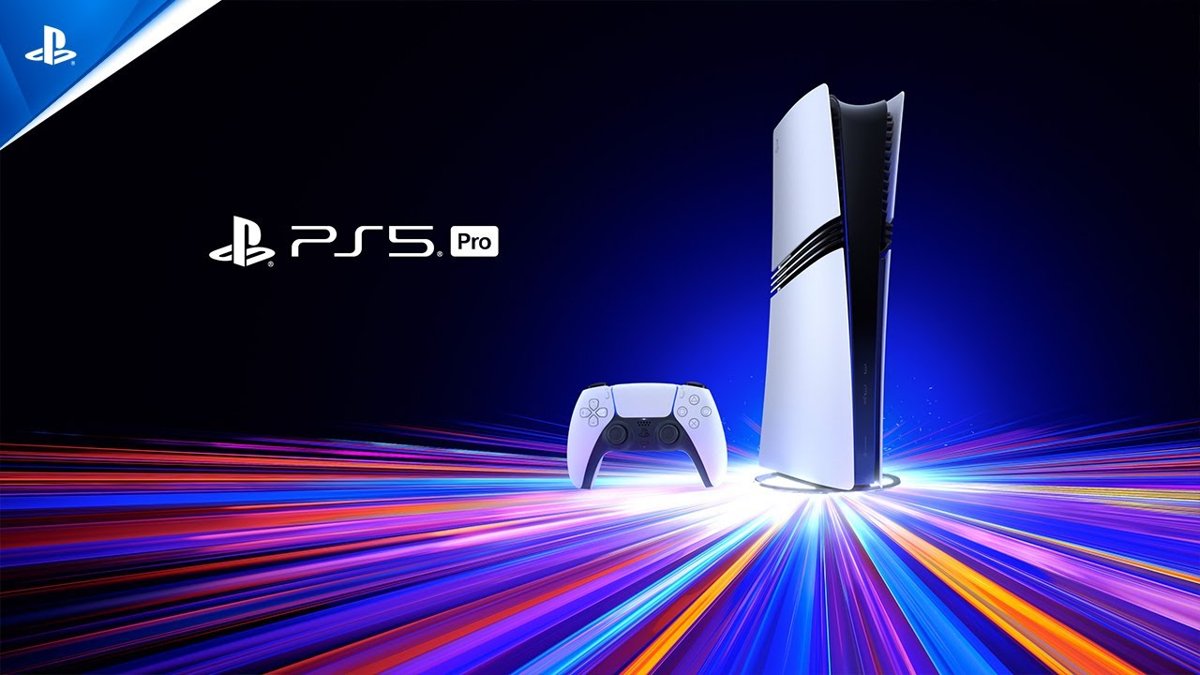
Sony positions the PS5 Pro as the premium PS5 model: the same game library, with sharper images and higher frame rates in games patched for it.
It sits above the PS5 ($649.99) and the PS5 Digital Edition ($599.99), so it costs $250 more than the disc model in the US.
| Question | Answer |
|---|---|
| When was the PS5 Pro released? | November 7, 2024. Sony announced it on September 10, 2024. |
| What does it cost now? | $899.99, £789.99, €899.99 or ¥137,980 recommended retail price from April 2, 2026. |
| What did it cost at launch? | $699.99, £699.99, €799.99 or ¥119,980 (tax included in Japan). |
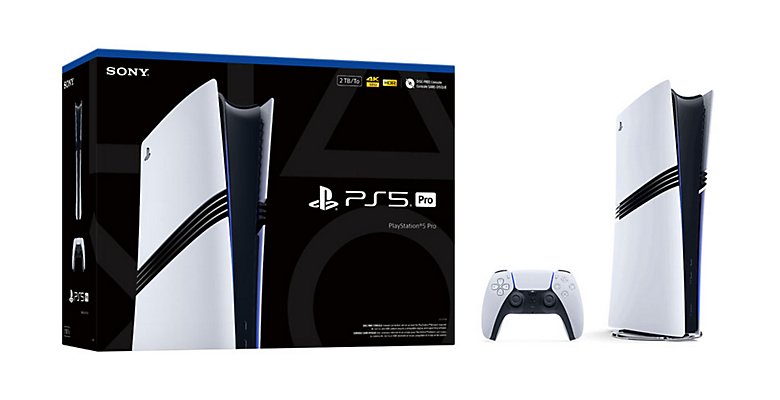
| What is in the box? | Console, DualSense wireless controller, 2TB SSD, two plastic stand feet, HDMI cable, AC power cord, user manual and Astro's Playroom pre-installed. |
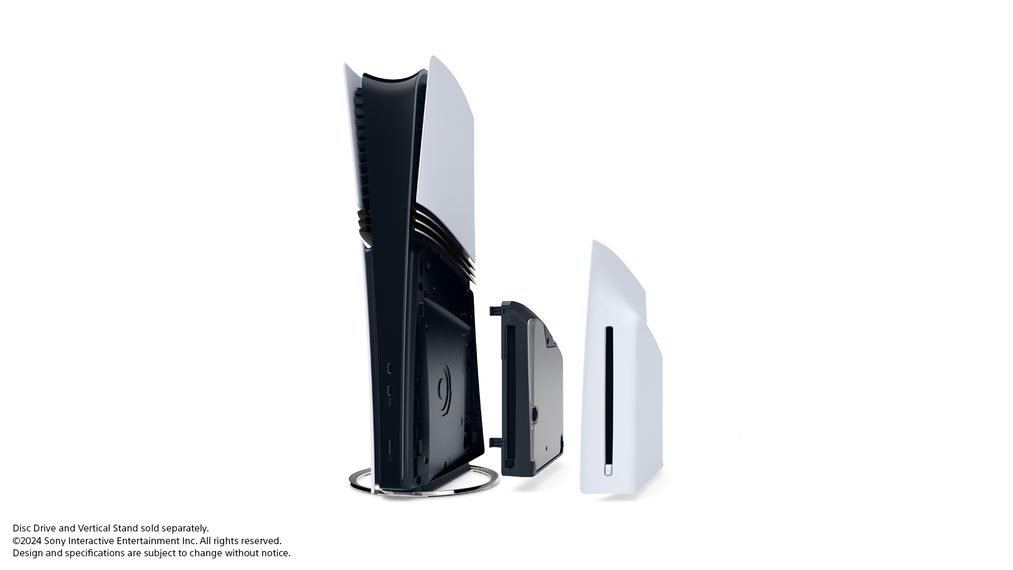
| Does it have a disc drive? | No. It is disc-free. The Disc Drive for PS5 Digital Edition consoles is sold separately ($79 on PlayStation Direct). |
| What is the main upgrade? | A GPU with 67% more compute units, ray tracing at double and at times triple the speed, and PSSR AI upscaling. |
| Does it play every PS5 game? | Yes. It plays all PS5 games and over 8,500 PS4 games, with extra features in over 100 PS5 Pro enhanced titles. |
PS5 Pro release date
Sony revealed the PS5 Pro on September 10, 2024, and released it on November 7, 2024, with more than 50 enhanced games ready at launch.
| Date | PS5 Pro milestone |
|---|---|
| September 10, 2024 | Sony announces the PS5 Pro and its launch prices. |
| September 26, 2024 | Pre-orders open. |
| October 10, 2024 | Pre-orders open at other participating retailers. |
| November 7, 2024 | PS5 Pro goes on sale, with more than 50 enhanced games at launch. |
| April 14, 2025 | Sony raises PS5 prices in Europe, the UK, Australia and New Zealand; the PS5 Pro price stays the same. |
| August 21, 2025 | US price rises from $699.99 to $749.99. |
| February 27, 2026 | Sony announces an upgraded PSSR upscaler; Resident Evil Requiem is the first game to use it. |
| March 2026 | A system software update adds the Enhance PSSR Image Quality setting. |
| April 2, 2026 | Prices rise again to $899.99, £789.99, €899.99 and ¥137,980. |
The PS5 Pro is sold as the CFI-7000 model group, the model number Sony uses for its 8K output setting.
PS5 Pro price
The PS5 Pro now costs $200 more in the US than it did at launch, after increases in August 2025 and April 2026.
Sony gave "continued pressures in the global economic landscape" as the reason for the April 2026 rise.
| Region | Launch price (November 2024) | Current price (from April 2, 2026) | Change |
|---|---|---|---|
| United States | $699.99 | $899.99 | +$200, via $749.99 from August 21, 2025 |
| United Kingdom | £699.99 | £789.99 | +£90 |
| Europe | €799.99 | €899.99 | +€100 |
| Japan | ¥119,980 (tax included) | ¥137,980 | +¥18,000 |
Add $79 for the Disc Drive and $29 for the Vertical Stand if you need them; PlayStation Direct lists both separately.
Other regions follow local retailer pricing. Sony points buyers to direct.playstation.com where it sells consoles directly.
PS5 Pro specifications and performance improvements
Sony publishes its PS5 Pro performance figures as gains over the standard PS5 rather than as raw clock speeds.
| Component | PS5 Pro | What it means in games |
|---|---|---|
| GPU | 67% more compute units than the PS5 | Up to 45% faster rendering for gameplay |
| Ray tracing | Rays cast at double, and at times triple, the PS5 speed | Ray-traced reflections, shadows and global illumination in supported games |
| Memory | 28% faster GDDR6 memory, plus a ninth DDR5 chip for lower-speed tasks | More bandwidth for higher-resolution rendering |
| Upscaling | PlayStation Spectral Super Resolution (PSSR), machine-learning based | Sharp 4K output from a lower internal resolution |
| Storage | 2TB SSD with an M.2 expansion slot | Part of the SSD is reserved for system software, so usable space is lower |
| Video output | 4K at up to 120Hz, VRR, and 8K at 60Hz | 8K needs an 8K60 TV with Display Stream Compression |
| Wireless | Wi-Fi 7 (IEEE 802.11 a/b/g/n/ac/ax/be) | Also works with Wi-Fi 6 and Wi-Fi 5 routers |
| Wired network | Ethernet 10BASE-T, 100BASE-TX, 1000BASE-T | Gigabit wired connection |
| Power supply | About 48W more output than the PS5 | Feeds the larger GPU and enhanced power delivery |
Sony's announcement and teardown give no CPU figures for the PS5 Pro, so treat third-party CPU claims with caution.
PS5 vs PS5 Pro: Key differences
The PS5 with disc drive and the PS5 Pro run the same games; the differences are hardware headroom, storage and the disc drive.
| Feature | PS5 (disc model) | PS5 Pro |
|---|---|---|
| US price (April 2026) | $649.99 | $899.99 |
| Disc drive | Ultra HD Blu-ray built in | Sold separately |
| Storage | 1TB SSD | 2TB SSD |
| GPU | Standard PS5 GPU | 67% more compute units, up to 45% faster rendering |
| Ray tracing | Supported | Double, at times triple, the speed |
| AI upscaling | Not available | PSSR and upgraded PSSR |
| Wi-Fi | Wi-Fi 6 (802.11ax) | Wi-Fi 7 (802.11be) |
| 8K output | No Allow 8K Output setting | Allow 8K Output on an 8K60 DSC TV |
| PS4 games | Game Boost in select PS4 games | PS5 Pro Game Boost plus Enhance Image Quality for PS4 Games |
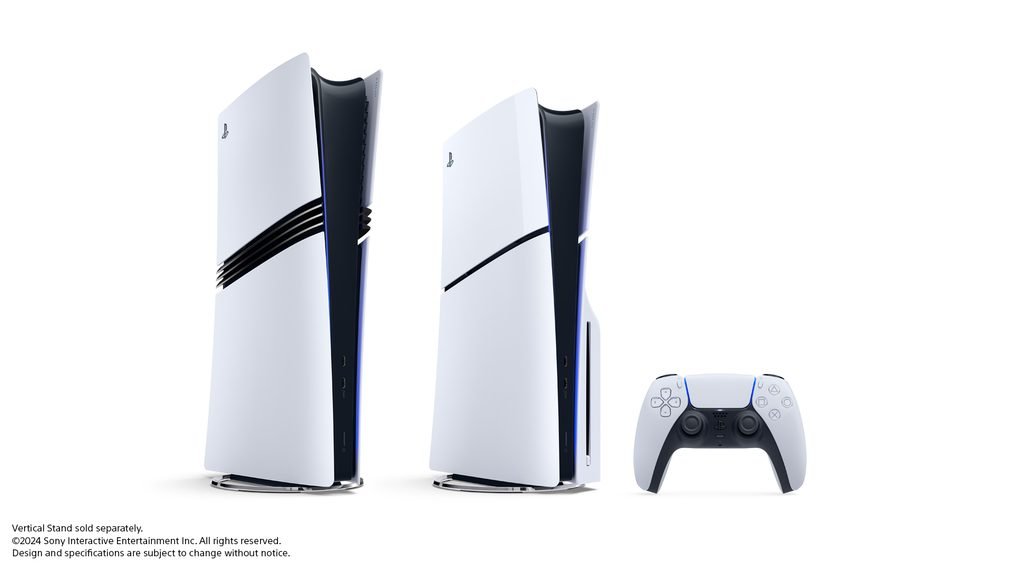
| Size | About 358 x 96 x 216 mm, 3.2 kg | About 388 x 89 x 216 mm, 3.1 kg |
The PS5 Digital Edition ($599.99) has 825GB of storage and no disc drive, so it is the cheapest route to the same library.
What the PS5 Pro actually improves over the standard PS5
The PS5 Pro only changes how a game looks or runs when the developer has patched it. Sony lists over 100 PS5 titles with PS5 Pro enhancements.
In Sony's own games, the Pro merges the old Fidelity and Performance modes into one mode with both the resolution and the frame rate.
| Game | PS5 Pro enhancement stated by the developer |
|---|---|
| Marvel's Spider-Man 2, Miles Morales, Ratchet & Clank: Rift Apart | New default Performance Pro mode with 4K-class resolution, ray tracing and 60fps |
| The Last of Us Part I and Part II Remastered | Renders at 1440p, upscales to 4K with PSSR, holds a 60fps target |
| Horizon Forbidden West | Matches or beats the PS5 Quality mode, now at 60fps |
| Final Fantasy VII Rebirth | Enhanced mode at 60fps with PSSR, near Graphics mode resolution |
| Stellar Blade | 4K at 50fps or more; HFR option at 80fps on a 120Hz display |
| Gran Turismo 7 | Ray tracing during races and experimental 8K/60fps output |
| Alan Wake 2 | Ray tracing added and 4K output in the 60fps Performance mode |
| Resident Evil Village | 120fps gameplay |
| Hogwarts Legacy | PSSR in all visual modes plus ray-traced reflections and shadows |
Older PS4 games also benefit. PS5 Pro Game Boost can apply to more than 8,500 backward-compatible PS4 games, and Enhance Image Quality for PS4 Games raises resolution in select titles.
What is PSSR on PS5 Pro?
PSSR (PlayStation Spectral Super Resolution) is the PS5 Pro's AI upscaler. It analyzes game images pixel by pixel as it upscales them for a 4K TV.
The upgraded version from March 2026 uses a new neural network from Sony's Project Amethyst work with AMD, building on AMD's FSR 4.
| PSSR version | How it works | Which games use it |
|---|---|---|
| Original PSSR (November 2024) | Machine-learning upscaling built into the PS5 Pro hardware | PS5 Pro enhanced games that support PSSR |
| Upgraded PSSR (March 2026) | Different neural network and algorithm; clearer hair and cloth detail, steadier image | Resident Evil Requiem first, then existing PSSR games through the Enhance PSSR Image Quality setting |
| Titles listed with Enhanced PSSR | Upgraded PSSR applied by Sony's setting | Resident Evil Requiem, Silent Hill f, Silent Hill 2, Final Fantasy VII Rebirth, Alan Wake 2, Control, Monster Hunter Wilds, Dragon's Dogma 2, Dragon Age: The Veilguard, Nioh 3, Rise of the Ronin, Crimson Desert, Assassin's Creed Shadows, Cyberpunk 2077 |
Sony says results vary by title, and the setting only affects games that already use PSSR.
How to turn on Enhance PSSR Image Quality on PS5 Pro
The PS5 Pro picture settings live in one menu. Install the latest system software first, because the PSSR setting arrived in a March 2026 update.
- From the PS5 Pro home screen, select Settings.
- Select Screen and Video.
- Select Video Output.
- Turn on Enhance PSSR Image Quality.
- Turn on Enhance Image Quality for PS4 Games if you play PS4 titles.
- Turn on 120 Hz Output and VRR if your TV supports them.
Turn Enhance Image Quality for PS4 Games off again if a PS4 game behaves unexpectedly; Sony gives that advice on its PS5 Pro troubleshooting page.
PS5 Pro 8K and 120Hz requirements
Most PS5 Pro owners play at 4K. 8K and 120Hz both depend on the TV, the HDMI port and the game.
| Feature | What you need | Limits Sony lists |
|---|---|---|
| 4K at 120Hz | An HDMI 2.1 TV port, the included HDMI cable or an Ultra High Speed HDMI cable, and 120 Hz Output turned on | Only in games that support 120Hz; some TVs still have 4K 120Hz issues |
| 8K output | A TV that supports 8K at 60Hz with Display Stream Compression (DSC), and Allow 8K Output turned on | Available only on the CFI-7000 model group (PS5 Pro) |
| VRR | A TV that supports variable refresh rate, and VRR turned on | VRR is disabled during 8K output |
| ALLM | A TV that supports auto low-latency mode; set at Settings > Screen and Video > Video Output > ALLM | VRR output forces low-latency mode even with ALLM off |
| 8K with other features | Disconnect PlayStation VR before switching to 8K | No zoom, no pin to side, and PS VR2 shows no video while the TV runs at 8K |
PS5 Pro design, cooling, and disc support
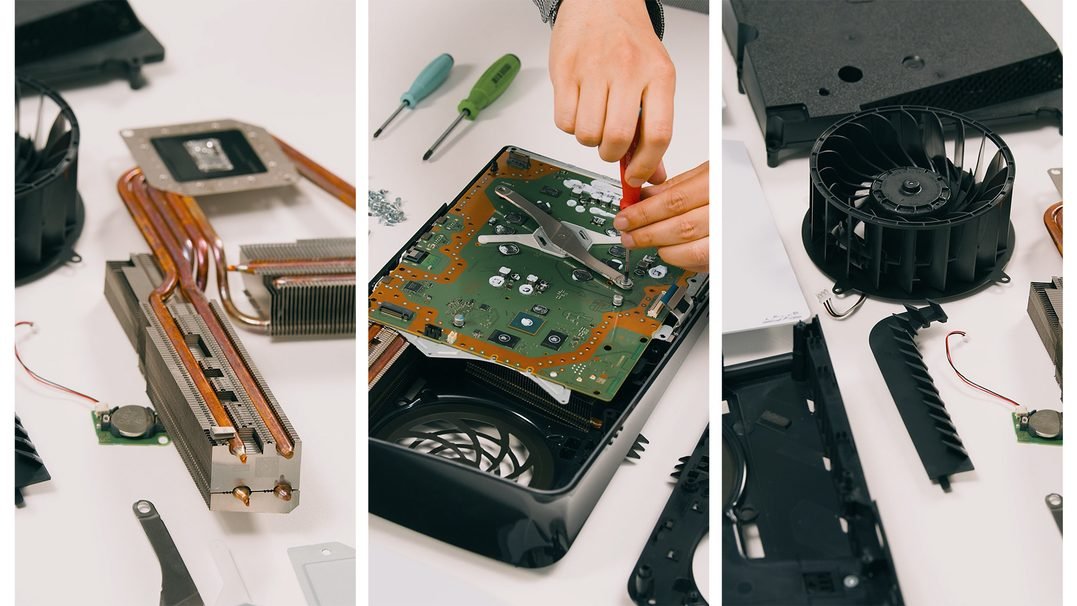
The PS5 Pro is slightly smaller than the original PS5, and its three slits through the body are new airflow paths for the bigger cooler.
| Area | PS5 Pro detail |
|---|---|
| Dimensions and weight | About 388 x 89 x 216 mm (W x H x D), around 3.1 kg |
| Cooling | Larger fan with a redesigned blade shape, more heat pipes, split fins and liquid metal on the chip |
| Ports | Front: one USB-C (10Gbps) and one USB-C (Hi-Speed). Rear: two USB-A (10Gbps), Ethernet and HDMI |
| Disc drive | Disc Drive for PS5 Digital Edition consoles, sold separately; it needs an internet connection to pair at setup |
| Stand | Two plastic feet in the box for horizontal use; the Vertical Stand is sold separately ($29) |
| Storage expansion | M.2 SSD slot on the bottom side; an M.2 drive from a PS5 can be moved across |
Sony has also announced that from January 2028, newly released PlayStation games will be sold in digital format only. Discs for games released before then still play.
How to transfer data from PS5 to PS5 Pro
Moving games and saves from a PS5 to a PS5 Pro takes one built-in transfer. Keep both consoles on the same network until it finishes.
- Update the system software on your original PS5 and sync your trophies.
- Sign in to the same PlayStation Network account on both consoles.
- Connect both consoles to the same network.
- On the PS5 Pro, go to Settings > System > System Software.
- Select Data Transfer, then Continue.
- Follow the on-screen instructions until the transfer completes.
Console Sharing and Offline Play turns on automatically when you first sign in on the PS5 Pro, and only one console can hold it at a time.
To bring a PlayStation Portal across, go to Settings > System > Remote Play on the PS5 Pro, turn on Enable Remote Play, then sign in on the Portal.
Should you upgrade to PS5 Pro in 2026?
Match your setup to a row. The deciding factors are your TV, whether you buy discs, and which games you play.
| Your situation | Recommendation | Why |
|---|---|---|
| You own a PS5, play on a 4K TV, and play enhanced games such as Spider-Man 2 or Final Fantasy VII Rebirth | Upgrade | Pro modes give 4K-class images at 60fps instead of a choice between the two |
| You play on a 1080p TV | Keep the PS5 | Sony pitches PSSR and Pro modes at 4K TVs |
| You buy most games on disc | Buy the standard PS5, or budget $79 for the Disc Drive | The PS5 Pro ships without a drive |
| You are buying your first PS5 | PS5 at $649.99 unless image quality is the priority | Same games for $250 less |
| You want 8K gaming | Upgrade only with an 8K60 TV that supports DSC | Without one, 8K output is unavailable and VRR turns off at 8K |
| You are buying for GTA 6 | Either console runs it | GTA 6 launches November 19, 2026 on PS5; Sony's pre-download notice lists no PS5 Pro modes |
GTA 6 needs at least 212GB of free space to pre-download, so the PS5 Pro's 2TB drive helps if your current console is full.
Buyers weighing a different platform can compare Nintendo Switch 2 price and release details before spending $899.99.
PS5 Pro enhancements not working
PS4 game not showing upgraded image quality on PS5 Pro
The PS4 image setting is off, or the TV output is below what the feature needs.
- Go to Settings > Screen and Video > Video Output.
- Turn on Enhance Image Quality for PS4 Games.
- Check that your screen supports 2160p (4K) at 60Hz or 1440p at 60Hz.
- Turn the setting off if the game behaves unexpectedly during play.
PS5 Pro 8K image not showing
The TV does not accept 8K at 60Hz with DSC, the setting is off, or a blocking feature is active.
- Confirm with the TV maker that the set supports 8K at 60Hz with Display Stream Compression.
- Go to Settings > Screen and Video > Video Output and turn on Allow 8K Output.
- Disconnect PlayStation VR, which blocks 8K output.
- Close pin to side mode and zoom before you switch, since neither works during 8K output.
PS5 Pro not running games at 120Hz
The game lacks a 120Hz mode, the TV port is not HDMI 2.1, or 120Hz output is off.
- Plug the console into an HDMI 2.1 port on the TV with the included HDMI cable.
- Go to Settings > Screen and Video > Video Output and turn on 120 Hz Output.
- Pick the game's high frame rate or performance mode in its own settings.
- Check the game supports 120Hz; Stellar Blade's 80fps HFR mode, for example, needs a 120Hz display.
Enhanced PSSR not improving a game
The system software is out of date, the setting is off, or the game does not use PSSR.
- Install the latest PS5 system software update.
- Go to Settings > Screen and Video > Video Output and turn on Enhance PSSR Image Quality.
- Confirm the game supports PSSR; the setting only changes PSSR games.
For overheating, disc errors, audio errors or flickering, Sony's PS5 Pro troubleshooting page sends you to the PlayStation Repairs diagnostic tool.
PS5 Pro FAQs
Is the PS5 Pro worth buying in 2026?
It is worth it for a 4K TV owner who plays PS5 Pro enhanced games. At $899.99 it costs $250 more than the PS5, plus $79 for a disc drive, so 1080p players get little for the extra money.
Does the PS5 Pro support 120Hz gaming?
Yes. The PS5 Pro supports 60Hz and 120Hz displays, and compatible games can run up to 120fps with 4K output and ray tracing. You need an HDMI 2.1 TV and 120 Hz Output turned on.
Are there PS5 Pro-exclusive games?
No. Sony sells PS5 Pro enhanced titles as PS5 games with extra visual and performance modes. Its product page lists over 100 enhanced titles and no game that runs only on the PS5 Pro.
Is the PS5 Pro digital-only?
It ships without a disc drive, but it is not locked to digital. You can add the Disc Drive for PS5 Digital Edition consoles, sold separately for $79 on PlayStation Direct, and pair it online at setup.
Will PS5 Pro games run on the standard PS5?
Yes. PS5 Pro enhanced games are ordinary PS5 games, so they run on every PS5. The standard console uses the regular PS5 modes, while the Pro-only features stay on the PS5 Pro.
Why is the PS5 Pro expensive?
Sony raised its price twice, to $749.99 in August 2025 and to $899.99 in April 2026, citing a challenging economic environment. The console also carries a larger GPU, faster memory and a 2TB SSD.
Can PS5 Pro play all of my existing PS5 games?
Yes. Sony states the PS5 Pro plays all PS5 games. Digital games come across with Data Transfer or a fresh download, and disc games need the separately sold Disc Drive.
Does PS5 Pro use the same controller as PS5?
Yes. The PS5 Pro comes with a DualSense wireless controller and also works with the DualSense Edge. Haptic feedback and adaptive triggers work in the same select titles as on the PS5.
Will my audio headset or other PS5 accessories work with PS5 Pro?
Yes. Sony says audio headsets and other accessories work with the PS5 Pro in the same way as on the standard PS5, including Pulse Elite and Pulse Explore with their USB adapters.
Is PS5 Pro backwards compatible with PS4 games?
Yes. The PS5 Pro plays over 8,500 PS4 games, and PS5 Pro Game Boost can smooth frame rates in some of them. A small number of PS4 games are not compatible, listed at playstation.com/bc.
PS5 Pro verdict in 2026
Buy the PS5 Pro only if you play on a 4K TV and want the Pro modes in games you already own; everyone else gets the same library on the $649.99 PS5. At $899.99 plus $79 for a disc drive, the Pro's value lies in sharper 60fps modes across over 100 enhanced games and the upgraded PSSR, not in any game you cannot play elsewhere.