You can see your complete Amazon order history in Your Orders by filtering one year at a time, or download a copy of your account data, including orders, with Amazon's Request your data tool.
This guide walks through both, then covers the app and mobile browser, older and archived orders, invoices, Amazon Pay and Prime Video purchases, and what to do when an order is missing.
Method 1: View Your Complete Order History from Your Amazon Orders Page
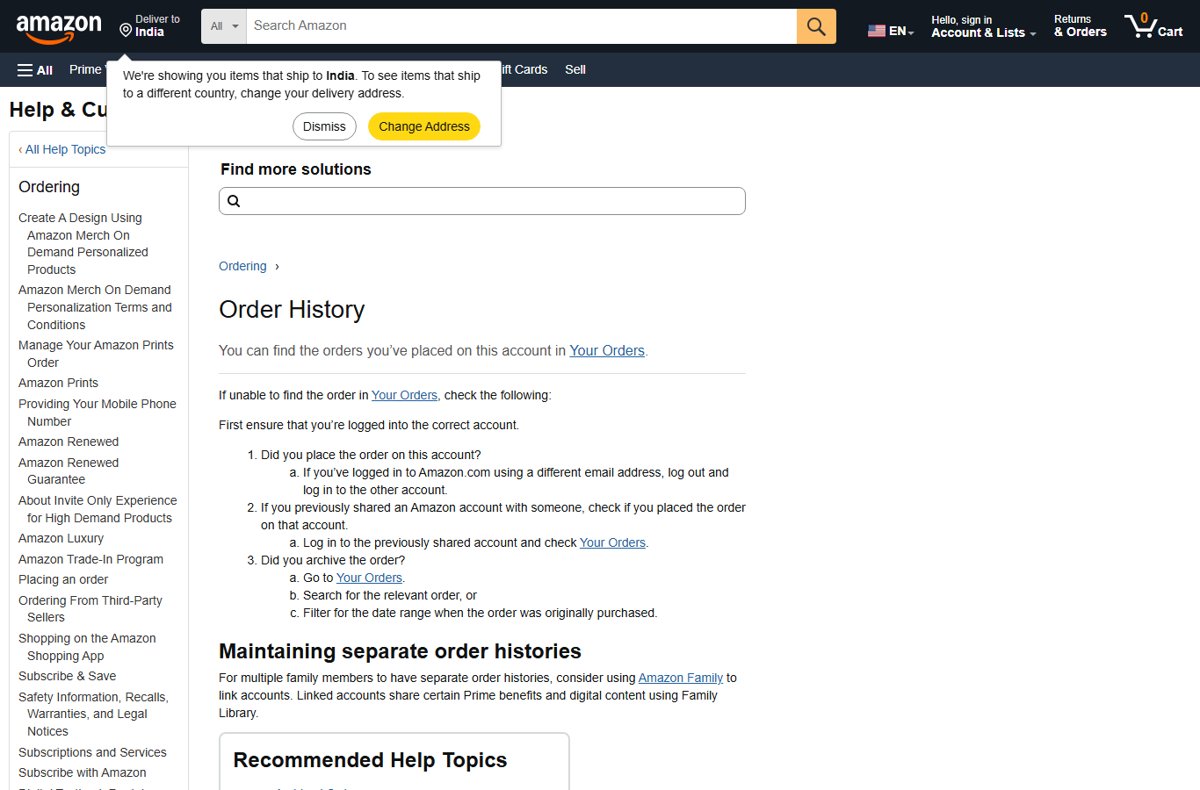
Your Orders lists every order placed on the account you are signed in to. Archived orders are included; Amazon says you find them by searching or by filtering the date range when they were bought.
- Go to amazon.com and sign in.
- Select Returns & Orders at the top of the page to open Your Orders.
- Open the date filter above the order list and choose a year or range.
- Work through each year back to when you opened the account to see the complete history.
- Type a product name in the order search box to jump straight to a specific order.
- Select Invoice under an order number to see that order's full summary.
Method 2: Download Your Amazon Order History Through Amazon’s Data Request Tool
Amazon's data request sends you a downloadable copy of personal data held on your account. Amazon notes that order history is already viewable in Your Account, so use this route when you want files you can keep or analyse.
- Open Amazon's help page Request your personal information and select Request your data.
- Sign in to your Amazon account; Amazon requires this for security.
- Select the information you want to receive, choosing the order-related category.
- Select Submit Request.
- Open the confirmation email Amazon sends and select the validation link.
- Wait for the second email, then download your data using the secure link in it.
Amazon does not state a fixed delivery time; the download link arrives by email when the data is ready. Keep the downloaded files somewhere private, because they contain addresses and purchase details.
Which Method Should You Use?
| Your situation | Use this | Why |
|---|---|---|
| Find or check one order | Method 1: Your Orders | Instant, with search and date filters |
| Print a receipt or invoice | Method 1: Your Orders | Invoice sits under each order number |
| Keep a full offline copy of your history | Method 2: Request your data | Delivers files you can store |
| Total up spending in a spreadsheet | Method 2: Request your data | Data files are easier to sort than web pages |
| Order made with Amazon Pay on another site | Neither; use Amazon Pay activity | Those orders are not in Your Orders |
View orders in the Amazon Shopping app
The same order history appears on every device signed in to the same account, so the app and a phone browser show what the desktop site shows.
| Where you are | How to reach Your Orders |
|---|---|
| Amazon Shopping app on iPhone, iPad or Android | Open the account menu in the app and select Your Orders |
| Phone or tablet browser | Sign in on amazon.com and open Returns & Orders, or Your Orders from the account menu |
| Desktop browser | Select Returns & Orders at the top of amazon.com |
| Several Amazon accounts | Use Switch Accounts and check Your Orders on each one |
View orders from a phone or tablet browser the same way as on a computer: sign in, open Your Orders, then search or filter by date.
Find an older Amazon order
- Open Your Orders.
- Change the date filter to the year you think you bought the item.
- If you are unsure of the year, type the product name into the order search box instead.
- Archived orders are not deleted or hidden from search, so they appear in the results too.
- Select the order to see its details, tracking history and Invoice.
View or print an Amazon receipt or invoice
An invoice becomes available in Your Account as soon as the order ships.
- Go to Your Orders.
- Select Invoice underneath the order number.
- Select Print this page for your records at the top of the order summary.
- Select your browser's print button, or choose a PDF printer to save a copy instead of printing.
Find an Amazon Pay transaction
Purchases made on other websites with Amazon Pay do not appear in Your Orders. They have their own activity page.
| Step | What to do |
|---|---|
| 1 | Go to pay.amazon.com and select Sign in at the top of the page |
| 2 | Select Check your Amazon Pay orders and sign in with your Amazon credentials |
| 3 | On Your Amazon Pay Activity, find the order or transaction |
| 4 | Select Details & Support for the full record |
Find Prime Video purchases and rentals
| What you bought | Where it appears | How long it stays |
|---|---|---|
| Purchased movie or episode | My Stuff on Prime Video | Generally available to stream or download, though licensing can remove a title |
| Rented title | My Stuff on Prime Video | 30 days from rental; at least 48 hours once you press play |
What About the Old Amazon Order History Reports Page?
Use Request your data instead; Amazon's old order history report help page no longer loads. The Download Order Reports feature once produced a spreadsheet of shipments, returns and refunds from Your Account. Its help page now returns Amazon's page-not-found message, and the current help pages point to Your Orders for viewing and to Request your data for a copy.
Can you download a complete Amazon order-history spreadsheet?
Not with one click on a personal account; request your data and work with the files Amazon sends. Your Orders shows everything on screen but offers no export button. Request your data is the documented way to get a downloadable copy.
Troubleshooting: If You Cannot Find an Order
What to do if an order is missing
Amazon's first check: you may be signed in to a different account from the one used for the order.
- Check which email address you are signed in with.
- If you used another email, sign out and sign in to that account.
- If you once shared an account with someone, sign in to that shared account and check Your Orders there.
An order you archived has disappeared
Archived orders stay in your history but drop out of the default view.
- Go to Your Orders.
- Search for the order, or filter for the date range when it was bought.
An order paid with Amazon Pay is not listed
Amazon Pay orders from other sites are kept separately.
- Go to pay.amazon.com and select Check your Amazon Pay orders.
- Find it on Your Amazon Pay Activity.
A family member's orders are mixed into yours
Several people are using one account.
- Set up Amazon Family to link separate accounts.
- Each person then keeps their own order history while sharing select Prime benefits.
Tips for Keeping a Better Amazon Purchase Archive Going Forward
| Habit | Why it helps |
|---|---|
| Save the invoice as a PDF when an order ships | You have proof of purchase even if you later close the account |
| Use one account per person, linked with Amazon Family | Keeps each order history separate |
| Request your data once a year | Builds an offline copy of the full history |
| Store downloads in an encrypted or private folder | The files contain addresses and purchase details |
Common Questions About Amazon Order History
How do I view my Amazon orders?
Sign in on amazon.com and select Returns & Orders at the top of the page to open Your Orders. Use the date filter to change the year, or search by product name. In the Amazon Shopping app, open the account menu and select Your Orders.
How do I download all my Amazon orders?
Use Amazon's Request your data tool. Sign in, select the information you want, select Submit Request, confirm through the validation email, and download the files from the secure link Amazon emails when they are ready. Your Orders itself has no export button.
Where do I download Amazon orders from?
From the Request your data page, reached through Amazon's help article Request your personal information. The finished download arrives as a secure link sent to your account email address. Individual invoices can be printed or saved from Your Orders.
Do archived Amazon orders get deleted?
No. Archived orders are not deleted or removed from search. Open Your Orders and either search for the order or filter for the date range when it was originally bought, and it appears with its details and invoice.
Why can't I see an order in my Amazon order history?
Most often you are signed in to a different account. Check the email address you used for that order, sign in to it, and look in Your Orders. Orders placed elsewhere with Amazon Pay appear on pay.amazon.com instead.
How do I get a receipt for an Amazon order?
Go to Your Orders and select Invoice under the order number. Then select Print this page for your records and use your browser's print button. Invoices are available once the order has shipped.
Can family members have separate Amazon order histories?
Yes. Amazon suggests using Amazon Family to link separate accounts. Each adult keeps their own order history, while linked accounts share select Prime benefits and digital content through Family Library.
The Bottom Line
Use Your Orders to view and print, and Request your data when you need a downloadable copy of everything. Your Orders is instant and already holds archived orders, while the data request is the documented way to take your history offline now that the old report page is gone.

![How to add another OneDrive account [use multiple accounts]](https://techdows.com/wp-content/uploads/2026/10/Microsoft-support-page-for-adding-an-account-in-OneDrive-with-Windows-tab-select-600x338.jpg)