The top 10 apps that help you track your water consumption are Waterllama, Hydro Coach, Plant Nanny, WaterMinder, Water Reminder by VGFIT, Water Drink Reminder, My Water, MyFitnessPal, Google Health (the former Fitbit app) and Apple Health.
Below you will find what each one runs on, how it sets your daily goal, how it reminds you, which health platform it syncs with, and what sits behind the paywall.
Best water tracking app for iPhone and Android
Every app on this list is free to install, and most keep reminders, goals and history behind an optional subscription.
On iPhone and Apple Watch, start with Waterllama; on Android, start with Hydro Coach. If you already log food in MyFitnessPal or wear a Fitbit or Pixel Watch, log water there instead so everything stays in one app. Waterllama calculates a goal from your weight, activity and weather, ships an Apple Watch app and widgets, and syncs water and caffeine to Apple Health. Hydro Coach calculates a goal from age, weight, lifestyle and weather, and syncs your drink log with Fitbit, Samsung Health and Google Fit.
Why use an app to track water consumption?
Most people misjudge how much they drink because nothing records it. A tracker replaces guesswork with a running total and a nudge when you fall behind.
| Problem without an app | What a hydration app does about it |
|---|---|
| You forget to drink during busy hours | Sends reminders between your wake and sleep times, at an interval you choose |
| You do not know your target | Estimates a daily goal from weight, and in some apps activity, age and weather |
| You cannot tell whether today was better than last week | Keeps daily, weekly and monthly charts of your intake |
| Coffee, tea and other drinks go uncounted | Logs separate drink types, often with caffeine or calories |
| Your watch and phone show different totals | Writes each drink to Apple Health, Health Connect, Google Fit or Samsung Health |
The practical benefits of using a hydration app come down to two habits: logging each drink as you finish it, and acting on the reminder instead of dismissing it.
What to look for in a water tracking app
| Feature | What good looks like | Apps that do it well |
|---|---|---|
| Easy and fast drink logging | One tap from a widget, watch or preset cup | Waterllama, WaterMinder, MyFitnessPal (Wear OS tile) |
| Personalized daily goals | Goal from weight plus activity, climate or pregnancy status, with a manual override | Waterllama, Hydro Coach, WaterMinder |
| Smart reminders that fit your routine | Start and end times, custom intervals, editable schedule | Water Reminder by VGFIT, Water Drink Reminder, WaterMinder |
| Wearable, health app and device integrations | Watch app plus sync with Apple Health, Google Fit, Health Connect or Samsung Health | Hydro Coach, Waterllama, MyFitnessPal, Google Health |
| Customization, reports and motivation | Custom cups, history graphs, streaks, challenges or characters | Plant Nanny, Waterllama, WaterMinder |
Check what the free tier includes before you commit. Several apps lock custom reminders, history graphs or extra drink types behind Premium.
Top 10 apps for tracking your water intake
| # | App | Developer | Platforms | Cost model |
|---|---|---|---|---|
| 1 | Waterllama | Llama Luna Apps | iPhone, iPad, Apple Watch | Free; Premium by subscription or one-time purchase |
| 2 | Hydro Coach | Codium App Ideas | Android | Free with ads; in-app purchases; separate paid PRO app |
| 3 | Plant Nanny | SPARKFUL | iPhone, iPad, Apple Watch, Android | Free with ads; SPARKFUL subscription |
| 4 | WaterMinder | Funn Media | iPhone, iPad, Apple Watch, Apple Vision, Android, Wear OS | Free; subscription with 7-day trial |
| 5 | Water Reminder – Daily Tracker | VGFIT | iPhone, iPad, Apple Watch | Free; 1-month or 1-year Premium |
| 6 | Water Drink Reminder | Leap Fitness Group | Android | Free with ads; in-app purchases |
| 7 | My Water: Daily Drink Tracker | My Water Drink Tracker Oy | iPhone, iPad, Apple Watch | Free; My Water Premium subscription |
| 8 | MyFitnessPal | MyFitnessPal | iPhone, Apple Watch, Android, Wear OS | Free; Premium and Premium Plus |
| 9 | Google Health (formerly Fitbit) | Android, iPhone, Fitbit and Pixel Watch | Free; some features need Google Health Premium | |
| 10 | Apple Health | Apple | iPhone (built in) | Free |
Prices for each subscription vary by country, so check the store page in your region before you upgrade.
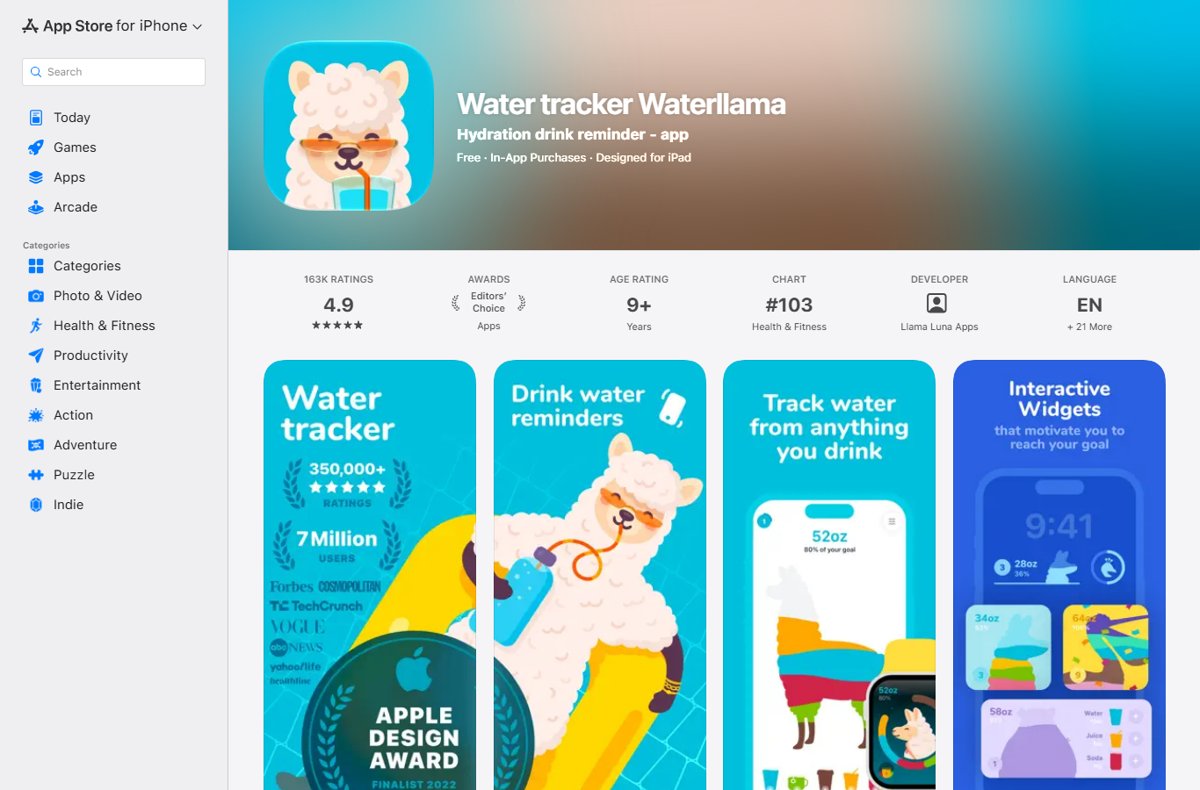
Waterllama water tracker for iPhone and Apple Watch
Waterllama turns your daily total into a character that fills up as you drink. It won a 2022 App Store Award and carries an Editors' Choice badge.
| Detail | Waterllama |
|---|---|
| Requirements | iOS 17.0 or later; iPhone, iPad, Apple Watch, iMessage stickers |
| Daily goal | Calculated from weight, activity level, climate and gender, including pregnancy or breastfeeding; custom goal allowed |
| Logging | Widgets on the Home Screen, Lock Screen and Control Center; Siri and Shortcuts; 150+ beverages |
| Health sync | Writes Water, Caffeine and Dietary Energy to Apple Health |
| Free tier | Water tracking, reminders, Apple Watch app, streaks, goal calculator, calendar, cup size |
| Premium | 100+ characters, 10+ challenges, 150+ beverages, custom beverages, editing past history; monthly, annual or one-time purchase |
Hydro Coach water tracker for Android
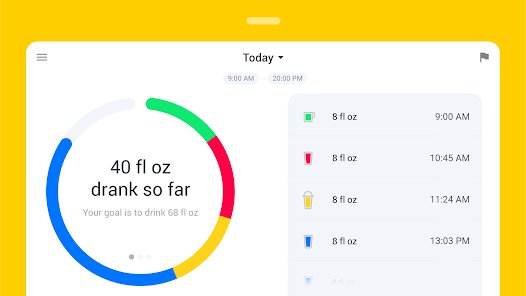
Hydro Coach is the Android pick because it pushes your drink log into the health platforms Android users already rely on.
| Detail | Hydro Coach |
|---|---|
| Platform | Android (Google Play), 1M+ downloads |
| Daily goal | Calculated from age, weight, lifestyle and current weather |
| Reminders | Drink reminders scheduled around your routine |
| Health sync | Fitbit, Samsung Health and Google Fit |
| Motivation | Statistics, achievements and a team feature to motivate friends or family |
| Cost | Free with ads and in-app purchases; a separate paid Hydro Coach PRO app removes the upgrade step |
Plant Nanny water reminder game for habit building
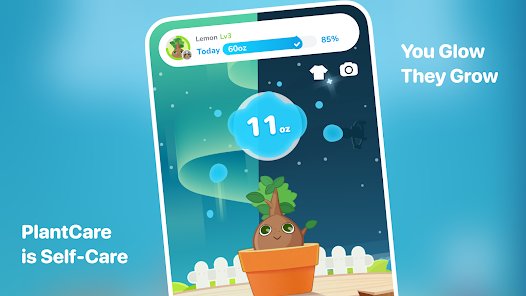
Plant Nanny links each glass you log to a virtual plant, so skipping water visibly wilts your greenhouse.
| Detail | Plant Nanny |
|---|---|
| Platforms | iPhone, iPad and Apple Watch; Android |
| Daily goal | Set from your personal health data and exercise habits |
| Tracking | Editable water logs; daily, weekly and monthly trends; a Home Screen widget |
| Health sync | Syncs hydration data with Apple Health on iPhone |
| Subscription | Unlimited exclusive plants, tailored reminders, an advanced water log and no ads |
| Support | In the app, open Menu > Settings > FAQ |
WaterMinder water tracker for iPhone, Android and Wear OS
WaterMinder is the cross-platform choice: one account works on iPhone and Android, with watch apps on both sides.
| Detail | WaterMinder |
|---|---|
| Platforms | iPhone, iPad, Apple Vision, standalone Apple Watch app; Android with a Wear OS app (Tiles and Complications) |
| Daily goal | Based on body weight on iPhone; weight, diet, activity and weather on Android; custom goal allowed |
| Reminders | Default schedule runs from 8am to 5pm on Android; you can edit it to any time of day |
| Logging | Pre-defined and custom cups (size, icon, color, drink type); US oz, UK oz, L and mL |
| Health sync | Apple Health sync; reads weight, gender and date of birth from HealthKit |
| Cost | Subscription with a 7-day free trial; on Android, custom reminders and history graphs are Premium |
Water Reminder – Daily Tracker by VGFIT for simple tracking
VGFIT's Water Reminder is the straightforward option: set your wake and sleep times, pick an interval, and log drinks.
| Detail | Water Reminder by VGFIT |
|---|---|
| Requirements | iOS 15.0 or later; iPhone, iPad, Apple Watch |
| Daily goal | Calculated from your personal data |
| Reminders | Scheduled between your wake and sleep times, at the interval you choose |
| Health sync | Writes water, caffeine, protein, calories, fat, carbs and sugars for each drink to the Nutrition section of Apple Health; can be switched off in the app's Settings |
| Premium | All drinks, notification sounds, widget, Apple Watch app and no ads; 1-month or 1-year plan |
Note that the Apple Watch app and the full drink list sit in Premium, so the free version suits phone-only water logging.
Water Drink Reminder by Leap Fitness for Android
Water Drink Reminder is the most installed tracker here, with more than 10 million downloads on Google Play.
| Detail | Water Drink Reminder |
|---|---|
| Platform | Android |
| Daily goal | Calculated from your weight |
| Reminders | Set a daily start and end time for drinking reminders |
| Logging | Custom cup sizes; oz or mL; graphs and logs of your schedule |
| Health sync | Syncs weight with Google Fit; syncs weight and water data with Samsung Health |
| Backup | Sign in with a Google account to back up and restore your drinking data |
My Water daily drink tracker for iPhone
My Water was one of the first trackers with Apple Watch support, and it reads your body measurements from Apple Health to set the goal.
| Detail | My Water |
|---|---|
| Requirements | iOS 18.0 or later; iPhone, iPad, Apple Watch |
| Daily goal | Water requirement calculator using body measurements from Apple Health |
| Features | Reminders, metric or fl oz units, statistics graphs, motivational awards, hydration tips |
| Premium | Different beverages, detailed statistics and custom volumes |
MyFitnessPal water tracker for calorie counters
MyFitnessPal is a calorie and macro tracker first, with a built-in water tracker beside your food diary.
| Detail | MyFitnessPal |
|---|---|
| Platforms | iPhone, iPad, Apple Watch; Android with Wear OS |
| Water logging | Built-in water tracker; on Wear OS, watch-face complications and a tile for faster logging |
| Integrations | Connects 40+ fitness trackers, smartwatches and health apps |
| Cost | Free with ads; Premium adds barcode scan, meal scan, voice logging and ad-free logging; Premium Plus adds meal plans |
Pick MyFitnessPal for water only if you already log meals in it. As a standalone water tracker it is more app than you need.
Google Health (Fitbit) app water tracking
The Fitbit app is now called Google Health, and it logs hydration in the same Nutrition area as food.
| Detail | Google Health |
|---|---|
| Platforms | Android and iPhone; works with Fitbit devices and Pixel Watch |
| Default hydration goal | About 3.7 L (15.5 cups) for men and 2.7 L (11.5 cups) for women; adjustable |
| Logging | Preset containers such as a glass, bottle or large bottle, with a custom amount and time |
| Other drinks | Caffeine and alcohol are tracked separately |
| Third-party data | Pulls nutrition from apps like MyFitnessPal through Health Connect on Android or Apple Health on iPhone |
Apple Health water intake tracking on iPhone
Apple Health is already on every iPhone, and its Nutrition category stores water from you and from every water app you allow to write to it.
| Detail | Apple Health |
|---|---|
| Cost | Free, built into iPhone |
| Manual logging | Add water entries yourself with Add Data |
| App data | Waterllama, Water Reminder by VGFIT, WaterMinder, Plant Nanny and My Water all sync with it |
| Limits | No reminders or goal calculator of its own; pair it with a water app for those |
Best apps for different needs and lifestyles
| Your situation | Use this app | Why |
|---|---|---|
| iPhone and Apple Watch user | Waterllama | Free Apple Watch app, widgets, Siri support and Apple Health sync |
| Android phone, Fitbit or Samsung watch | Hydro Coach | Syncs with Fitbit, Samsung Health and Google Fit |
| You need a game to build the habit | Plant Nanny | Each glass waters a plant; skipped water shows |
| Fitness-focused and already counting calories | MyFitnessPal or Google Health (Fitbit) | Water sits next to food, workouts and sleep in one log |
| You want simple tracking and nothing else | Water Reminder by VGFIT | Wake and sleep times plus an interval; minimal screens |
| Household with both iPhone and Android | WaterMinder | Same app on iOS and Android, with Apple Watch and Wear OS apps |
| You do not want another app | Apple Health or Google Health | Log water in the health app your phone already has |
How to log water in the Google Health app
- Open the Google Health app and go to the Health tab.
- Tap Nutrition.
- Tap Add, then Hydration.
- Enter the amount, or pick a preset container such as a glass, bottle or large bottle.
- Set the date and time if you are logging an earlier drink.
- Tap Save.
To change your target, go to Nutrition, open the more options menu and choose Nutrition and hydration settings. Tap any water entry later to edit its amount or delete it.
How to add water intake to Apple Health manually
- Open the Health app on your iPhone.
- Tap Browse to open the Health Categories screen.
- Tap Nutrition, or type Water in the search field.
- Tap Water.
- Tap Add Data at the top right.
- Enter the amount and the time you drank it, then save the entry.
Check that a water app syncs with Apple Health
A water app that syncs correctly makes each logged drink appear in Apple Health within moments of logging it.
- Log one drink in your water app.
- Open the Health app and tap Browse.
- Tap Nutrition, then Water, and confirm the new entry appears with the right amount.
- If it is missing, scroll down to Options and tap Data Sources & Access.
- Make sure your water app is listed and allowed to write data, then log another drink to test.
On Google Health, synced drinks from other apps arrive through Health Connect on Android or Apple Health on iPhone. Manual entries take priority when the same drink arrives from two sources.
Tips for building a consistent hydration habit
- Set a realistic daily target first: start from the app's calculated goal, and change it only on your doctor's advice or once you know your own needs.
- Tune reminders so they help instead of annoy: limit them to your waking hours with the app's start and end times.
- Space reminders at an interval you will actually act on rather than one you will learn to swipe away.
- Log each drink the moment you finish it, using a widget, watch app or preset cup to keep it to one tap.
- Log coffee, tea and other drinks as their own type so the app's history reflects what you really drank.
- Review patterns, not just streaks: open the weekly or monthly chart and look for the time of day or day of the week where you fall short.
- Move a reminder to that weak spot instead of adding more reminders across the day.
Water tracking apps: frequently asked questions
How accurate are water tracking apps?
A water tracking app is only as accurate as what you log. It records the amounts you enter and adds them up; it does not measure what you drink. Preset and custom cup sizes that match your real glass or bottle make the total far more reliable.
Can a hydration app tell me how much water I personally need each day?
No app can tell you exactly. Apps such as Waterllama, Hydro Coach and WaterMinder estimate a goal from weight, activity or weather, and WaterMinder states it is not a medical app. Ask your doctor for a target if you have a medical condition.
Which water tracking apps work best with Apple Watch, Fitbit, or Google Fit?
Waterllama, WaterMinder, Plant Nanny and My Water have Apple Watch apps. Hydro Coach syncs with Fitbit, Samsung Health and Google Fit. Google Health, the former Fitbit app, logs water itself and works with Fitbit devices and Pixel Watch.
Are free water reminder apps good enough, or should I pay for one?
Free versions are good enough for basic logging and reminders in most apps. Pay only for a specific missing feature: VGFIT keeps its Apple Watch app in Premium, and WaterMinder on Android keeps custom reminders and history graphs in Premium.
Do coffee, tea, sparkling water, and sports drinks count toward my daily water intake?
Most of these apps let you log them as separate drink types, and Waterllama lists over 150 beverages. How each app weights non-water drinks against your goal varies, and Google Health tracks caffeine and alcohol separately from hydration.
Does Apple Health track water intake?
Yes. Apple Health stores water in its Nutrition category. You can add entries yourself with Add Data, or let apps like Waterllama and Water Reminder by VGFIT write each drink to it. Apple Health has no water reminders of its own.
Can I log water in the Fitbit app?
Yes. The Fitbit app is now Google Health. Go to the Health tab, tap Nutrition, then Add and Hydration, enter the amount or pick a container, and tap Save. The default goal is about 3.7 L for men and 2.7 L for women.
Is there a water tracker that works on both iPhone and Android?
Yes. WaterMinder, Plant Nanny, MyFitnessPal and Google Health all run on both iPhone and Android. WaterMinder also has watch apps on both sides: a standalone Apple Watch app and a Wear OS app with Tiles and Complications.
Bottom line: which water tracking app should you use?
Install Waterllama on an iPhone, Hydro Coach on Android, or WaterMinder if your household mixes both. If you already track food or wear a Fitbit or Pixel Watch, log water in MyFitnessPal or Google Health instead of adding another app. These apps cover the free basics well, sync with the health platform your phone already uses, and keep your water total in the same place as the rest of your health data.

![How to copy and paste on Chromebook [text & image shortcut]](https://techdows.com/wp-content/uploads/2026/10/Open-Chromebook-laptop-showing-its-keyboard-touchpad-and-ChromeOS-desktop-600x338.jpg)