A search term is the word or set of words a person types into a search engine such as Google or Bing, and you use it best by choosing the words a good page would contain, then narrowing with operators like quotes, site: and the minus sign.
This guide defines search terms, separates them from advertising keywords, lists the Google and Bing operators with examples, and shows how marketers read the Google Ads search terms report.
The fastest way to use search terms well
These five steps fix most weak searches on Google or Bing. Each operator is covered in detail further down.
- Type the words the page you want would use, not how you would describe the problem. Google's own example: search
headache, notmy head hurts. - Put a fixed phrase inside quotes to match it exactly, such as
"tallest building". - Add
site:with no space to search one website, such assite:youtube.com cat videos. - Put a minus sign before a word to drop results that contain it, such as
jaguar speed -car. - Add
filetype:to get one kind of document, such asphotoelectric effect paper filetype:pdf.
What is a search term?
Google defines a search term as "a word or set of words a person enters when searching on Google or one of our Search Network sites." Search query and search phrase mean the same thing in everyday use.
| Term | What it means | Example |
|---|---|---|
| Search term (query) | The exact words a person types into the search box | best running shoes for flat feet |
| Keyword (Google Ads) | A word or phrase an advertiser adds to an ad group so ads can show for related searches | running shoes |
| Search operator | A symbol or command that changes how a search engine reads your words | "running shoes", -kids, site: |
| Query (Search Console) | The search people typed before your site appeared in Google results | A row in the Queries tab of the Performance report |
Capitalization does not matter to Google: New York Times and new york times return the same search. Google's spell checker also uses the most common spelling of a word, whatever you typed.
Search terms vs keywords: what is the difference?
The two get mixed up constantly in marketing. The searcher owns the search term; the advertiser owns the keyword.
| Search term | Keyword | |
|---|---|---|
| Who writes it | The person searching | The advertiser or site owner |
| Where it lives | The search box on Google, Bing or a partner site | An ad group in a Google Ads campaign |
| What it does | Asks the engine for results | Tells Google Ads which searches an ad may show for |
| Example | cheap blue running shoes size 10 |
running shoes in phrase match |
| Where to see it | Search terms report, Search Console Queries | The Keywords page of the campaign |
One keyword can match many different search terms. That gap is why the search terms report exists: it shows what people actually typed before your ad appeared.
Which search technique should you use?
| Your goal | Use this | Example |
|---|---|---|
| Match an exact phrase | Quotes | "tallest building" |
| Search one website only | site: |
site:youtube.com cat videos |
| Drop results about the wrong meaning | Minus sign (Bing also accepts NOT) |
jaguar speed -car |
| Find a PDF or other document type | filetype: |
photoelectric effect paper filetype:pdf |
| Limit results to a date | before: and after: on Google |
avengers endgame after:2019-03-01 before:2019-03-05 |
| Accept either of two words | OR or | on Bing |
sculpture (loc:US OR loc:GB) |
| Get a dictionary definition | define before the word |
define ephemeral |
| Find local results | Add the place name | bakery seattle |
How to use Google search operators (with examples)
Google's help page lists these operators for Google Search. Do not put a space between the operator and your search term.
| Operator | What it does | Example |
|---|---|---|
" " |
Matches the exact word or phrase inside the quotes | "tallest building" |
site: |
Shows results from one site | site:youtube.com cat videos |
- |
Excludes results that contain the word | jaguar speed -car |
before: |
Shows results from before a date | astronomy discovery before:2025/11/01 |
after: |
Shows results from after a date | avengers endgame after:2020 |
before: + after: |
Shows results inside a date range | avengers endgame after:2019-03-01 before:2019-03-05 |
filetype: |
Shows one file type | photoelectric effect paper filetype:pdf |
imagesize: |
Finds images of one size (Google Images only) | imagesize:1200x800 |
Google also offers filters under the search box, such as Images, News, Videos and Shopping, plus an Advanced Search page for readers who prefer form fields to operators.
How to use Bing search operators and keywords
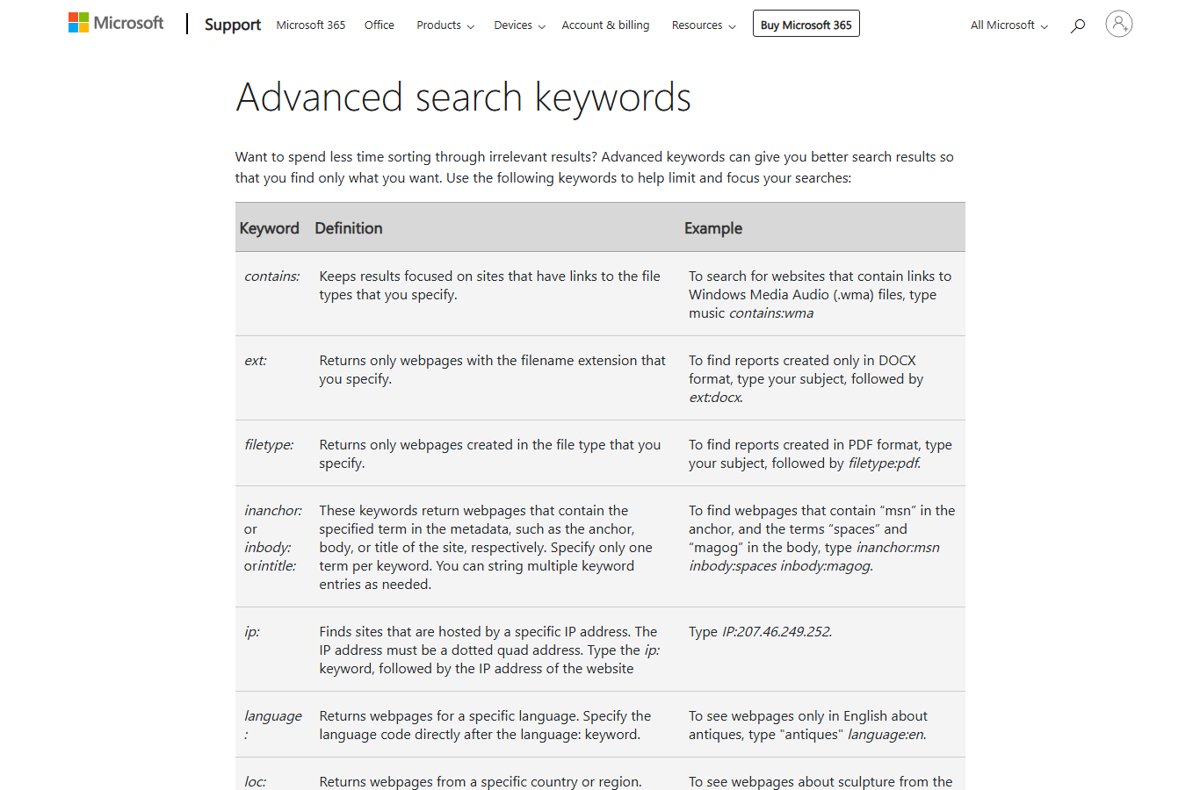
Microsoft documents a larger operator set for Bing. By default, every Bing search is an AND search. Type NOT and OR in capitals, or Bing ignores them as stop words.
| Operator | What it does | Example |
|---|---|---|
" " |
Finds the exact words in a phrase | "heart disease" |
+ |
Requires a term, including one Bing normally ignores | +the who tour |
AND or & |
Requires all terms or phrases | antiques AND furniture |
NOT or - |
Excludes a term or phrase | jaguar NOT car |
OR or | |
Accepts either term | site:bbc.co.uk OR site:cnn.com |
( ) |
Groups words; wrap OR terms in parentheses | "heart disease" (site:bbc.co.uk OR site:cnn.com) |
site: |
Limits results to one site or directory | site:www.microsoft.com/games/pc halo |
filetype: / ext: |
Returns one file type or extension | annual report filetype:pdf |
intitle: / inbody: / inanchor: |
Requires a term in the title, body or link text; one term per keyword | inanchor:msn inbody:spaces inbody:magog |
language: |
Returns pages in one language | "antiques" language:en |
loc: or location: |
Returns pages from one country or region | sculpture (loc:US OR loc:GB) |
prefer: |
Adds emphasis to a term | football prefer:organization |
url: |
Checks whether a domain is in the Bing index | url:microsoft.com |
Bing uses only the first 10 terms of a search. It applies operators in this order: parentheses, quotes, NOT/-/+, AND/&, then OR/|.
How to choose better search terms
Operators only sharpen a search. The words you pick decide most of the result quality.
- Write down the one thing you want to find, such as a price, a fix or a definition.
- Swap everyday phrasing for the words an expert page would use, such as
headacheinstead ofmy head hurts. - Keep the two or three words that carry the meaning and drop filler like
how can I find. - Add a qualifier that narrows the answer: a place (
bakery seattle), a model name or a year. - Run the search and scan the first results for words you missed, then add or swap them.
- Add an operator only when the plain words still return the wrong kind of page.
For research databases, check the database's own help page before you start. Many accept quotes and AND, OR and NOT, but each one documents its own syntax.
How to view the Google Ads search terms report
The search terms report shows the real searches that triggered your ads, next to the keyword that matched each one.
- Sign in to your Google Ads account.
- Select Campaigns in the left navigation panel.
- Open the Insights and reports sub-menu.
- Select Search terms.
- Review each term and its matching keyword, and look for searches that do not fit your product.
- Add an irrelevant term as a negative keyword, or change the match type of the keyword that caught it.
The report only lists terms that a significant number of people searched. Google leaves out some low-volume searches to keep its data privacy standards, so the totals will not add up to every click.
How to control which search terms trigger your ads
Keyword match types decide how far Google Ads can stretch a keyword to meet a search term. Negative keywords block terms you never want.
| Setting | How to type it | What it matches or blocks | Example from Google |
|---|---|---|---|
| Broad match | low carb diet plan |
Related searches, including ones without your exact words | Can match carb free foods or mediterranean diet books |
| Phrase match | "tennis shoes" |
Searches that include the meaning of your keyword | Reaches more than exact, fewer than broad |
| Exact match | [red shoe] |
Searches with the same meaning or intent | Most control, fewest searches |
| Negative broad | running shoes |
Blocks searches that contain all the words, in any order | Blocks blue running shoes; running shoe can still show |
| Negative phrase | "running shoes" |
Blocks the words in that order, with extra words allowed | Blocks blue running shoes; allows shoes running |
| Negative exact | [running shoes] |
Blocks only that exact search | Blocks running shoes; allows blue running shoes |
Negative keywords do not match close variants. Add singular, plural and synonym forms separately if you want to block them too.
How to see which search terms bring visitors to your site
Site owners do not need an ad account. Google Search Console shows the searches that made your pages appear in Google results.
- Open Google Search Console and select your property.
- Open the Performance report.
- Select the Queries tab under the chart.
- Sort by Clicks or Impressions to find your strongest search terms.
- Turn on the CTR and average position metrics to spot terms where you rank but few people click.
Seeing a query in the list does not mean your site will show when you search it yourself. Google results depend on the searcher's time, place, device and recent history.
How to check your search terms worked
- Scan the first page of results: every result should match the topic you meant, not a second meaning of the word.
- Check that a
site:search shows only addresses from that domain. - Check that a minus or
NOTsearch shows no result with the excluded word in the title or snippet. - Open one
filetype:result and confirm it is the document type you asked for. - For ads, recheck the search terms report after a few days and confirm the blocked terms no longer appear.
How to remove search terms from your Google history
Your past search terms are stored in My Activity when Web & App Activity is on. Deleted history cannot be recovered.
- Open your search history in Google My Activity.
- To remove one search, select the delete icon next to it.
- To remove a whole day, select Delete all activity from that day.
- To remove everything, select Delete, then Delete all time.
- To delete old searches automatically, select Controls, find Web & App Activity, choose the Auto-delete option and pick 3, 18 or 36 months.
- Select Next to save the auto-delete setting.
Fix search terms that return the wrong results
Results keep including a word you want to eliminate
The search engine still ranks pages that use the other meaning of your term.
- Put a minus sign directly before the unwanted word, with no space:
jaguar speed -car. - On Bing, type
NOTin capitals, or it is treated as a stop word. - Add a word that only belongs to the meaning you want, such as
animal.
An operator seems to be ignored
A space after the colon, lowercase or/not on Bing, or an operator the engine does not support.
- Remove any space after the colon:
site:youtube.com, notsite: youtube.com. - Type
ORandNOTin capitals on Bing. - Wrap OR terms in parentheses when you combine them with other operators.
- Check the operator appears in the Google or Bing tables above;
imagesize:works only on Google Images.
Irrelevant search terms trigger your ads
Broad match is reaching related searches you do not serve.
- Open Campaigns > Insights and reports > Search terms in Google Ads.
- Add each off-topic term as a negative keyword.
- Switch the keyword that caught it to phrase or exact match if the problem repeats.
- Add plural and synonym forms of the negative, because negatives do not match close variants.
A search term finds nothing useful
The words describe the problem, not the answer a page would contain.
- Change the term to the vocabulary an expert page would use.
- Remove quotes and extra operators, then add them back one at a time.
- Try fewer words; Bing uses only the first 10 terms anyway.
Frequently Asked Questions
What is a search term?
A search term is the word or set of words a person types into a search engine to find information. Google defines it as a word or set of words someone enters when searching on Google or its Search Network sites. Search query means the same thing.
What are search terms in Google?
In Google Search, a search term is whatever you type into the search box. In Google Ads, the search terms report lists the real searches that triggered your ads, which can differ from the keywords you chose. Search Console calls the same data Queries.
What are search terms in marketing?
In marketing, search terms are the real searches customers typed before they saw your ad or your page. Advertisers compare them with their keywords to find wasted spend, add negative keywords and discover new phrases customers actually use.
How do search terms work?
A search engine matches the words you type against pages in its index and ranks the best matches. Operators such as quotes, site: and the minus sign change that matching. In Google Ads, your keyword's match type decides which search terms can show your ad.
What are search terms and phrases?
A search term can be one word, such as headache, or a phrase, such as tallest building. Put a phrase in quotes when the words must appear together and in order. Without quotes, the engine can match the words separately.
Which terms could be used to search for a topic?
Use the words a good page on that topic would contain, not how you would describe the problem aloud. Start with two or three core words, add a qualifier such as a place or model name, then borrow extra words from the first results.
What are search terms in databases?
In a research database, search terms are the keywords you combine to find articles on a topic. Many databases accept quotes and the Boolean operators AND, OR and NOT, but check that database's own help page, because syntax varies.
How do you eliminate search terms from results?
Put a minus sign directly before the word you want gone, such as jaguar speed -car. On Bing you can also type NOT in capitals. In Google Ads, add the unwanted search term as a negative keyword instead.
How do you remove search terms from your history?
Open Google My Activity, then select the delete icon next to one search, or select Delete and Delete all time to clear everything. You can also set auto-delete for 3, 18 or 36 months. Deleted history cannot be recovered.
How do you find the definition of a term?
Type define followed by the word in Google, such as define ephemeral, and Google shows a dictionary definition at the top of the results. This works for single words and common phrases.

![Fix: VLC Is Unable To Open MRL File [Step by Step Guide]](https://techdows.com/wp-content/uploads/2026/09/VLC-Media-menu-open-with-Open-File-highlighted-showing-CtrlO-shortcut-508x338.jpg)