To use Translator in Bing, open bing.com/translator, type or paste your text into the left box, and pick a language on the right.
This guide also covers translating from the Bing search box, translating whole pages in Microsoft Edge, and the voice, camera and conversation tools in the Microsoft Translator app.
The fastest way to translate text with Bing
The Bing Translator page works in any desktop or mobile browser and needs no account.
- Go to https://www.bing.com/translator in your browser.
- Type or paste your text into the box on the left.
- Leave the source language on Auto-Detect, or pick the language yourself for very short text.
- Choose the language you want to translate to in the menu on the right.
- Read the translation in the right-hand box, then select the Copy icon to copy it.
- Select the speaker icon if you want to hear the translation read aloud.
Which Bing translation route should you use?
| Your situation | Use this | Why |
|---|---|---|
| A sentence, paragraph or email text | bing.com/translator | Largest text box, audio playback, copy button and edit suggestions |
| A single word while you are already searching | The Bing search box | The answer appears on the results page without leaving search |
| A whole foreign-language website | Microsoft Edge's built-in translator | Translates the page in place and can do it automatically for a language |
| Signs, menus or printed text | Microsoft Translator app camera | Reads text from the camera or a saved photo |
| Talking with someone face to face | Microsoft Translator app split-screen or conversation mode | Both people speak into one phone, or join from their own devices |
| A Word document | Word's Review > Translate tools | Keeps the formatting and opens a translated copy |
What Translator in Bing Can Do
Bing's translation runs on Microsoft Translator, so the same engine turns up across several Microsoft products. Microsoft keeps the current language list on its supported languages page.
| Where | What it translates | Useful extras |
|---|---|---|
| bing.com/translator | Typed or pasted text | Auto-Detect, text-to-speech audio, Copy, Suggest an edit |
| Bing search box | Words and sentences you type into search | No separate page to open |
| Microsoft Edge | Entire web pages | Always translate from a language, Show original |
| Microsoft Translator app (Android, iOS) | Text, speech, photos and live conversations | Offline language packs, phrasebook, pinned translations |
| Word and Outlook | Selected text, whole documents and emails | Translator for Outlook add-in for regular email translation |
Microsoft Translator has also been built into other companies' products; see how Mozilla planned to use Microsoft Translator for translations in Firefox.
How to Translate Text Directly in Bing Search
Microsoft says you can enter any word or sentence you want translated straight into the Bing search bar. A clear request with the target language gives Bing the best chance of showing a translation box.
- Open bing.com.
- Type the word or sentence with the word translate and the target language, for example
translate good morning to Spanish. - Press Enter.
- Read the translation in the Translator box at the top of the results.
- Change either language in the box if Bing guessed the wrong pair.
- Open bing.com/translator instead if no translation box appears.
How to Translate Web Pages from Bing Results
Microsoft documents full-page translation through Microsoft Edge, which uses Microsoft Translator. Open the foreign-language result in Edge and let the browser translate it.
- Open the foreign-language result from Bing in Microsoft Edge.
- Wait for Edge to detect the page language and show a translation prompt.
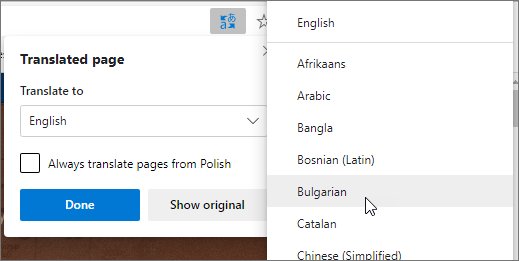
- Pick your language in the Translate to menu.
- Select Translate.
- If no prompt appears, select the translate icon in the address bar, pick a language and select Translate.
- Select the translate icon and choose Show original to switch back.
Tick Always translate from [Language] in the prompt to skip this step for that language in future.
Using Voice, Image, and Conversation Translation Options
Voice, camera and conversation translation live in the Microsoft Translator app for Android and iOS. The app does not require you to sign in.
| Option | How to start it (Android) | What to know |
|---|---|---|
| Voice | Tap the Microphone icon, tap the from-language, then press and hold the microphone and speak. Let go to see the translation. | Speak clearly and avoid background noise. On iOS, a microphone with stars auto-detects which of the two languages you speak. |
| Image and camera | Tap the camera icon, choose the from and to languages, point at the text and tap the camera icon. | Hold the phone level over text with good contrast. You can also upload a saved photo from your gallery. |
| Split-screen conversation | Tap the Microphone icon, then the icon with two microphones. Press and hold the microphone and speak. | Two people share one phone, each speaking their own language. |
| Multi-device conversation | Host or join a live translated conversation from the app. | Each person reads the translation on their own device. Presenters can turn on Presenter mode in the conversation settings. |
On bing.com/translator itself, the speaker icon reads a translation aloud using computer-generated speech.

How to control when Edge offers to translate
Edge offers translation by default for pages that are not in one of your preferred languages.
- In Edge, select Settings and more (the three dots), then Settings.
- Select Languages.
- Turn Offer to translate pages that aren't in a language I read on or off.
- To stop prompts for one language only, choose Never translate [Language] in the translation prompt.
- To translate a page after turning prompts off, select the translate icon in the address bar and select Translate.
How to check the translation worked
- On bing.com/translator, confirm the detected source language matches your text, not a similar language.
- Paste the translation back into the left box and translate it to the original language to spot changed meaning.
- In Edge, select the translate icon: an option to Show original confirms the page is currently translated.
- In the Translator app, select the speaker icon to hear the result and check pronunciation.
Tips for Getting More Accurate Translations
| Do this | Why it helps |
|---|---|
| Write short, complete sentences | Microsoft recommends breaking long material into shorter segments for better accuracy |
| Pick the source language for short text | Auto-Detect sometimes lacks enough text to identify the language |
| Choose the right language pair, including regional variants | A near-miss source language produces a confident but wrong result |
| Review translated web pages against the original | Show original in Edge lets you compare names, prices and dates |
| Photograph text level and well lit | The camera reads high-contrast, straight text most reliably |
| Use Suggest an edit when you know better | Your correction goes back to Microsoft Translator as feedback |
Common Problems and How to Fix Them
The translation box does not show in Bing Search
Bing did not read the query as a translation request, or the feature is not offered in your market or browser.
- Add the word translate and the target language to the query.
- Remove extra words that make it look like a general search.
- Open bing.com/translator and paste the text there instead.
A web page will not translate correctly
Edge prompts only for languages outside your preferred list, and a saved Never translate choice suppresses the prompt.
- Select the translate icon in the address bar and select Translate manually.
- Go to Settings > Languages and turn on Offer to translate pages that aren't in a language I read.
- Select Show original, reload the page, then translate again.
- For a single paragraph, copy it into bing.com/translator.
The detected language or output is wrong
Short text gives Auto-Detect too little to work with, or the wrong target language is selected.
- Replace Auto-Detect with the actual source language.
- Check the target language on the right-hand side.
- Add a few words of context and translate again.
- Select Suggest an edit to submit a correction.
The Bing camera or voice translator does not work
Camera and voice live in the Microsoft Translator app, and voice needs a connection and a supported language.
- Install Microsoft Translator from Google Play or the App Store.
- Check that both languages in the pair support speech; on iOS a disabled microphone means they do not.
- Download an offline language pack from Offline Languages in the app menu for text and camera without a connection.
Frequently Asked Questions
How do I use Bing Translator?
Open bing.com/translator, type or paste text into the left box, and choose a target language on the right. The translation appears instantly. You can copy it, listen to it with text-to-speech, or select Suggest an edit if it is wrong.
How do I translate in Bing search?
Type the word or sentence into the Bing search box with the word translate and a target language, such as translate thank you to French. Bing shows a Translator box at the top of the results when it recognises the request. Use bing.com/translator for longer text.
How do I get Bing Translator?
You do not need to install anything for text: go to bing.com/translator in any browser. For voice, camera and conversation translation on a phone, install the Microsoft Translator app from Google Play or the App Store. Microsoft Edge has page translation built in.
How do I use the Bing camera translator?
Camera translation is part of the Microsoft Translator app. Tap the camera icon, choose the from and to languages, point the phone at the text and tap the camera icon again. You can also translate a saved photo from your gallery.
How do I chat with Bing Translator in two languages?
Use the Microsoft Translator app. Tap the Microphone icon, then the icon with two microphones for split-screen mode, where two people share one phone. For a group, host a multi-device conversation so each person follows in their own language on their own device.
How do I add Bing Translator to Word?
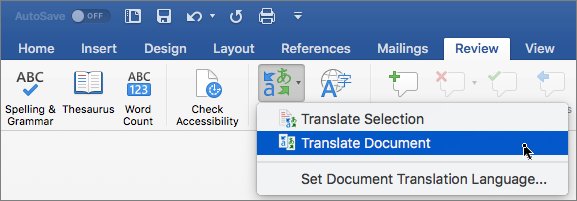
Word has translation built in, with no add-in needed. Select Review > Translate > Translate Selection for highlighted text, or Translate Document to open a translated copy in a new window. Pick your language and select Insert or Translate.
How do I make Bing translate web pages automatically?
Open a foreign-language page in Microsoft Edge and tick Always translate from that language in the translation prompt. Edge then translates every page in that language without asking. Make sure Offer to translate pages that aren't in a language I read is on under Settings > Languages.
How good is Bing Translator quality?
Bing Translator handles everyday text well, but accuracy drops with very short phrases, idioms and long passages. Choose the source language manually for short text, split long text into shorter segments, and check important results by translating them back into the original language.
Does Bing Translator work offline?
The website needs a connection. The Microsoft Translator app can translate text and photos offline after you download a language pack from Offline Languages in the app menu. Voice and conversation translation still need an internet connection.
Bottom Line
Use bing.com/translator for text, Microsoft Edge for whole web pages, and the Microsoft Translator app for speech, signs and conversations. All three run on the same Microsoft Translator engine, but each one is built for a different input, so matching the tool to the input saves the most copying and pasting.