HTTP error codes are three-digit status codes a web server sends when a request fails: 4xx codes such as 403 and 404 point at the request, and 5xx codes such as 500, 502 and 503 point at the server.
This hub lists every standard code with its meaning, the fix a visitor can try, the fix a site owner needs, and the browser ERR_ messages that appear when no status code arrives at all.
How to fix 403, 404, 500, 502 and 503 errors fast
Read the number first. A 4xx error is about the address, your access or your request, and a 5xx error is a fault on the site's side that only its owner can repair.
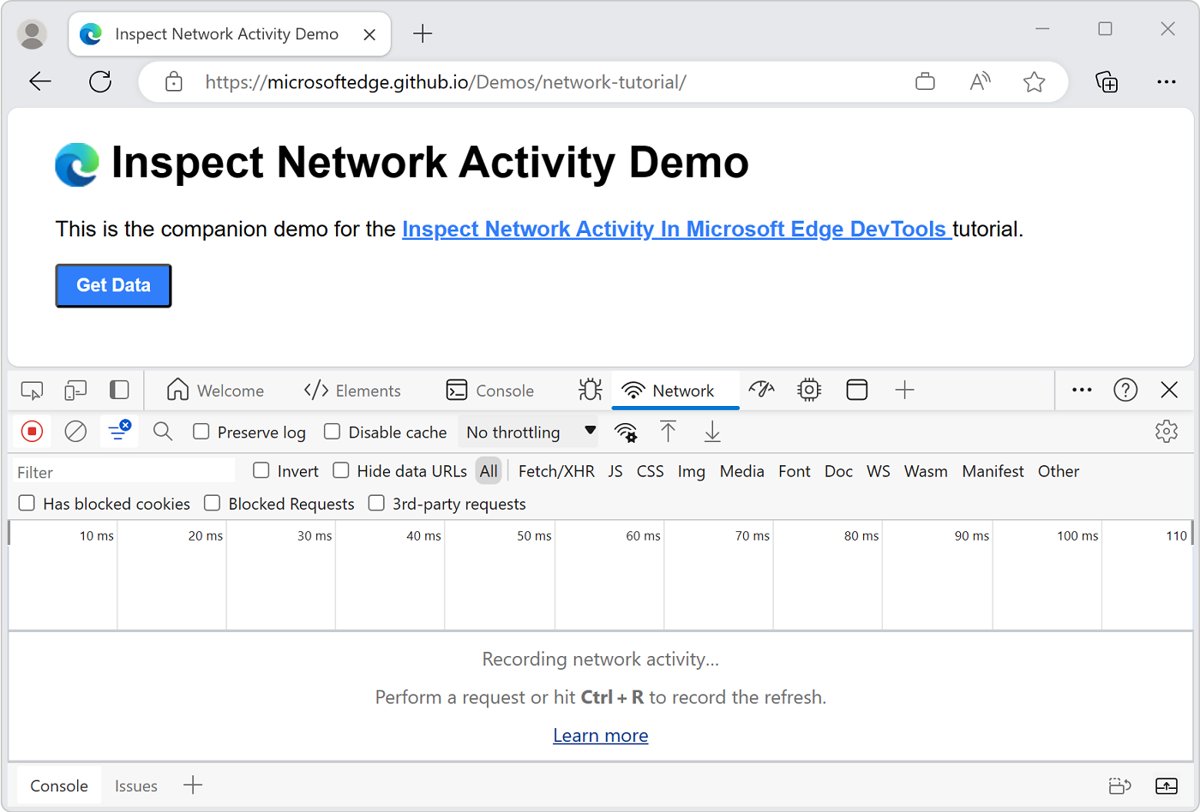
- Reload the page once, since 502 and 503 errors are often temporary.
- Check the address bar for a typo, a missing letter or an old link if you see 404 or 403.
- Open the page in an Incognito or InPrivate window to rule out cookies and extensions.
- Delete the site's cookies and cached files if the error follows you between pages.
- Wait a few minutes and try again if the code starts with 5.
- Contact the site owner when a 5xx error lasts, because the fix lives on their server.
HTTP status codes
HTTP response status codes report whether a request completed. RFC 9110 defines them, and they fall into five classes by their first digit.
| Class | Range | What it tells you | Is it an error? |
|---|---|---|---|
| 1xx status codes [informational]: informational responses | 100-199 | Interim replies while the request continues, such as 100 Continue and 103 Early Hints | No |
| 2xx status codes [success]: successful responses | 200-299 | The request succeeded, for example 200 OK or 201 Created | No |
| 3xx status codes [redirection]: redirection messages | 300-399 | The resource lives at another URL, or a cached copy is still valid | No, unless redirects loop |
| 4xx status codes (client error): client error responses | 400-499 | The server will not process the request as sent | Yes, usually fixable by the visitor or the link's owner |
| 5xx status codes (server error): server error responses | 500-599 | The server failed to complete a valid request | Yes, fixed by the site owner |
A code outside these standard lists is non-standard and usually specific to that server's software.
Common HTTP error codes list and description
These are the error codes visitors actually meet. Each row gives the quick fix for both sides of the screen.
| Code | Name | What it means | Visitor fix | Site-owner fix |
|---|---|---|---|---|
| 400 | Bad Request | The server will not process a malformed or invalid request | Retype the URL, clear the site's cookies | Check the request syntax, headers and form data your app sends |
| 401 | Unauthorized | The client must authenticate before it gets the response | Sign in again | Check the login flow and authentication settings |
| 403 | Forbidden | The server knows who you are but refuses access to the content | Check the URL, sign in, turn off the VPN; the 403 Forbidden fixes go further | Check file permissions, access rules and the index file |
| 404 | Not Found | The server cannot find anything at that URL | Fix the address or search the site; recover from a 404 page step by step | Redirect the moved page with a 301, fix internal links |
| 405 | Method Not Allowed | The URL exists but rejects the HTTP method sent, such as POST or DELETE | Reload the page instead of resubmitting the form | Read the Allow header and fix the 405 method error in the form, route or server rule |
| 408 | Request Timeout | The server wants to close an idle connection | Reload | Review timeout settings if it happens on active requests |
| 410 | Gone | The content was deleted for good with no forwarding address | Look for the content elsewhere on the site | Use it only for pages removed on purpose |
| 429 | Too Many Requests | The client sent too many requests in a set time (rate limiting) | Wait, then try again more slowly | Send a Retry-After header and tune rate limits |
| 500 | Internal Server Error | The server hit a situation it does not know how to handle | Reload later; visitors cannot fix it | Read the error log and trace the 500 error causes |
| 502 | Bad Gateway | A gateway or proxy got an invalid response from the server behind it | Reload, try another browser, flush DNS | Check the upstream app server and diagnose the Bad Gateway causes |
| 503 | Service Unavailable | The server is not ready, usually down for maintenance or overloaded | Wait and retry | Add capacity or end maintenance, then clear the 503 Service Unavailable error |
| 504 | Gateway Timeout | A gateway did not get a response from the server behind it in time | Reload after a minute | Speed up slow upstream requests or fix the 504 gateway timeout in nginx or the CDN |
2xx status codes [success] and REST specific HTTP status codes
REST APIs lean on a wider set of codes than browsers show, so developers see these in API responses and tools like Postman.
| Code | Name | Meaning in an API |
|---|---|---|
| 200 | OK | The request succeeded; the body holds the result |
| 201 | Created | A new resource was created, typically after POST or PUT |
| 202 | Accepted | The request was received but not yet acted on |
| 204 | No Content | Success with no body to send |
| 206 | Partial Content | Part of a resource returned for a range request |
| 409 | Conflict | The request conflicts with the server's current state |
| 415 | Unsupported Media Type | The server rejects the format of the data sent |
| 422 | Unprocessable Content | The request is well formed but has semantic errors |
3xx status codes [redirection]
Redirects are not errors, but a loop between them is. Browsers show that loop as ERR_TOO_MANY_REDIRECTS rather than a number.
| Code | Name | Use it when |
|---|---|---|
| 301 | Moved Permanently | A URL has changed for good |
| 302 | Found | A URL has changed temporarily |
| 303 | See Other | The client should fetch the result with a GET request |
| 304 | Not Modified | The client's cached copy is still current |
| 307 | Temporary Redirect | A temporary move that must keep the same method, such as POST |
| 308 | Permanent Redirect | A permanent move that must keep the same method |
4xx status codes (client error)
The 4xx codes below are the rarer ones that appear in logs and API tools. The common ones sit in the main table above.
| Code | Name | What it means |
|---|---|---|
| 402 | Payment Required | Reserved for payment systems; rarely used |
| 406 | Not Acceptable | No content matches what the browser asked for |
| 407 | Proxy Authentication Required | Like 401, but a proxy needs the sign-in |
| 411 | Length Required | The server needs a Content-Length header |
| 413 | Content Too Large | The request body is over the server's limit, often a large upload |
| 414 | URI Too Long | The URL is longer than the server will read |
| 421 | Misdirected Request | The request reached a server that cannot answer for that host |
| 431 | Request Header Fields Too Large | Headers, often oversized cookies, are too big |
| 451 | Unavailable For Legal Reasons | The resource cannot legally be provided |
5xx status codes (server error)
Every 5xx code means the request was valid and the server could not complete it. Error 500 is the generic one, used when no more specific 5xx code fits.
| Code | Name | What it means |
|---|---|---|
| 500 | Internal Server Error | Generic server failure |
| 501 | Not Implemented | The server does not support the request method |
| 502 | Bad Gateway | Invalid response from an upstream server |
| 503 | Service Unavailable | Server down for maintenance or overloaded |
| 504 | Gateway Timeout | No response from the upstream server in time |
| 505 | HTTP Version Not Supported | The server does not support the request's HTTP version |
| 507 | Insufficient Storage | The server cannot store what the request needs |
| 508 | Loop Detected | The server found an infinite loop while processing |
| 511 | Network Authentication Required | You must sign in to the network, such as hotel or airport Wi-Fi |
Browser error codes: ERR_ and NET::ERR_ errors
Chrome and Edge show an ERR_ code when the page never returned an HTTP status at all. The cause sits in the connection, DNS, certificate or redirects, not in a server status.
| Browser error | What it means | Visitor fix | Site-owner fix |
|---|---|---|---|
| ERR_TOO_MANY_REDIRECTS | The page redirected you too many times | Delete the site's cookies; stop the redirect loop | Check the site URL settings, CDN SSL mode and server redirects |
| ERR_CONNECTION_CLOSED | The connection to the site was closed | Check the router, extensions, VPN and proxy; fix the connection closed error | Confirm the server accepts HTTPS connections |
| ERR_CONNECTION_TIMED_OUT | The page took too long to connect | Flush DNS, reset TCP/IP, check the proxy; clear the timed out error on Windows | Check the server is up and the firewall allows traffic |
| ERR_NETWORK_CHANGED | The device lost or switched networks while loading | Reload and renew your IP; stop network changed errors | None needed |
| NET::ERR_CERT_AUTHORITY_INVALID | The browser does not trust the certificate's issuer | Sign in to public Wi-Fi, update the OS; untrusted certificate fixes | Install a certificate from a trusted authority with its full chain |
| NET::ERR_CERT_COMMON_NAME_INVALID | The certificate does not cover the name you typed | Check the address; fix the certificate name mismatch | Reissue a certificate that lists every domain |
| NET::ERR_CERT_DATE_INVALID | The device's date or time is wrong | Correct the clock | Renew an expired certificate |
| ERR_NAME_NOT_RESOLVED | The address may not exist or points to a new IP | Check spelling, flush DNS | Check the domain's DNS records |
| Safari: cannot connect to server | Safari could not reach the site | Test another network and check Private Relay; Safari connection fixes | Check the server and DNS |
What is a 403 Forbidden error?
A 403 means the server understood the request and refuses it. Unlike a 401, the server already knows who you are; you simply lack access rights to that content.
| Types of 403 Forbidden errors and their common causes | Who can fix it |
|---|---|
| 403 Forbidden on a page you should reach: stale cookies or a broken sign-in | Visitor |
| Access denied: the account or IP address is not allowed | Site owner |
| 403 Forbidden nginx or openresty: wrong file permissions or a deny rule in the server config | Site owner |
| Directory listing forbidden: the folder has no index file | Site owner |
| Blocked by a firewall or security rule: your VPN or region is flagged | Visitor (turn off VPN) or site owner |
Servers may also send 404 instead of 403 to hide that a resource exists from someone who is not allowed to see it.
Effective ways to resolve 403 Forbidden error
Work through these in order. Most visitor-side 403s clear by step 3.
- Refresh the page once.
- Double check the address: a URL that ends in a folder name with no page often returns 403.
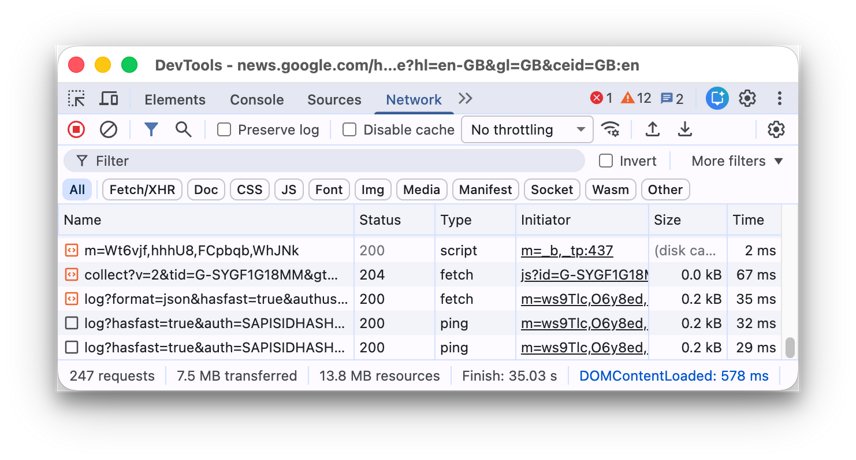
- Clear your browser cookies and cache for that site, then sign in again.
- Check if you have permission to access the URL, such as a members-only or company page.
- Disconnect from your VPN, since some sites block VPN addresses.
- Try again later if the site was mid-update.
- Contact the website and give them the URL and the time of the error.
- Contact your ISP only if every site returns 403, which points to your IP address being blocked.
You can manage Chrome cookies per site, so one bad cookie does not cost you every sign-in.
What is a 500 Internal Server Error?
What a 500 Internal Server Error means is simple: the server hit a failure it does not know how to handle and found no more precise 5xx code to report it.
| 500 internal server error variations | What it usually points to |
|---|---|
| 500 Internal Server Error | Generic message from the web server |
| HTTP Error 500 | Same error as shown by IIS or a browser |
| Internal Server Error, The server encountered an internal error or misconfiguration | A server config file problem |
| A blank white page | A PHP or application fatal error with error display off |
| Other common error codes in the error 500 code list: 501, 502, 503, 504 | A more specific server failure, listed in the 5xx table |
What are the causes of a 500 Internal Server Error?
The status code does not say which part failed. The server's error log does, so read it before changing anything.
| Potential causes of 500 internal server error | Where to look |
|---|---|
| Bad rule or syntax in a server config file | Recent config edits |
| Faulty plugin or theme after an update | The plugin or theme changed last |
| PHP or application code error | PHP error log or the framework's log |
| Wrong file or folder permissions | Permissions on the files the script reads |
| Script hit its memory or time limit | Hosting resource limits |
| Database connection failure | Database server status and credentials |
How to fix a 500 Internal Server Error
Visitors can only reload and wait. Site owners fix the cause, and the steps differ slightly by platform.
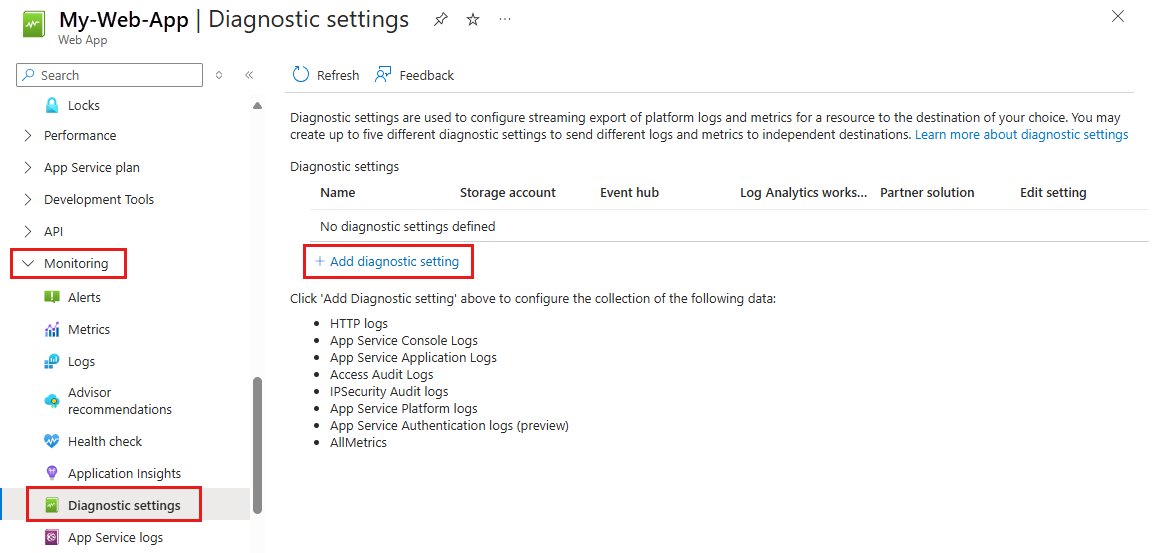
- As a visitor, reload the page after a minute and try again later.
- As the owner, open the server error log and note the exact error and file.
- Undo the last change: a config edit, a plugin, a theme or a code deploy.
- Fixing a 500 internal server error on WordPress: rename the plugins folder, reload, then restore plugins one at a time to find the culprit.
- Fixing a 500 internal server error on PHP websites: check the PHP error log and raise the memory limit only if the log names it.
- Fixing a 500 internal server error on Django or another framework: read the application log and keep debug output off on a live site.
- Reload the page and confirm it returns 200.
500 errors impact on SEO
A short 500 does little harm. A long one costs crawling and, in the end, index entries.
| Status | Impact of the error on a website's search presence |
|---|---|
| 5xx and 429 | Search crawlers slow down crawling of the site |
| 500 that persists | URLs that keep returning a server error are removed from the index |
| Already indexed URLs during a short outage | Kept for a while, then eventually dropped |
| 4xx (except 429) | Treated as content that does not exist; indexed URLs are removed |
| Back to 2xx | Crawl rate gradually increases again |
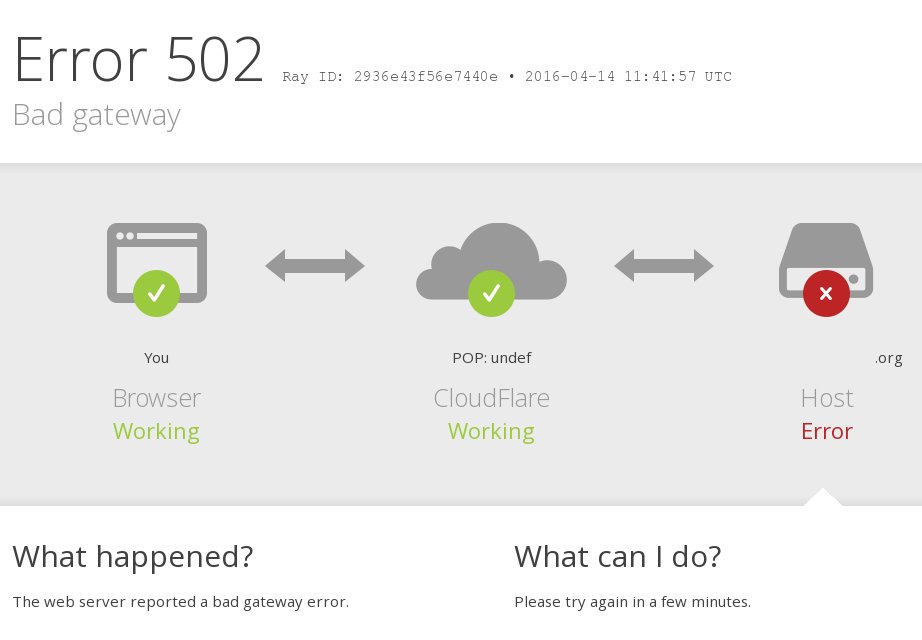
What is a 502 Bad Gateway error?
A 502 means a server acting as a gateway or proxy got an invalid response from the server behind it. The front server works; the one it talks to does not.
| 502 Bad Gateway error variations and causes | What causes the 502 Bad Gateway error |
|---|---|
| 502 Bad Gateway, 502 Proxy Error, HTTP Error 502 | The upstream app server crashed or is restarting |
| 502 Bad Gateway nginx | nginx cannot get a valid reply from PHP-FPM or the app behind it |
| Bad Gateway page from a CDN | The CDN cannot reach the origin server |
| 502 after a deploy | A plugin, theme or code change breaks the app's responses |
| Intermittent 502 | The upstream server is overloaded or a firewall blocks the proxy |
How to fix a 502 Bad Gateway error
These steps cover the 13 methods most guides list, in the order a visitor and then an owner should try them.
- Refresh the page after a minute.
- Check other websites, and check if the site is down for other people.
- Try another browser, or a private window.
- Clear your browser's cache and cookies for the site.
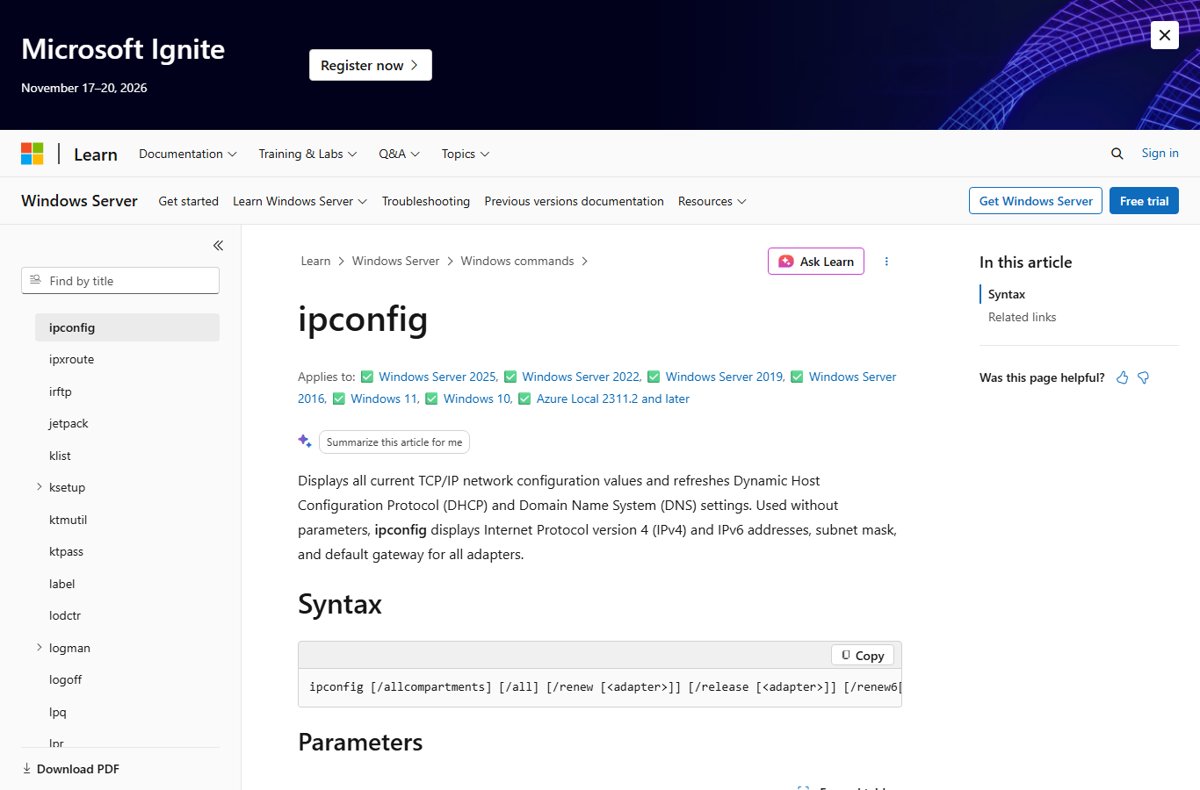
- Clear DNS cache with
ipconfig /flushdnsin an administrator Command Prompt. - Check your plugins and extensions by turning browser extensions off one at a time.
- Restart your devices, including the router and modem.
- Change your DNS servers if lookups keep failing.
- Contact website administrator with the URL and the time you saw the error.
If your favorite sites are down at once, it might be a major internet outage rather than one broken server. The Windows command lets you flush the DNS cache without a restart, and you can change DNS settings on Windows to a public resolver.
A cached error page can linger after the site recovers, so clear Chrome's cache or hard refresh Microsoft Edge before you give up. Any browser can load a non-cached page with a hard refresh.
Additional steps for advanced users
These steps are for the person who runs the site. They apply to 502 and 504 errors alike.
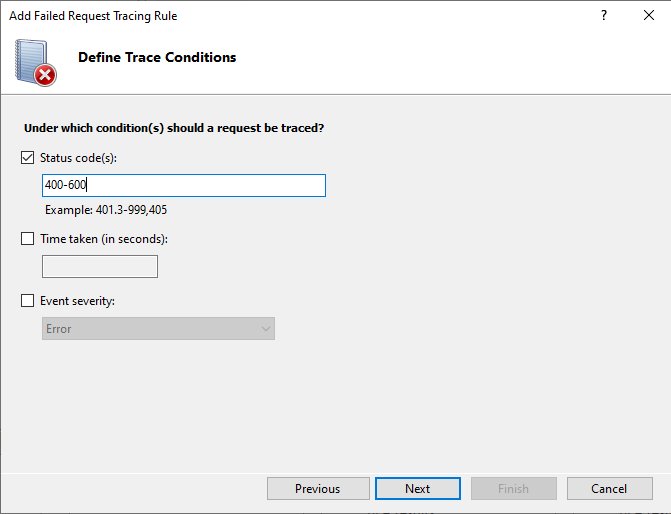
- Check server status: confirm the app server, PHP-FPM or upstream service is running.
- Check error log entries on the proxy and the upstream server for the same timestamp.
- Check plugins and themes by turning off the last ones you changed.
- Pause the CDN or proxy briefly to see whether the origin answers on its own.
- Check that the firewall allows the proxy's and CDN's IP addresses.
- Raise upstream timeouts only after slow requests are fixed.
What does 503 Service Unavailable mean?
A 503 means the server is not ready to handle the request, usually because it is down for maintenance or overloaded. The condition is meant to be temporary.
| 503 error variations | How the 503 Service Unavailable error appears |
|---|---|
| 503 Service Unavailable | Plain server message |
| HTTP 503.0, 503.2, 503.3 or 503.4 | IIS substatus codes: application pool stopped, concurrent request limit reached, ASP.NET queue full, FastCGI queue full |
| 503 page that mentions cloudflare | Generated by Cloudflare rather than by the origin server |
| 503 with a Retry-After header | How 503 Service Unavailable looks from the outside to tools and crawlers: the header gives the expected wait |
503 vs 500, 502 and 429
| Code | Who failed | Temporary? | What causes it |
|---|---|---|---|
| 500 | The server's own code or config | Not until fixed | An error the server cannot classify |
| 502 | The upstream server behind a proxy | Often | An invalid reply passed to the gateway |
| 503 | The server as a whole | Yes, by design | Maintenance or overload |
| 429 | The client sent too much | Yes | Rate limiting on your requests |
How to fix the HTTP error 503 as a website owner
Visitors can only retry a 503. For owners, the first job is how to find the cause fast: maintenance, traffic or a stuck process.
- Check whether a maintenance mode or deploy is still running and end it.
- Look at CPU, memory and connection counts for a traffic spike.
- Restart the stuck app pool, PHP-FPM or service, and read its log.
- How to fix the 503 error in WordPress: turn off recently added or updated plugins one at a time to find the one that overloads the server.
- Review code and configuration: worker limits, rate limits and health checks that pull servers out of rotation.
- Send a Retry-After header during planned downtime, and keep 503 pages out of the cache.
How to prevent 503 Service Unavailable
| Prevention step | Why it helps |
|---|---|
| Schedule updates for low-traffic hours | Maintenance windows hit fewer visitors |
| Put a CDN or cache in front of the site | Fewer requests reach the origin server |
| Set uptime monitoring with alerts | You hear about a 503 before readers do |
| Size worker and connection limits to real traffic | The server is not overloaded by normal peaks |
| Send Retry-After with planned 503s | Clients and crawlers know when to return |
How to check a website's HTTP status code
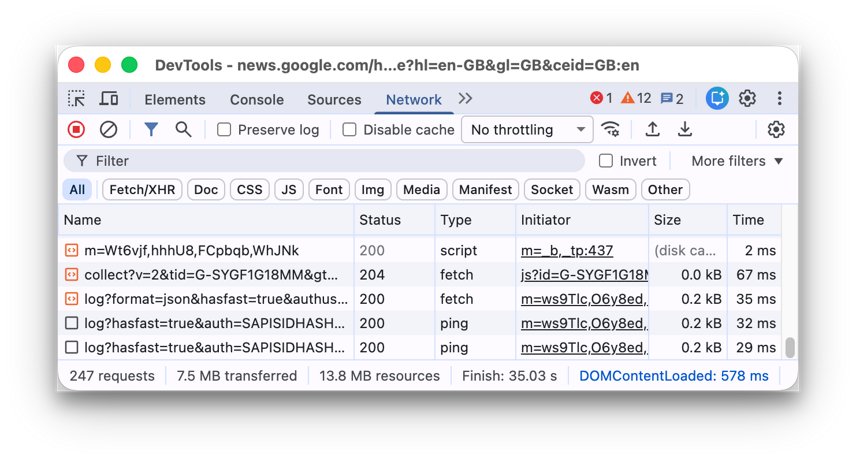
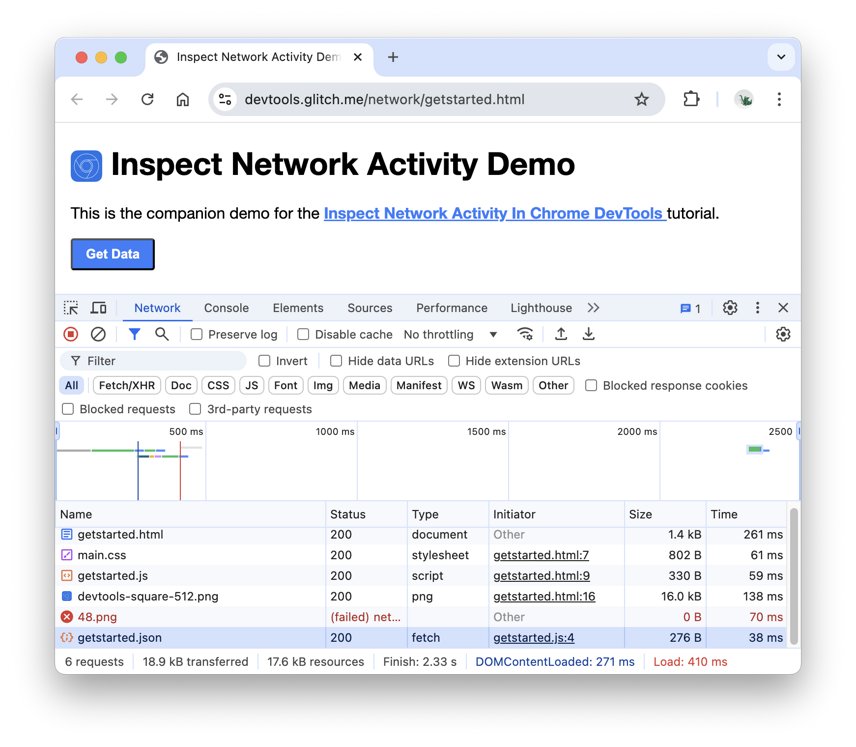
Error pages do not always show the real code. DevTools shows what the server actually sent.
- Open the page in Chrome or Edge and press F12 to open DevTools.
- Select the Network tab.
- Tick Disable cache so the browser does not reuse a stored response.
- Reload the page.
- Read the Status column for the first request: 200 means the page now works.
HTTP error codes troubleshooting by symptom
403 Forbidden error on Edge only
Edge holds a stale cookie or an extension blocks the request.
- Open the page in an InPrivate window.
- If it loads, delete that site's cookies in Edge.
- Turn extensions back on one at a time to find the one that blocks it.
403 Forbidden nginx or openresty page
The server config or file permissions deny the request.
- Visitors: check the URL and contact the site.
- Owners: check the nginx error log for the denied path.
- Confirm the folder has an index file and the web server user can read it.
403 Forbidden error in Postman
The API key, token or headers do not grant access to that endpoint.
- Check the token has not expired.
- Confirm the account has rights to the endpoint.
- Compare the headers with a request that works in the browser.
HTTP error code 0
Not a real status code: browsers report a status of 0 before a request completes and when the request fails without a response.
- Check the connection.
- Open DevTools Console for a blocked-request message.
- Retry once the network is back.
HTTP error codes FAQ
What is an HTTP error?
An HTTP error is a status code from 400 to 599 that a web server returns when it cannot complete a request. Codes from 400 to 499 point at the request, and codes from 500 to 599 point at a server fault.
What are HTTP error codes?
They are the 4xx and 5xx entries in the HTTP status code list defined by RFC 9110. The most common are 400, 401, 403, 404, 429, 500, 502, 503 and 504, each naming a different reason the page failed.
What does 403 Forbidden mean?
403 Forbidden means the server understood your request and refuses to give you the content. Unlike 401, the server knows who you are, but your account, IP address or the file's settings do not allow access.
Why am I getting a 403 Forbidden error on a website?
Usually a stale cookie, a VPN address the site blocks, a page that needs a sign-in, or a wrong URL pointing at a folder. When none of those apply, the site's own permissions are wrong and only its owner can fix them.
Why does 403 Forbidden say access is denied?
Access is denied because the server has a rule against your request, such as an IP block, a login requirement or file permissions. Signing in with the right account or turning off a VPN clears the visitor-side cases.
How do I clear a 403 Forbidden error?
Reload the page, check the address, delete the site's cookies and cache, sign in again and turn off your VPN. If it still appears, contact the website, because the block is on their server.
What is the difference between 401 and 403?
401 means you are not authenticated and must sign in. 403 means the server knows who you are and still refuses access, so signing in again with the same account will not help.
Can I view an older copy of a web page that shows an error?
Sometimes. If your browser cached the page on an earlier visit, a normal reload may still show it, and a public web archive may hold a snapshot. Otherwise wait until the site owner clears the 500 or 503 error.
Is a 404 an HTTP error code?
Yes. 404 Not Found is a 4xx client error meaning the server cannot find anything at that URL. It is one of the best-known error codes on the web, usually caused by a moved page or a mistyped link.