Windows 11 has no built-in CPU temperature readout, so check it in your PC's UEFI firmware or with a free hardware monitor such as Core Temp or HWMonitor.
This guide covers both routes, other monitoring tools, the temperature limits Intel publishes, and what to do when no reading appears.
Method 1: Check CPU temp in BIOS/UEFI (no software needed)
The firmware reads the motherboard's sensors directly, so this works on any Windows 11 PC without installing anything.
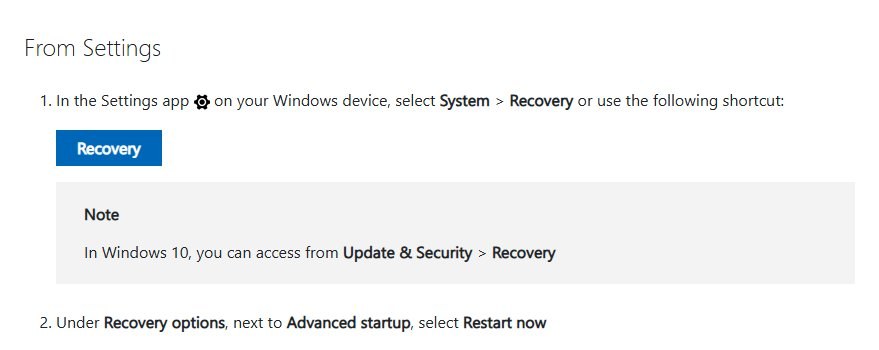
You do not need to know the key to enter the BIOS on your PC, because Windows 11 can restart straight into the firmware from Settings.
- Save your work and close open apps, because the PC restarts.
- Press Win + I to open Settings.
- Go to System > Recovery.
- Under Recovery options, next to Advanced startup, select Restart now, then confirm with Restart now.
- On the blue screen, select Troubleshoot > Advanced options > UEFI Firmware Settings, then select Restart.
- In the firmware, open the page that reports hardware status. Its name depends on the motherboard maker, so look for words such as monitor, health or status.
- Read the CPU temperature, then exit the firmware without saving changes to return to Windows.
The firmware reading is taken while the processor is almost idle, so it is lower than what you see while gaming or rendering. Use a monitoring app for temperatures under load.
Best CPU temp method to use on Windows 11
| Your situation | Use this | Why |
|---|---|---|
| You only want a quick idle reading | UEFI firmware (Method 1) | No software to install, works on every PC |
| You want live per-core readings while you work or play | Core Temp (Method 2) | Small app that shows each core's temperature in real time |
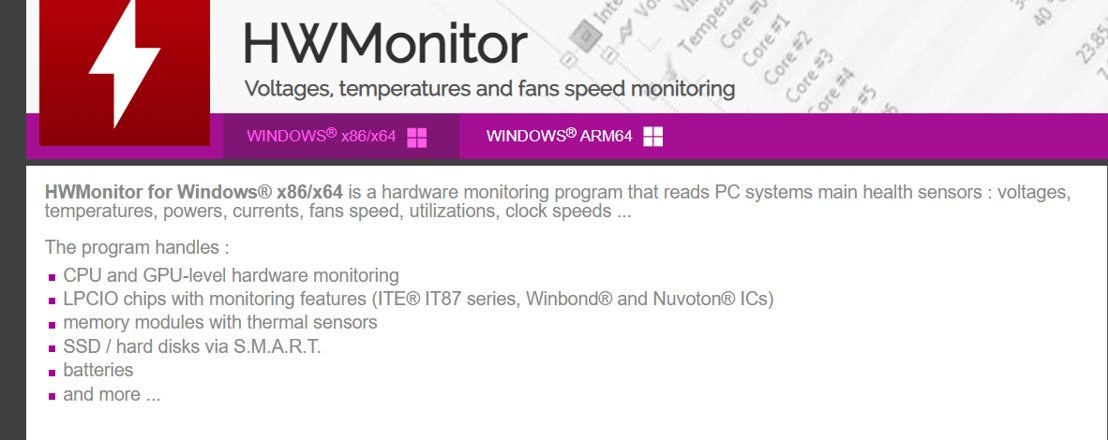
| You also want fan speeds, voltages and SSD temperatures | HWMonitor or HWiNFO | Read every sensor on the board, not just the CPU |
| You have an unlocked Intel K- or X-series CPU | Intel Extreme Tuning Utility | Intel's own tool to monitor and tune the processor |
| You have a laptop from Dell, HP, Lenovo or another maker | The maker's own system app | Uses the sensors and fan profiles that maker configured |
| Your PC is in Windows 11 S mode | UEFI firmware | S mode installs Microsoft Store apps only |
If you are not sure about the last row, check whether Windows 11 is in S mode before you download a monitoring app.
Method 2: Check CPU temp with Core Temp (free third-party tool)
Core Temp is a small free monitor that reads the digital temperature sensor inside each processor core. It runs on Intel and AMD processors.
- Open the Core Temp developer's official website in your browser and download the installer from there, not from a download portal.
- Run the installer and read each screen before you select Next, so you skip any optional extras you do not want.
- Launch Core Temp from the Start menu.
- Check the processor name at the top of the window to confirm it matches your CPU.
- Read the temperature listed next to each core, along with its minimum and maximum values since the app started.
- Leave Core Temp open while you run a game or heavy task to see the temperature under load.
Alternative ways to monitor CPU temperature
Several other tools read the same sensors. Download each one only from its developer's own site.
| Tool | Who makes it | What it reads | Best for |
|---|---|---|---|
| HWMonitor | CPUID | Voltages, temperatures, power, currents, fan speeds, utilisation and clock speeds, including CPU and GPU sensors, memory modules with thermal sensors, SSDs and hard disks via S.M.A.R.T., and batteries | One window with every sensor on the PC |
| HWiNFO64 | HWiNFO | Detailed hardware information and live sensor readings | Logging and detailed sensor tables |
| MSI Afterburner | MSI | Graphics card monitoring, with an optional on-screen display in games | Gamers who want temperatures while playing |
| Intel Extreme Tuning Utility (XTU) | Intel | Monitoring, stress testing and overclocking on Windows 11 and Windows 10 | Unlocked Intel K- and X-series processors only |
| AMD Ryzen Master | AMD | Monitoring and tuning of AMD Ryzen processors | Ryzen desktop owners |
| Your laptop manufacturer's app | Dell, HP, Lenovo, ASUS, MSI and others | System health, fans and power modes the maker supports | Laptops, where third-party tools may not see every sensor |
Intel states XTU is supported with unlocked K- and X-series processors only and needs a chipset that supports full overclocking, such as a Z-series board.
Check CPU temp on Windows 11 using CMD or PowerShell
Windows includes a WMI class for temperature probes, but it does not report live CPU temperatures on current systems.
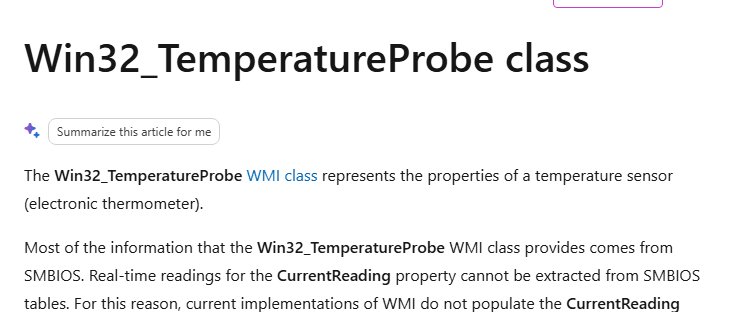
Get-CimInstance -ClassName Win32_TemperatureProbeQueries the Win32_TemperatureProbe WMI class from PowerShell. Microsoft documents that most of its data comes from SMBIOS, which cannot hold real-time readings, so current WMI implementations do not populate the CurrentReading property.
You should see: The command returns probe details or nothing at all, and CurrentReading stays empty. That empty result is expected, so use a monitoring app or the UEFI firmware for an actual number.
Why doesn’t Windows 11 show CPU temperature?
| Where you might look | What it shows | CPU temperature? |
|---|---|---|
| Task Manager > Performance > CPU | Utilisation, speed, processes, threads and uptime | No |
| Settings > System > About | Processor model and installed RAM | No |
| WMI (Win32_TemperatureProbe) | Probe description and thresholds from SMBIOS | No live reading |
| UEFI firmware | Motherboard sensor readings | Yes, at idle |
| Hardware monitoring apps | Live readings from CPU and board sensors | Yes, live |
CPU sensors are read through chipset and processor-specific interfaces that Windows does not expose in its own tools. That is why every live method on this page uses the firmware or a dedicated app.
How to tell if your CPU temperature reading is accurate
- Note the reading at the desktop with no apps open. It should sit well below your processor's maximum.
- Start a demanding task such as a game or a video export.
- Watch the reading climb within a few seconds. A value that never moves points to the wrong sensor.
- Close the task and confirm the reading drops back toward the idle figure.
- Compare two tools, such as Core Temp and HWMonitor. Readings within a few degrees of each other confirm the sensor.
What is a safe CPU temperature on Windows 11?
There is no single safe number. Each processor has its own maximum, which its maker publishes.
| Term | What it means | Where to find it |
|---|---|---|
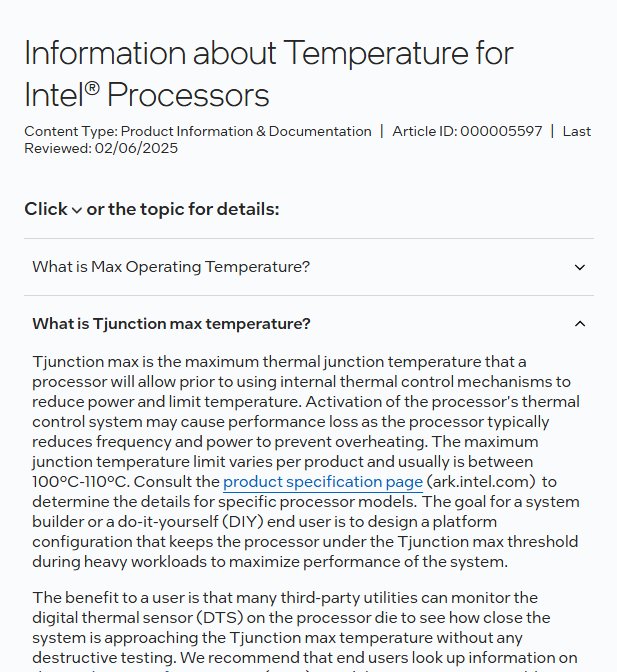
| Tjunction max (Tjmax) | The highest temperature an Intel processor allows before it cuts power to limit heat. Intel says it is usually 100°C to 110°C, depending on the model | ark.intel.com > your processor > Package Specifications |
| Max operating temperature | The highest temperature the processor's sensors are allowed to report, which can briefly be exceeded | ark.intel.com > Package Specifications |
| Tcase max | The maximum temperature at the processor's heat spreader, listed for some models | ark.intel.com > Package Specifications |
| AMD maximum operating temperature | The limit for AMD Ryzen processors | The processor's specifications page on amd.com |
Intel says a processor running at its maximum temperature during a heavy workload is not necessarily a problem, because Turbo Boost raises temperature quickly. When a core gets too hot, it lowers power, and it shuts down if it cannot stay at a safe temperature.
Sustained CPU throttling still costs performance, so clean the vents and check the fans if your readings sit at the limit during light work.
Still not seeing a temperature reading?
UEFI Firmware Settings is missing from Advanced options
The option appears only when the firmware supports booting straight into setup from Windows.
- Restart the PC.
- Watch the first screen for the key it names for setup or BIOS, and press it repeatedly before Windows loads.
- If no key is shown, look up the setup key in your PC or motherboard manual on the manufacturer's support site.
The firmware has no CPU temperature page
Many laptops and some prebuilt desktops leave sensor readings out of their firmware.
- Exit the firmware without saving.
- Install your laptop or PC maker's own system app from its support site.
- Or use HWMonitor or Core Temp from Windows.
PowerShell or CMD returns no CPU temperature
Current WMI implementations do not populate the CurrentReading property of Win32_TemperatureProbe.
- Stop retrying the command, because the value will stay empty.
- Use Core Temp, HWMonitor or HWiNFO for a live reading.
Monitoring app shows no reading or a value that never changes
The app may not support a newer processor yet, or it is reading a board sensor instead of the CPU.
- Update the app to its latest version from the developer's site.
- Run it as administrator by right-clicking it and selecting Run as administrator.
- Try a second tool and compare the readings.
- On AMD Ryzen or Intel unlocked CPUs, try AMD Ryzen Master or Intel XTU.
The app will not install
Windows 11 in S mode runs Microsoft Store apps only.
- Check the edition in Settings > System > Activation.
- Use the UEFI method, or switch out of S mode if you accept that the change is one-way.
Frequently asked questions
Can Windows tell me my CPU temp?
No. Windows 11 and Windows 10 have no built-in CPU temperature readout in Task Manager, Settings or WMI. Read the temperature in your PC's UEFI firmware, or install a free monitoring app such as Core Temp, HWMonitor or HWiNFO from the developer's own site.
How do I check CPU temp on Windows 11 in Task Manager?
You cannot. The CPU page in Task Manager's Performance tab shows utilisation, speed, processes, threads and uptime, but no temperature. Task Manager is still the right place to check CPU usage, which often explains why a processor is running hot.
How do I check CPU temp on Windows 11 using CMD?
You cannot get a live reading from CMD or PowerShell. The Win32_TemperatureProbe WMI class exists, but Microsoft documents that current WMI implementations do not populate its CurrentReading property. Use a monitoring app or the UEFI firmware instead.
How do I check CPU temp on Windows 11 without BIOS?
Install a free monitoring app such as Core Temp, HWMonitor or HWiNFO from its developer's site. These read the processor's sensors live from the Windows desktop, so you can watch the temperature while gaming or working without restarting the PC.
How do I check CPU temp on a Windows 11 laptop?
Use the laptop maker's own system app first, because it reads the sensors and fan profiles that maker configured. Core Temp and HWMonitor also work on most laptops. Many laptop firmware screens do not show temperatures, so the UEFI method may not help.
How do I check CPU temp on Windows 11 with an AMD processor?
Use AMD Ryzen Master, AMD's own tool for Ryzen processors, or a general monitor such as HWMonitor or HWiNFO. Core Temp also supports AMD processors. Compare the reading with the maximum operating temperature on your processor's amd.com specifications page.
How do I check CPU temp on Windows 10?
Use the same methods as Windows 11. Open Settings > Update & Security > Recovery, select Restart now under Advanced startup, then Troubleshoot > Advanced options > UEFI Firmware Settings. Or install Core Temp, HWMonitor or HWiNFO.
Is 80°C too hot for a CPU while gaming?
Not for most processors. Intel lists Tjunction max values that usually fall between 100°C and 110°C, and says running near the maximum under a heavy workload is not necessarily a concern. Check your exact model's limit on ark.intel.com or amd.com.
Can a CPU be damaged by overheating?
It is unlikely. Intel says its processors reduce power when a core gets too hot and shut down if they cannot hold a safe temperature. Repeated throttling still slows the PC, so clean dust from vents and fans if temperatures stay high.
Quick summary
Use the UEFI firmware for a one-off idle check, and install Core Temp or HWMonitor when you need live readings under load. Windows 11 has no built-in CPU temperature readout, and the firmware cannot show what happens while you game or render. Compare the result with your processor's published maximum, not a generic number.