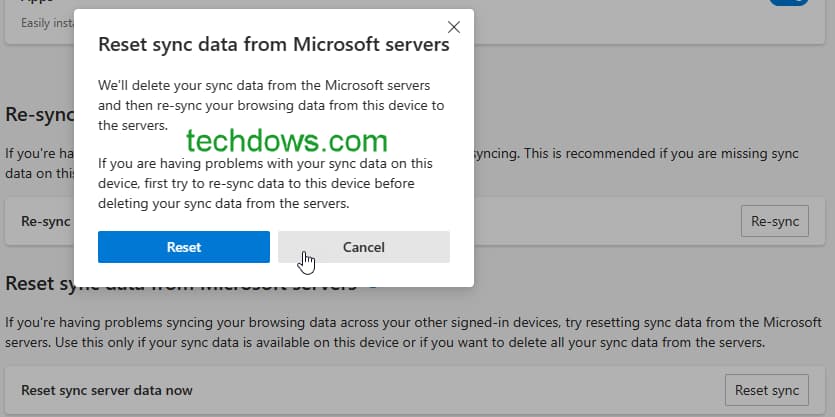
Microsoft has re-added the ability to delete sync data from the cloud again in Edge browser after criticism from users. The new option “Reset sync data from Microsoft Servers” is now available in Edge Canary, here is how to use it to Reset Sync in Edge.
Microsoft Edge after switching to Chromium, allowed users to synchronize their browsing data such as passwords, history, extensions, settings, etc across signed-in devices.
Edge initially, offered the option to clear Sync data from Microsoft Servers in Sync settings. But recently, the “Reset Sync” button was removed in Edge 114 and replaced with a Re-sync button.
The change merges local browsing data with sync data on the cloud. If you’re privacy aware or want to sync data fresh, Reset Sync is an easier option. This is no longer availble.
The workaround available involves navigating to the “edge://sync-internals/” page and hitting “disable sync (clear server data)”. But, this is not a straight forward procedure to follow for a normal user.
After criticism from users, Microsoft added the sync reset option back in the latest Edge Canry 116. It may take time to reach Edge Stable.
Meanwhile, if you’re running Edge Canary, here is how you can delete Edge Sync data from Microsoft Servers.
How to Reset Edge Sync data from Microsoft Servers
- Launch Microsoft Edge
- Visit Settings > Profiles > Sync
- Scroll down to “Re-sync data to this device”, and click on “Still having sync Problems? Try another option”.
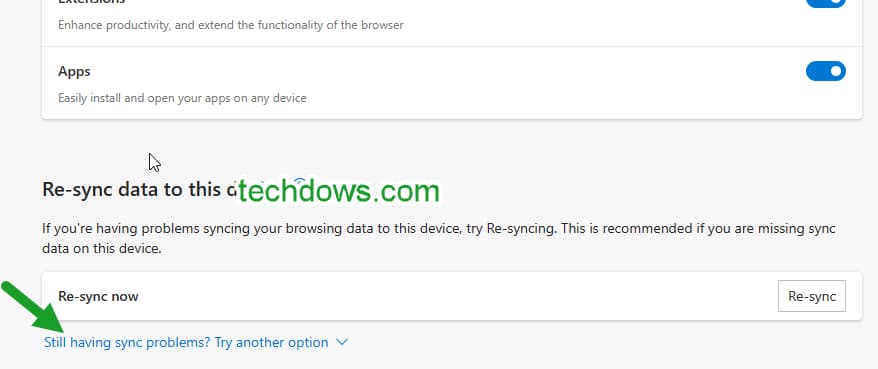
- Under the new “Reset Sync data from Microsoft Servers“, for “Reset sync server data now”, click “Reset Sync”
- Click “Reset”

Microsoft recommends to re-sync data on the device before deleting sync data from its servers. Users need to only use this option when they have syncing issues in Edge or if they want to start from the beginning.
It is still unclear, why Microsoft made the change in the first place. Does the company want users to delete Edge sync data from Servers less often? Leaving the only re-sync to the device option is a bad move.
Edge got the Reset Sync option anyway now although not visible and hidden by default.
What’s your take on this? Let us know in the comments below.
Final words: Microsoft has re-added the ability to remove Edge Sync data from the cloud in Edge 116 after it was removed in Edge 114.
More on Microsoft Edge:
6 Sure Ways to Fix Microsoft Edge’s Constant Crashes on Windows 11/10
How to disable Video background on Microsoft Edge’s New Tab Page
Microsoft is rolling out a new look to the Edge browser
Microsoft Edge Built-in VPN could offer 5GB of Free data for Month
