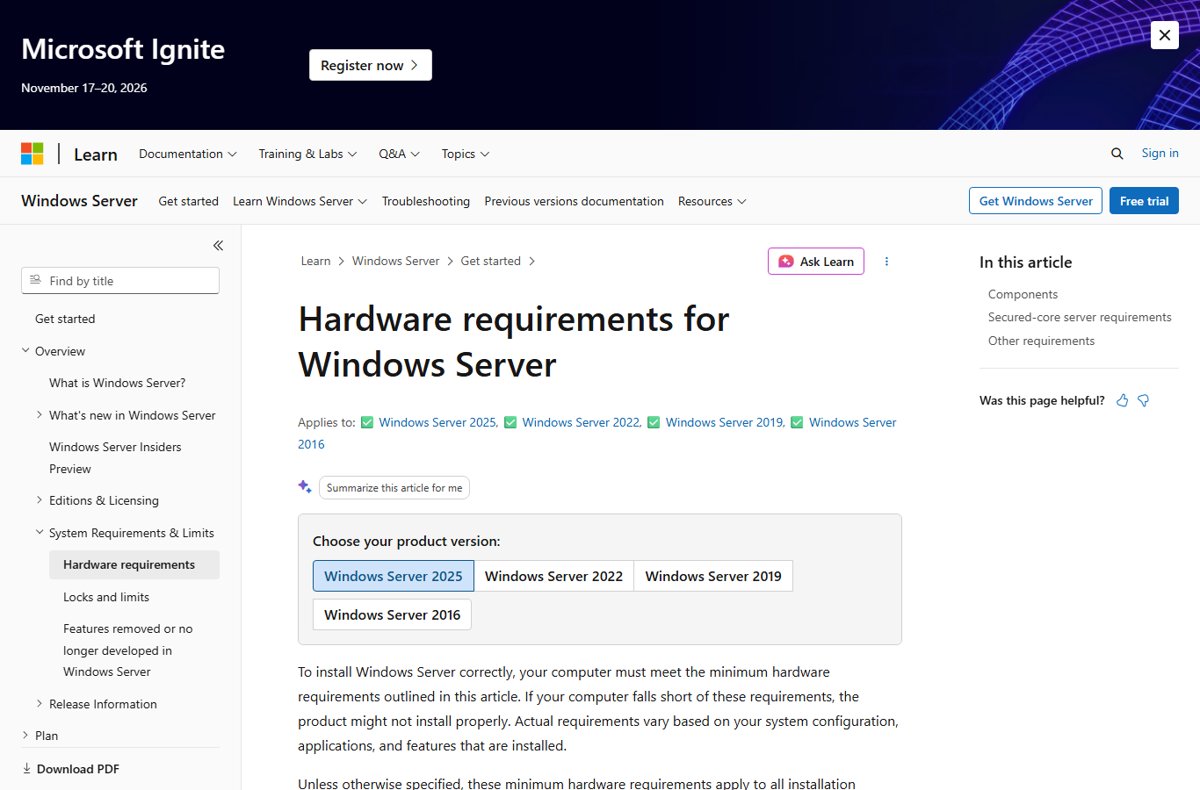
Windows Server 2025 needs at least a 1.4 GHz 64-bit processor with SSE4.2 and POPCNT support, 2 GB of RAM, 32 GB of disk space and a 1 Gbps PCI Express Ethernet adapter.
This guide covers each minimum from Microsoft's own documentation, what changed from Windows Server 2022, Server Core versus Desktop Experience sizing, TPM and Secured-core needs, and how to check a machine before you install.
Minimum Windows Server 2025 hardware requirements
These minimums apply to both Standard and Datacenter editions, and to both Server Core and Server with Desktop Experience unless a row says otherwise.
| Component | Minimum for Windows Server 2025 | Note |
|---|---|---|
| Processor | 1.4 GHz 64-bit, x64 instruction set | Must also support NX/DEP, CMPXCHG16b, LAHF/SAHF, PrefetchW, SLAT, SSE4.2 and POPCNT |
| Memory (RAM) | 2 GB | 4 GB recommended for Desktop Experience; ECC or similar on physical hosts |
| Storage | 32 GB system partition | PCI Express storage adapter; no PATA, ATA, IDE or EIDE boot, page or data drives |
| Network | 1 Gbps Ethernet adapter | PCI Express compliant |
| Firmware | UEFI 2.3.1c with Secure Boot | Needed only for features that use it |
| TPM | TPM 2.0 | Needed only for features such as BitLocker Drive Encryption |
| Graphics | Super VGA (1024 x 768) or higher | Needed only for certain features |
Microsoft does not publish recommended specifications beyond these minimums. It advises sizing each server from the documentation for the roles you plan to run and from test deployments.
Windows Server 2025 processor requirements
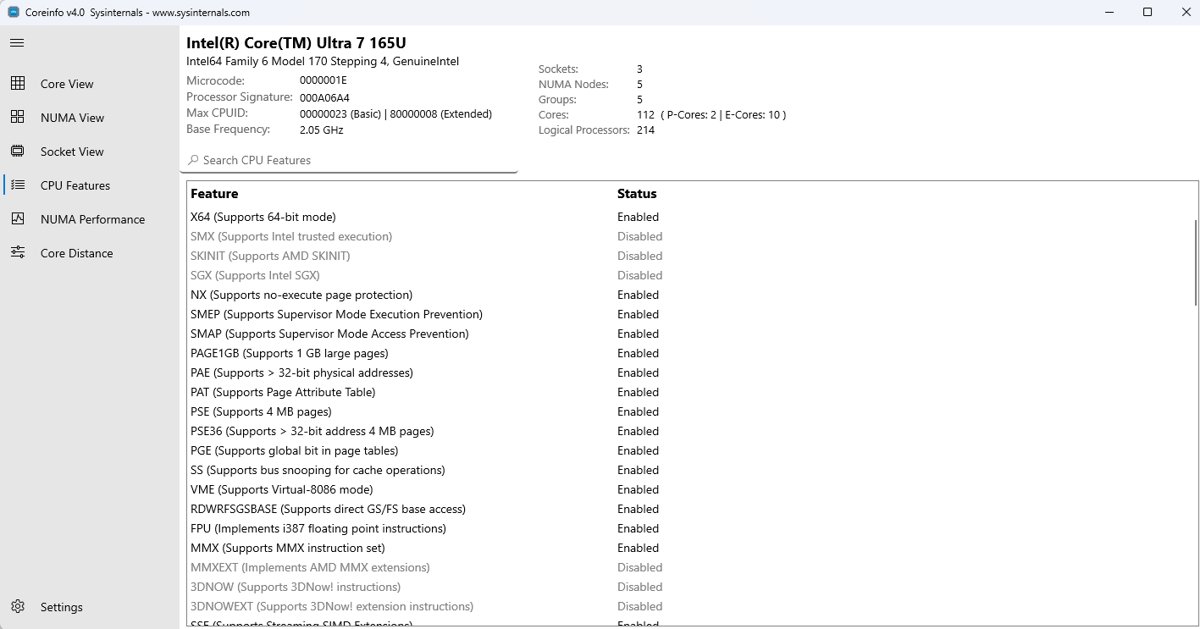
Clock speed is only one factor. Microsoft notes that core count and cache size also decide processor performance, so the list below is about compatibility rather than speed.
| CPU requirement | What it means | New in 2025? |
|---|---|---|
| 1.4 GHz 64-bit processor | The lowest supported clock speed | No |
| x64 instruction set | 32-bit and Arm processors are not on the minimum list | No |
| NX and DEP | No-execute page protection must be available | No |
| CMPXCHG16b, LAHF/SAHF, PrefetchW | Specific instructions the kernel relies on | No |
| Second Level Address Translation (EPT or NPT) | Intel EPT or AMD NPT memory virtualization | No |
| SSE4.2 instruction set | Streaming SIMD Extensions 4.2 | Yes |
| POPCNT instruction | Population count instruction | Yes |
SSE4.2 and POPCNT are the two lines that block very old processors which ran Windows Server 2022 without complaint.
Windows Server 2025 RAM requirements
| Install option | Minimum RAM | Microsoft's guidance |
|---|---|---|
| Server Core | 2 GB | Minimum only |
| Server with Desktop Experience | 2 GB | 4 GB recommended |
| Physical host | ECC (Error Correcting Code) or similar | Required for physical deployments |
| Virtual machine during setup | 1,280 MB or more | Setup fails at 1,024 MB; you can lower it to 1,024 MB after setup |
Hyper-V hosts need far more. Microsoft tells you to plan for at least 4 GB and enough memory for the host plus every virtual machine running at the same time.
Windows Server 2025 storage and disk space requirements
| Storage item | Requirement |
|---|---|
| System partition | 32 GB absolute minimum |
| What 32 GB covers | A Server Core install with the Web Services (IIS) role |
| Desktop Experience | About 4 GB larger than the same server as Server Core |
| Storage adapter | Compliant with the PCI Express architecture specification |
| Disallowed interfaces | PATA, ATA, IDE and EIDE for boot, page or data drives |
| Extra space needed | Network installs, and servers with more than 16 GB of RAM (paging, hibernation and dump files) |
Microsoft does not require an SSD; the drive type matters less than the PCI Express adapter in front of it. Note that 32 GB leaves almost no room for updates and logs on a production server.
Windows Server 2025 network adapter requirements
| Network feature | Status |
|---|---|
| Ethernet adapter with at least 1 Gbps throughput | Required |
| PCI Express compliant adapter | Required |
| Network debugging (KDNet) support | Useful, not required |
| Preboot Execution Environment (PXE) support | Useful, not required |
Windows Server 2025 TPM, UEFI and graphics requirements
Unlike Windows 11, Windows Server 2025 installs without TPM 2.0 or Secure Boot. Those components are needed only for the features that use them; the Windows 11 26H2 system requirements require TPM 2.0 and a Secure Boot capable PC.
| Component | When you need it | Specification |
|---|---|---|
| DVD drive | Installing from DVD media | Any compatible drive |
| UEFI firmware | Secure Boot | UEFI 2.3.1c-based system and firmware |
| TPM | BitLocker Drive Encryption and similar features | TPM 2.0 with an EK certificate and SHA-256 PCR banks (PCRs 0-23) |
| Graphics and monitor | Local console use | Super VGA (1024 x 768) or higher |
| Keyboard and mouse | Local console use | Any compatible pointing device |
| Internet access | Updates and online activation | Fees might apply |
Optimizing performance for GUI installations
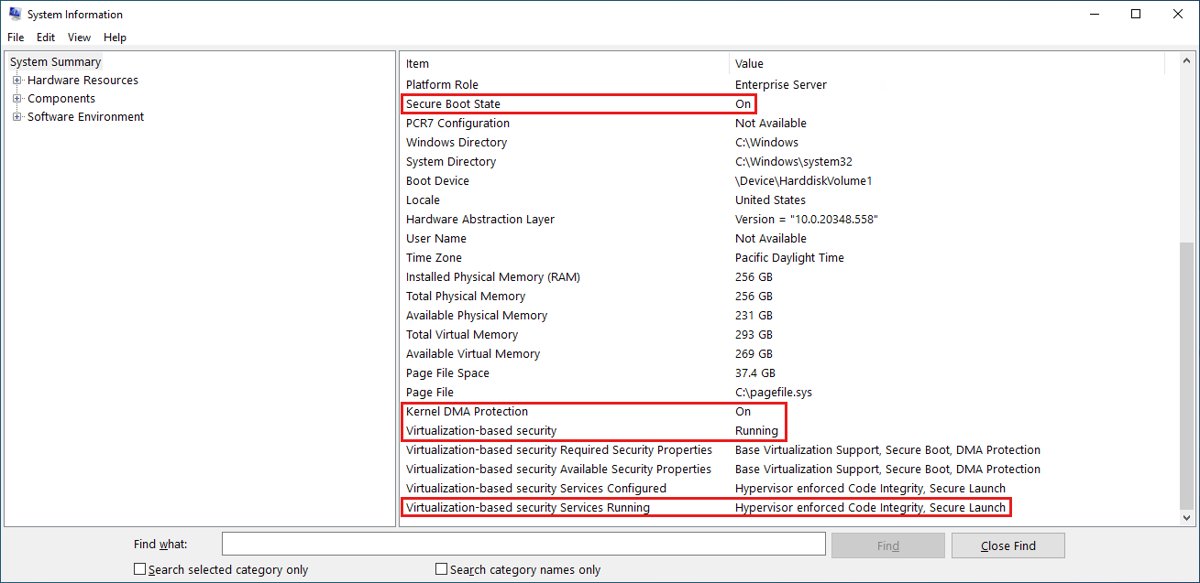
The install option changes your RAM and disk budget. You cannot convert between Server Core and Server with Desktop Experience after setup, so choose before you install.
| Your situation | Choose | Why |
|---|---|---|
| Hardware near the 2 GB / 32 GB minimum | Server Core | About 4 GB less disk and no desktop shell to run |
| Admins need Server Manager and MMC on the box | Server with Desktop Experience | Full GUI and all roles available; give it 4 GB RAM or more |
| Server managed remotely with Windows Admin Center, RSAT Server Manager or PowerShell | Server Core | Remote GUI tools still work and the attack surface is smaller |
| Apps that need GUI components | Desktop Experience, or Server Core with the App Compatibility Feature on Demand | Some roles and features are missing from Server Core |
Windows Server 2025 Desktop Experience features
The features in Server with Desktop Experience include a desktop shell in the style of Windows 11, which sets it apart from older Windows Server releases. Several of them use hardware that the minimum list does not mention.
| Feature | Hardware or setup it needs | Default state |
|---|---|---|
| Windows 11 style desktop shell | Server with Desktop Experience; Server Core has no desktop shell | On at first sign-in |
| Microsoft Edge | Desktop Experience | Pinned to Start |
| Bluetooth mice, keyboards, headsets and audio devices | A Bluetooth adapter | Supported |
| Wi-Fi | A wireless network adapter; run net start wlansvc to start the Wireless LAN Service |
Installed, startup set to manual |
| Dev Drive for developer workloads | A ReFS-formatted volume; block cloning speeds up large file copies | Supported |
To get the best response from these GUI features, give the server the 4 GB of RAM Microsoft recommends for Desktop Experience rather than the 2 GB minimum.
Windows Server 2025 vs 2022 system requirements
| Requirement | Windows Server 2022 | Windows Server 2025 |
|---|---|---|
| CPU instruction sets | x64, NX/DEP, CMPXCHG16b, LAHF/SAHF, PrefetchW, SLAT | Same, plus SSE4.2 and POPCNT |
| RAM, Server Core | 1 GB | 2 GB |
| RAM, Desktop Experience | 2 GB | 2 GB (4 GB recommended) |
| VM RAM needed for setup | 800 MB | 1,280 MB |
| Disk | 32 GB | 32 GB |
| Network | 1 Gbps PCI Express Ethernet | 1 Gbps PCI Express Ethernet |
A server that runs Windows Server 2019 or 2022 today usually meets the 2025 minimums. The CPU instruction check and the higher RAM floor are the two things to confirm first.
Secured-core server requirements for Windows Server 2025
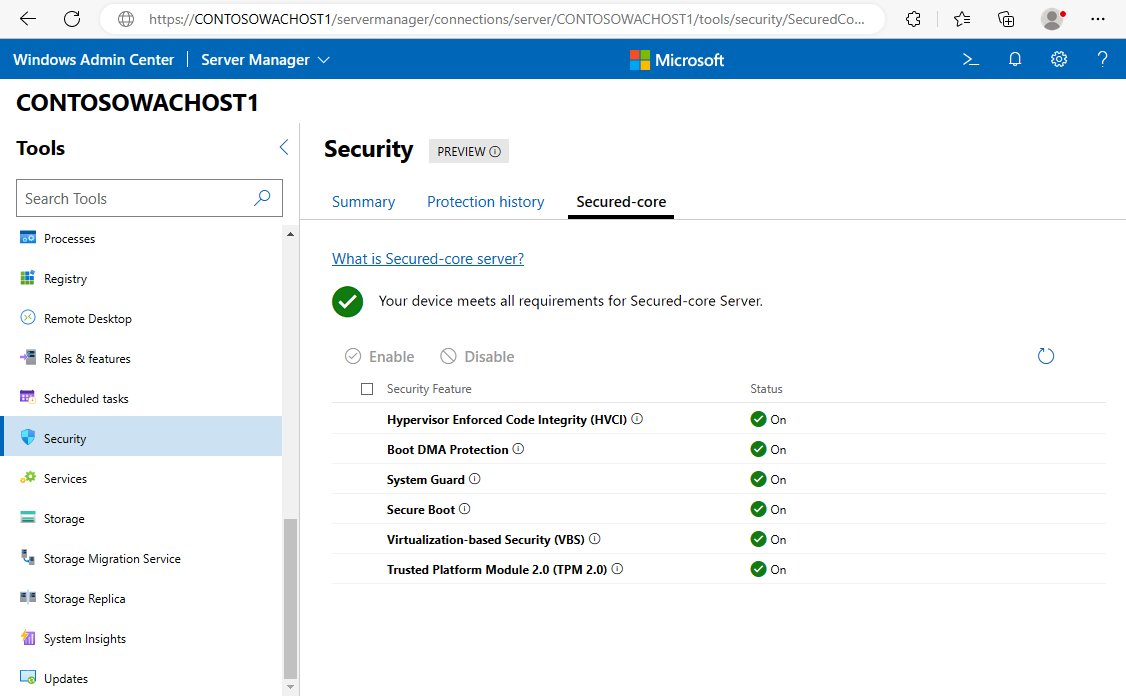
Secured-core is optional. It adds firmware and hardware protections that start before the operating system boots.
To achieve Secured-core status, the server needs every item below.
| Secured-core requirement | Purpose |
|---|---|
| DMA remapping (IOMMU): Intel VT-d or AMD-Vi | Stops devices from reading memory they should not access |
| Kernel DMA Protection (opt-in capable) | Blocks attacks through external peripherals |
| DRTM (Dynamic Root of Trust for Measurement) | Verifies the integrity of the startup environment |
| TPM 2.0 enabled | Hardware root of trust |
| Secure Boot enabled | Only signed boot components load |
| Virtualization-based Security support | Includes hardware virtualization extensions |
Windows Server 2025 Standard vs Datacenter hardware limits
Both editions share the same minimum hardware. The difference is how far they scale and how many virtual machines a license covers.
| Limit | Standard | Datacenter | Datacenter: Azure Edition |
|---|---|---|---|
| Maximum 64-bit sockets | 64 | 64 | 64 |
| Maximum cores | Unlimited | Unlimited | 2,048 logical processors |
| Maximum RAM | 4 PB (5-level paging) or 256 TB (4-level paging) | 4 PB (5-level paging) or 256 TB (4-level paging) | 240 TB for a generation 2 VM, 1 TB for generation 1 |
| Virtual machines per license | 2, plus one Hyper-V host | Unlimited, plus one Hyper-V host | Unlimited, plus one Hyper-V host |
| Hyper-V isolated containers | 2 | Unlimited | Unlimited |
Windows Server 2025 system requirements check
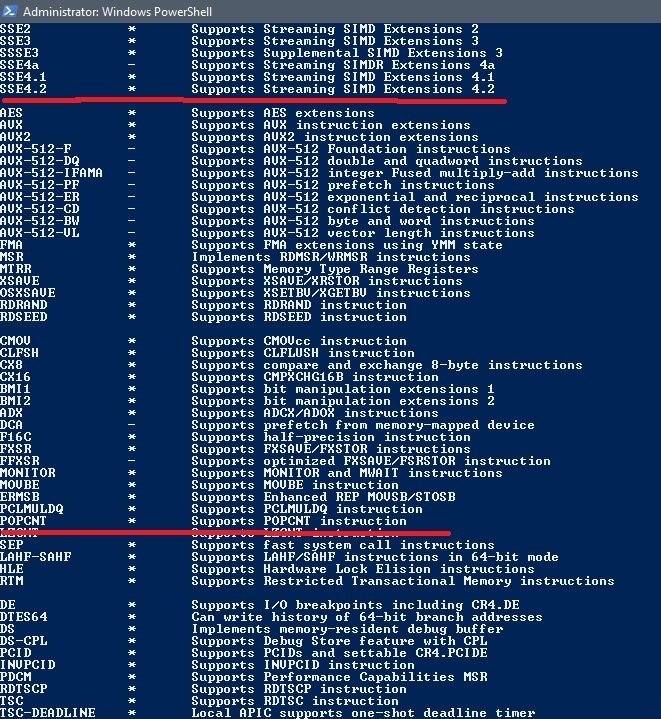
Microsoft points to Coreinfo, part of Sysinternals, for checking CPU features. Run it from an elevated Command Prompt in the folder where you extracted it, on a machine with no hypervisor running.
coreinfo64 -fLists the processor's feature flags. An asterisk (*) next to a feature means it is supported, and a dash (-) means it is not. Run coreinfo64 -v as administrator to see the second-level address translation line (EPT on Intel, NPT on AMD).
You should see: SSE4.2, POPCNT, NX, CX16, LAHF-SAHF and PREFETCHW all show an asterisk.
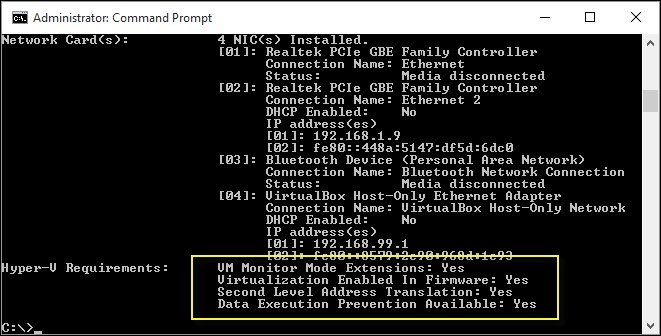
For the Hyper-V role, run systeminfo.exe and scroll to Hyper-V Requirements. Every item should read Yes; on an existing host the section says a hypervisor has been detected.
Download Windows Server 2025 ISO for evaluation
Microsoft offers a free 180-day evaluation of Windows Server 2025, so you can explore and test it on your own hardware before you buy a license.
- Open the Windows Server 2025 page on the Microsoft Evaluation Center and register.
- Select ISO download (64-bit edition) in your language, or VHD download for a ready-made virtual disk in English.
- Install it on a physical server or a virtual machine that meets the minimums above.
- Activate the evaluation over the internet within the first 10 days, or it shuts down automatically.
- Once setup is done, run Windows Update to install the latest servicing package.
Windows Server 2025 is the current Long-Term Servicing Channel (LTSC) release, on OS build 26100. Mainstream support runs to 13 November 2029 and extended support to 14 November 2034; the October 2026 update raised the build version to 26100.33650 (KB5126646).
Test your roles in an evaluation VM first to measure the CPU, memory and disk resources they actually use before you size production hardware.
You can upgrade in place to Windows Server 2025 from Windows Server 2012 R2 and later.
Why hardware compatibility matters
Microsoft states that a computer below the minimums might not install Windows Server properly, and that real requirements rise with the roles and applications you add.
| If the hardware lacks | What happens |
|---|---|
| SSE4.2 or POPCNT | The processor falls below the Windows Server 2025 CPU minimum |
| SLAT, VT-x/AMD-V or hardware DEP | The Hyper-V role cannot install its hypervisor |
| A PCI Express storage adapter | PATA, ATA, IDE and EIDE drives cannot hold boot, page or data volumes |
| TPM 2.0 | BitLocker Drive Encryption and Secured-core are unavailable |
| 1,280 MB of RAM on a new VM | Setup fails before it finishes |
For servers bought for a specific role, Microsoft's Hyper-V documentation also tells you to review the Windows Server catalog of certified hardware.
Fix Windows Server 2025 install failures caused by hardware
Setup fails on a virtual machine with 1 GB of RAM
Windows Server 2025 setup cannot finish with the 1,024 MB minimum.
- Shut down the VM and raise its memory to 1,280 MB or more.
- Run setup again; add more if your boot image includes extra languages or updates.
- After setup completes, lower the allocation to as little as 1,024 MB if the workload allows.
You cannot add RAM to the VM before setup
Setup needs a page file to complete on a minimum-memory VM.
- Boot the VM from the Windows Server 2025 media and press Shift + F10 at the first setup screen.
- Run
diskpart.exeand create and format the installation partition. - Run
wpeutil createpagefile /path=C:\pf.sys, replacing C: with your installation partition. - Close the Command Prompt and continue setup.
systeminfo shows No under Hyper-V Requirements
Virtualization or DEP is turned off in firmware, or the CPU lacks SLAT.
- Restart into the BIOS or UEFI setup.
- Turn on Intel VT or AMD-V and hardware DEP (XD on Intel, NX on AMD).
- Save, boot Windows Server and run
systeminfo.exeagain.
BitLocker or Secured-core options are missing
The server has no TPM 2.0, or TPM and Secure Boot are off in firmware.
- Check the firmware for a TPM 2.0 setting and enable it.
- Turn on Secure Boot in UEFI setup.
- If the board has no TPM 2.0, plan BitLocker for different hardware.
Windows Server 2025 system requirements FAQ
What are the minimum requirements for Windows Server 2025?
Windows Server 2025 needs a 1.4 GHz 64-bit processor with SSE4.2 and POPCNT, 2 GB of RAM, 32 GB of disk space on a PCI Express storage adapter, and a 1 Gbps PCI Express Ethernet adapter. These apply to Standard and Datacenter.
What are the recommended specs for Windows Server 2025?
Microsoft publishes no general recommended specification beyond 4 GB of RAM for Server with Desktop Experience. It says role documentation and test deployments should set the real figures, because requirements depend on the roles and applications you install.
What CPU does Windows Server 2025 require?
It requires a 1.4 GHz or faster x64 processor with NX/DEP, CMPXCHG16b, LAHF/SAHF, PrefetchW, Second Level Address Translation, SSE4.2 and POPCNT. SSE4.2 and POPCNT are new compared with Windows Server 2022.
Does Windows Server 2025 require TPM 2.0?
No. Windows Server 2025 installs without a TPM. A TPM 2.0 chip is needed only for features such as BitLocker Drive Encryption and Secured-core server, and it must meet Microsoft's EK certificate and SHA-256 PCR requirements.
Can I run Windows Server 2025 on Windows Server 2019 hardware?
Usually, if the processor supports SSE4.2 and POPCNT and the machine has at least 2 GB of RAM and 32 GB of disk. Run Coreinfo with the -f switch to confirm the CPU flags before you upgrade.
Is an HDD enough for Windows Server 2025?
Yes. Microsoft requires 32 GB on a drive behind a PCI Express compliant storage adapter and does not require an SSD. PATA, ATA, IDE and EIDE drives are not allowed for boot, page or data volumes.
How much RAM does Windows Server 2025 Standard need?
Windows Server 2025 Standard needs 2 GB of RAM for both Server Core and Desktop Experience, with 4 GB recommended for Desktop Experience. Physical hosts need ECC or similar memory, and Hyper-V hosts need memory for every running VM.
How many VMs can a Windows Server 2025 host with 32 GB of RAM run?
Microsoft gives no fixed number. Memory must cover the host plus every VM running at once, and each Windows Server 2025 guest needs at least 2 GB. Standard licensing covers 2 VMs per license, Datacenter unlimited.
How do I check if my server meets Windows Server 2025 requirements?
Run coreinfo64 -f from Sysinternals to confirm SSE4.2, POPCNT and the other CPU flags, then check installed RAM, a free 32 GB system disk and a 1 Gbps network adapter. Use systeminfo.exe to check Hyper-V readiness.

![[Solved] Lenovo laptop plugged in but not charging](https://techdows.com/wp-content/uploads/2026/10/Solved-Lenovo-laptop-plugged-in-but-not-charging-533x338.jpg)