Techdows

Windows how-to guides, fixes and software downloads

  • Home
  • Windows guides

    • Printer settings and problems
    • Windows Update
    • Wi-Fi and network settings
    • Sound and microphone
    • Keyboard shortcuts and symbols

    Popular fixes

    • Get help in Windows 11
    • Connect a wireless printer
    • Re-pair Bluetooth earbuds for stereo sound
    • Cancel a stuck print job
    • Change default programs

    Windows 11 26H2

    • Should you install 26H2?
    • 26H2 not showing in Windows Update
    • 26H2 build numbers explained
    • Where is My Computer (This PC)
    • ncpa.cpl network connections

    All Windows how-to guides →

  • Popular downloads

    • GTA V for PC
    • YouTube app for PC
    • Google Meet for PC
    • Cisco Packet Tracer
    • TikTok for PC

    Office and productivity

    • Microsoft Office
    • Microsoft Word
    • Google Sheets for PC
    • Office product key

    Windows tools

    • PC Health Check app
    • HEVC Video Extension
    • DirectX 12
    • Cinebench R23

    All software downloads →

  • Microsoft Edge

    • Fix WebView2 using too much memory
    • Internet Explorer mode in Edge
    • Manage Edge favorites
    • Set or remove Edge as default

    Chrome and Firefox

    • Make Chrome the default browser
    • Restore closed tabs
    • Change the default web browser
    • Google Chrome news and tips
    • Firefox news and tips

    All Microsoft Edge articles →

  • Office apps

    • Office product key
    • Office Deployment Tool
    • What is OneDrive?
    • Turn off OneDrive in Windows 11

    Outlook and Teams

    • Outlook inbox view changed
    • Schedule an email in Outlook
    • Outlook dark mode
    • Teams breakout rooms
  • PHP security

    • PHP2Shell patch download
    • PHP critical RCE security update
    • CVE-2026-109618 fix
    • CVE-2026-109619 explained
    • Mitigations if you can't update

    Update PHP

    • Update PHP to the latest version
    • Check your PHP version
    • Update PHP on Ubuntu and Debian
    • Restart PHP-FPM

    Hosting and local servers

    • Update PHP in XAMPP
    • Change PHP version in cPanel
    • Update PHP in Laragon and WampServer
    • Update PHP Docker images
    • WordPress PHP version check

    PHP downloads

    • PHP 8.5.12 download
    • PHP 8.4.27 download
    • PHP 8.3.36 and 8.2.35 download
    • Download PHP for Windows

    PHP2Shell by platform

    • PHP 8.3 fix on Ubuntu 24.04
    • PHP 8.1 fix on Ubuntu 22.04
    • PHP 8.2 and 8.4 fix on Debian
    • Update PHP on IIS
    • Cloudflare PHP2Shell WAF rule

    All PHP guides →

  • News
Home›Opera

Opera

202 articles

Opera browser coverage from Techdows: what is new in each Opera release, built-in features like the free VPN, workspaces and sidebar, customization tips, and fixes for common Opera issues on Windows and Mac.

Opera

Disable News on Speed Dial in Opera

April 27, 2018 by Venkat Eswarlu Leave a Comment

In the upcoming version, Opera displays News on Speed Dial by default, if you want to keep your start page clean and tidy, you can disable or remove it, here is how that can be done.

Posted in: Opera, Tips and Tricks
How to

How to disable My Flow in Opera browser?

April 26, 2018 by Venkat Eswarlu Leave a Comment

You can use My Flow to seamlessly connect Android Phone and Opera browsers, and share stuff between the devices, If you don’t have a SmartPhone or not willing to use My Flow in Opera Desktop browser, you can disable it, here is how that can be done.

Posted in: How to, Opera, Tips and Tricks
How to

How to Set up Flow in Opera Desktop browser

April 26, 2018 by Venkat Eswarlu Leave a Comment

Learn how to Set up Flow in Opera desktop browser, so that can you can seamlessly send videos, notes, images and other stuff to Opera Touch without needing to sign into account or by using synchronization feature.

Posted in: How to, Opera, Tips and Tricks
News

Opera’s Instant Search is like Quick Commands in Vivaldi

April 25, 2018 by Venkat Eswarlu Leave a Comment

Latest Opera Stable has got instant search feature, which lets you search on web and find open tabs without leaving the tab you’re on. Opera’s Instant Search looks similar to Vivaldi Quick Commands feature, which you can run by pressing F2 button on the keyboard.

Posted in: News, Opera
News

Opera 50 released, here is what’s new

January 1, 2018 by Venkat Eswarlu Leave a Comment

Opera 50 stable released on Dec, 4, 2018 integrates anti-Bitcoin mining tool, upgrades VPN service, debuts Save Page as PDF feature, updates VR Player &

Posted in: News, Opera
News

Opera 51 adds option to run Flash on All sites

January 1, 2018 by Venkat Eswarlu Leave a Comment

Opera 51, the next version of Opera browser in development, offers a new option to run Flash on all sites without request, you can find this option in Opera

Posted in: News, Opera
News
Opera Reset browser settings button

Opera 51 adds Reset Browser Settings button

December 1, 2017 by Venkat Eswarlu Leave a Comment
Opera Reset browser settings button

Opera 51 has added reset browser settings button

Posted in: News, Opera
News

Opera moves Browser VPN to their own data centers

December 1, 2017 by Venkat Eswarlu Leave a Comment

Opera no longer uses SurfEasy VPN, browser VPN has been moved to Opera data centers.

Posted in: News, Opera
News

Opera 50 Promises CryptoCurrency Mining Protection

December 1, 2017 by Venkat Eswarlu Leave a Comment

Opera Software has released release candidate for upcoming Opera 50 version by including CrptoCurrency Mining Protection.
Posted in: News, Opera
How to
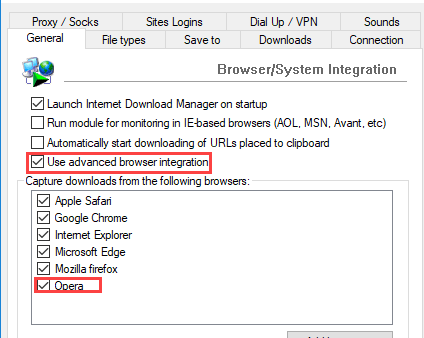
IDM Integration Opera

How to Add IDM extension to Opera browser

November 1, 2017 by Venkat Eswarlu Leave a Comment
IDM Integration Opera

Learn how to install IDM integration module extension in Opera browser

Posted in: How to, Opera, Tips and Tricks
News

Opera 49 released, here is what’s new

November 1, 2017 by Venkat Eswarlu Leave a Comment

Opera 49 comes with easy setup, VR 360 Player and snapshot editing tool. Find out all the new features Opera version 49 has got in detail.

Posted in: News, Opera
News

Opera 51: Video Pop-out with Back to Tab button

November 1, 2017 by Venkat Eswarlu Leave a Comment

Opera 51 features back to tab button for Video Pop-out to return to original video playing tab and collapses open tabs list in Tab menu by default.

Posted in: News, Opera
« Previous 1 … 3 4 5 … 17 Next »

More from Techdows

Use Ctrl+F to find words - using a desktop computer
How to use CTRL+F to find words on your computer?
How to · 5 hours ago
Share Netflix account - Netflix on a TV
Can you share Netflix account?
How to · 5 hours ago
Remove cookies in Windows 10 - web browser on a screen
How to remove cookies from Windows 10: A step-by-step guide
How to · 5 hours ago
GTG meaning in text - hands holding smartphones
GTG meaning in text and ways to use it appropriately
How to · 5 hours ago
Xerox printer driver version, supported systems and price summary
Download Xerox Printer Drivers for PC, Windows 11/10 & Mac (Free)
Software · 5 hours ago
DCOM Event ID 10016 error - Windows PC monitor
Fix DCOM Event ID 10016 error on Windows 11/10
How to · 5 hours ago
Fix washed-out Windows 11 colors - dual monitor workspace
Fix washed-out Windows 11 colors: HDR, ICC and RGB range
How to · 4 hours ago
Calendar app in Windows 11 - calendar on a wall
How to use Calendar app in Windows 11 PC
How to · 4 hours ago

© 2009–2026 Techdows · About · Contact · Privacy Policy

Copyright © 2026 Techdows.

Techdows WordPress Theme by Techdows