Techdows

Windows how-to guides, fixes and software downloads

  • Home
  • Windows guides

    • Printer settings and problems
    • Windows Update
    • Wi-Fi and network settings
    • Sound and microphone
    • Keyboard shortcuts and symbols

    Popular fixes

    • Get help in Windows 11
    • Connect a wireless printer
    • Re-pair Bluetooth earbuds for stereo sound
    • Cancel a stuck print job
    • Change default programs

    Windows 11 26H2

    • Should you install 26H2?
    • 26H2 not showing in Windows Update
    • 26H2 build numbers explained
    • Where is My Computer (This PC)
    • ncpa.cpl network connections

    All Windows how-to guides →

  • Popular downloads

    • GTA V for PC
    • YouTube app for PC
    • Google Meet for PC
    • Cisco Packet Tracer
    • TikTok for PC

    Office and productivity

    • Microsoft Office
    • Microsoft Word
    • Google Sheets for PC
    • Office product key

    Windows tools

    • PC Health Check app
    • HEVC Video Extension
    • DirectX 12
    • Cinebench R23

    All software downloads →

  • Microsoft Edge

    • Fix WebView2 using too much memory
    • Internet Explorer mode in Edge
    • Manage Edge favorites
    • Set or remove Edge as default

    Chrome and Firefox

    • Make Chrome the default browser
    • Restore closed tabs
    • Change the default web browser
    • Google Chrome news and tips
    • Firefox news and tips

    All Microsoft Edge articles →

  • Office apps

    • Office product key
    • Office Deployment Tool
    • What is OneDrive?
    • Turn off OneDrive in Windows 11

    Outlook and Teams

    • Outlook inbox view changed
    • Schedule an email in Outlook
    • Outlook dark mode
    • Teams breakout rooms
  • PHP security

    • PHP2Shell patch download
    • PHP critical RCE security update
    • CVE-2026-109618 fix
    • CVE-2026-109619 explained
    • Mitigations if you can't update

    Update PHP

    • Update PHP to the latest version
    • Check your PHP version
    • Update PHP on Ubuntu and Debian
    • Restart PHP-FPM

    Hosting and local servers

    • Update PHP in XAMPP
    • Change PHP version in cPanel
    • Update PHP in Laragon and WampServer
    • Update PHP Docker images
    • WordPress PHP version check

    PHP downloads

    • PHP 8.5.12 download
    • PHP 8.4.27 download
    • PHP 8.3.36 and 8.2.35 download
    • Download PHP for Windows

    PHP2Shell by platform

    • PHP 8.3 fix on Ubuntu 24.04
    • PHP 8.1 fix on Ubuntu 22.04
    • PHP 8.2 and 8.4 fix on Debian
    • Update PHP on IIS
    • Cloudflare PHP2Shell WAF rule

    All PHP guides →

  • News
Home›Opera

Opera

202 articles

Opera browser coverage from Techdows: what is new in each Opera release, built-in features like the free VPN, workspaces and sidebar, customization tips, and fixes for common Opera issues on Windows and Mac.

News
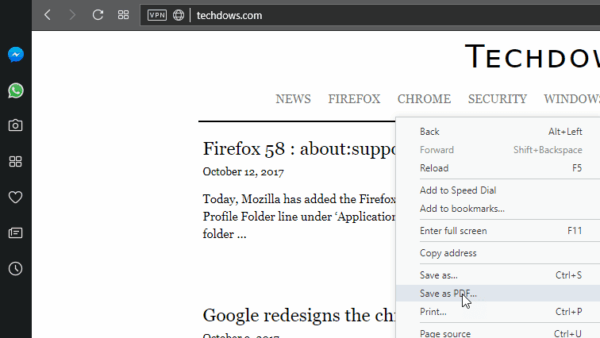
Opera save as PDF option page right click menu

Opera 50 gets Save Page as PDF feature

October 1, 2017 by Venkat Eswarlu Leave a Comment
Opera save as PDF option page right click menu

Opera 50 adds screen-friendly Save as PDF option to Page menu under Opera menu

Posted in: News, Opera
News

Opera 50 gets Chromecast Support

October 1, 2017 by Venkat Eswarlu 2 Comments

Opera 50 adds Chromecast support and now can cast tabs, videos and desktop to your TV or other devices.

Posted in: News, Opera
How to

Opera 50 : How to Restore Opera Factory Settings

October 1, 2017 by Venkat Eswarlu Leave a Comment

Opera 50 offers reset button, learn how to enable it so that you can restore Opera factory settings when needed

Posted in: How to, Opera, Tips and Tricks
News

Opera 48 released, here is what’s new

September 1, 2017 by Venkat Eswarlu Leave a Comment

Opera 48 released with time zone and unit converters, Snapshot tool and more
Posted in: News, Opera
News
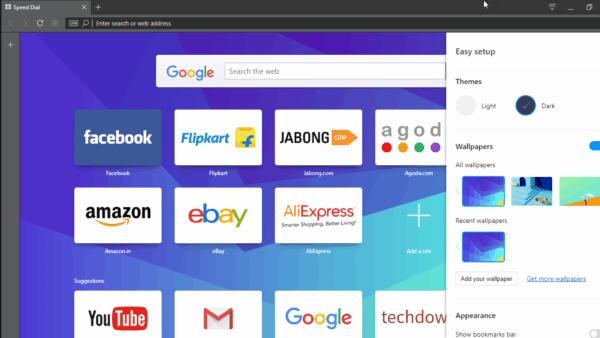
Opera easy setup panel

Opera 49 introduces Easy Setup Panel

September 1, 2017 by Venkat Eswarlu Leave a Comment
Opera easy setup panel

Easy Setup panel on Start Page in Opera 49, allows new users to configure Opera’s features.
Posted in: News, Opera
News
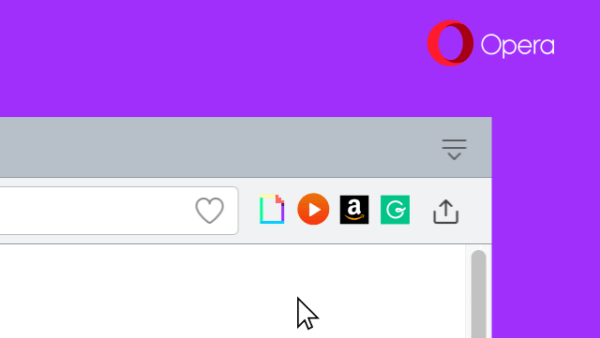
Opera shuffle extensions

Opera 49 : Shuffle Extension icons

September 1, 2017 by Venkat Eswarlu Leave a Comment
Opera shuffle extensions

Opera 49 now allows to rearrange or shuffle extension icons on the toolbar.

Posted in: News, Opera
News

Opera 48 lets you remove History Suggestions in Address bar

August 11, 2017 by Venkat Eswarlu Leave a Comment

This may not be a major feature, but a convenience for sure. Removing history items suggested in address bar of Opera browser is a … [Read more…]

Posted in: News, Opera
News

Opera 47 released with bookmarks export feature, improves video playback

August 9, 2017 by Venkat Eswarlu Leave a Comment

Opera team has added one of the most requested features- bookmarks export -to opera 47 and its stable version is now available for Windows, … [Read more…]

Posted in: News, Opera
How to

How to Set Custom Image as Opera Start Page background

August 6, 2017 by Venkat Eswarlu Leave a Comment

You can set custom Image as Vivaldi Start Page background and even you can use desktop wallpaper for that of Speed dial, browser originated … [Read more…]

Posted in: How to, Opera, Tips and Tricks
News

Latest Opera dev improves Snapshot tool, adds Feedback button

July 31, 2017 by Venkat Eswarlu Leave a Comment

Today, the Opera Desktop team has released an update for Opera 48 dev that improves Screen Capture tool (now they’re calling it as snapshot … [Read more…]

Posted in: News, Opera
News

Opera 48 gets Screen Capture tool

July 24, 2017 by Venkat Eswarlu Leave a Comment

Browser vendors these days are adding screen capture feature to their browsers, after Vivaldi and Firefox (with name Firefox screenshots still not available in stable … [Read more…]

Posted in: News, Opera
How to

How to add a Site RSS feed to Opera Personal News

July 17, 2017 by Venkat Eswarlu Leave a Comment

News feature introduced in Opera browser has turned out as an RSS Reader, which was not getting that much attention lately or been forgotten … [Read more…]

Posted in: How to, Opera, Tips and Tricks
« Previous 1 … 4 5 6 … 17 Next »

More from Techdows

Reconnect a File History drive - external hard drive connected to a laptop
How to reconnect a File History drive in Windows
How to · 5 hours ago
Right-click without a mouse - laptop keyboard and touchpad
4 ways to right click without a mouse
How to · 5 hours ago
Use Ctrl+F to find words - using a desktop computer
How to use CTRL+F to find words on your computer?
How to · 5 hours ago
Share Netflix account - Netflix on a TV
Can you share Netflix account?
How to · 5 hours ago
Remove cookies in Windows 10 - web browser on a screen
How to remove cookies from Windows 10: A step-by-step guide
How to · 4 hours ago
GTG meaning in text - hands holding smartphones
GTG meaning in text and ways to use it appropriately
How to · 4 hours ago
Xerox printer driver version, supported systems and price summary
Download Xerox Printer Drivers for PC, Windows 11/10 & Mac (Free)
Software · 4 hours ago
DCOM Event ID 10016 error - Windows PC monitor
Fix DCOM Event ID 10016 error on Windows 11/10
How to · 4 hours ago

© 2009–2026 Techdows · About · Contact · Privacy Policy

Copyright © 2026 Techdows.

Techdows WordPress Theme by Techdows