To reach a CAC-protected DoD site in Safari, connect a USB CCID card reader, insert your CAC, install and trust the DoD root certificates in Keychain Access, then choose your CAC certificate and enter your PIN when Safari asks.
This guide covers what macOS supports without extra software, how to import and trust certificates, how to confirm the card is read, and fixes for the usual Safari errors.
Access a CAC website in Safari on a Mac
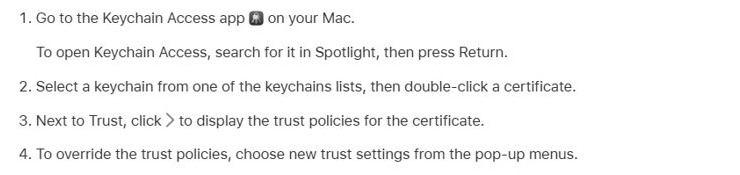
Recent macOS versions read PIV smart cards such as the Common Access Card with built-in software, so a separate card driver is usually not needed.
- Plug a USB CCID class-compliant smart card reader into your Mac.
- On macOS 13 or later, click Allow if macOS asks whether the accessory can connect.
- Insert your CAC into the reader with the chip facing the contacts.
- Import the DoD root and intermediate certificates your organization provides, and set them to trusted in Keychain Access.
- Open Safari and go to the DoD site you need.
- Choose the CAC certificate Safari offers for authentication, then enter your CAC PIN.
CAC reader requirements for Mac
| Item | What macOS needs | Notes |
|---|---|---|
| Card | A PIV-standard smart card (the CAC carries PIV certificates) | Built-in support uses the CryptoTokenKit framework |
| Reader | A USB CCID class-compliant reader | No extra software is required for PIV cards |
| macOS version | macOS 10.15 or later for Apple's documented native PIV support | Older releases may need a third-party token |
| Accessory approval | macOS 13 or later asks before a new USB accessory can talk to the Mac | Approve the reader when prompted |
| Certificates | DoD root and intermediate CA certificates in your keychain | Without them Safari cannot trust DoD sites or your card's chain |
| PIN | The PIN set when your CAC was issued | Repeated wrong PINs can lock the card |
Import DoD certificates into Keychain Access
Get the DoD certificate bundle from your command's IT office or the official DoD PKI distribution point they name. Never install root certificates from an unofficial site.
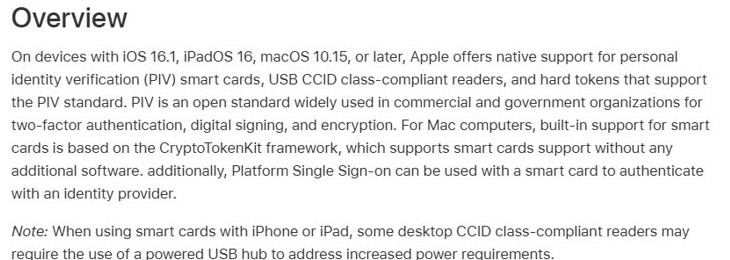
- Open Keychain Access: press Command + Space, type Keychain Access and press Return.
- Choose File > Import Items.
- Select the DoD certificate file you were given.
- In the Destination Keychain pop-up menu, choose login or System, then click Open.
- Enter your Mac administrator password if macOS asks for it.
Trust DoD root certificates on a Mac
Imported roots are not always trusted automatically. Set trust on each DoD root certificate so Safari accepts the sites it signs.
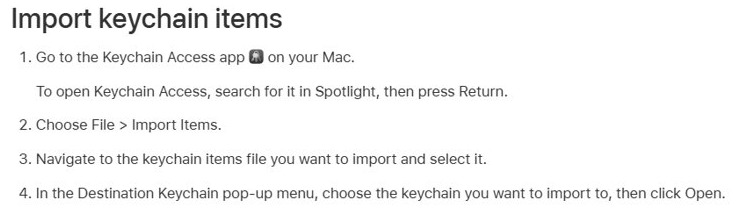
- In Keychain Access, select the keychain you imported into.
- Double-click a DoD root certificate.
- Next to Trust, click Show to display the trust policies.
- Set When using this certificate to Always Trust.
- Close the window and enter your password to save the change.
- Repeat for each DoD root certificate, then quit and reopen Safari.
Check a CAC is detected in macOS Terminal
sudo security list-smartcardsLists the smart cards macOS can currently read. A related command, pluginkit -m -p com.apple.ctk-tokens, lists the CryptoTokenKit token drivers macOS has loaded.
You should see: Your inserted card appears in the list. An empty result means macOS does not see the card or the reader.
Check the DoD site certificate in Safari
- Open the DoD site in Safari.
- Choose Safari > Connection Security Details from the menu bar.
- Confirm the certificate chain ends in a DoD root certificate and the connection is encrypted.
- If Safari shows a certificate warning instead, click Show Certificate and check the issuer before you continue.

Why does Safari say not secure on a DoD site?
| Safari message | What it means | What to do |
|---|---|---|
| Not Secure in the Smart Search field | The page is not using HTTPS, has no certificate, or does not encrypt data | Use the site's https address; do not enter credentials on the http page |
| Certificate warning with Show Certificate | Safari cannot build a trusted chain to a known root | Import and trust the DoD root certificates, then reload |
| Certificate name does not match | The certificate belongs to a different site or organization | Click Cancel and confirm the address with your IT office |
Fix CAC not working in Safari on Mac
Safari never asks for a certificate
macOS is not reading the card, or the reader was never approved.
- Remove and reinsert the CAC.
- Unplug the reader and plug it back in, then click Allow at the accessory prompt.
- Run
sudo security list-smartcardsin Terminal and confirm the card is listed. - Try a different USB port or a powered hub if the reader still is not detected.
Safari says the site's certificate is not trusted
The DoD root or intermediate certificates are missing or not trusted.
- Open Keychain Access and search for the DoD root certificates.
- Import the bundle again with File > Import Items if they are missing.
- Set each root to Always Trust under Trust.
- Quit Safari completely and reopen the site.
Safari picks the wrong certificate or the site rejects login
The CAC holds several certificates, and the site expects a specific one.
- Quit Safari to clear the remembered choice.
- Reopen the site and choose the authentication certificate rather than the email or signing certificate.
- Ask your IT office which certificate the site expects if login still fails.
PIN is rejected
The PIN is wrong, or the card is locked after too many attempts.
- Check Caps Lock and enter the PIN slowly.
- Stop after repeated failures and contact your local ID card office to unlock or reset the card.
DoD CAC Safari FAQ
How do I access DoD websites from home on a Mac?
Connect a CCID-compatible USB card reader, insert your CAC, install and trust the DoD root certificates in Keychain Access, then open the site in Safari and choose your CAC certificate. Some sites also require a VPN or approved network, which your IT office can confirm.
Do I need a CAC driver for macOS?
Usually not. Apple documents built-in support for PIV cards and USB CCID readers on macOS 10.15 and later through CryptoTokenKit. The CAC carries PIV credentials, so most readers work without installing a separate driver.
How do I log in to DoD SAFE?
Open the DoD SAFE site in Safari with your CAC inserted, choose your CAC authentication certificate when prompted and enter your PIN. If Safari shows a certificate error first, install and trust the DoD root certificates in Keychain Access.
How do I get access to DoD SAFE?
You need a valid CAC with working certificates, a reader your Mac recognises, and the DoD root certificates trusted on the Mac. Account eligibility and any sending rights are set by the DoD service, so ask your IT office if login works but features are missing.
How secure is Safari for CAC-protected sites?
Safari uses HTTPS and certificate checks, and your CAC private keys stay on the card, protected by your PIN. Keep macOS updated, trust only official DoD root certificates, and check the certificate chain with Safari > Connection Security Details.
Why does Safari say not secure?
Safari shows Not Secure when a page does not use HTTPS, lacks a certificate, or does not encrypt data. On DoD sites, use the https address and make sure the DoD root certificates are trusted in Keychain Access.
Why does my Mac not see my CAC reader?
On macOS 13 and later, a new USB accessory must be approved before it can connect, so click Allow when prompted. Also try another port or a powered hub, then check the card with sudo security list-smartcards in Terminal.