An iPhone app only shows up in the Apple Watch app if it has a watch-compatible version, and you install it from My Watch > Apps > Available Apps or from the App Store on the watch.
This guide covers how to install missing apps manually, how automatic downloads work, how to find an app that installed but seems hidden, and fixes when an app still will not appear.
How to install iPhone apps on Apple Watch from the Watch app
By default, watch-compatible versions of your iPhone apps install on the watch automatically. When one does not, install it by hand from your iPhone.
- Open the Apple Watch app on your iPhone.
- Tap My Watch at the bottom of the screen.
- Tap Apps.
- Scroll to the Available Apps list.
- Tap Install next to each app you want on the watch.
- Keep the iPhone and watch close together until the install finishes.
If the app is not in Available Apps at all, it has no watchOS version you can install from the iPhone. Search for it in the App Store on the watch instead.
Why iPhone apps are not showing on Apple Watch
| What you see | Likely reason | What to do |
|---|---|---|
| App missing from Available Apps | The developer has not made a watch-compatible version | Search the watch App Store; if it is not there, the app does not run on Apple Watch |
| App listed under Available Apps, not on the watch | Automatic install did not run for that app | Tap Install next to it |
| App bought on another device never arrives | Automatic Downloads is off on the watch | Turn on Automatic Downloads in the watch's App Store settings |
| App was on the watch, now gone | It was deleted from the watch, or from the iPhone | Download it again from the App Store on the iPhone or watch |
| App installed but you cannot find it | It sits at the end of a long Grid view | Switch the watch to List view |
Deleting an app from your iPhone also deletes it from your Apple Watch. Deleting it on the watch does not remove the iPhone copy.
Download apps from the App Store on Apple Watch
The App Store on the watch installs watch apps directly, which helps when the iPhone list is empty or an install stalls.
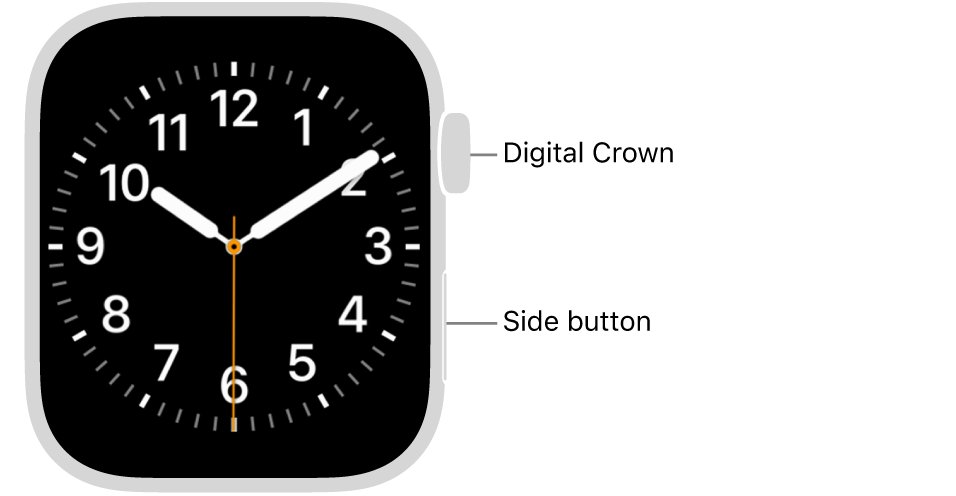
- Press the Digital Crown and open the App Store app on your watch.
- Turn the Digital Crown to browse, or tap the search button and search by app name.
- Tap the app.
- Tap Get for a free app, the price for a paid app, or Download if you already own it.
- Double-click the side button to confirm a purchase.
Purchases use the payment method on your Apple Account. To see what you already own, scroll to the bottom of the App Store on the watch, tap Account, then tap Purchased.
Turn on Automatic Downloads for Apple Watch apps
Automatic Downloads installs the watchOS versions of free and paid apps you bought on your other devices. Automatic Updates keeps installed watch apps current.
- Open Settings on your Apple Watch.
- Tap App Store.
- Turn on Automatic Downloads.
- Turn on Automatic Updates if you want new versions installed for you.
- To change the same settings from the iPhone, open the Apple Watch app and go to My Watch > App Store.
Find installed apps on Apple Watch in List view
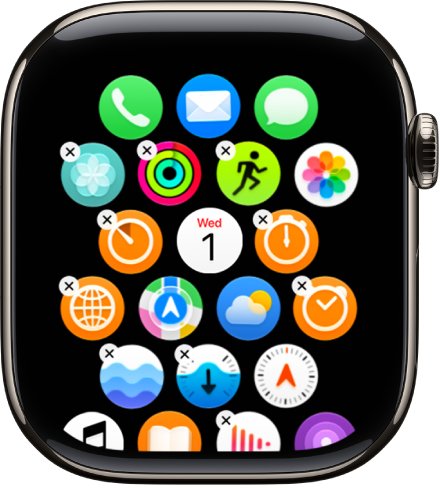
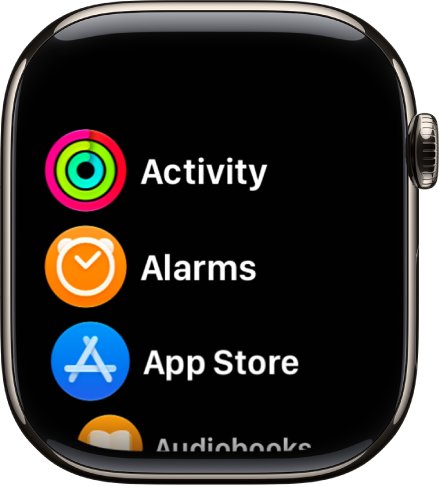
A watch app can install correctly and still be easy to miss in the honeycomb Grid view. List view sorts every app alphabetically.
- Press the Digital Crown to open the app screen.
- Turn the Digital Crown to scroll to the bottom.
- Tap List View to sort apps alphabetically.
- Alternatively, open Settings on the watch, tap App View and choose List View.
Check that the app installed on Apple Watch
- Open the Apple Watch app on your iPhone and tap My Watch.
- Confirm the app now appears in the list of apps installed on the watch rather than under Available Apps.
- On the watch, find the app in List View and open it.
Fix apps not showing on Apple Watch
Installed apps not showing on the watch after tapping Install
The transfer from iPhone stalled or the watch needs a restart.
- Keep the iPhone and watch close together and wait for the install to finish.
- Take the watch off its charger, because it cannot restart while charging.
- Press and hold the side button until the sliders appear, tap the power button icon and drag the Power Off slider.
- Press and hold the side button until the Apple logo appears.
- Open My Watch > Apps again and tap Install.
Watch does not respond, so apps never appear
The watch is frozen and a normal restart is not possible.
- Press and hold the side button and the Digital Crown together for at least 10 seconds.
- Release both when the Apple logo appears.
- Install the app again once the watch has started.
An app disappeared from the watch
It was deleted on the watch, or deleted on the iPhone, which removes it from both.
- Open the App Store on the iPhone or the watch.
- Search for the app.
- Tap Download to restore it at no charge.
App not in Available Apps or the watch App Store
The app has no Apple Watch version.
- Search the App Store on the watch for the app name.
- If no result appears, the app does not run on Apple Watch, and no setting will add it.
Apple Watch apps not showing FAQ
Why are my installed apps not showing on Apple Watch?
Most iPhone apps that are missing have no watch-compatible version. If one does, it appears under Available Apps in the Apple Watch app on iPhone, where you tap Install, or you can get it from the App Store on the watch.
Do iPhone apps install on Apple Watch automatically?
Yes. By default, watch-compatible versions of your iPhone apps install automatically when they are available. Apps bought on other devices also arrive automatically when Automatic Downloads is on in the watch's App Store settings.
Why is an app not showing in Available Apps?
An app missing from Available Apps either has no Apple Watch version or is already installed on the watch. Check the installed list under My Watch, then search the watch App Store to confirm.
Does deleting an app on Apple Watch delete it from iPhone?
No. Removing an app from Apple Watch leaves the iPhone copy in place. Removing an app from your iPhone, however, also deletes it from your Apple Watch.
How do I see all apps on my Apple Watch?
Press the Digital Crown, scroll to the bottom of the app screen and choose List View. You can also open Settings on the watch, tap App View and pick List View to see every app alphabetically.
Can I get apps on Apple Watch without my iPhone?
Yes. Open the App Store app on the watch, search for the app and tap Get, the price or Download. Paid purchases use the payment method on your Apple Account and you confirm them with a double-click of the side button.