Type chrome://dino in the Chrome address bar, press Enter, then press Space to start the Chrome Dino game.
This guide covers both ways to reach the game, how a run works, the obstacles and modes it adds over time, and the Chrome policy that turns it on or off.

How to play Chrome Dino game
The game is built into Google Chrome, so there is nothing to install. It works the same on Windows, macOS, Linux and ChromeOS.
- Open Google Chrome.
- Click the address bar, type
chrome://dinoand press Enter. - Press Space on your keyboard. The T-Rex starts running across the desert.
- Press Space again each time a cactus comes up, so the dinosaur jumps over it.
- Keep jumping and dodging until the dinosaur hits an obstacle and the run ends.
- Press Space to start a new run from the game over screen.
A run ends the moment the dinosaur touches an obstacle, and the score counts how far it got.
How to get to the Chrome Dino game: chrome://dino or the offline page
There are two doors into the same game. Pick the one that fits your connection and your device.
| Your situation | Use this | Why |
|---|---|---|
| You are online and want to play now | Type chrome://dino in the address bar | The page loads the game without disconnecting anything |
| Your internet has dropped | Open any website in Chrome | Chrome shows the no-connection page with the dinosaur on it |
| You want a bigger playfield | chrome://dino with arcade mode | Arcade mode gives the game a full-window layout |
| You are on a school or work Chromebook | Ask the admin | Enrolled ChromeOS devices block the game unless policy allows it |
Play the dino game in Chrome without going offline using chrome://dino
Google created the chrome://dino address so people could play the dinosaur game while online, without cutting their connection. It is the fastest route on any desktop.
- Open a new tab in Chrome with Ctrl + T on Windows or Command + T on a Mac.
- Type
chrome://dinoin the address bar. - Press Enter. The page shows the dinosaur standing still.
- Press Space to start the run.
- Bookmark the page if you want one-click access next time.
Google later gave the page an arcade mode for chrome://dino that fills the window.
Start the Chrome dino game from the no internet page
The game began life as an Easter egg on the page Chrome shows when there is no connection. That page still hosts it.
- Disconnect from the internet, for example by turning off Wi-Fi.
- Open Chrome and try to load any website.
- Wait for the page that says there is no internet connection. The small dinosaur appears above the message.
- Press Space to start the game.
- Reconnect to the internet when you are done, then reload the tab to get the site you wanted.
What is the Chrome Dino game?
The Chrome Dino is an endless runner hidden in Google Chrome. The idea was a joke: without Wi-Fi, you are back in the prehistoric age.
| Fact | Detail |
|---|---|
| Character | A running T-Rex, also the Chrome team's internal mascot |
| First built | Submitted in September 2014 as an Easter egg on the offline page |
| Available everywhere | On all Chrome platforms by December 2014 |
| Design code name | Project Bolan |
| Core actions | Run, duck and jump |
| Play volume | About 270 million games a month across laptops and phones |
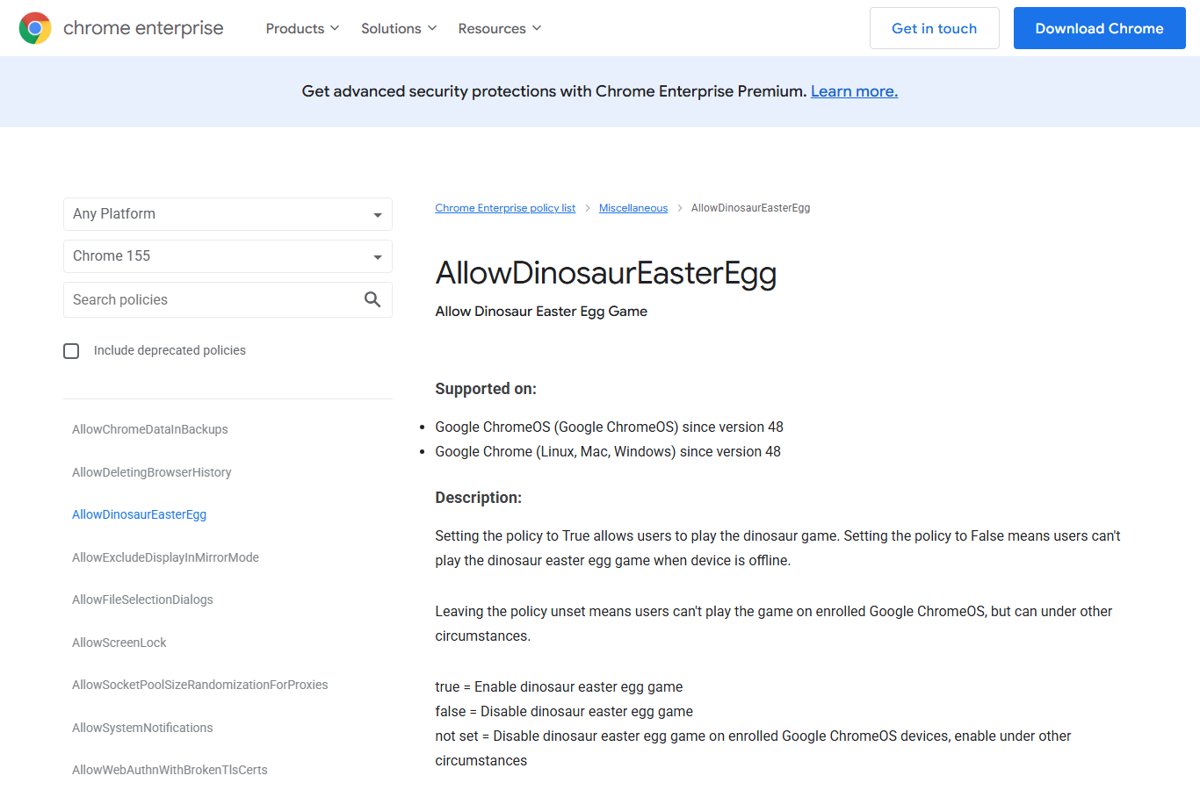
| Admin control | The AllowDinosaurEasterEgg policy, supported since Chrome 48 |
Chrome dino game obstacles, night mode and arcade mode
The game started with cacti only. Later updates added new hazards and visual modes, so the run changes as you progress.
| Element | What it does in a run |
|---|---|
| Cacti | Ground obstacles from the very first version; jump over them |
| Pterodactyls | Flying obstacles added in a later update; dodge them by jumping or ducking |
| Night mode | A dark version of the desert scene added in a later update |
| Arcade mode | Available on chrome://dino so players can practise in a full-window game |
| Birthday edition | For Chrome's 10th birthday the game added cake, balloons and a party hat |
| Maximum length | The game is built to max out at roughly 17 million years of play |
The 17 million year cap is a nod to how long the T-Rex lived on Earth, so in practice no run will ever reach it.
Turn the Chrome dino game on or off with the AllowDinosaurEasterEgg policy
Schools and companies asked Google for a way to stop people playing at work, so Chrome has a policy for it. The setting below is for the person who manages the PC.
Setting the value to 0 blocks the offline game, and setting it to 1 allows it. With no value, the game is blocked on enrolled ChromeOS devices and allowed everywhere else.
- Sign in to Windows with an administrator account.
- Press Win + R, type
regeditand press Enter. - Go to
HKEY_LOCAL_MACHINE\SOFTWARE\Policies\Google\Chrome, creating the Google and Chrome keys if they are missing. - Right-click the Chrome key and select New > DWORD (32-bit) Value.
- Name the value
AllowDinosaurEasterEgg. - Double-click it and set Value data to
0to block the game or1to allow it. - Close and reopen Chrome, because the policy applies only after a browser restart.
The registry value is the Windows form of the policy, and it takes effect once you restart Google Chrome. On an enrolled school or work Chromebook, only the administrator can change it.
T-Rex dinosaur game FAQs
How do I get to the Chrome dino game?
Type chrome://dino into the Chrome address bar and press Enter, then press Space. You can also reach it by losing your connection and loading any website, because the dinosaur sits on Chrome's no-internet page.
How do I access the Chrome dino game while online?
Use the chrome://dino address. Google built that page so people could play without going offline, and it loads the same game you see on the no-connection screen. Press Space to start the run.
How do I play the Chrome dino game?
Press Space to start, then press Space each time an obstacle approaches so the T-Rex jumps over it. The dinosaur runs, jumps and ducks, and the run ends the moment it touches a cactus or pterodactyl.
What is the Chrome dino?
The Chrome dino is a running T-Rex in an endless runner game built into Google Chrome. It first appeared in 2014 on the offline page and doubles as the Chrome team's internal mascot.
Is there an end to the Google Chrome dinosaur game?
Technically yes. The developers built it to max out at about 17 million years of play, roughly how long the T-Rex lived on Earth. No human session comes close, so for players it is endless.
Can I play the Google Chrome dinosaur game with an internet connection?
Yes. Open chrome://dino in Chrome and press Space. The offline page is only one way in; the dedicated address works whether you are connected or not.
Can I play the Google Chrome dinosaur game on mobile?
Yes on Chrome for Android, where the game was rewritten after the first version ran poorly on older phones. Google counts mobile among the roughly 270 million games played each month.
Does the dinosaur game work on all browsers?
The T-Rex runner is a Google Chrome feature, and chrome://dino is a Chrome internal page. Google documents the game and its policy for Chrome on Windows, Mac, Linux and ChromeOS only.
Why can't I play the dino game on my school Chromebook?
Enrolled ChromeOS devices block the game by default unless the admin sets the AllowDinosaurEasterEgg policy to true. Only the school or company administrator can change that setting.
Why does Chrome show a dinosaur when the internet is down?
It is a joke from the Chrome design team. Being without Wi-Fi felt like the prehistoric age, so the offline page shows a T-Rex that turns into a runner game when you press Space.
Bottom line: the quickest way to start the Chrome dino game
Bookmark chrome://dino and press Space whenever you want a run. The address works online or offline on every desktop version of Chrome, so you never have to cut your connection to reach the T-Rex.