To delete an Instagram account, open Accounts Center, go to Personal details > Account ownership and control > Deactivation or deletion, pick the profile and select Delete account.
This guide covers the steps on iPhone, Android and a computer, exporting your data first, the 30-day window to change your mind, and what to do when the delete option will not appear.
How to delete Instagram account permanently in Accounts Center
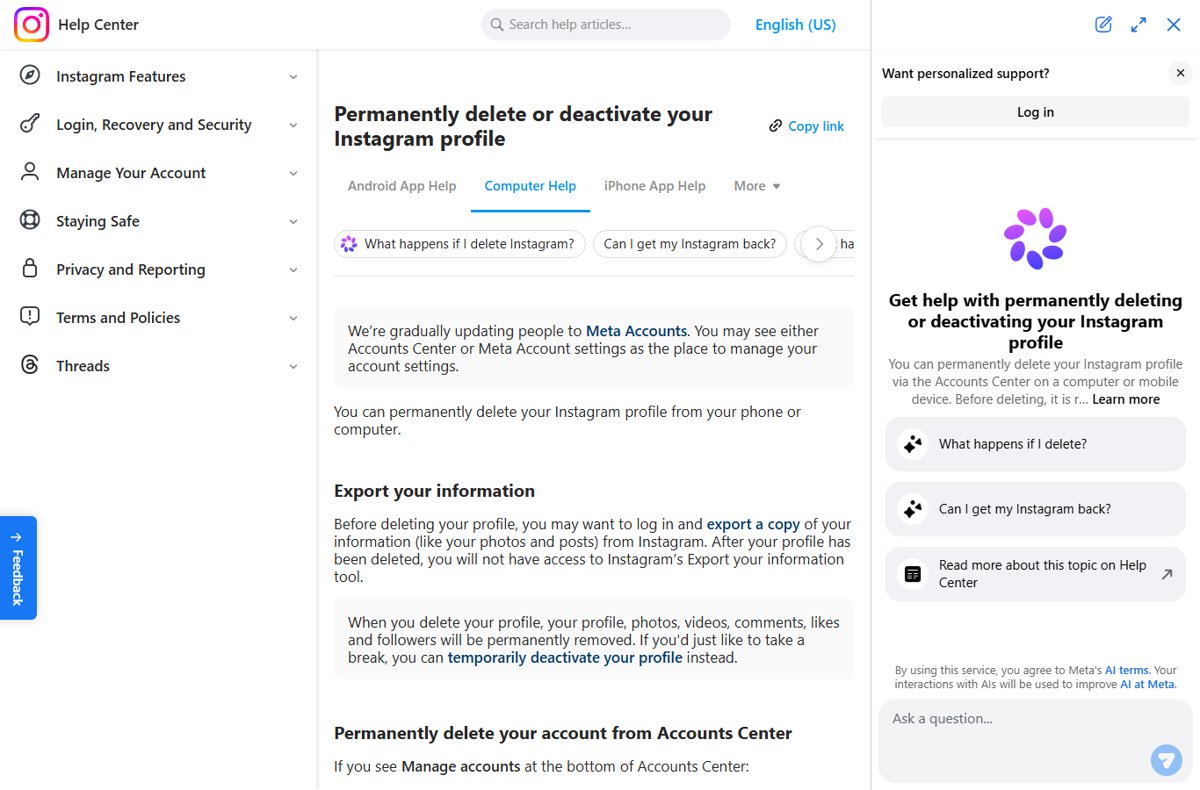
Instagram moved deletion out of its own settings and into the Meta Accounts Center, so every route below ends on the same Deactivation or deletion screen. You must be logged in to the profile you want to remove.
- Open Instagram and log in to the profile you want to delete.
- Open Accounts Center from your settings.
- Select Personal details under Account Settings.
- Select Account ownership and control, then Deactivation or deletion.
- Choose the Instagram profile, select Delete account, then Continue.
- Follow the on-screen prompts, re-enter your password, and confirm the deletion.
Your profile disappears from Instagram straight away, and permanent deletion happens 30 days after the request. The exact cancellation window varies by region.
Which option should you choose?
Deleting and deactivating sit on the same screen, but only one of them is reversible after a month. Match your situation to a row before you tap anything.
| Your situation | Choose this | Why |
|---|---|---|
| You want a break and may come back | Deactivate account | Photos, comments and likes are hidden until you log back in; nothing is removed |
| You never want the profile again | Delete account | Profile, photos, videos, comments, likes and followers are permanently removed after 30 days |
| You only want strangers out | Make the account private | Only approved followers see your posts; the account stays intact |
| You want to use Instagram less | Set a daily time limit | Instagram reminds you once you reach the time you chose |
| You use Instagram on Android and cannot find the delete option | Delete from instagram.com in a browser | Instagram's Android help tells app users to finish deletion on the website |
| You run several profiles in one Accounts Center | Delete only the profile you select | Deletion applies to the account you choose on the Deactivation or deletion screen |
What actually happens when you delete your Instagram account
| When | What happens |
|---|---|
| Right after the request | Your content is no longer accessible to other people on Instagram |
| Day 1 to day 30 | You can cancel by logging back in; the content remains subject to Instagram's Terms of Use and Privacy Policy |
| After 30 days | Your profile and all its information are permanently deleted and cannot be retrieved |
| Up to 90 days | The full deletion process can take this long; copies may stay longer in disaster-recovery backups |
| Legal or safety holds | Meta may keep some information for legal issues, terms violations or harm prevention |
| Your username | It becomes available again; you can reuse it if no one else has claimed it |
| Export tool | It stops working for you once the profile is deleted, so export first |
A profile removed for breaking the Community Standards is a different case. Instagram says you may not be able to sign up again with the same username.
What to sort out before you hit delete
| Check | Why it matters |
|---|---|
| You can log in | Instagram cannot delete a profile for you; you need to sign in to request deletion |
| Your data export is downloaded | The Export your information tool is gone after deletion, and export links can take up to 30 days to arrive |
| You picked the right profile | Accounts Center lists every linked profile; only the one you select is deleted |
| Paid subscriptions are cancelled | Instagram Plus and Meta Verified have their own cancellation pages in the Help Center |
| Chats you care about are saved | Instagram's deletion page lists profile, photos, videos, comments, likes and followers; it does not spell out what happens to sent messages |
| Edits and Threads | Edits is powered by Instagram, so deleting Instagram is how you delete Edits; Threads has its own delete page |
| Your login is not shared | Anyone with your password could log in during the 30 days and cancel the deletion |
Step 1: Download your Instagram data before you delete anything
The export lives in Accounts Center under Your information and permissions. On a computer, open More > Settings first; in the app, start from your profile and tap the menu in the top right.
- Open Settings, then select Meta Account or Accounts Center, whichever your account shows.
- Select Your information and permissions, then Export your information.
- Select Create export, choose your Instagram profile and select Next.
- Select Export to device.
- Choose the information, date range, format, notification email and media quality.
- Select Start export, then download the file from Available downloads when the email arrives.
The finished export stays available for 4 days. Larger exports with high-quality video take more storage, so check free space before you download to a phone.
Step 2: Delete your Instagram account on mobile (iOS & Android)
Meta is moving accounts to a new layout gradually, so your Accounts Center shows either Accounts or Manage accounts at the bottom. These steps use the Accounts layout; the other one is in the next section's table.
- Tap Profile or your profile picture in the bottom right.
- Tap Menu in the top right.
- Tap Accounts Center at the top of the screen.
- Tap Personal details under Account Settings.
- Tap Account ownership and control, then Deactivation or deletion.
- Choose the profile, select Delete account and tap Continue.
- Follow the instructions to confirm.
On Android, Instagram's help page says app users need to open instagram.com in a computer or mobile browser to delete the profile. If the Android app does not offer Delete account, use Step 3 in Chrome on the phone.
Step 3: Delete your Instagram account on a computer (PC or Mac)
Go to instagram.com in any browser on Windows or macOS and log in. The same steps work in a phone's mobile browser.
- Click More in the bottom left, then click Settings.
- Click Accounts Center at the top left.
- Click Personal details under Account Settings.
- Click Account ownership and control.
- Click Deactivation or deletion and choose the profile.
- Select Delete account, click Continue, then follow the instructions to confirm.
Instagram Accounts Center layouts: Manage accounts vs Accounts
Look at the bottom of Accounts Center to see which layout you have, then follow that row.
| Bottom of Accounts Center shows | Path to Delete account |
|---|---|
| Accounts | Personal details > Account ownership and control > Deactivation or deletion > choose profile > Delete account > Continue |
| Manage accounts | Profiles and personal details > Manage (next to the account type) > Deactivation or deletion > choose account > Delete account > Continue |
| Meta Account settings | Meta is rolling out Meta Accounts; look for the same Deactivation or deletion option under your personal details |
Alternative solutions if you are not ready to delete
Deactivation hides your profile until you log back in. Instagram allows it only once a week, and you must be able to log in. The steps match deletion until the final choice.
- Open Accounts Center from your profile menu or from More > Settings on the web.
- Select Personal details, then Account ownership and control.
- Select Deactivation or deletion and choose the profile.
- Select Deactivate account, then Continue.
- Follow the instructions to confirm. Log back in whenever you want the profile visible again.
To lock things down without leaving, tap Menu, open Account privacy under Who can see your content, and turn on Private account. Business profiles must switch back to a personal account first. If cross-posting is what bothers you, stop Instagram story sharing to Facebook instead.
Deleting the app from your phone does not delete the account. Your profile stays live and public until you request deletion or deactivation.
How to cancel Instagram account deletion within 30 days
- Open the Instagram app or instagram.com.
- Log in with the username and password of the profile you scheduled for deletion.
- Follow the prompt to keep your account if Instagram shows one.
- Open your profile and confirm your posts and followers are back.
This works only inside the cancellation window, which is generally 30 days and varies by region. Once Instagram finishes the deletion, the account cannot be restored.
How to check your Instagram deletion request worked
Do not log back in to check. Logging in during the window cancels the request.
- Open a private browser window, or use a friend's account.
- Search Instagram for your old username.
- Confirm the profile no longer appears, or that its page shows as unavailable.
- Wait out the 30 days without signing in on any device.
Still not working? Common problems and fixes
Why can't I delete my Instagram account?
The option sits in Accounts Center, its layout differs between accounts, and the Android app may not offer it.
- Check the bottom of Accounts Center for Accounts or Manage accounts and use the matching path above.
- On Android, open instagram.com in a browser and use the computer steps.
- Make sure you selected the Instagram profile, not a linked Facebook account, on the Deactivation or deletion screen.
How to delete Instagram account without login
For security reasons, Instagram cannot delete a profile for you; you must be logged in.
- Open the Instagram I Can't Log In help page in a browser.
- Reset your password, or recover a forgotten username, from the options listed there.
- Use the lost email or phone number option if you no longer have the contact details on the account.
- Once you are back in, delete the profile from Accounts Center.
Why did Instagram delete my account?
Either Instagram disabled it for breaking the Community Standards, or someone with your password requested deletion.
- Try to log in and read the message; a disabled account shows a notice when you sign in.
- If you think the decision is a mistake, follow the on-screen instructions to request a review.
- If there is no disabled notice, follow the hacked account steps in the Instagram Help Center.
- If the account was deleted, create a new one; the old username may not be available.
Instagram account deletion FAQ
How do I delete my Instagram account permanently?
Open Accounts Center, select Personal details, then Account ownership and control, then Deactivation or deletion. Choose the profile, select Delete account and confirm. The profile is permanently removed 30 days after the request, although the window to cancel varies by region.
How do I delete my Instagram account on a laptop or PC?
Go to instagram.com in a browser, click More in the bottom left, then Settings and Accounts Center. Open Personal details, Account ownership and control, then Deactivation or deletion. Pick the profile and select Delete account.
How do I delete my Instagram account on iPhone?
Tap your profile picture, then Menu in the top right, then Accounts Center. Tap Personal details, Account ownership and control, and Deactivation or deletion. Choose the profile, tap Delete account, then Continue and confirm.
Can I delete my Instagram account in the Android app?
Instagram's Android help says app users need to go to instagram.com in a computer or mobile browser to delete the profile. Log in on the website, open Accounts Center, and use Deactivation or deletion.
Can I delete an Instagram account without logging in?
No. Instagram cannot delete a profile for you for security reasons, so you must log in to request deletion. Recover access first through the I Can't Log In help page, then delete it.
Can I recover my Instagram account after deleting it?
Yes, but only during the cancellation window, generally 30 days after the request. Log back in to cancel. After the window ends, the profile and its information are permanently deleted and cannot be retrieved.
Does deleting Instagram also delete my Facebook account?
No. Accounts Center lists each linked profile separately, and the Deactivation or deletion screen deletes only the account you choose. Your Facebook account stays unless you select it and delete the Facebook account too.
Can someone take my username after I delete my Instagram account?
Yes. After deletion, the username is free, and you can reuse it only if no one else has taken it first. A profile removed for breaking the Community Standards may not get its username back.
How long does it take to download my Instagram data?
Instagram says the export link can take up to 30 days to arrive by email. Once it is ready, you have 4 days to download it from Available downloads in the Export your information tool.
Will people still see my messages after I delete my account?
Instagram's deletion page lists your profile, photos, videos, comments, likes and followers as removed, but does not detail sent messages. Delete any chat you want gone from your inbox before you request deletion.
Quick summary: delete or deactivate your Instagram account?
Export your data, then delete the profile from Accounts Center under Deactivation or deletion; deactivate instead if there is any chance you will come back. Deletion becomes permanent after the 30-day window and the export tool disappears with the account, while deactivation hides everything and restores it the moment you log in.
If you are clearing out other social apps the same day, you can also delete a Snapchat account or remove your Telegram account.