Firefox 14 reached release users as version 14.0.1 on July 17, 2012. It was a security-minded update: Google searches moved to HTTPS, the site identity panel got harder to spoof, and plugins could be set to load only on a click. Here is what changed, based on Mozilla’s release notes.
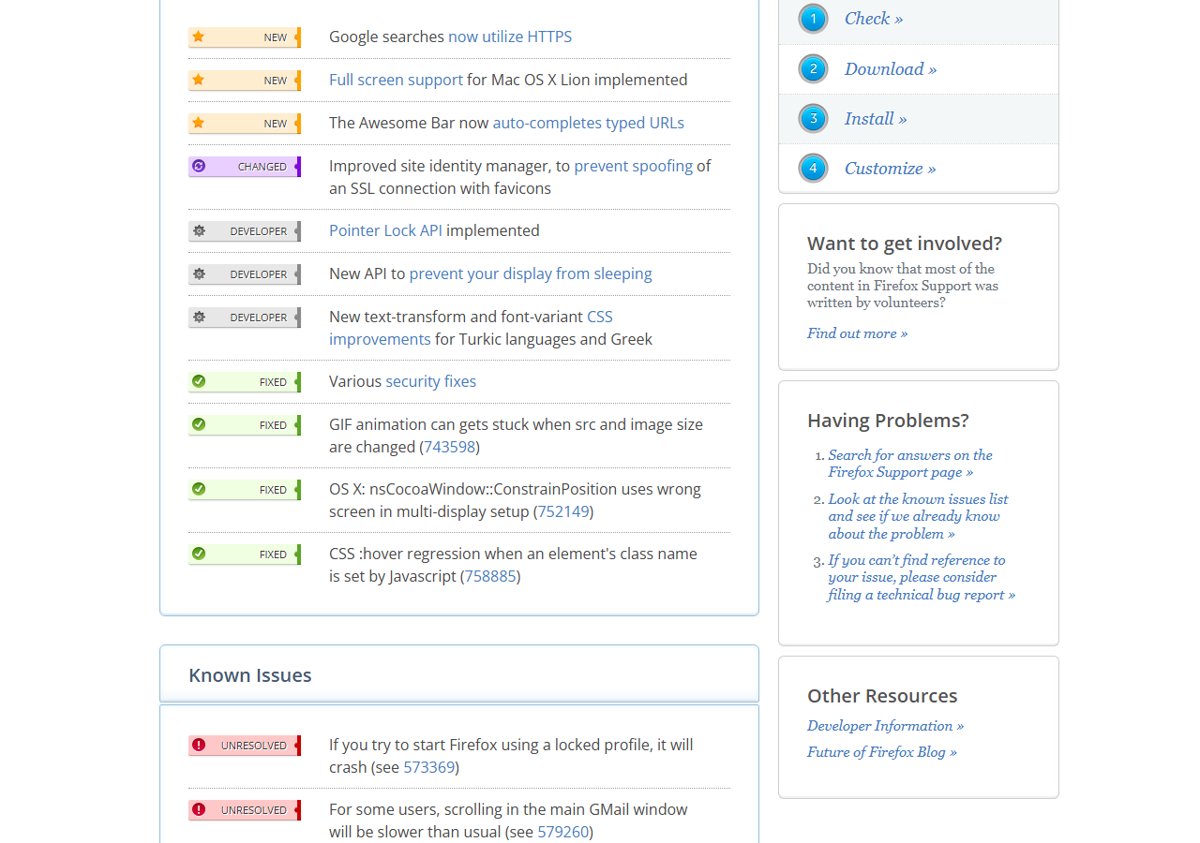
Google searches now use HTTPS
Searches from Firefox’s built-in Google search box now use a secure HTTPS connection. That stops people on the same network, such as a public Wi-Fi hotspot, from seeing what you search for.
The Awesome Bar autocompletes typed URLs
The address bar, which Mozilla called the Awesome Bar, now completes web addresses as you type them. Type the first few letters of a site you visit and Firefox fills in the rest, so pressing Enter takes you straight there.
Full screen on Mac OS X Lion
Firefox 14 supports the native full-screen mode of Mac OS X Lion.
Better protection against site identity spoofing
Mozilla improved the site identity manager to prevent spoofing of an SSL connection with favicons. A site could no longer use a padlock-style favicon to look like a secure page.
Click to Play for plugins
Firefox 14 also added Click to Play for plugins, switched off by default. With it on, Flash and other plugin content waits for a click before it loads. You turn it on by setting plugins.click_to_play to true in about:config. Our about:config guide shows how to change hidden preferences like this one.
Why HTTPS search matters
Without HTTPS, your search terms travel across the network as plain text. Anyone on the same open Wi-Fi network, or an operator along the way, could read them. HTTPS encrypts the request between Firefox and Google, so only you and Google see what you searched for.
For web developers
- The Pointer Lock API is implemented, useful for games and 3D apps that need raw mouse movement.
- A new API lets a page stop the display from going to sleep, for example while a video plays.
- CSS text-transform and font-variant got improvements for Turkic languages and Greek.
Fixes
- Various security fixes.
- GIF animations no longer get stuck when the image source and size change.
- On OS X, windows no longer open on the wrong screen in multi-display setups.
- A CSS :hover regression when JavaScript set an element’s class name is fixed.
Known issues
- Starting Firefox with a locked profile makes it crash.
- For some users, scrolling in the main Gmail window is slower than usual.
- Focus rings keep growing when you repeatedly tab through elements.
- On Windows, using System Restore shortly after updating Firefox may prevent future updates.
Updating Firefox
Firefox updates itself, but you can check by opening Help > About Firefox. Firefox 14 is long out of date, so make sure you are on a current version. Mozilla’s offline installers are listed in our post on Firefox standalone installers.