Clear speaker holes by turning the device off and brushing the grille gently with a dry, soft-bristled brush, then wiping it with a lint-free cloth.
This guide covers iPhone and Android phone speakers, laptop and MacBook grilles, AirPods meshes, water in the speaker, and what to do when the sound stays muffled.
How to clean speaker holes the safe way
This routine suits phone, tablet and laptop speaker grilles. It uses no liquid, so nothing gets pushed into the openings.
- Unplug every cable and turn the device off.
- Hold the device so the speaker grille faces down, letting loose dust fall out rather than in.
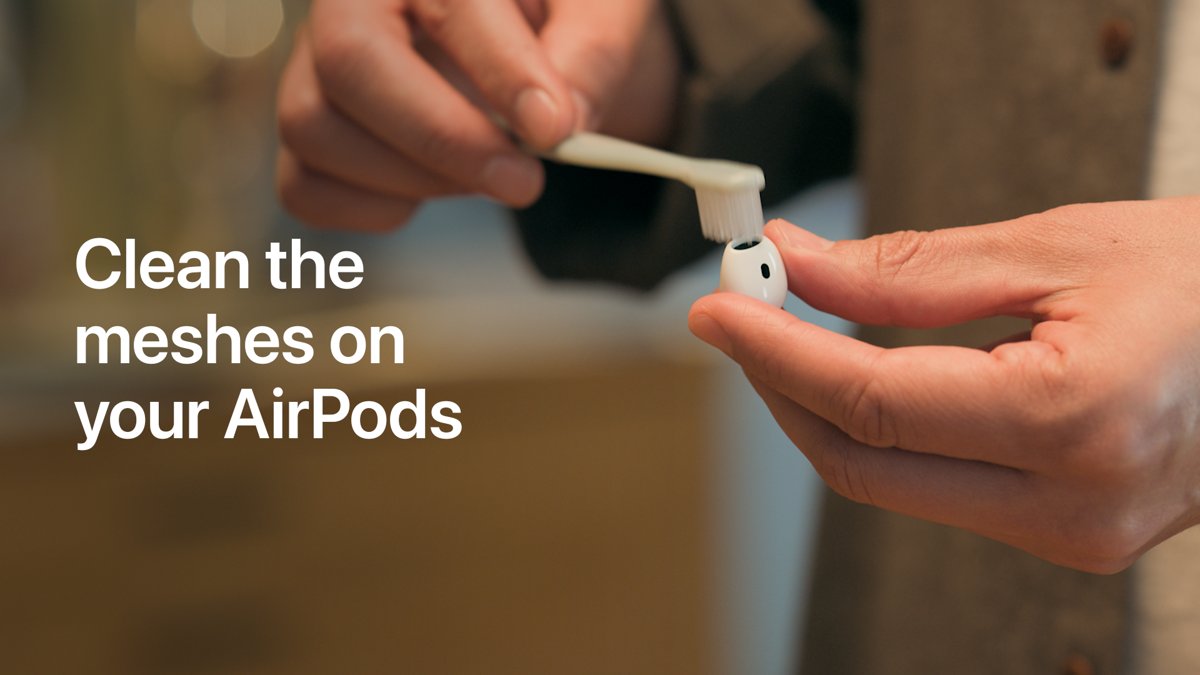
- Brush across the holes with a clean, dry, soft-bristled brush, such as a new child's toothbrush, using short light strokes.
- Wipe the grille with a soft, lint-free cloth such as a lens or microfiber cloth.
- Repeat the brushing once more if you still see lint in the holes.
- Turn the device on and play audio at medium volume to check the sound.
Apple tells iPhone owners to avoid getting moisture in openings and not to use compressed air, so keep the routine dry.
Best way to clean speaker holes by device
| Device | Use | Avoid |
|---|---|---|
| iPhone speaker and receiver | Dry soft brush, lint-free cloth | Compressed air, liquid in openings, bleach or hydrogen peroxide |
| Android phone speaker | Dry soft brush, lint-free cloth | Pins, needles, liquid sprayed at the grille |
| Laptop or MacBook grille | Dry soft brush with the lid open and the laptop off | Spraying liquid directly on the computer |
| AirPods 3, 4 or later meshes | Apple's micellar water and soft toothbrush routine | Running AirPods under water, sharp objects |
| Wet phone speaker | Speaker facing down on a lint-free cloth, cool airflow | Heat sources, cotton swabs in the port |
Tools to clean speaker holes
| Tool | Why it works | Notes |
|---|---|---|
| Soft-bristled brush (new child's toothbrush or soft paintbrush) | Lifts lint out of holes without forcing it deeper | Keep it dry for phones and laptops |
| Lint-free cloth (lens or microfiber) | Removes surface grime around the grille | Apple recommends it for iPhone and Mac |
| Micellar water and distilled water | Loosens earwax on AirPods meshes | Only for the AirPods routine Apple documents |
| 70% isopropyl alcohol wipe | Disinfects the outer case | Apple allows it on iPhone exterior surfaces, never into openings |
Skip toothpicks, SIM pins and needles. Metal and wood points tear the acoustic mesh behind the holes, which ends in a repair.
How to clean iPhone speaker holes
The bottom grille is the loudspeaker. The slot above the screen is the receiver, which carries call audio.
- Unplug all cables and turn off your iPhone.
- Remove the case so the bottom edge is fully exposed.
- Brush the bottom speaker holes with a dry soft-bristled brush, angling the phone so the holes face down.
- Brush the receiver slot above the screen with the same light strokes.
- Wipe both areas with a soft, slightly damp, lint-free cloth, keeping moisture out of the openings.
- Turn the iPhone on and play a video or a voicemail to compare the sound.
The same steps apply to every recent model, including iPhone 12 and later.
How to clean cell phone speaker holes on Android
- Turn the phone off and remove its case.
- Hold the phone with the speaker grille facing the floor.
- Brush along the grille with a dry soft-bristled brush for 20 to 30 seconds.
- Wipe the grille and the edge of the phone with a lint-free cloth.
- Check the earpiece grille at the top of the screen and brush it the same way.
- Turn the phone on and play audio to test both speakers.
How to clean laptop speaker holes
Laptop speakers sit under the keyboard deck, at the front edge or on the underside, depending on the model.
- Shut down the laptop and unplug the power adapter.
- Find the speaker grilles beside the keyboard, along the front edge or on the base.
- Tilt the laptop so the grille faces down and brush across it with a dry soft brush.
- Wipe the area with a soft, lint-free cloth dampened with water only, keeping moisture out of the holes.
- Let any damp area dry fully, then turn the laptop on and play audio.
On a MacBook, Apple says to avoid moisture in any openings and never spray liquid directly on the computer.
How to clean AirPods speaker mesh
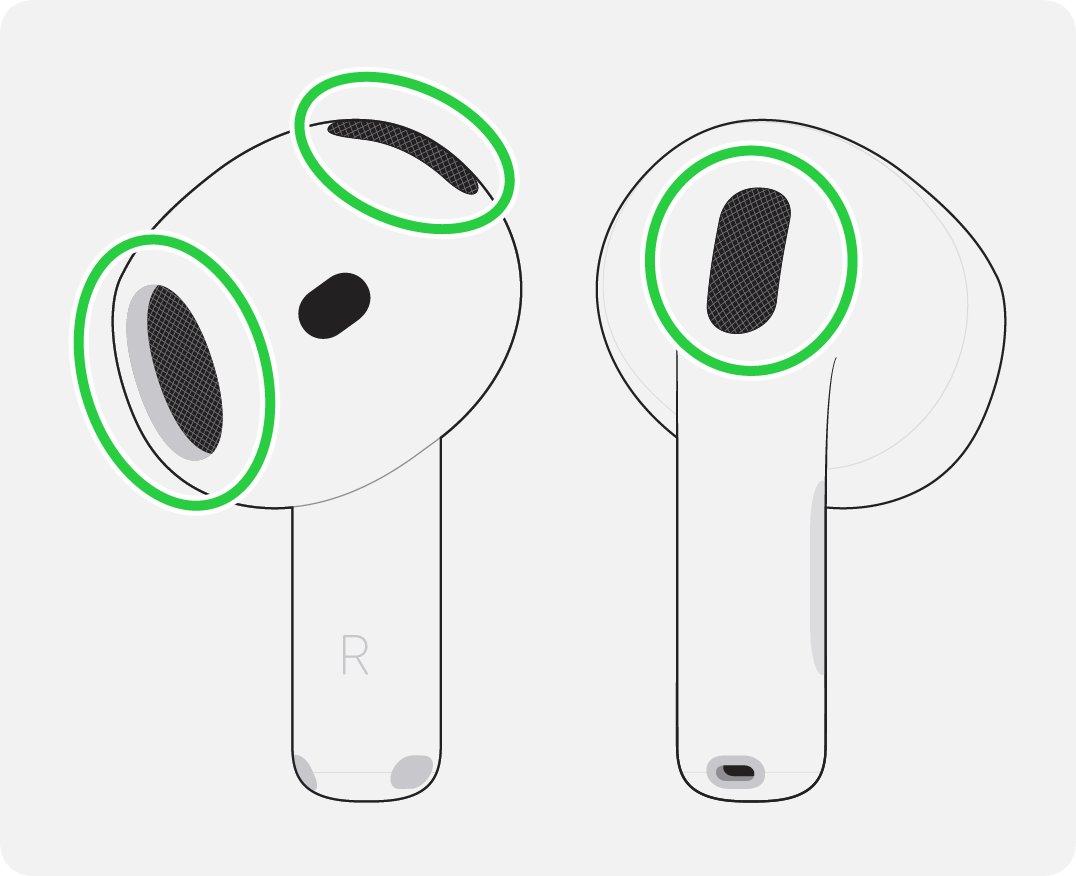
Apple publishes this routine for the meshes on AirPods (3rd generation) and later, and says to avoid cleaning any other areas.
- Pour a small amount of micellar water into a cup.
- Dip a soft-bristled children's toothbrush until the bristles are saturated.
- Hold the AirPod with the mesh facing up and brush in circles for about 15 seconds.
- Turn the AirPod over and blot the mesh on a paper towel.
- Repeat the brushing and blotting two more times for each mesh.
- Rinse the brush and repeat the routine with distilled water.
- Let the AirPods dry for at least two hours before charging or wearing them.
Clear water from speakers after a splash
Water in the speaker port muffles sound until it evaporates. Apple's guidance for iPhone 7 and later applies to most phones.
- Wipe the phone with a soft, lint-free cloth.
- Tap the phone gently against your hand with the port facing down.
- Place the phone speaker-side down on a lint-free cloth and check whether water drips out.
- Leave it in a dry place with good airflow; a fan blowing cool air at the port helps.
- Wait at least 5 hours before charging with a cable or connecting an accessory.
Never dry a phone with a hair dryer or other heat source, and never push a cotton swab or paper towel into the port.
Test speaker sound after cleaning
- Play the same song or video you used before cleaning, at the same volume.
- Listen for clearer high notes and less muffling.
- Shine a light across the grille and check that no lint remains in the holes.
- Make a call on speaker to test the microphone and receiver too.
Fix speaker sound not clear after cleaning
Speaker sound still muffled
Water or debris is still trapped behind the mesh.
- Leave the device speaker-side down in a dry, airy spot for several hours.
- Brush the grille once more with a dry brush.
- If the sound stays muffled after a full day, book a repair, since the mesh or driver may be damaged.
Speaker keeps popping or crackling
A torn cone or mesh, often from a pin pushed into the holes, or liquid inside.
- Lower the volume and test with a different audio file.
- Let the device dry fully if it was wet.
- Contact the manufacturer or an authorised service provider if crackling continues.
Speaker keeps cutting out or disconnecting
Cutting out on a Bluetooth speaker is a connection problem, not dirt in the grille.
- Move the phone closer to the speaker.
- Turn Bluetooth off and on, then reconnect.
- Charge the speaker, since low battery causes dropouts on many models.
Can you damage speaker holes by cleaning them?
Yes, if you use sharp objects, compressed air or liquid, so stick to a dry soft brush and a lint-free cloth. Apple warns against compressed air and moisture in openings on iPhone, and liquid that gets inside needs a service visit.
Speaker holes cleaning FAQ
How do I clean laptop speaker holes?
Shut down the laptop, unplug it, tilt the grille downward and brush it with a dry soft brush. Finish with a lint-free cloth dampened with water only, and keep moisture out of the holes.
How do I clean iPhone speaker holes?
Turn off the iPhone, remove the case and brush the bottom grille and the receiver with a dry soft-bristled brush. Apple says not to use compressed air and to keep moisture out of openings.
How do I clean iPhone 12 speaker holes?
The routine is the same as for any recent iPhone: power off, brush the grilles gently with a dry soft brush, then wipe around them with a lint-free cloth. Avoid pins and liquids.
How do I clean cell phone speaker holes?
Power off the phone, hold the grille facing down and brush it with a dry soft-bristled brush. Wipe with a lint-free cloth afterwards, and never push a pin or toothpick into the holes.
Is there a sound to clear water from speakers?
Some phones and apps play a low tone to push water out, but Apple's own advice is simpler: tap the iPhone with the port facing down and let it dry in moving air.
How do I fix a hole in a speaker?
A torn speaker cone or mesh needs a repair or a replacement part. Cleaning will not close a tear, so contact the manufacturer or an authorised service provider.
Why does my speaker keep popping?
Popping usually comes from a damaged driver, liquid inside or a weak connection. Dry the device, test another audio file and seek a repair if the noise continues.
Why does my speaker keep cutting out?
On Bluetooth speakers, distance, low battery and interference cause dropouts. Move closer, charge the speaker and reconnect Bluetooth before blaming the grille.
Can I use a toothpick to clean speaker holes?
No. A toothpick or pin can tear the acoustic mesh behind the holes or push debris further in. A dry soft-bristled brush is safer.