To delete a spam calendar invite on iPhone, open the event in Calendar, tap Report Junk, then tap Delete and Report Junk.
This guide also covers spam that arrives through a subscribed calendar, removing it on iCloud.com, and stopping new junk invitations from landing in Calendar.
Delete a spam calendar invite on iPhone with Report Junk
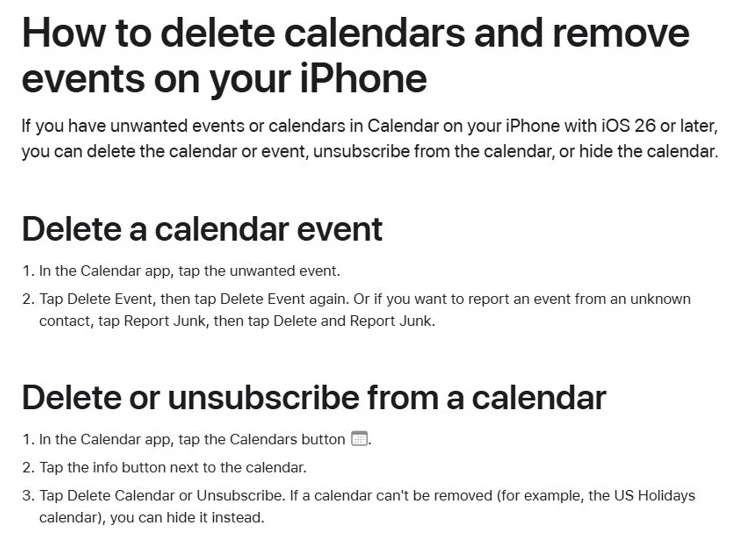
Use this route when a single unwanted event shows up from someone you do not know. Report Junk sends the event to Apple and removes it in one step.
- Open the Calendar app on your iPhone.
- Tap the spam event to open its details.
- Tap Report Junk.
- Tap Delete and Report Junk to confirm.
Do not tap Accept, Maybe or Decline first. Any reply can tell the sender that your address is active, while Report Junk removes the event without answering it.
Spam calendar events vs spam calendar subscriptions on iPhone
Calendar spam reaches an iPhone in two different ways, and each one needs a different fix. Look at which calendar the event belongs to before you start deleting.
| What you see | Where it comes from | Fix that removes it |
|---|---|---|
| One odd invitation from an unknown sender | An event invitation sent to your email address | Open the event and tap Report Junk, then Delete and Report Junk |
| Dozens of events with prize, virus or dating text | A subscription calendar added by tapping a link | Tap Calendars, tap the info button next to the calendar, then tap Unsubscribe |
| Junk events that you cannot delete one by one | A whole calendar you did not create | Delete or unsubscribe from that calendar |
| Spam shows up on iPhone, iPad and Mac together | Your iCloud calendar | Report it on iCloud.com so it is removed on every signed-in device |
How to remove spam calendar subscriptions on iPhone
Many spam events come from an iCalendar (.ics) subscription. Tapping a link to a .ics file can subscribe you, so a pop-up on a website is a common source.
Unsubscribing removes every event in that calendar at once. The Unsubscribe and Report Junk option also reports the calendar to Apple as a suspected junk subscription.
- Open the Calendar app.
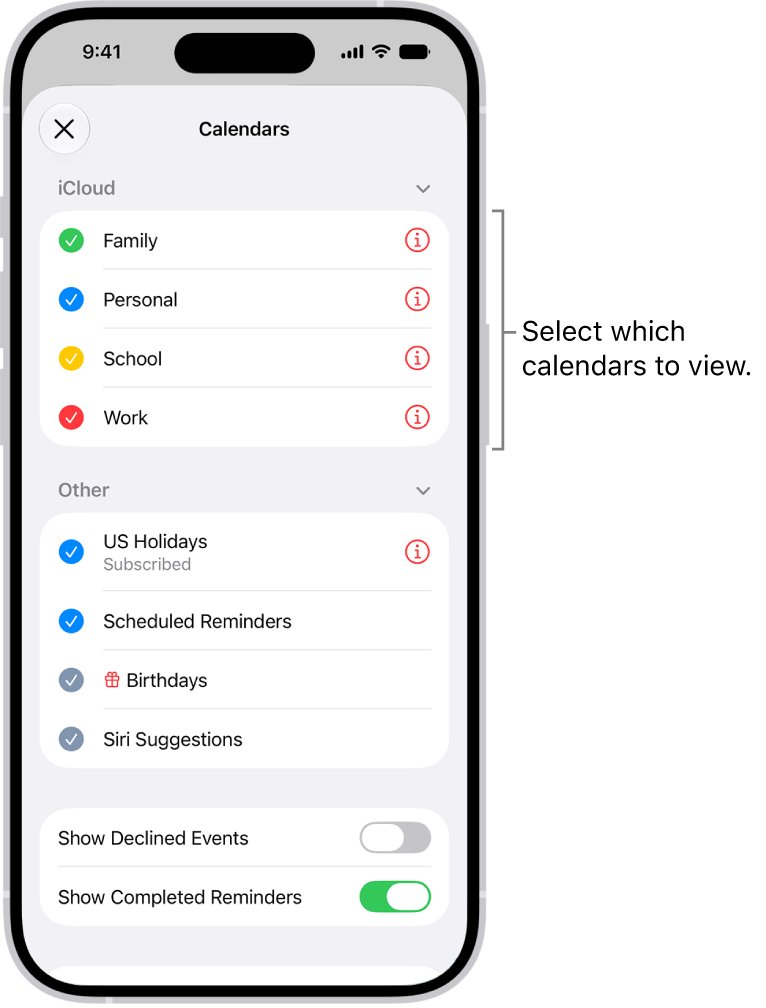
- Tap the Calendars button.
- Find the calendar you do not recognise in the list.
- Tap the info button next to that calendar.
- Tap Unsubscribe.
- Tap Unsubscribe and Report Junk to remove the calendar and report it to Apple.
Delete or hide an unwanted calendar on iPhone
Some calendars show Delete Calendar instead of Unsubscribe. Some built-in ones, such as the US Holidays calendar, cannot be removed at all, so hide them instead.
| Goal | Steps in Calendar |
|---|---|
| Delete a calendar you own | Tap Calendars, tap the info button next to it, tap Delete Calendar, then tap Delete Calendar again to confirm |
| Hide a calendar you cannot delete | Tap Calendars, then tap to clear the checkmark next to that calendar |
| Delete a single event | Tap the event, tap Delete Event, then tap Delete Event again |
Report a junk calendar invitation on iCloud.com
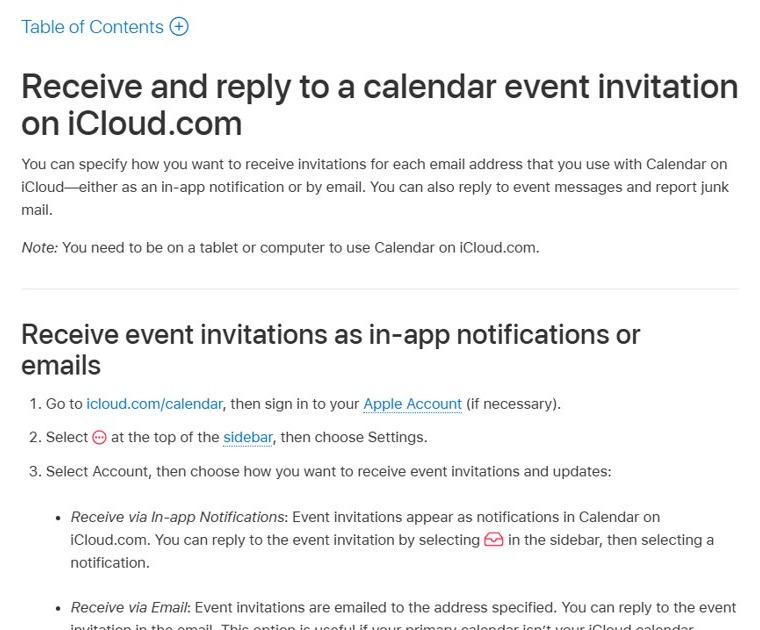
Use iCloud.com when you are at a computer or tablet. Apple notes that Calendar on iCloud.com needs a tablet or computer rather than a phone.
- Go to icloud.com/calendar and sign in to your Apple Account.
- Open the event you want to report.
- Select Report Junk.
- Confirm the report.
The event is deleted from your calendar on every device signed in to the same Apple Account with iCloud for Calendar turned on.
How to block spam calendar invites on iPhone
There is no blocklist for calendar senders in the iPhone Calendar app. What you can change is how iCloud Calendar delivers invitations, so they arrive as email instead of appearing straight in Calendar.
- Open Settings and tap your name at the top.
- Tap iCloud.
- Tap Show All, then tap iCloud Calendar.
- Tap Send & Receive.
- Tap the Receiving pop-up menu and choose Email.
This needs iOS 17 or later. The choice applies to every device signed in to the same Apple Account, including a Mac, and you reply to real invitations from the email instead.
Check that the calendar spam is gone
- Open Calendar and switch to the day the spam event used to occupy.
- Tap Calendars and confirm the junk subscription no longer appears in the list.
- Sign in at icloud.com/calendar and confirm the event is gone there too.
- Open Calendar on your iPad or Mac and check that the event has disappeared after it syncs.
Fix spam iPhone calendar events that keep coming back
Spam calendar events return after you delete them
The events belong to a subscription calendar, so deleting one event leaves the source in place.
- Tap Calendars in the Calendar app.
- Look for a calendar name you never created.
- Tap the info button next to it and tap Unsubscribe.
- Choose Unsubscribe and Report Junk.
Report Junk does not appear on the event
Report Junk is offered for events from an unknown contact, so it may be missing for some calendars or accounts.
- Tap Delete Event, then tap Delete Event again to remove it.
- If the event is in an iCloud calendar, open it on icloud.com/calendar and select Report Junk there.
- If the event is in a Google or work account, report it from that provider's own calendar instead.
Spam invitations keep arriving in Calendar
iCloud Calendar is set to deliver invitations as in-app notifications.
- Open Settings, tap your name, then tap iCloud.
- Tap Show All, then iCloud Calendar, then Send & Receive.
- Set Receiving to Email.
You declined a spam invite and still see it
Calendar can show declined events when Show Declined Events is turned on.
- Open the Calendar list of calendars.
- Turn off Show Declined Events.
- Report future spam with Report Junk instead of declining.
Spam iPhone calendar invites FAQ
How do I delete spam calendar invites on iPhone?
Open the event in Calendar, tap Report Junk, then tap Delete and Report Junk. That removes the event and reports it to Apple without sending any reply to the sender. Use Delete Event if Report Junk is not offered.
How do I remove spam calendar events from my iPhone all at once?
Unsubscribe from the calendar that holds them. Tap Calendars, tap the info button next to the unknown calendar, tap Unsubscribe, then choose Unsubscribe and Report Junk. Every event in that subscription disappears together.
How do I block spam calendar invites on iPhone?
Calendar has no sender blocklist. In Settings, open your name, iCloud, Show All, iCloud Calendar and Send & Receive, then set Receiving to Email. Invitations then arrive as email instead of landing directly in Calendar.
How do I remove spam calendar invitations without replying?
Use Report Junk rather than Accept, Maybe or Decline. Any of those replies goes back to the organizer, while Report Junk deletes the event and reports it to Apple without answering it.
How do I clear iPhone calendar spam from all my Apple devices?
Report the event on icloud.com/calendar by opening it and selecting Report Junk. iCloud then deletes it on every device signed in to the same Apple Account with iCloud for Calendar turned on.
How did spam get into my iPhone calendar?
Spam arrives either as an invitation sent to your email address or as a subscription calendar. Tapping a link to an iCalendar (.ics) file subscribes you to that calendar, which is how many junk event floods start.
How do I eliminate spam calendar invites that keep coming back?
Recurring spam almost always comes from a subscription. Find the calendar you did not create under Calendars, tap its info button, and unsubscribe. Deleting individual events leaves the subscription active, so new ones keep syncing in.
Best way to stop iPhone calendar invite spam
Use Report Junk for single invitations and Unsubscribe and Report Junk for junk calendars, then switch iCloud invitations to email if spam keeps arriving. Reporting removes the event without replying to the sender, unsubscribing clears an entire junk calendar in one step, and email delivery keeps future invitations out of Calendar until you choose to add them.