Dial \*67 and then the full 10-digit number to hide your caller ID for that one call on an iPhone, an Android phone or a US landline.
This guide covers what *67 does, how to hide your number on every call in iPhone and Android settings, why *67 sometimes fails, and the other ways to keep your number private.
How to use Star 67 (*67)
The code works in the dialer of any phone on a US carrier. It applies to one call only, so repeat it each time.
- Open the Phone app on your iPhone or Android phone.
- Type \*67 on the keypad.
- Type the 10-digit number you want to call, with no spaces, for example \*675551234567.
- Tap the call button.
- Check that the person you call sees No Caller ID, Private or Unknown instead of your number.
On a landline, press \*67 at the dial tone, listen for a series of tones followed by a new dial tone, and then dial the number as usual. AT&T notes that blocking switches off again once you hang up.
What does *67 do?
*67 is a vertical service code that tells your carrier to withhold your name and number from the caller ID display of the person you are calling. It is per-call blocking: the next call shows your number again.
| Question | Answer |
|---|---|
| Does it cost anything? | No. AT&T lists per-call blocking as free and included on all wireless voice plans and home phone lines. |
| How long does it last? | One call. Dial *67 again for the next call. |
| What does the other person see? | A blocked label such as No Caller ID, Private or Unknown, depending on their phone. |
| Does it hide texts? | No. Samsung notes your number is not hidden when you send text messages. |
| Does it work on toll-free numbers or 911? | No. AT&T states caller ID cannot be blocked on calls to toll-free numbers or 911. |
How to block your caller ID on an iPhone
To hide your number on every outgoing call instead of one, switch off Show My Caller ID in Settings. Apple documents these steps for current iOS versions.
- Open the Settings app.
- Tap Apps, then tap Phone.
- Tap Show My Caller ID.
- Turn off the Show My Caller ID switch.
- Make a test call; the recipient no longer sees your phone number.
If Show My Caller ID is dimmed or missing, your carrier controls the setting. Apple's advice is to contact the carrier, and AT&T adds the feature at no charge for phones without the option.
How to block your caller ID on an Android
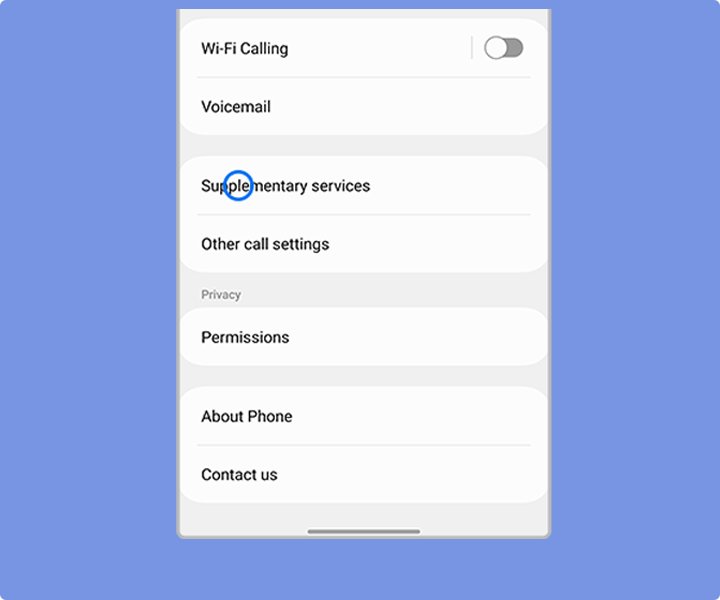
On a Samsung Galaxy phone, the caller ID setting sits inside the Phone app rather than the main phone Settings app. Other Android dialers place a similar option in their call settings, and some carriers hide it entirely.
- Open the Phone app.
- Tap the three-dot menu and select Settings.
- Tap Supplementary services.
- Tap Show caller ID.
- Choose Never to hide your number on all calls, or Network default to let the carrier decide.
If Supplementary services does not appear, the carrier has removed the menu. Ask the carrier to add line-level caller ID blocking instead, and keep using *67 for single calls in the meantime.
Hide caller ID for one call or for all calls
| Your situation | Use this | Why |
|---|---|---|
| You want privacy on a single call | *67 before the number | Nothing to change in settings and your next call is normal |
| You never want your number shown on an iPhone | Settings > Apps > Phone > Show My Caller ID off | Applies to every call until you turn it back on |
| You never want your number shown on a Galaxy phone | Phone > Settings > Supplementary services > Show caller ID > Never | Applies to every call from the dialer |
| The phone setting is missing or dimmed | Ask your carrier for line blocking | The carrier controls the feature on that line |
| You use Google Voice | Anonymous caller ID in the Voice app | Voice calls do not follow your phone's caller ID setting |
Test call to confirm caller ID is hidden
- Borrow a second phone or use a family member's number.
- Call it with \*67 in front of the number, or with your all-calls setting switched off.
- Look at the incoming call screen on the second phone.
- Confirm it shows a blocked label rather than your number or contact name.
- Call again without *67 to confirm your number shows normally when you want it to.
What to do if *67 doesn’t work — and what does *67 do in these cases?
Your number still shows on a call to a 1-800 number or 911
Caller ID blocking does not apply to toll-free numbers or 911, so the number is passed on by design.
- Accept that these calls always carry your number.
- Use a different line if the toll-free call must stay private.
The call does not connect at all
The person you are calling may reject or silence calls from blocked or unknown numbers. Samsung warns that a recipient with unknown numbers blocked cannot be reached this way.
- Call again without *67.
- Send a text first so the recipient expects your call.
The Show My Caller ID or Show caller ID option is missing
Your carrier controls caller ID on the line and has removed the menu.
- Keep using *67 for individual calls.
- Contact your carrier and ask for caller ID blocking on all calls.
Your number appears when you call from Google Voice
Google Voice manages its own caller ID, separate from the phone setting.
- Open the Google Voice app and tap Menu, then Settings.
- Under Calls, turn on Anonymous caller ID, or dial \*67 before the number in the Voice keypad.
*67 hid your number on the last call but not this one
Per-call blocking resets when you hang up.
- Dial *67 again before each call.
- Switch off caller ID for all calls if you want it permanent.
Other ways to block your number when Star 67 isn’t enough
Several routes keep your mobile number private without relying on a code each time.
| Option | How it hides your number | Limits |
|---|---|---|
| Ask your service provider | The carrier blocks caller ID on the whole line. AT&T home phone customers request permanent blocking on 800.288.2020. | Applies to every call; toll-free and 911 still see the number |
| Free phone number apps such as Google Voice | Calls go out from a second number, and Anonymous caller ID can hide that one too | Hiding applies to every device on the same Voice account |
| Messaging apps with voice calling | The call is placed inside the app, so the other person sees your app profile rather than a phone line | Both people need the same app, and many apps still tie the account to your number |
| Phone settings | Show My Caller ID on iPhone or Show caller ID on Galaxy hides it on every dialer call | Carrier must allow it |
Reminders about using Star 67 & other call block services
A few rules apply whichever method you pick.
| Reminder | Detail |
|---|---|
| Texts are not covered | Messages still show your number. |
| Emergency and toll-free calls are exempt | 911 and toll-free numbers receive your caller ID. |
| Blocked calls are often screened | Many people decline or silence calls without a caller ID, so tell them first. |
| Settings stay until changed | AT&T notes the phone setting remains in effect until you switch it back. |
| No extra charge on major carriers | AT&T includes caller ID blocking on all wireless voice plans. |
Frequently asked questions about what does *67 do
Does *67 work on an iPhone?
Yes. Type *67 in the iPhone Phone app keypad, then the 10-digit number, and tap call. Your number is hidden for that call only. To hide it on every call, turn off Show My Caller ID under Settings, Apps, Phone.
Does *67 work on Android?
Yes. Any Android dialer on a US carrier accepts *67 before the number. Galaxy phones can also hide caller ID on all calls through Phone, Settings, Supplementary services, Show caller ID, Never.
Is *67 free?
Yes on major US carriers. AT&T states there is no charge for per-call blocking on wireless plans or home phone lines, and the feature needs no sign-up.
Does *67 hide my number from 911?
No. Caller ID blocking does not work on calls to 911 or toll-free numbers, so emergency services and 1-800 lines still receive your number.
Does *67 hide my number in text messages?
No. *67 only affects voice calls. Text messages still show your number, and Samsung confirms that the caller ID setting does not hide texts either.
Why did my *67 call not go through?
The person you called may block or silence calls from unknown or private numbers. Call again without *67, or text first so they expect the call.
How long does *67 hide my number?
Only for the call you dial it on. Once you hang up, blocking switches off, and the next call shows your number unless you dial *67 again or change the phone setting.
Can I hide my caller ID with Google Voice?
Yes. In the Google Voice app, open Menu, then Settings, and turn on Anonymous caller ID under Calls. For one call, dial *67 before the number in the Voice keypad.