To check if a recently installed Windows is activated, open Settings > System > Activation on Windows 11 (or Settings > Update & Security > Activation on Windows 10) and read the line next to Activation status.
This guide covers the Settings check, two Command Prompt checks, what each status message means, how to activate a fresh install, and the fixes for the most common activation errors.
How to check if Windows is activated or not
The Activation page in Settings is the official place to check. It works for every edition and needs no administrator rights to read.
- Select the Start button, then select Settings.
- On Windows 11, select System > Activation. On Windows 10, select Update & Security > Activation.
- Read the message next to Activation status.
- If it starts with Windows is activated, your new installation is licensed and nothing else is required.
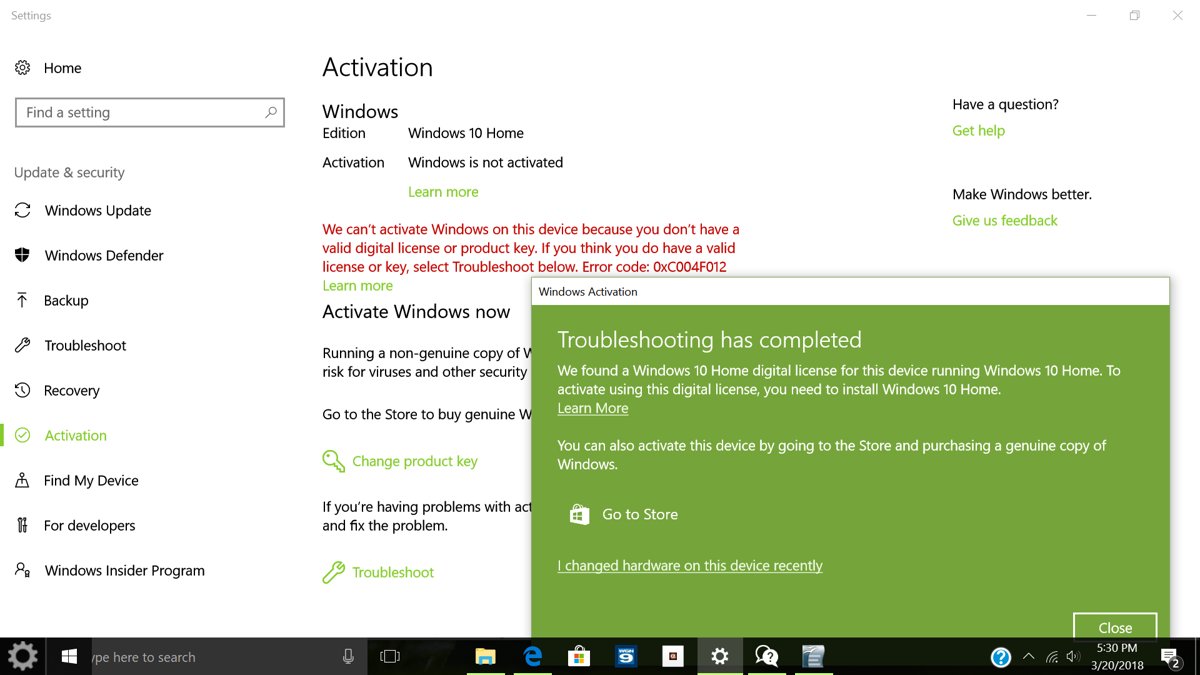
- If it says Windows is not activated, note the error message and code shown under it, then go to the activation steps below.
Shortcut: press Win + R, type ms-settings:activation and press Enter to jump straight to the Activation page.
Signs that Windows is properly activated
Windows 11 and Windows 10 show one of four messages on the Activation page. Three of them mean you are activated; the difference is whether your license is linked to a Microsoft account.
| Activation status message | Activated? | What it means | What to do |
|---|---|---|---|
| Windows is activated | Yes | Licensed, but no Microsoft account is linked | Select Add an account to link one |
| Windows is activated with a digital license | Yes | Digital license present, not linked to your Microsoft account | Select Add an account to link it |
| Windows is activated with a digital license linked to your Microsoft account | Yes | Fully activated and ready for reactivation after a hardware change | Nothing |
| Windows is not activated | No | No valid digital license or product key was found; an error message explains why | Enter a key, run Troubleshoot or buy a license |
Other signs line up with the status: the Activation page shows your edition, slmgr /xpr reports the activation expiry, and a genuine, activated copy does not keep showing notifications that Windows might not be genuine.
Linking matters most right after a clean install. A digital license linked to your Microsoft account is what lets the Activation troubleshooter reactivate Windows if you later replace the motherboard.
Check Windows activation status with Command Prompt
The Software Licensing Management Tool (slmgr) reports license details from a terminal. Both of these switches only read information, so a normal Command Prompt window is enough.
slmgr /xpr
slmgr /dli
/xpr shows the activation expiration date of the current Windows edition; retail and MAK activation is perpetual, so a date only matters on volume (KMS) clients. /dli shows the license information for the installed active Windows edition, including its license status.
You should see: A Windows Script Host dialog opens for each command. On a retail or OEM-activated PC, /xpr reports that activation is permanent rather than giving an expiry date, and /dli reports the edition as licensed.
Run slmgr /dlv instead when you need the detailed version, including the activation ID of each installed product.
Check activation status using the Run tool
The Run box opens the same pages without clicking through Settings. Use these entries to see activation, edition and build together.
| Type in Run (Win + R) | What opens | What it confirms |
|---|---|---|
ms-settings:activation |
Settings > Activation page | Activation status and installed edition |
ms-settings:about |
Settings > System > About | Device and Windows specifications |
winver |
About Windows dialog | Windows version and build number |
cmd, then slmgr /xpr |
Command Prompt and a Windows Script Host dialog | Whether activation is permanent or time-limited |
Check the edition on the Activation page against what you bought. A Windows 11 Home license does not activate Windows 11 Pro, and a fresh install of the wrong edition is a common reason a new installation stays unactivated.
Differences between digital license and product key
A recently installed Windows activates with either a digital license (Microsoft calls it a digital entitlement in Windows 11) or a 25-character product key. How you got Windows decides which one you have.
| How you got Windows | Activation method | Where it is | What a clean install needs |
|---|---|---|---|
| Free upgrade from genuine, activated Windows 10, 8.1 or 7 | Digital license | Tied to the hardware and your Microsoft account, if linked | Select I don't have a product key and go online |
| Bought Windows or a Pro upgrade in the Microsoft Store app | Digital license | The Microsoft account that got the purchase email | Sign in with that account after setup |
| PC that came with Windows | Product key | Preinstalled, in the packaging or on the Certificate of Authenticity (COA) | Usually nothing; it activates online |
| Boxed copy from an authorized retailer | Product key | Label inside the box | Enter the key in setup or Settings |
| Digital copy from a retailer or the Microsoft online store | Product key | Confirmation email or the retailer's digital locker | Enter the key in setup or Settings |
| Volume Licensing or MSDN subscription | Product key | Your program's web portal | Your organization's activation process |
The practical difference: a digital license needs nothing typed and reactivates the same edition after a reinstall, while a product key must be kept and re-entered. Microsoft only keeps a record of keys bought from the Microsoft online store, listed in your account's Order history.
How to activate Windows if needed
If the status says Windows is not activated, connect to the internet first. A device with a digital license for the same edition activates by itself once it is online.
If it still is not activated, enter your product key with the steps below.
- Open Settings > System > Activation (Windows 10: Update & Security > Activation).
- Select Change product key.
- Type the 25-character key, in the format XXXXX-XXXXX-XXXXX-XXXXX-XXXXX.
- Follow the prompts and approve the administrator prompt if it appears.
- Check that Activation status now begins with Windows is activated.
- With no key and no digital license, select Go to Store to buy a digital license in the Microsoft Store app.
On Windows 10, the same page and Change product key button work the same way when you activate Windows 10 with a product key.
Link your Microsoft account after a new Windows installation
Do this while the new installation is activated. It is what makes reactivation possible after a later hardware change.
- Open Settings > Accounts > Your info and confirm Administrator appears under your name.
- Check that an email address shows above Administrator; that means you are using a Microsoft account.
- Go back to Settings > System > Activation.
- Select Add an account, enter your Microsoft account and password, then select Sign in.
- Confirm the status reads Windows is activated with a digital license linked to your Microsoft account.
How to check activation on a new laptop
A new laptop that came with Windows has its product key preinstalled, so it should activate automatically the first time it reaches the internet. Check it before the return window closes.
- Finish setup and connect the laptop to Wi-Fi or Ethernet.
- Open Settings > System > Activation and confirm the status begins with Windows is activated.
- Compare the edition shown on the same page with the edition listed on the box or receipt.
- If it is not activated, look for a product key on the packaging, a card in the box or the COA label.
- For a refurbished laptop, ask the refurbisher for the key; the refurbisher, not Microsoft, must supply it.
- If a laptop sold with Windows preinstalled shows error 0xC004C003 on first start, contact the manufacturer.
Troubleshoot common activation problems
Start with the built-in troubleshooter at Settings > System > Activation > Troubleshoot. If the error code changes after it runs, look up the new code.
Not activated after reinstalling with "I don't have a product key"
The edition you installed differs from the edition your digital license covers (errors 0xC004F212, 0xC004F210).
- Check the edition shown on the Activation page.
- Select Troubleshoot; if it finds a digital license for another edition, follow its instructions to install that edition.
- Or enter a product key that matches the installed edition through Change product key.
Error 0x803F7001 or 0x800704CF: no valid license found
The device has no digital license and no valid key has been entered.
- Find your key in the purchase email, the packaging or the COA sticker.
- Select Change product key and enter the 25-character key.
- If you have no key, select Go to Microsoft Store and buy a digital license.
Error 0xC004F211 or 0xC004F213 after replacing the motherboard
Windows cannot find a license that matches the changed hardware.
- Sign in with the Microsoft account that was linked before the change.
- Select Troubleshoot, then the link to reactivate after a hardware change if it appears.
- If you have the product key used before the change, enter it with Change product key.
Error 0xC004C008, 0xC004C770 or 0x803FA071: key already in use
The key has been used on another device or on more devices than the license terms allow.
- Buy a separate license for this device from Go to Microsoft Store.
- If the PC was repaired with a different key, reinstall your original edition and enter the original key.
Error 0xC004FC03 or 0x8007267C: cannot reach the activation server
No internet connection, a firewall blocking activation, or a temporary server outage.
- Confirm the PC is online and that your firewall is not blocking Windows activation.
- Wait a while and select Activate again; Windows activates automatically when the service is back.
- To activate by phone, type
SLUI 04in the taskbar search box, select it and follow the instructions (not available on Pro EDU or Pro for Workstations).
On Windows 10, the older Windows 10 activation troubleshooter sits under Update & Security > Activation.
Can you use Windows without activation?
Yes, an unactivated Windows installation still runs, but it is not properly licensed. Microsoft states what still works and what does not.
| Area | Activated Windows | Not activated |
|---|---|---|
| Critical security updates | Delivered | Still delivered |
| Other updates and downloads reserved for genuine Windows | Available | Not available until validation passes |
| Notifications | None about licensing | Messages that Windows may not be genuine, plus the error on the Activation page |
| Reactivation after a hardware change | Possible with a linked Microsoft account | Not applicable until activated |
| Licence compliance | Matches the Microsoft Software License Terms | Not licensed for that device |
Activate a new installation soon after setup. Buying a license through Go to Store on the Activation page gives the device a digital license tied to your Microsoft account.
Windows activation check FAQs
How do I know if my Windows is activated?
Open Settings > System > Activation on Windows 11, or Settings > Update & Security > Activation on Windows 10. If the line next to Activation status begins with Windows is activated, your copy is licensed for that device.
Can I check Windows activation using Command Prompt?
Yes. Open Command Prompt and run slmgr /xpr to see whether activation is permanent, or slmgr /dli to see the license status of the installed edition. Neither command needs administrator rights because both only read license information.
Why does my computer show activation messages after a fresh install?
Windows has not found a valid digital license or product key for the edition you installed. Connect to the internet, check the edition matches your license, and enter your key with Change product key if it still does not activate.
What happens if Windows is not activated?
Windows keeps running and still receives critical security updates. Other updates and downloads reserved for genuine Windows are not available, and you see messages that your copy may not be genuine until you activate it with a valid license.
Is a digital license better than a product key?
Neither is more valid; both activate Windows fully. A digital license is more convenient because nothing needs to be typed after a reinstall of the same edition, and when linked to your Microsoft account it helps reactivation after a hardware change.
Can I activate Windows without internet access?
Yes, on most editions. Type SLUI 04 in the taskbar search box and follow the phone activation instructions. Windows 11 Pro EDU and Windows 11 Pro for Workstations are the exceptions and must activate over the internet.
Does reinstalling Windows remove activation?
Not if the device has a digital license and you reinstall the same edition. Select I don't have a product key during setup, and Windows activates online after installation. With a product key instead, enter the same key during or after setup.
How can I fix Windows activation errors?
Run Troubleshoot on the Activation page first. If the error remains, note the code: 0x803F7001 means no license was found, 0xC004F212 means the edition does not match, and 0xC004FC03 means Windows could not reach the activation server.