An iPhone that feels slow right after the iOS 26 update is usually still finishing setup in the background, so leave it charging on Wi-Fi for a day, then restart it and install the latest iOS 26 point release.
If the lag stays, this guide walks through battery health and performance management, storage, app updates, Liquid Glass motion and transparency settings, and a settings reset, with fixes grouped by symptom.
Fastest fix for iPhone lag after the iOS 26 update
Apple says that right after an update, especially a major release, the iPhone needs time to index data and files for search, download new assets and update apps. That work causes temporary slowdowns, heat and battery drain.
- Plug the iPhone into power and connect it to Wi-Fi.
- Leave it alone, locked, for several hours or overnight so background setup can finish.
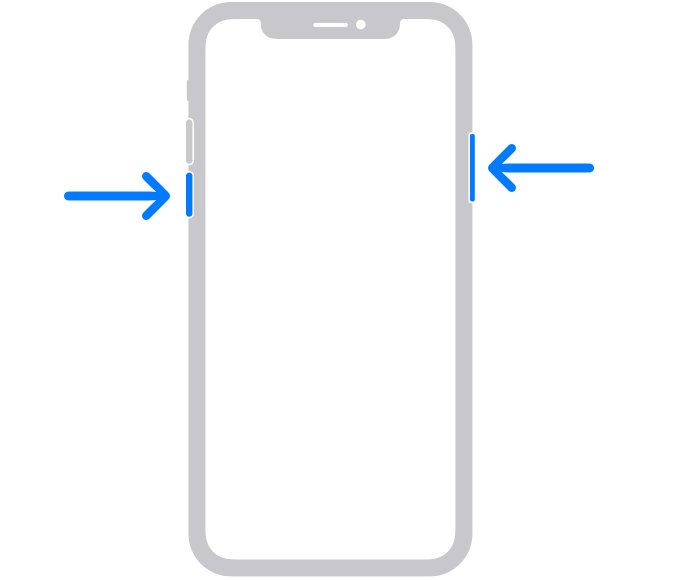
- Restart the iPhone: press and hold either volume button and the side button, drag the slider, wait 30 seconds, then hold the side button until the Apple logo appears.
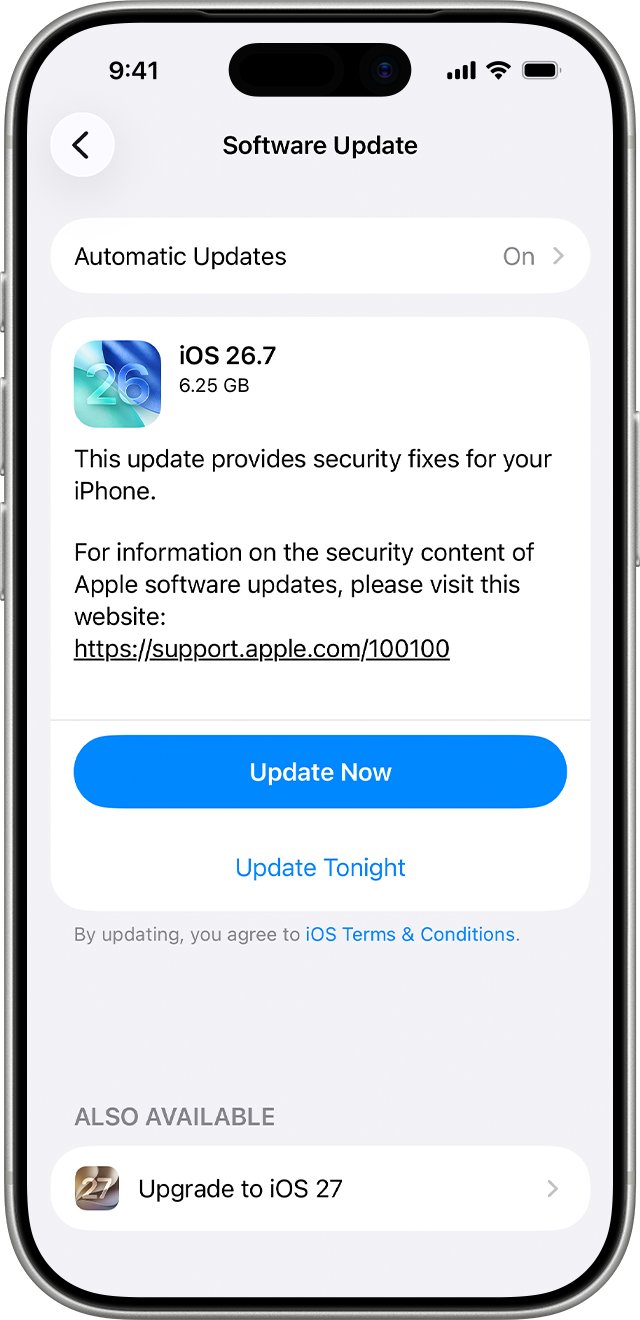
- Open Settings > General > Software Update.
- Tap Download and Install if a newer iOS 26 release is listed.
- Use the iPhone normally for a day and check whether the lag has gone.
If the iPhone is still slow after that, the cause is something lasting, such as an aged battery, full storage or an app that has not been updated for iOS 26.
Why is my iPhone slow after the update: match the symptom to the fix
| What you notice | Likely cause | Fix to try first |
|---|---|---|
| Slow, warm and draining battery in the first day or two | Background indexing and asset downloads after the update | Charge on Wi-Fi overnight, then restart |
| Slow app launches and choppy scrolling that never improve | Battery performance management on an aged battery | Check Battery Health |
| Slow to load apps and photos, Storage Almost Full alert | Too little free storage | Free space in iPhone Storage |
| One app freezes or crashes, the rest are fine | App not yet updated for iOS 26 | Update the app in the App Store |
| Animations and blur effects feel heavy | Liquid Glass motion and transparency effects | Turn on Reduce Motion and Reduce Transparency |
| Lag started after you changed many settings | A setting conflicting with the new release | Reset All Settings |
Which iPhone models run iOS 26
iOS 26 supports iPhone 11 and later plus iPhone SE (2nd and 3rd generation). The oldest supported models have the oldest batteries, so they are the most likely to show lasting lag.
| Model family | Runs iOS 26 |
|---|---|
| iPhone 11, 11 Pro, 11 Pro Max | Yes |
| iPhone SE (2nd and 3rd generation) | Yes |
| iPhone 12 and iPhone 13 series, including mini | Yes |
| iPhone 14 and iPhone 15 series | Yes |
| iPhone 16 series and iPhone 16e | Yes |
| iPhone 17, 17 Pro, 17 Pro Max, iPhone Air, iPhone 17e | Yes |
| iPhone XS, XS Max, XR and earlier | No |
To see your model and version, open Settings > General > About and read Model Name and iOS Version.
Install the latest iOS 26 update to fix lag
Apple ships regular point releases after a major update, and they include bug fixes that improve stability. iOS 26.4 and 26.7, for example, made Reduce Motion more reliably reduce Liquid Glass animations.
- Back up the iPhone with iCloud or a computer.
- Plug it into power and connect to Wi-Fi.
- Open Settings and tap General.
- Tap Software Update to see the installed version and any available update.
- Tap Download and Install, then follow the onscreen instructions.
- To stay current, tap Automatic Updates and turn on Automatically Install.
Apple keeps offering security updates for the previous major version for a while, so you can stay on the latest iOS 26 release instead of moving to a newer major version right away.
Check iPhone battery health and performance management
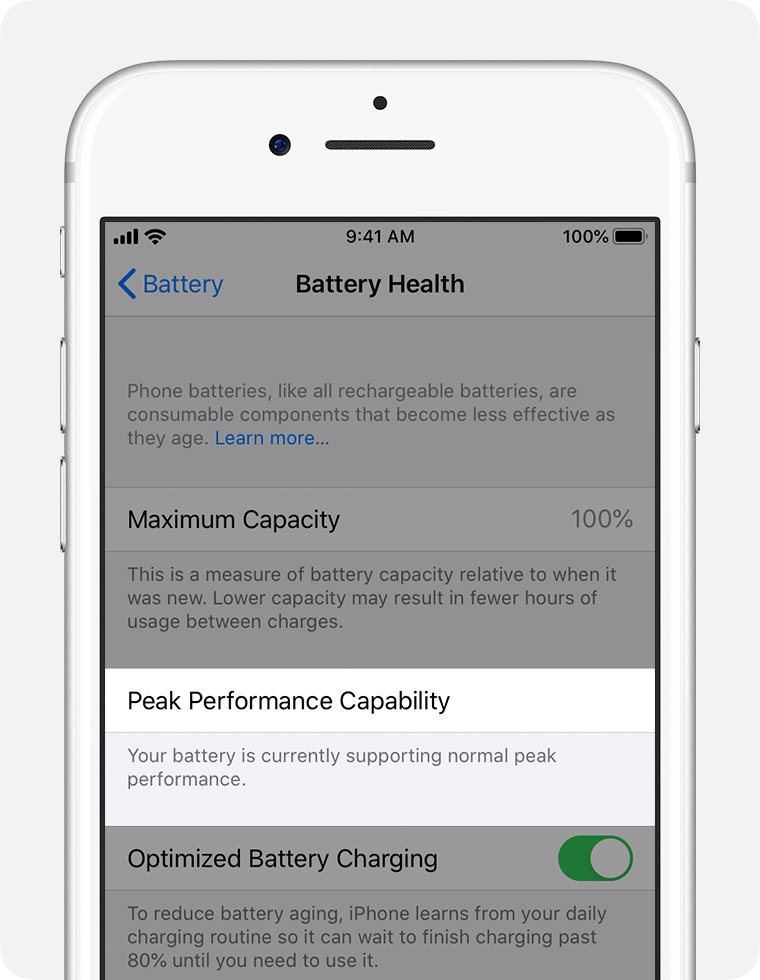
An aged battery cannot always deliver peak power. To prevent unexpected shutdowns, iOS can limit CPU and GPU performance, which shows up as longer app launch times and lower frame rates while scrolling.
- Open Settings and tap Battery.
- Tap Battery Health.
- Read Maximum Capacity to see the capacity compared with when the battery was new.
- Read Peak Performance Capability.
- If it says performance management has been applied, or that battery health is significantly degraded, get the battery replaced by Apple or an Apple Authorized Service Provider.
Batteries in iPhone 14 models and earlier are designed to keep 80 percent of their capacity at 500 complete charge cycles; iPhone 15 batteries are rated for 1,000 cycles. Cold weather and a low charge also trigger temporary performance management.
Free up iPhone storage when it is slow to load
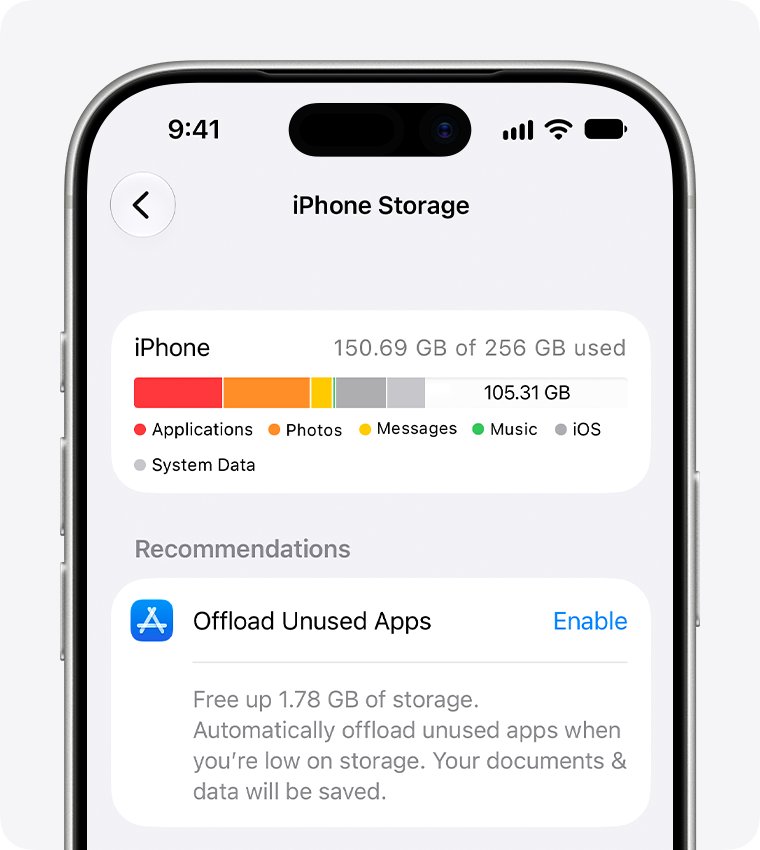
When storage runs low, the iPhone spends time removing temporary files and offloading unused apps to make room. A Storage Almost Full alert is the clearest sign this is behind the slowdown.
- Open Settings and tap General.
- Tap iPhone Storage to see recommendations and a list of apps by size.
- Tap Show All and tap Enable on any recommendation you want, such as offloading unused apps.
- Tap a large app and choose Offload App to keep its data, or Delete App to remove it completely.
- Delete large videos you no longer need from the Photos app.
Update iPhone apps that lag after iOS 26
- Open the App Store.
- Tap the My Account button or your photo at the top of the screen.
- Tap App Updates.
- Tap Update All, or tap Update next to the app that lags.
- To keep apps current, open Settings > Apps > App Store and turn on App Updates.
If one app is still slow after updating, check its App Store page for a newer release, or contact the developer.
Reduce Liquid Glass motion and transparency effects on iOS 26
iOS 26 introduced the Liquid Glass design, which refracts and reflects content in real time. Turning down its motion and blur makes the interface simpler and can make it feel quicker on older iPhones.
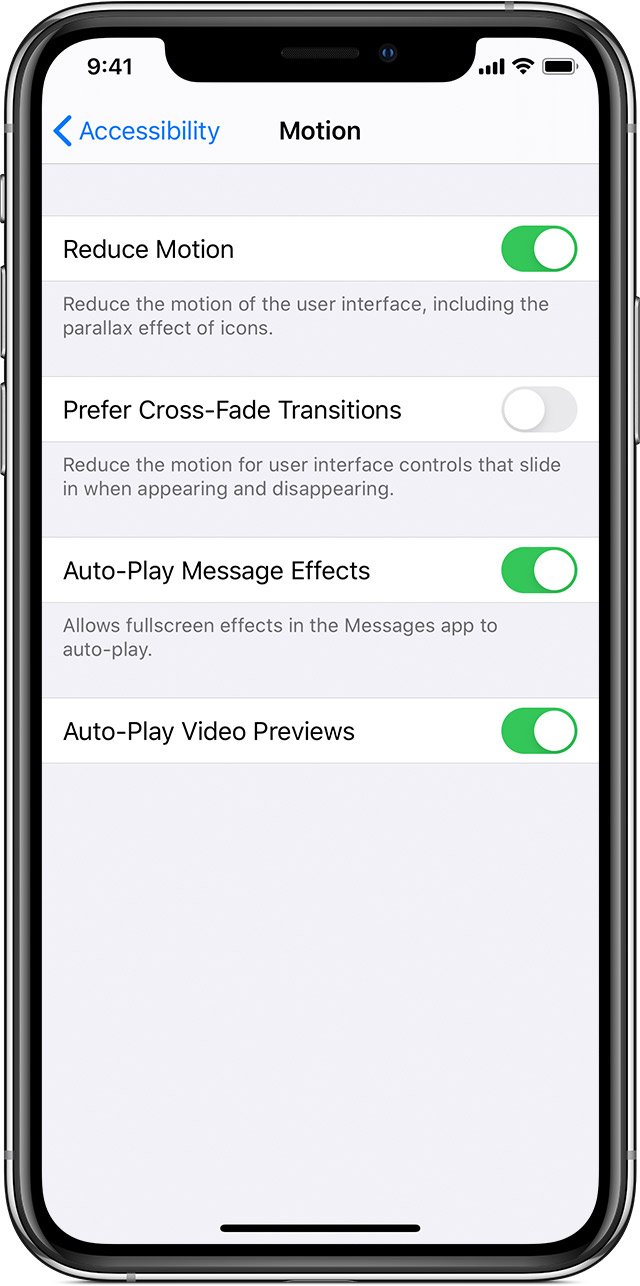
- Open Settings and tap Accessibility.
- Tap Motion, then turn on Reduce Motion. Transitions change to a dissolve instead of zoom or slide.
- Go back to Accessibility and tap Display & Text Size.
- Turn on Reduce Transparency to make blurred, see-through backgrounds solid.
- Use the iPhone for a while and turn either setting off again if you prefer the full effect.
Manage Background App Refresh and Low Power Mode
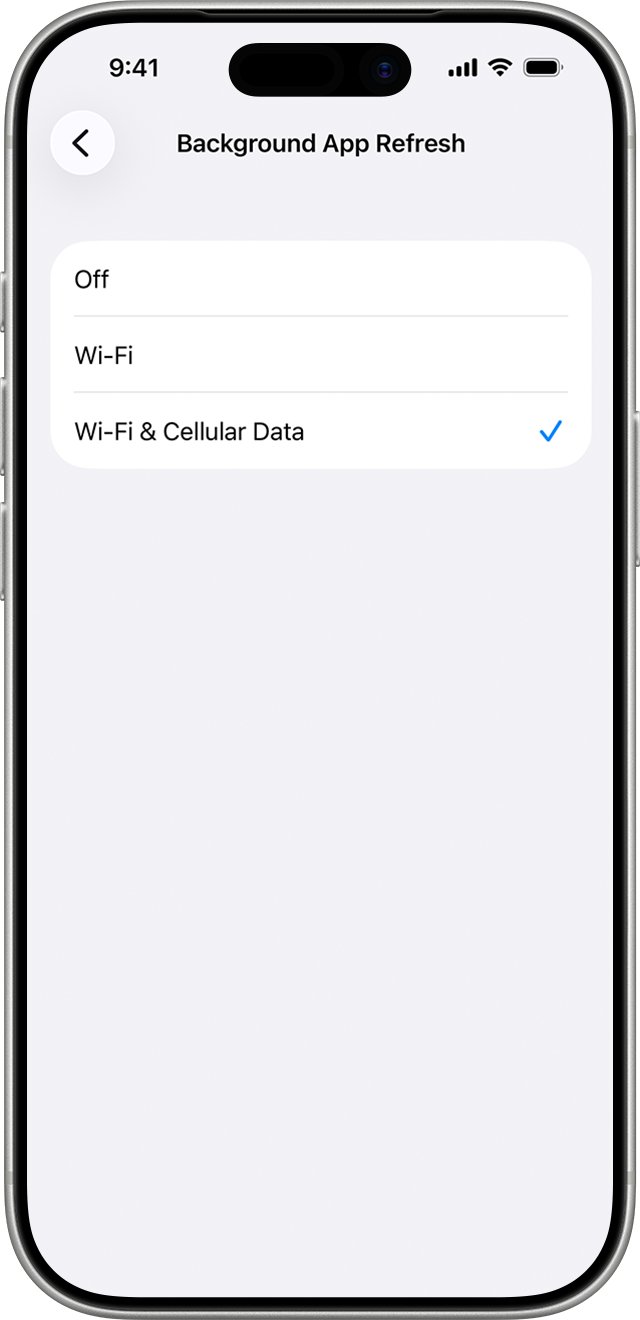
Background App Refresh lets suspended apps check for new content. Turning it off for apps you do not need updated in the background cuts work the iPhone does while you use other apps.
- Open Settings and tap General.
- Tap Background App Refresh.
- Turn it off for individual apps, or tap Background App Refresh again to choose Off, Wi-Fi or Wi-Fi & Cellular Data.
- Low Power Mode does this automatically: on iPhone 15 and later open Settings > Battery > Power Mode; on iPhone 14 and earlier open Settings > Battery.
- Turn Low Power Mode off when you want full performance again, since it also turns off some visual effects and pauses iCloud Photos.
Closing apps from the App Switcher does not speed up the iPhone. Apple says recently used apps only use resources when they are active or running specific background tasks.
Reset all settings on iPhone to fix lag
If nothing else helps, resetting settings returns every setting to its default without deleting your data or media. Back up first so you can restore your previous settings if the reset does not help.
- Back up the iPhone with iCloud or a computer.
- Open Settings and tap General.
- Tap Transfer or Reset iPhone, then tap Reset.
- Tap Reset All Settings and enter your passcode to confirm.
- Reconnect to Wi-Fi and set up Apple Pay cards again after the restart.
Do not choose Erase All Content and Settings here; that option removes all your content.
How to check your iPhone is running normally again
- Open Settings > General > Software Update and confirm it says iOS is up to date.
- Open Settings > Battery > Battery Health and confirm it says the battery supports normal peak performance.
- Open Settings > General > iPhone Storage and confirm there is free space and no Storage Almost Full alert.
- Open the apps that lagged and scroll through a long list or feed to check it moves smoothly.
Fix iPhone running slow after update by symptom
iPhone slow and laggy the day after updating
Background setup after a major release: search indexing, asset downloads and app updates.
- Leave the iPhone charging on Wi-Fi overnight.
- Restart it the next morning.
- Wait a day before trying bigger fixes.
iPhone working so slow weeks after the update
A lasting cause such as battery aging or low storage, not the update itself.
- Check Settings > Battery > Battery Health for performance management.
- Check Settings > General > iPhone Storage for free space.
- Install the latest iOS 26 point release.
iPhone slow to load apps
Apps not yet updated for iOS 26, or storage nearly full.
- Update all apps from the App Store.
- Offload or delete large apps you rarely use.
- Restart the iPhone.
iPhone frozen or not responding
The system or an app has stopped responding, so the iPhone needs a force restart.
- On an iPhone with Face ID, press and quickly release volume up, then volume down.
- Press and hold the side button until the Apple logo appears, which can take longer than 10 seconds.
- If it will not turn on, charge it for one hour and try again.
iOS 26 slow iPhone FAQ
Why is my iPhone slow after update?
Right after a major update, the iPhone indexes data for search, downloads new assets and updates apps in the background. Apple says this temporarily affects performance, heat and battery life, and it settles once setup finishes.
How long does iPhone lag last after an iOS update?
Apple does not give a fixed time; it depends on how much data needs indexing. Leaving the iPhone charging on Wi-Fi overnight usually lets the background work finish. Lag that lasts for weeks points to another cause.
Why is my iPhone slow and laggy?
The most common causes are background setup after an update, an aged battery with performance management applied, nearly full storage, and apps that need updating. Check Battery Health and iPhone Storage first.
How do I fix my iPhone running slow?
Restart it, install the latest iOS update, update your apps, and free up storage. If Battery Health shows performance management applied, a battery replacement restores full performance.
Why is my iPhone slow today?
A sudden slowdown often follows an overnight automatic update, a large app update, or a backup and photo sync in the background. Cold weather and a low battery charge also trigger temporary performance management.
Does closing apps make my iPhone faster?
No. Apple says closing all your apps does not affect overall performance, because recently used apps only use resources when they are active or performing specific background tasks.
Does Low Power Mode make my iPhone slower?
Low Power Mode limits background activity, turns off some visual effects, pauses iCloud Photos and sets Auto-Lock to 30 seconds. It turns off automatically once the battery charges to 80 percent or more.
Why is my iPad running slow after updating?
The same causes apply on iPadOS 26: background indexing after the update, low storage and outdated apps. Use the same fixes: charge on Wi-Fi, restart, update the software and apps, and free up storage.
How do I fix slow performance on iPad?
Open Settings > General > Software Update to install updates, update apps in the App Store, and free space in iPad Storage. Turning on Reduce Motion and Reduce Transparency also simplifies the interface.
Will Reset All Settings delete my data?
No. Reset All Settings returns settings such as network, keyboard dictionary, location and privacy to defaults and removes Apple Pay cards, but no data or media are deleted.
Bottom line: fixing a slow iPhone on iOS 26
Give the iPhone a night on the charger and Wi-Fi, install the latest iOS 26 release, then check Battery Health and iPhone Storage before changing anything else. Most post-update lag is temporary background work that Apple documents, and the lasting causes, an aged battery or full storage, show up clearly on those two screens.