To share photos with someone who has no Apple Account, put them in an iCloud Shared Album and send its link: in iOS 27 the album link opens on any device, and in iOS 26 you turn on Public Website first.
This guide covers both versions, iCloud.com and Mac, what the viewer can and cannot do, the size and quality limits, and how to stop sharing.
Share iCloud photos with non-Apple users from iPhone (iOS 27)
From iOS 27, iPadOS 27 and macOS 27, people can join a shared album and add their own photos on the web, even without an Apple Account or an Apple device.
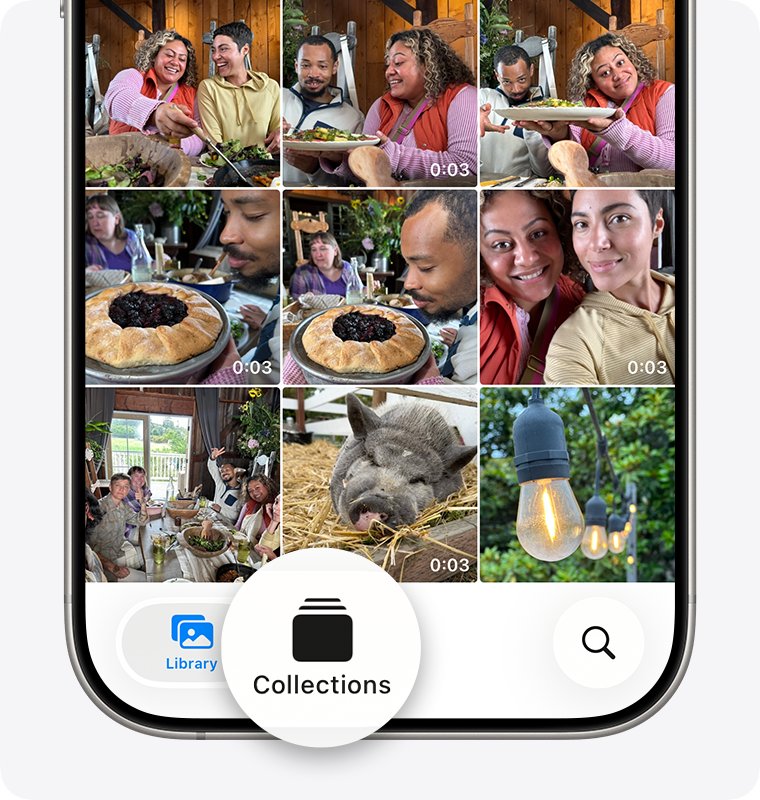
- Open the Photos app and tap Collections.
- Scroll down to Shared Albums, then tap Shared Albums.
- Tap the Add button, name the album and choose the photos to include.
- Tap Sharing Options and choose to share the album with a link.
- Tap Done to create the album.
- Open the album, tap Manage Shared Album, then tap Copy Album Link under Participants.
- Paste the link into a text, email or chat and send it to the people without an Apple Account.
The recipient opens the link in a browser on any phone or computer. If you require approval, they tap Send Request and wait for you to approve them.
Ways to share Apple photos with non-Apple devices
| Your situation | Use this | What the other person gets |
|---|---|---|
| iPhone or iPad on iOS 27 or iPadOS 27 | Shared Album shared with a link | A web album they can view and add photos to without an Apple Account |
| iPhone or iPad still on iOS 26 | Shared Album with Public Website turned on | A read-only web page anyone with the link can see |
| Working from a Windows PC or Chromebook | Shared Albums on icloud.com/photos with Anyone with the Link | The same link-based album, created in a browser |
| Working on a Mac | Shared Album with Public Website or a link-based album | A web link you paste into Mail or Messages |
| Sending a few photos once | Share button, then Mail or Messages | Copies of the photos, no album to maintain |
| A party or trip album that should not linger | Shared Album with Make Album Temporary on | An album that expires after 30 days |
If the people you share with all keep their pictures in Google, sharing a Google Photos link works the same way outside iCloud.
Turn on Shared Albums in iCloud settings
Shared Albums must be on before the Photos app shows the shared album tools. Update to the latest iOS first, because link sharing for people without an Apple Account needs iOS 27.
- Open Settings on your iPhone or iPad.
- Tap your name, then tap iCloud.
- Under Saved to iCloud, tap Photos.
- On iOS 27 or iPadOS 27, make sure iCloud Photos is turned on.
- Scroll down, tap Shared Albums and turn it on.
A temporary shared album works without iCloud Photos turned on.
Turn on Public Website for a shared album in iOS 26
On iOS 26, iPadOS 26 and visionOS 26, Apple's route for friends who do not use iCloud is a public web page for the album. Anyone with the address can view it in an up-to-date browser.
- Open Photos, tap Collections and scroll to Shared Albums.
- Tap Shared Albums, then the Add button, name the album and choose the photos.
- Tap Create.
- Open the shared album you created and tap the More button.
- Tap Shared Album Details.
- Turn on Public Website.
- Copy the web link that appears and send it by text or email.
Share iCloud photos with non-Apple users from iCloud.com on Windows or Android
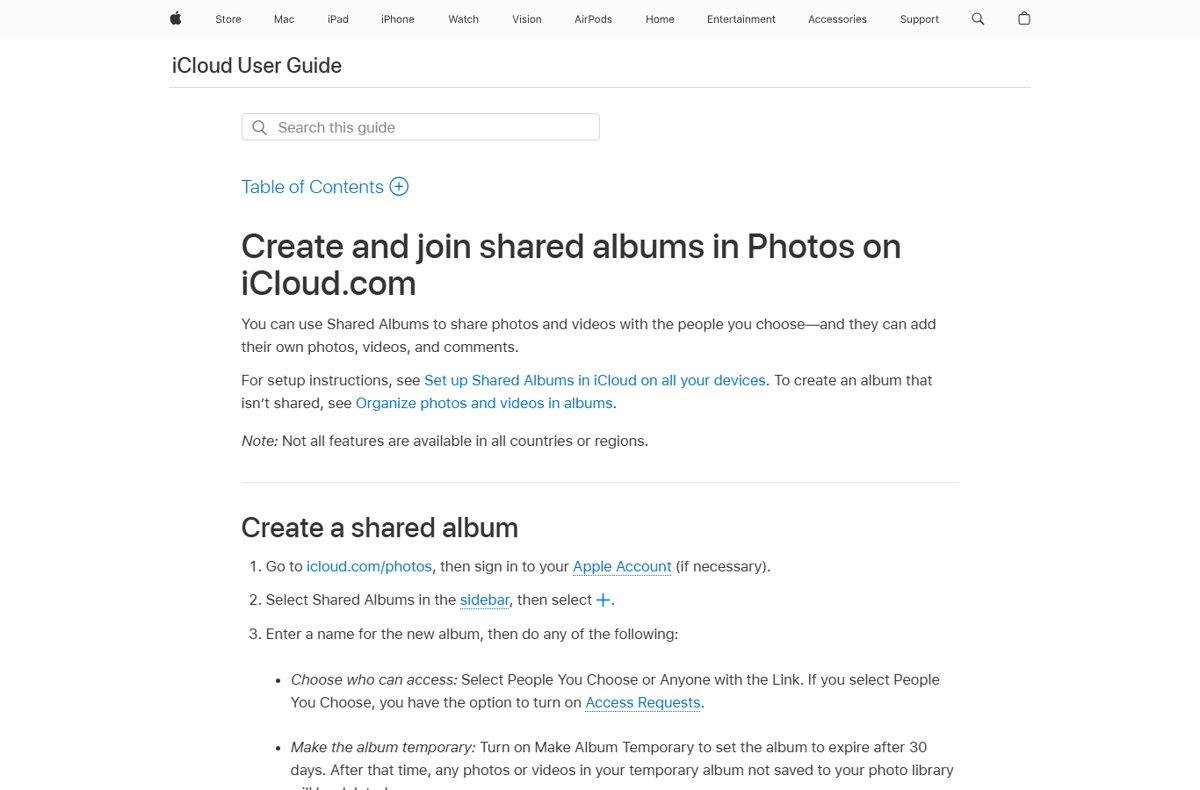
icloud.com/photos works in a browser on a phone, tablet or computer, so you can build the album from a Windows PC. Sign in with your own Apple Account; the viewer still needs none.
- Go to icloud.com/photos and sign in to your Apple Account.
- Select Shared Albums in the sidebar, then select the Add button.
- Enter a name for the album.
- Under who can access, select Anyone with the Link.
- Select Create, then upload the photos from your computer into the album.
- Open the album's menu, choose Manage Shared Album, select Invite Participant, then Create Link.
- Copy the link and send it to the person you want to invite.
For an older album that shows Subscribers Can Post, turn on Public Website and select Copy to get the link instead. If you prefer a desktop app, iCloud for Windows adds an iCloud Shared Albums app once you tick Shared Albums under Photos.
Share a Photos album from Mac with people who don't use iCloud
- Open the Photos app on your Mac.
- Click Shared Albums in the sidebar and double-click the album.
- Click the album's sharing settings button in the toolbar.
- Select Public Website.
- Copy the link and paste it into an email or text message.
To create a new album from the Mac, click the add button next to Shared Albums and set Who Can Access to anyone with the link.
What non-Apple ID users can do with an iCloud shared album link
| Album type | View photos | Add photos | Comments | Account needed |
|---|---|---|---|---|
| iOS 27 link album, joined on the web | Yes | Yes, if the owner grants Can Add Photos | Set by the owner's permission | None; they may be asked for an email or to request access |
| iOS 26 or Mac album with Public Website | Yes, in a browser | No | Cannot comment or see new comments | None |
| Album where the owner requires approval | After you approve their request | Depends on the permission you set | Depends on the permission you set | None for the web; sign in only to save it to an account |
On a Public Website album, post any comments before you send the link, because web viewers cannot see comments added later.
iCloud shared album limits and photo quality
| Limit | Album created in iOS 27 or later | Album created in iOS 26 or earlier |
|---|---|---|
| Photo quality | Original format at full resolution | Reduced to 2,048 pixels on the long edge (panoramas up to 5,400 pixels wide) |
| Video | Original format | Up to 15 minutes, delivered at up to 720p |
| iCloud storage | Counts against the owner's storage, including participants' uploads | Does not count against your storage |
| Participants per album | 100, including the owner | 100 subscribers |
| Photos per album | No limit beyond the owner's storage (5,000 in a temporary album) | 5,000 |
| Spatial photos and video | Not supported | Not supported |
Anyone who has the link to a Public Website or anyone-with-the-link album can open it, so do not post that link publicly unless you mean to.
Check the shared album link works for non-Apple users
- Open the copied link in a private browser window on a Windows PC or Android phone.
- Confirm the album name and photos load; the viewer may be asked for an email address or to request access, but not to create an Apple Account.
- On iOS 27, check Manage Shared Album for the new participant or a pending request.
- Approve the request under Invitations and Access Requests if you set the album to approval.
Stop sharing iCloud photos with someone
- Open the shared album you created.
- On iOS 27, tap Manage Shared Album, tap the participant and tap Remove Participant.
- On iOS 26, tap the More button, tap the album name, tap the person and tap Remove Subscriber.
- For a Public Website album, turn Public Website off in the album details.
- To end sharing completely, tap the More button, then Delete Shared Album and Delete.
Deleting a shared album removes it from every participant and from the web, and permanently deletes its photos. Photos you already saved to your own library stay there.
Fix iCloud shared photos not appearing
Shared photos are not appearing on your iPhone
Shared Albums is turned off, or the invitation was never accepted.
- Go to Settings, tap your name, tap iCloud, then Photos.
- Turn on Shared Albums.
- Open Photos, go to Collections, scroll to Shared Albums, tap Activity and tap Accept.
- If the invite was declined or lost, ask the owner to resend it.
Unable to share photos to a shared album from iPhone
The owner has not given you permission to add photos.
- Ask the owner to open the album and tap Manage Shared Album (iOS 27) or the More button and album name (iOS 26).
- Have them tap your name and select Can Add Photos, or turn on Participants Can Add Photos.
- Try Share then Add to Shared Album again.
Shared album not showing photos for a friend on an older iPhone
Albums created in iOS 27 need the latest software to open in the app.
- Ask them to update their iPhone to the latest iOS.
- Until then, they can open the album on icloud.com in a browser.
A photo or video will not upload from Windows
Shared Albums on a Windows PC refuse HEIF images, HEVC videos and RAW photos.
- Convert the file to JPEG or MP4 before adding it.
- Or add the original from your iPhone or Mac instead.
Sharing iCloud photos with non-Apple users FAQ
Can you share iCloud photos with someone who doesn't have an Apple ID?
Yes. Create an iCloud Shared Album and send its link. In iOS 27 the person can join and add photos on the web without an Apple Account; in iOS 26, turn on Public Website so anyone with the link can view the album in a browser.
How do you share a picture with an iPhone user?
Open the photo, tap the Share button and pick AirDrop, Messages or Mail. AirDrop sends it instantly to a nearby iPhone, while Messages and Mail work at any distance. For many photos, add them to a shared album and invite the person instead.
How do you share photos between Apple devices?
Turn on iCloud Photos on each device signed in to the same Apple Account, and the library stays in sync automatically. To share with other people's Apple devices, use a Shared Album or an iCloud Shared Photo Library with up to five other people.
How do you accept shared photos on iPhone?
Tap the shared album invitation in Notification Center and tap Accept. You can also open Photos, go to Collections, scroll to Shared Albums, tap Activity and tap Accept. Shared Albums must be turned on in Settings > [your name] > iCloud > Photos first.
How do you find shared photos on iPhone?
Open the Photos app, tap Collections and scroll down to Shared Albums, then tap Shared Albums to see every album you own or joined. If the section is missing, turn on Shared Albums under Settings > [your name] > iCloud > Photos.
Does Apple Family Sharing share all photos?
No. Apple's photo sharing works through iCloud Shared Photo Library and Shared Albums, and you choose what goes into each. Your personal iCloud Photos library stays private to your Apple Account unless you add items to one of those shared spaces. Family Sharing itself covers subscriptions and purchases made by family members, not photos.
How do you not share photos on iPhone?
Remove people from the shared album, turn off Public Website, or delete the album. In iOS 27, tap Manage Shared Album, tap the person and tap Remove Participant. Deleting an album removes it for everyone and from the web.
Why are my shared photos not appearing?
Shared Albums is usually turned off on that device, or the invitation was not accepted. Turn on Shared Albums in iCloud Photos settings, then accept the invite from Photos > Collections > Shared Albums > Activity, or ask the owner to resend it.
Do shared albums use iCloud storage?
It depends on the version. Albums created in iOS 27 or later count against the owner's iCloud storage, including participants' uploads. Albums created in iOS 26 or earlier, and temporary albums, do not count against your storage.
Can people without an Apple Account see shared photos on Windows?
Yes. They open the shared album link in any up-to-date browser on Windows, Android or a Chromebook. No iCloud app or sign-in is needed to view a Public Website album or an iOS 27 album shared with a link.
Bottom line: best way to share Apple photos with non-Apple users
Update to iOS 27 and share a Shared Album by link; on iOS 26, turn on Public Website for the album instead. The iOS 27 link keeps full resolution and lets non-Apple users add their own photos, while Public Website is view-only and reduces photos to 2,048 pixels.

![How do I find saved passwords on my computer [Windows 11/10]](https://techdows.com/wp-content/uploads/2026/10/How-Do-I-Find-Saved-Passwords-on-My-Computer-Windows-1110.jpg)