You cannot log in to a privaterelay.appleid.com email directly, because it is a Hide My Email forwarding address with no inbox of its own: sign in to the app with the Sign in with Apple button, and read its emails in the personal inbox they forward to.
This guide shows how to sign in on any device, find which app an address belongs to, locate the inbox that receives its mail, change or stop forwarding, and tell it apart from iCloud Private Relay.
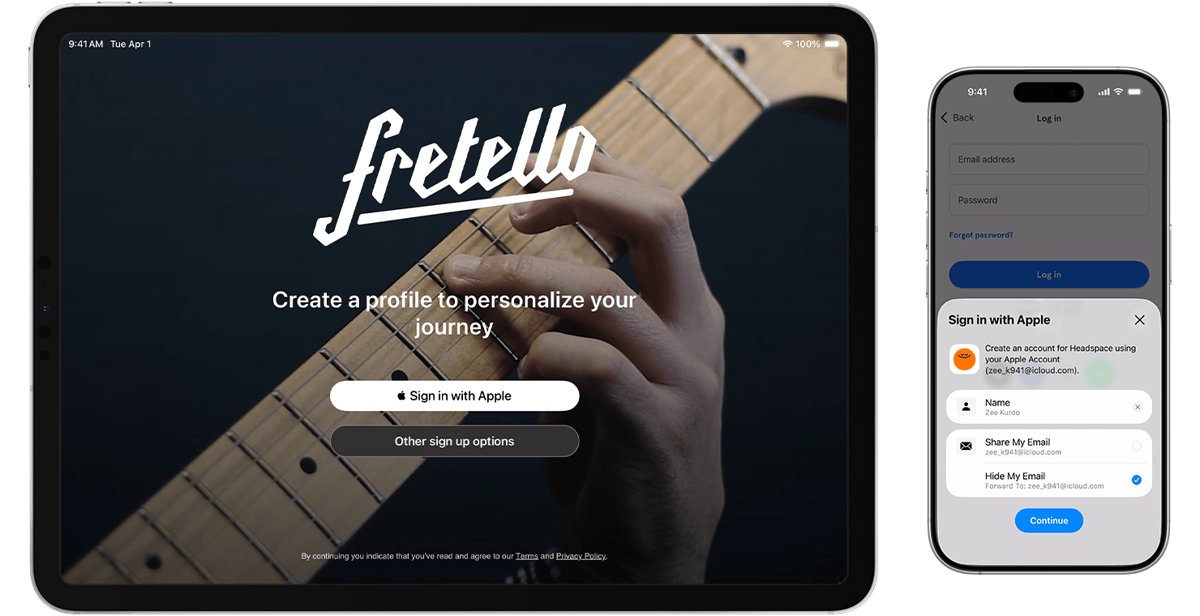
How to sign in to an account that uses a privaterelay.appleid.com email
The address was created when you picked Hide My Email while signing up with Sign in with Apple. Your Apple Account is the login, not the relay address.
- Open the app or website that shows the privaterelay.appleid.com address.
- On its sign-in screen, tap Sign in with Apple instead of typing the email and a password.
- Review the details Apple shows for the app.
- Confirm with Face ID, Touch ID or your device passcode.
- On a non-Apple device or browser, enter your Apple Account email or phone number, password and the six-digit verification code.
Using Sign in with Apple again signs you in to the same account you used before. You need to be signed in to your Apple Account with two-factor authentication turned on. If the verification code goes to a phone you no longer have, you can still sign in to iCloud without your phone.
What is privaterelay.appleid.com?
| Question | Answer |
|---|---|
| Who runs it | Apple; it is the domain for Hide My Email addresses created through Sign in with Apple |
| Is there an inbox | No; mail is forwarded to the verified email address on your Apple Account |
| Who can email it | Only the app or website you created the account with, from its designated addresses |
| Does Apple keep the mail | No; messages are deleted from the relay servers after delivery, usually within seconds |
| Does Apple read it | Apple says it does not read or process content, apart from standard spam filtering |
| Can you reply | Yes; you can read and respond directly, and your personal address stays private |
| Is it unique | Yes; each address is random and unique to you and that app |
If you saw the address in an email or in a company's account page, that company only knows the relay address, not your real email.
Find which app a privaterelay.appleid.com address belongs to
Every app you joined with Sign in with Apple is listed in your Apple Account settings, with the address it received.
- On iPhone or iPad, open Settings and tap your name.
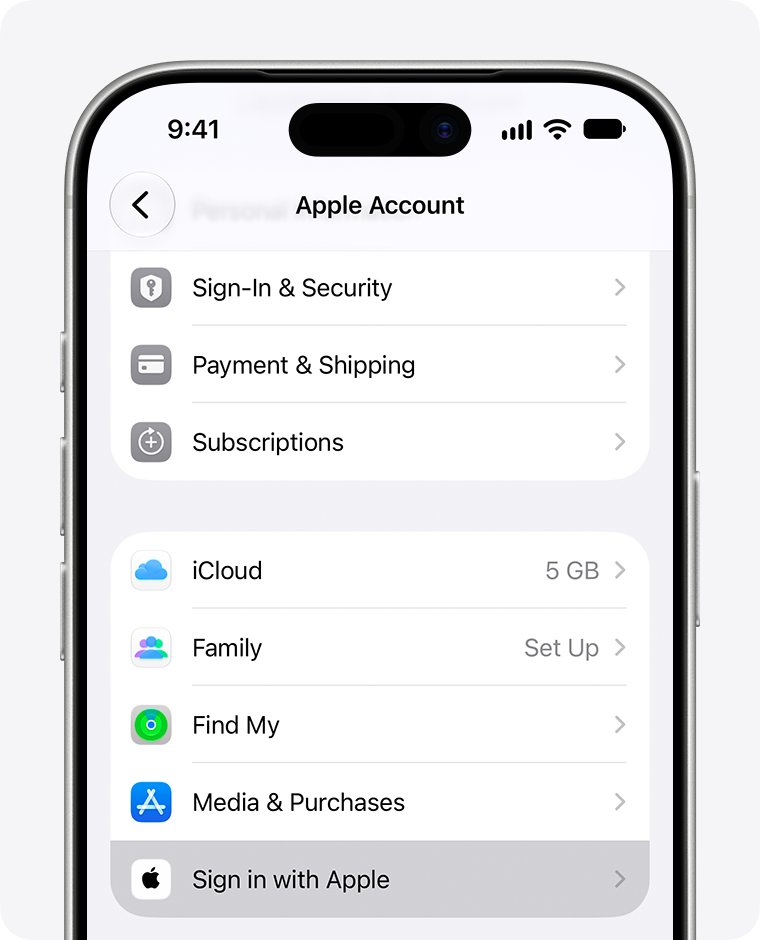
- Tap Sign in with Apple to see the apps and websites using it.
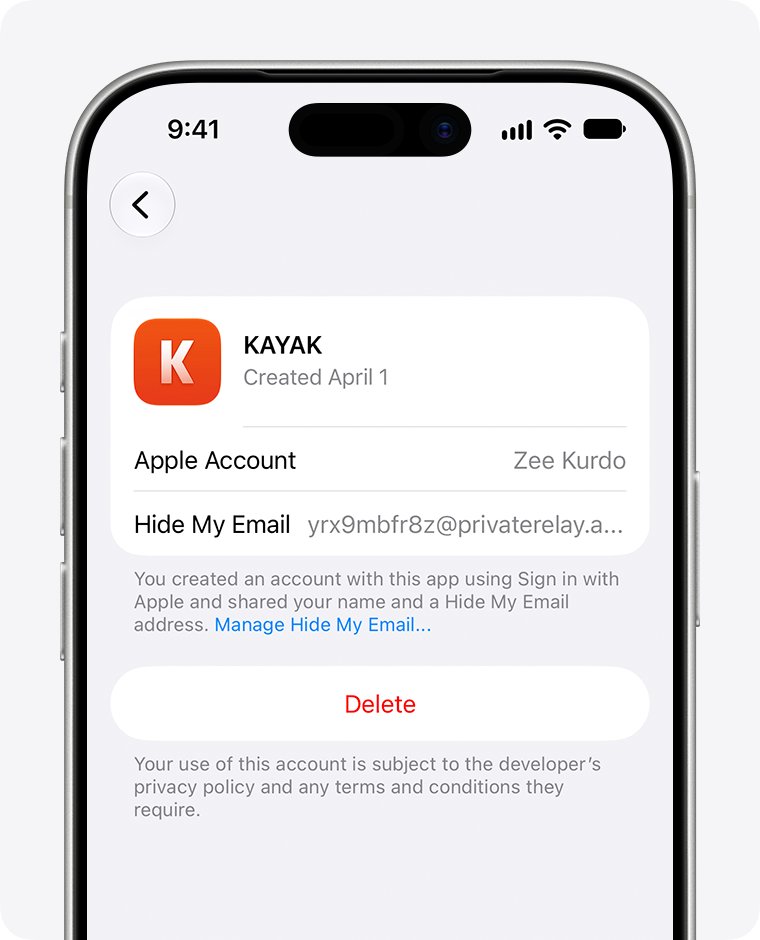
- Tap an app to see the information you shared, including the @privaterelay.appleid.com address.
- On a Mac, open Apple menu > System Settings, click your name, then Sign in with Apple.
- On the web, sign in at account.apple.com, go to Sign-In & Security, then Sign in with Apple.
Where privaterelay.appleid.com emails go: find your forwarding inbox
Mail sent to the relay address lands in the inbox set under Forward To. Check that inbox, not a separate Apple mailbox.
- On iPhone, open Settings, tap your name, then tap iCloud.
- Scroll to iCloud+ Features and tap Hide My Email.
- Scroll down to Forward To and note the address selected there.
- Open that mailbox wherever it is hosted, for example by signing in to your Gmail account, Outlook or iCloud Mail.
- Search it for the app's name to find the forwarded messages.
If you have no iCloud+ subscription, the mail still goes to the verified email address on your Apple Account. To read relay mail inside iCloud Mail on the web, the forwarding address must be your iCloud Mail address or a custom domain address.
Set a password for an app account that uses a privaterelay.appleid.com email
Apple notes that some apps let you create a password for an existing Sign in with Apple account, so you can sign in without your Apple Account. The reset email goes through the relay to your forwarding inbox.
- Copy the privaterelay.appleid.com address from Settings > your name > Sign in with Apple > the app.
- On the app's sign-in page, choose its forgot password or reset option.
- Paste the relay address as your email.
- Open the reset email in your forwarding inbox and set a password.
- Sign in with the relay address and the new password from then on.
Not every app offers this. If the reset option does not accept the address, keep using the Sign in with Apple button.
Is privaterelay.appleid.com the same as iCloud Private Relay?
The names overlap, which is why people search for an Apple private relay login. Only the first two involve email.
| Feature | What it does | Needs iCloud+ | Where to manage it |
|---|---|---|---|
| Sign in with Apple + Hide My Email (@privaterelay.appleid.com) | Random address given to one app at sign-up | No | Settings > your name > Sign in with Apple |
| Hide My Email in iCloud+ | Random addresses you create on demand in Safari, Mail or forms | Yes | icloud.com/icloudplus or Settings > your name > iCloud > Hide My Email |
| iCloud Private Relay | Hides your IP address while browsing in Safari | Yes | Settings > your name > iCloud > Private Relay |
None of these has a login page of its own. Each is managed through your Apple Account.
Change where privaterelay.appleid.com emails are forwarded
With iCloud+, you can send relay mail to any email address that is on file in your Apple Account. The change applies to every app using Hide My Email.
- Open Settings, tap your name, then tap iCloud.
- Tap Hide My Email in the iCloud+ Features section.
- Scroll to the bottom and tap Forward To.
- Choose the address you want relay mail delivered to.
- On a Mac, use System Settings > your name > iCloud > Hide My Email and the Forward To menu.
On the web, go to icloud.com/icloudplus and use the Forward to section. To add a new address to the list, add it to your Apple Account first.
Stop emails from a privaterelay.appleid.com address
- Open Settings, tap your name, then tap iCloud.
- Tap Hide My Email under iCloud+ Features.
- Select the app or developer.
- Turn off Forward To for it.
To drop the account link completely, go to Settings > your name > Sign in with Apple, select the app and tap Delete. You are signed out, and next time you can sign in with Apple again or create a new account. If a developer runs several apps on one account, the change applies to all of them.
How to check your privaterelay.appleid.com email is forwarding
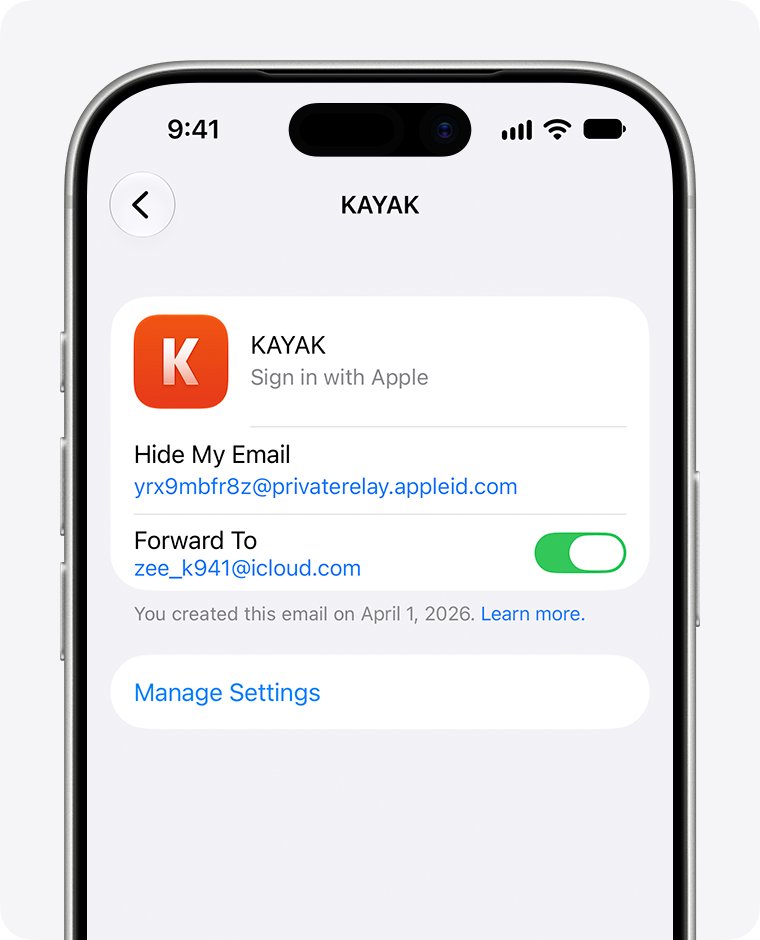
- Open Settings > your name > Sign in with Apple and select the app.
- Confirm it lists an @privaterelay.appleid.com address, which means Hide My Email is in use.
- Ask the app to send an email, such as a password reset or verification message.
- Check the inbox shown under Forward To within a few minutes.
- If nothing arrives, check that Forward To is turned on for that app.
privaterelay.appleid.com email FAQ
What is privaterelay.appleid.com?
It is the domain Apple uses for Hide My Email addresses created with Sign in with Apple. Each address is random, unique to one app, and forwards that app's mail to the verified email address on your Apple Account.
Is there a privaterelay.appleid.com email login page?
No. There is no inbox to log in to. You sign in to the app with the Sign in with Apple button, and you read the app's emails in your forwarding inbox.
Where do privaterelay.appleid.com emails go?
They go to the address set under Forward To in Hide My Email, which is the verified email on your Apple Account by default. Apple deletes the messages from its relay servers after delivery, usually within seconds.
How do I log in to Zoom or another app with a privaterelay.appleid.com email?
Use the Sign in with Apple option on the app's sign-in screen. That signs you in to the same account you created. Some apps also let you set a password using the relay address through their password reset.
Can I reply to an email sent to my privaterelay.appleid.com address?
Yes. You can read and respond directly from your forwarding inbox, and your personal email address is kept private from the app.
Is privaterelay.appleid.com the same as iCloud Private Relay?
No. privaterelay.appleid.com is an email forwarding domain. iCloud Private Relay is an iCloud+ feature that hides your IP address while you browse in Safari.
Can I see my privaterelay.appleid.com address on the web?
Yes. Sign in at account.apple.com, go to Sign-In & Security, and select Sign in with Apple. Select an app to see the information you shared with it.
What happens if I stop using Sign in with Apple with an app?
You are signed out of that app. Next time, you can sign in with Apple again to reach the same account, or create a new account. Turning off forwarding instead stops the app's emails without removing the link.
Bottom line: logging in with a privaterelay.appleid.com address
Treat the privaterelay.appleid.com address as a label, not a mailbox: sign in with the Sign in with Apple button, and read its mail in the inbox listed under Forward To. Apple only relays the messages to your Apple Account email and deletes them from its servers within seconds, so there is nothing to log in to at privaterelay.appleid.com itself.
If the problem is your Apple Account password rather than the relay address, change your Apple Account password first and then use Sign in with Apple.


![Rockstar Games Launcher not working on Windows PC [Fix]](https://techdows.com/wp-content/uploads/2026/10/Rockstar-Games-Launcher-not-working-on-Windows-PC-Fix-600x338.jpg)