Apple account recovery is the waiting-period process you start at iforgot.apple.com or in the Apple Support app when you cannot reset your Apple Account password with a trusted device or your recovery factors.
This guide covers the faster routes to try first, how to start and track a recovery request, what cancels it, and how a recovery key or recovery contact changes the process.
How to recover an Apple Account step by step
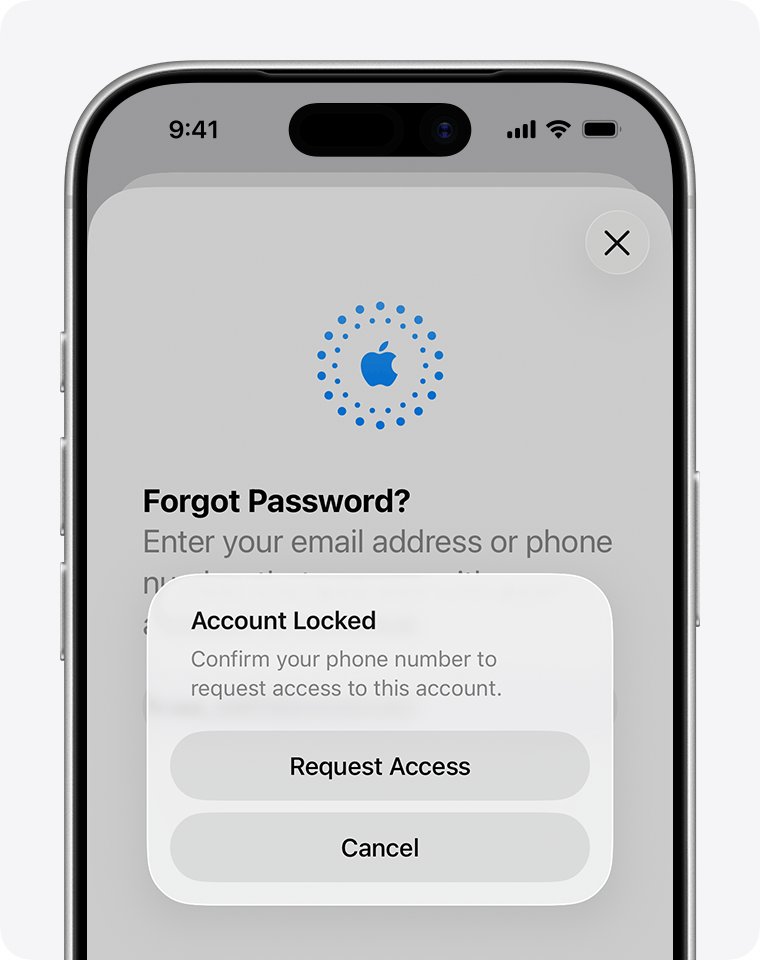
Start with Forgot password? wherever Apple asks you to sign in. The onscreen flow sends you to a trusted device, asks for recovery factors, or offers account recovery when nothing else works.
- On the sign-in screen of a new device, the Settings app or the App Store, select Forgot password? or Forgot password or don't have an Apple Account?.
- Enter the email address or phone number of your Apple Account. Any address or number linked to the account works.
- If a trusted device is offered, approve the request on it and set a new password there.
- If not, provide the recovery factors you are asked for, such as a code sent to your trusted phone number.
- If you cannot provide them, choose to request account recovery and enter a phone number Apple can contact.
- Wait for the confirmation email or iMessage, which arrives within 72 hours with the date and time access is expected.
- When Apple texts, calls or emails that the account is ready, follow the instructions, or go to apple.com/recover after the time in your confirmation email.
Apple Account recovery options: which one applies to you?
Account recovery is the slowest route, so Apple advises waiting a few days if you will soon have your trusted device or trusted phone number back.
| Your situation | What to use | How long it takes |
|---|---|---|
| You are still signed in on an iPhone, iPad, Mac, Apple Watch or Apple Vision Pro | Change the password on that trusted device | Immediate, though Stolen Device Protection can add a one-hour delay |
| You have your trusted phone number but no trusted device | Forgot password? with a verification code | Usually immediate |
| You set up a recovery contact | Six-digit code from your recovery contact | As soon as the contact gives you the code |
| You set up a recovery key | Recovery key plus trusted phone number and an Apple device | Immediate; standard account recovery is turned off |
| No trusted device, no trusted number, no other recovery factors | Account recovery request | Several days or longer |
| You see "disabled for security reasons" | Reset your password | Depends on the factors you have |
Apple account recovery factors to have ready
Gather these before you start, because Apple may ask for any of them and each one you can provide can shorten the process.
| Recovery factor | What Apple asks for |
|---|---|
| Trusted phone number | A two-factor verification code sent to the number you set up |
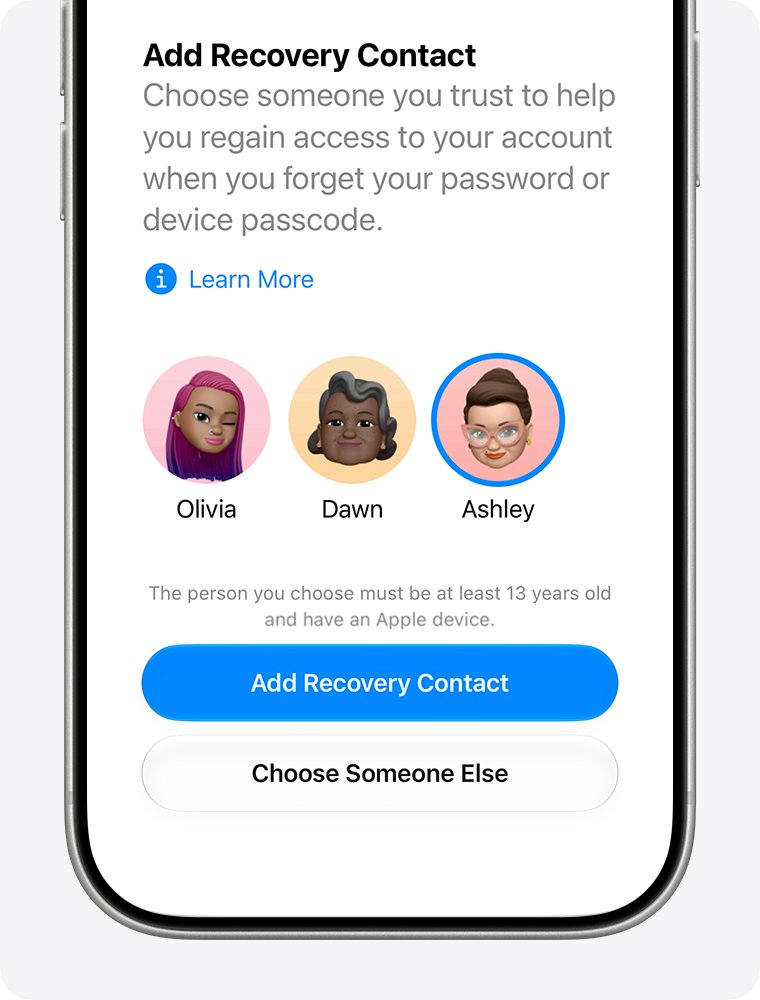
| Recovery contact | A six-digit code from the person you chose, or their help in person |
| Apple Account email address | Access to the inbox linked to the account |
| Payment card on the account | The card's CVV; if the issuer declines the check, select Don't have access to this card |
| Recovery key or security keys | The 28-character recovery key or your physical security key, which use a different process |
Change your Apple Account password on a trusted device first
A trusted device can skip account recovery entirely. If you are signed in on an iPhone while setting up a new iPad, change the password on the iPhone.
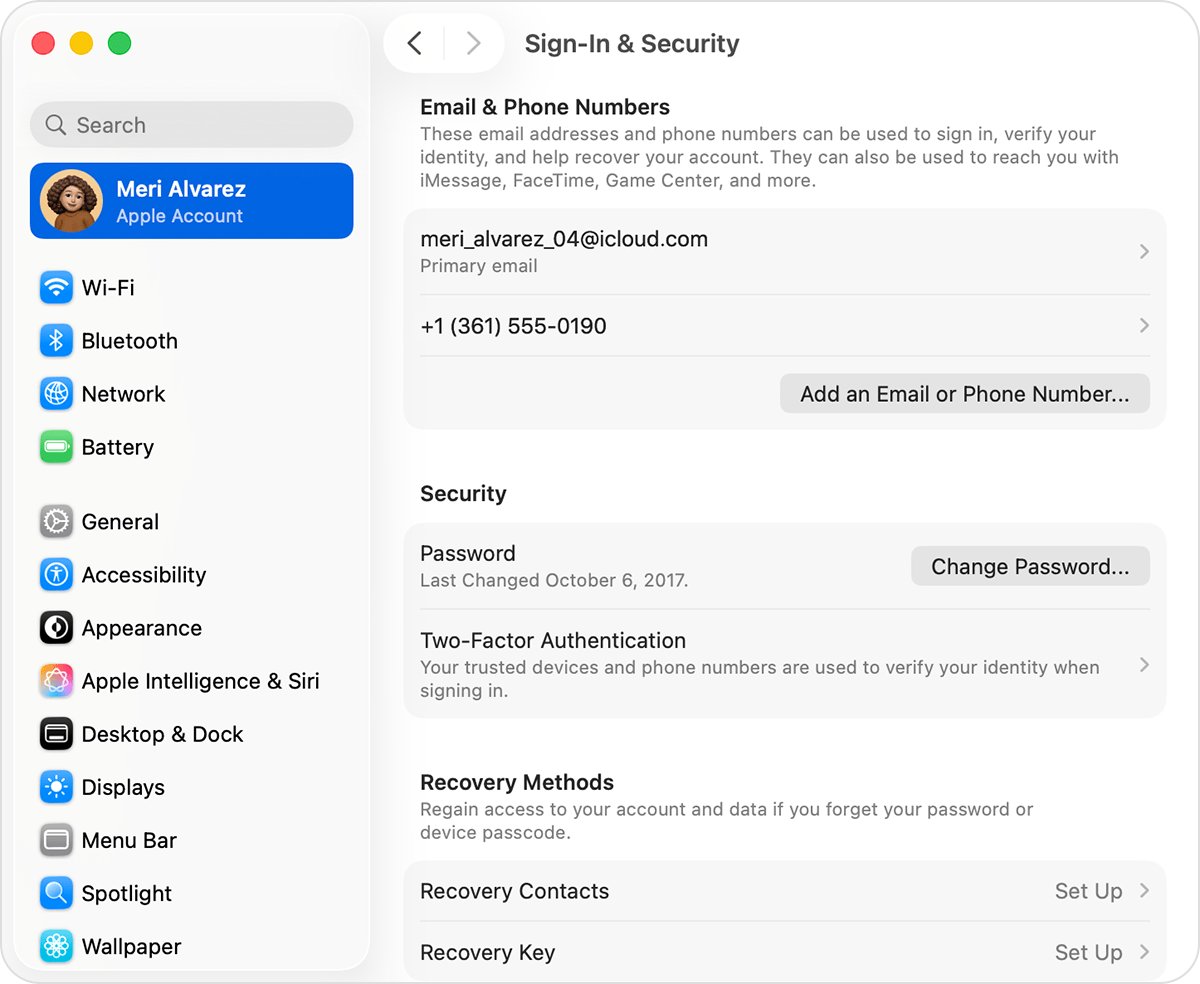
- On iPhone, iPad, Apple Watch or Apple Vision Pro, open Settings and tap your name.
- Tap Sign-In & Security, then tap Change Password.
- Enter the device passcode if asked and type a new password.
- Choose Remove Other Devices or Keep All Devices Signed In.
- On a Mac, choose Apple menu > System Settings, click your name, click Sign-In & Security, then click Change Password and enter your Mac login password.
The same password also signs you in to iCloud and the App Store. Your Mac login and lock screen passwords are separate, and you can change your MacBook login password on its own.
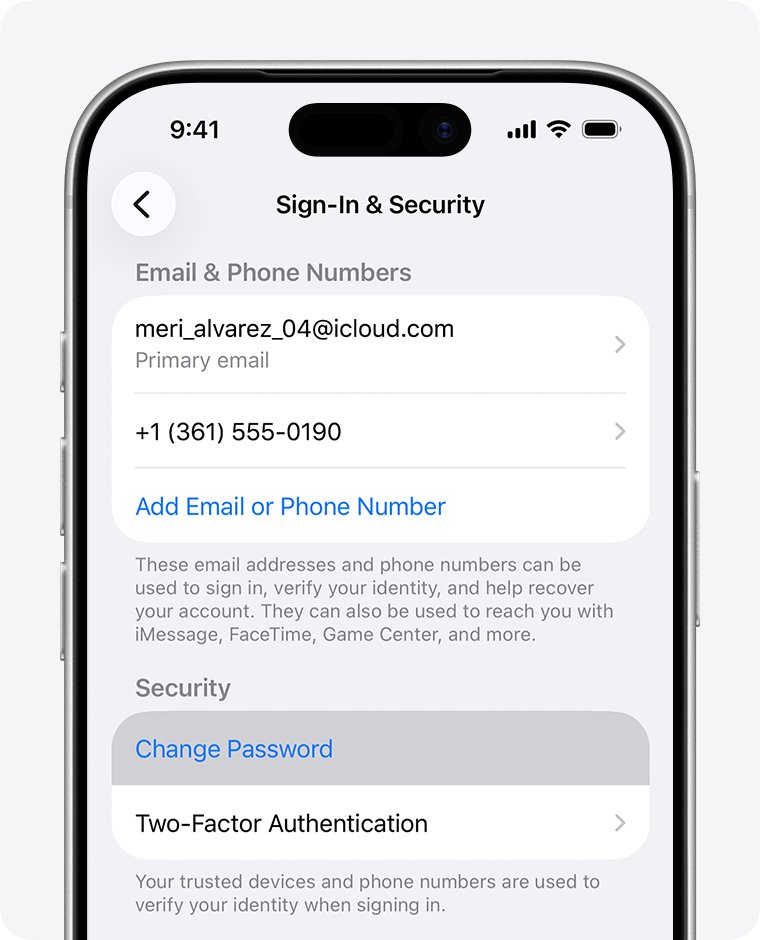
Start Apple account recovery at iforgot.apple.com or in the Support app
Use one of the two official starting points. Do not submit a second request later unless you find more recovery factors, because a new request can extend the wait.
- On a device with iOS 17 or later or macOS 27 or later, open Safari and go to iforgot.apple.com.
- Alternatively, on a borrowed device or one at an Apple Store, open the Apple Support app, scroll to Support Tools, tap Reset Password and tap Help Someone Else.
- Enter your Apple Account email address or phone number and follow the prompts.
- When password reset is not possible, choose to start account recovery.
- Enter a phone number you can receive texts or calls on; Apple uses it to contact you when the account is ready.
- Write down exactly which email address and phone number you entered.
Information entered in the Support app on a borrowed device is not stored on that device.
What to do with your Apple devices during the recovery wait
Activity from any device signed in to your Apple Account cancels the request, so the wait is mostly about leaving things alone.
- If you started recovery on a device with iOS 17, iPadOS 17 or macOS 27 or later, keep using that device.
- If you started recovery on the web, turn off all your Apple devices until the wait ends.
- If you find another device still signed in to your account, change your password on it; this cancels recovery but gives you access at once.
- If you cannot unlock that device, for example because you forgot its passcode, turn it off.
- Do not contact Apple Support to shorten the wait; the waiting period is fixed.
Check your Apple account recovery status
- Open the confirmation email or iMessage and note the expected completion date and time.
- If it has not arrived, wait the full 72 hours, then check your spam or junk folder.
- Go to iforgot.apple.com and enter the same email address and phone number you used to start the request.
- If the request is active, the site shows the expected recovery time.
- If it is not active, the request was not submitted or was cancelled; submit a new one.
Entering different details on iforgot.apple.com than you used originally can extend the wait period.
Use a recovery contact or recovery key to regain access
A recovery contact is someone you trust who can get a six-digit code for you; they never get access to your account. A recovery key is a 28-character code that replaces Apple's standard account recovery, and Apple cannot provide it if you lose it.
| Detail | Recovery contact | Recovery key |
|---|---|---|
| Where to set it up | Settings > your name > Sign-In & Security > Recovery Contacts | Settings > your name > Sign-in & Security > Recovery Key |
| Requirements | iOS 15, iPadOS 15 or macOS Monterey 12 or later on all your devices and theirs; iMessage turned on; both over 13 | iOS 14, iPadOS 14 or macOS Big Sur or later; two-factor authentication |
| How you use it | Start account recovery, contact them in person or by phone, then enter their code on your device | Enter the key and a code sent to your trusted phone number |
| If you lose it | Standard account recovery still works, but takes longer | You can be locked out of your account permanently |
| Limit | Up to five recovery contacts | One key; Replace Recovery Key creates a new one |
Never store the recovery key in Passwords, iCloud Photos, Notes or iCloud Drive, because you cannot open them while locked out.
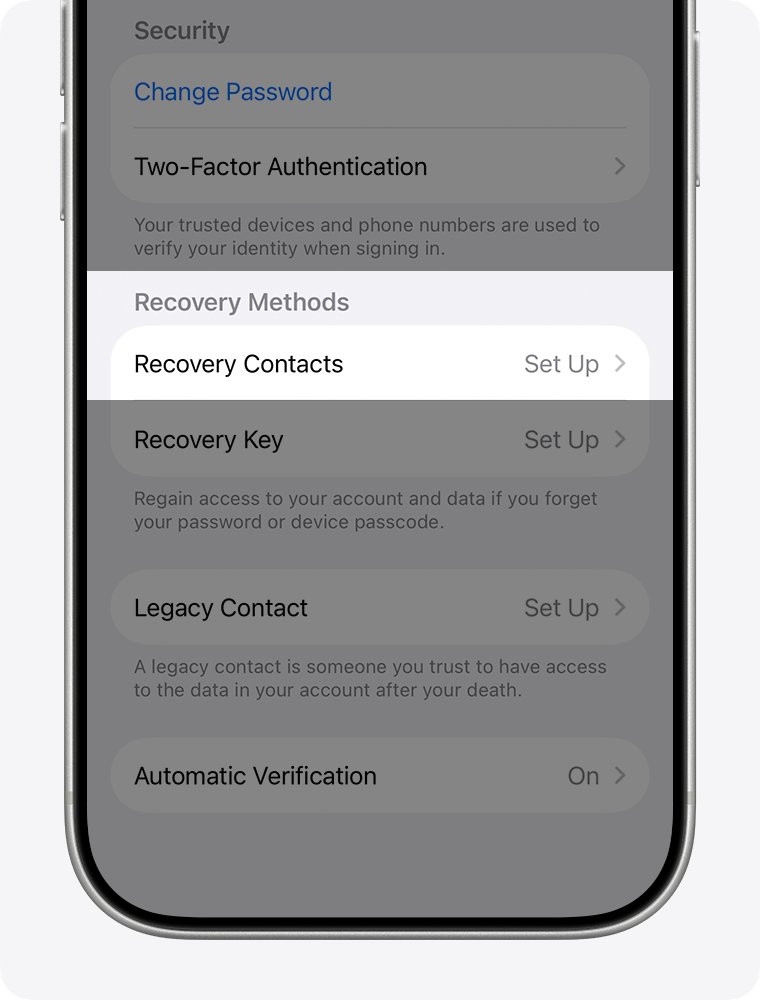
How to cancel an Apple account recovery request
- If you remember your password, sign in; the request cancels automatically and the account works immediately.
- If you did not request recovery, open the confirmation email and use its cancellation link straight away.
- Change your Apple Account password on a trusted device and review your account security.
Apple account recovery not working: causes and fixes
Apple account recovery takes so long or takes days
Apple builds in a security delay of several days or longer, and Apple Support cannot shorten it.
- Check the expected date in the confirmation email.
- Keep signed-in devices off or unused so the request is not cancelled.
- If you find a recovery factor, such as your trusted phone number, try Forgot password? again.
The recovery request disappeared or shows as not active
A signed-in device was used during the wait, or the request was never submitted.
- Check status at iforgot.apple.com with the original email address and phone number.
- Submit a new request if it is not active, then keep your devices off.
No confirmation email arrived
The email can take up to 72 hours or land in spam.
- Wait the full 72 hours from the start of recovery.
- Check spam and junk, then check status at iforgot.apple.com.
Account recovery is not offered at all
A recovery key turns off Apple's standard account recovery.
- Find your printed or written recovery key.
- Enter it with the verification code sent to your trusted phone number.
The card verification says the information is incorrect
The card issuer declined the CVV check even though the number was right.
- Select Don't have access to this card and continue with other factors.
"This Apple Account is locked and can't be used"
Apple denied the request to unlock the account.
- Create a new Apple Account if you cannot regain access.
- If a device has Activation Lock and you have proof of purchase, start an Activation Lock support request with Apple.
Apple account recovery FAQ
What is Apple account recovery?
Apple account recovery is a process that restores access to your Apple Account when you cannot reset the password with a trusted device or recovery factors. After a security waiting period, Apple contacts you with instructions to set a new password.
Why does Apple account recovery take so long?
The delay of several days or longer is deliberate and protects your account from someone trying to take it over. Apple says contacting Apple Support cannot shorten the wait, and a second request can make it longer.
Why is my Apple account recovery not working?
The most common cause is a cancelled request: using a device signed in to your account during the wait cancels it. Check iforgot.apple.com with the same email and phone number you used, and submit a new request if it is not active.
Does Apple account recovery delete everything?
Apple's recovery pages describe regaining access to your existing account, not erasing it. The exception is end-to-end encrypted data under Advanced Data Protection, which needs a recovery key or recovery contact, and losing a recovery key can lock you out permanently.
Can the Apple Store help with account recovery?
Yes, you can start recovery in the Apple Support app on a device at an Apple Store by choosing Reset Password and Help Someone Else. Apple Support staff cannot shorten the waiting period once it starts.
How does account recovery for Apple work?
You start a request at iforgot.apple.com or in the Support app, receive a confirmation within 72 hours, and wait for the stated date. Apple then emails and texts or calls you, or you go to apple.com/recover to finish.
Does Apple account recovery work without a phone number?
You need a phone number Apple can contact when the account is ready, because Apple texts or calls the number used to start recovery. It does not have to be your old trusted number.
What is the Apple account recovery website?
Start and check recovery at iforgot.apple.com. When the waiting period ends, apple.com/recover is where you go to finish if you did not get the text or call.
Bottom line: the fastest way back into your Apple Account
Try a trusted device or your trusted phone number first, and use account recovery only when neither is available. Account recovery works but takes several days, and any signed-in device you use during the wait cancels it. Once you are back in, add a recovery contact so the next lockout takes minutes.