Windows 10 reached end of life on October 14, 2025, so Home and Pro PCs no longer get free security updates, fixes or technical support.
This guide explains what that means, how to enroll in Extended Security Updates (ESU) to keep getting patches until October 12, 2027, and what to do if ESU is not an option.
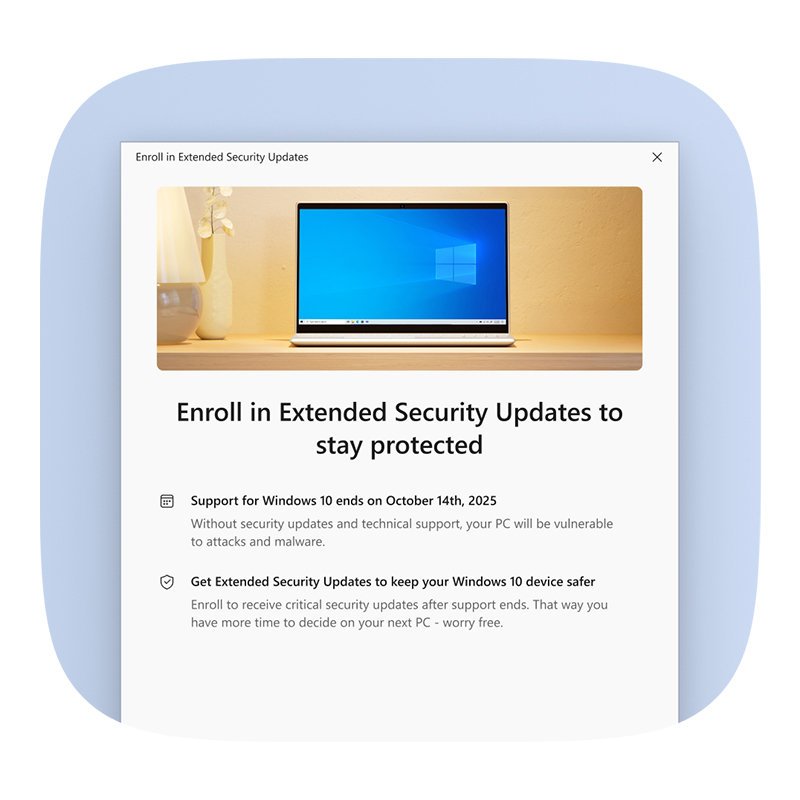
How to keep your Windows 10 PC protected after end of life
The consumer ESU program is the only way to keep getting Microsoft security updates on Windows 10 Home and Pro. Enrolled PCs get critical and important security updates through October 12, 2027.
- Confirm the PC runs Windows 10, version 22H2: press Win + R, type
winverand press Enter. - Open Settings > Update & Security > Windows Update and install every pending update.
- Sign in to Windows with a Microsoft account that is an administrator, not a child account.
- On the Windows Update page, select Enroll now under the Extended Security Updates notice.
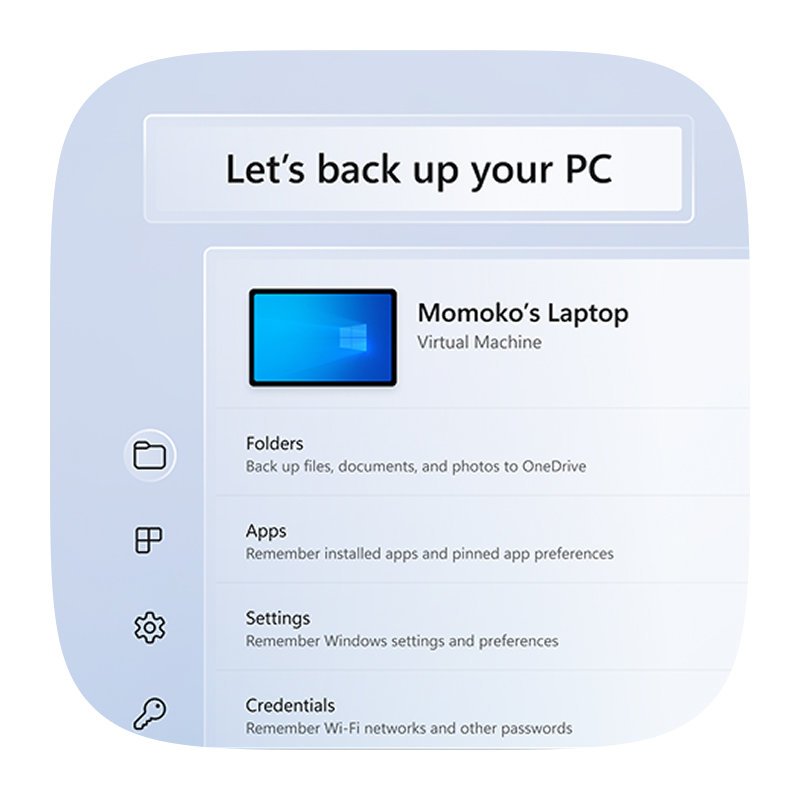
- Pick an enrollment option: back up your PC settings (no cost), redeem 1,000 Microsoft Rewards points, or make a one-time $30 USD purchase.
- On your other Windows 10 PCs, select Enroll now and then Add device while signed in with the same Microsoft account. One license covers up to 10 devices.
- Check whether the PC can run Windows 11, because the upgrade stays free for eligible Windows 10 Home and Pro devices.
Which option should you choose now that Windows 10 is retired?
| Your situation | Best option | Why |
|---|---|---|
| PC meets Windows 11 requirements | Upgrade to Windows 11 for free | Fully supported, no cost through Windows Update |
| PC cannot run Windows 11 and you need more time | Enroll in consumer ESU | Security updates continue to October 12, 2027 |
| PC is old or failing | Replace the hardware | A new Windows 11 PC is supported for years |
| Work PC managed by an organization | Commercial ESU through your IT department | Organizations can buy up to three years of ESU |
| Enterprise LTSC edition | Stay on the LTSC lifecycle | LTSC releases follow their own support dates |
| ESU and an upgrade are both off the table | Move to Linux or ChromeOS Flex, or take the machine offline | Avoids running an unpatched system on the internet |

What Windows 10 end of life actually means
End of life and end of support mean the same thing here. Microsoft stopped three things for Windows 10 Home, Pro, Pro Education and Pro for Workstations on October 14, 2025. Version 22H2 is the final version of Windows 10.
| What changed | Status after October 14, 2025 |
|---|---|
| Security and quality updates | Stopped, unless the PC is enrolled in ESU |
| Feature updates and new features | Stopped for good, ESU included |
| Microsoft technical support | Stopped |
| The PC itself | Keeps working and booting normally |
| Microsoft 365 apps | Keep running; security updates continue until October 10, 2028 |
| Office 2016 and Office 2019 | Support has ended on every operating system |
| Office 2021 and 2024 on Windows 10 | Still run, but are not supported on Windows 10 |
Why Windows 10 end of life still matters in 2026
Every month without patches adds known, published vulnerabilities to an unenrolled Windows 10 PC. Antivirus software such as Microsoft Defender helps, but it cannot fix holes in the operating system itself.
| Windows 10 edition | Support ends |
|---|---|
| Home, Pro, Pro Education, Pro for Workstations | October 14, 2025 |
| Consumer ESU (enrolled Home and Pro PCs) | October 12, 2027 |
| Commercial ESU | Up to three years after October 14, 2025 |
| Enterprise LTSC 2021 | January 12, 2027 |
| Enterprise LTSC 2019 | January 9, 2029 |
Windows 10 Enterprise LTSC editions follow the Fixed Lifecycle Policy, so they were not affected by the October 2025 date.
Windows 10 ESU cost and eligibility
| Item | Consumer ESU | Commercial ESU |
|---|---|---|
| Who qualifies | Individuals on Windows 10 22H2 for personal use | Organizations through Volume Licensing |
| Price | Free with settings backup, 1,000 Rewards points, or $30 USD once | $61 USD per device for year one, doubling each year |
| Length | Through October 12, 2027 | Maximum of three years |
| Devices | Up to 10 per license | Bought per device |
| Excluded | Organization-managed and enterprise-licensed PCs | Partial-year purchases |
ESU delivers security updates only. It adds no new features, no non-security fixes and no general technical support. Enrollment options and timing can differ by region, such as in the European Economic Area.
Alternative solutions if ESU is not an option
| Alternative | What it involves | Keep in mind |
|---|---|---|
| Upgrade to Windows 11 for free | Go to Settings > Update & Security > Windows Update and accept the Windows 11 offer if the PC is eligible | Eligible Home and Pro PCs move to the matching Windows 11 edition at no cost |
| Replace the hardware | Buy a Windows 11 PC and move files with Windows Backup | Microsoft and retail partners offer trade-in and recycling programs in some regions |
| Move to Linux or ChromeOS Flex | Replace Windows with a supported operating system | Windows apps will not run natively; back up everything first |
| Take the machine offline | Disconnect it from the internet and use it for offline tasks only | No browsing, email or file downloads on that PC |
How to back up Windows 10 before you upgrade or replace the PC
Windows Backup saves your files, settings and apps to OneDrive so they restore on a Windows 11 PC. It needs a Microsoft account, and backups over 5 GB need a Microsoft subscription or trial.
- Select Start, type Windows Backup and open the app.
- Sign in with your Microsoft account if prompted.
- Choose the folders, settings and apps you want to back up.
- Select Back up and wait for it to finish.
- Sign in with the same Microsoft account on the new PC to restore the backup.
Some apps must be reinstalled manually from their original provider, and some may not run on Arm devices.
Security habits that matter more after end of life
| Habit | Why it matters on Windows 10 now |
|---|---|
| Keep Microsoft Defender or your antivirus updated | It still blocks known malware, even though it cannot patch Windows |
| Update browsers and apps yourself | Third-party software keeps patching its own flaws |
| Use a standard account for daily use | Malware gets fewer rights without an administrator token |
| Back up files regularly | A ransomware hit on an unpatched PC is easier to recover from |
| Avoid unknown attachments and downloads | Unpatched systems are the easiest target for exploits |
| Plan the move off Windows 10 | ESU coverage ends on October 12, 2027 even if you enroll late |
How to confirm Windows 10 ESU enrollment worked
- Open Settings > Update & Security > Windows Update.
- Check that the Enroll now link has been replaced by a message that the PC is enrolled in Extended Security Updates.
- Select Check for updates and confirm that monthly security updates install.
Still not working? Common ESU enrollment problems
The Enroll now link does not appear in Windows Update
The PC does not meet one of the ESU prerequisites yet.
- Run
winverand upgrade to version 22H2 if the PC is on an older version. - Select Check for updates and install every pending update, then restart.
- Sign in with an administrator Microsoft account rather than a child account.
Enrollment is blocked on a work or school PC
Consumer ESU excludes devices in kiosk mode, joined to an Active Directory domain, Microsoft Entra joined or enrolled in MDM.
- Ask the organization's IT department about commercial ESU for that device.
- Use consumer ESU only on a personal PC; Microsoft Entra registered devices remain eligible.
Asked to sign in with a Microsoft account
ESU enrollment requires a Microsoft account even if Windows uses a local account.
- Select Enroll now and sign in with your Microsoft account when prompted.
- Make sure that account is an administrator on the PC.
A second PC will not join the same ESU license
The second PC is signed in with a different Microsoft account, or the license already covers 10 devices.
- Sign in on the second PC with the account used to enroll the first one.
- Select Enroll now and then Add device.
Windows 10 end of life FAQ
What is the end of life date for Windows 10?
Windows 10 Home, Pro, Pro Education and Pro for Workstations reached end of support on October 14, 2025. PCs enrolled in consumer ESU keep getting security updates until October 12, 2027.
Is Windows 10 end of life or end of support?
Both terms describe the same date. Microsoft calls it end of support: October 14, 2025, when free security updates, feature updates and technical support stopped for Windows 10 Home and Pro.
What happens after Windows 10 end of life?
Your PC keeps working, but it no longer receives security or quality updates, new features or Microsoft support unless it is enrolled in ESU. Each new vulnerability stays unpatched.
How to use Windows 10 after end of life?
Keep using it as normal, but enroll in consumer ESU so security updates continue until October 12, 2027. Keep antivirus, browsers and apps updated, and plan a move to Windows 11 or another system.
How to keep Windows 10 safe after end of life?
Enroll in ESU from Settings > Update & Security > Windows Update. Antivirus alone is not enough, because it cannot fix flaws in Windows itself. Back up files and use a standard account.
Is Windows 10 ESU really free?
It can be. Consumer ESU costs nothing if you back up your PC settings with Windows Backup. Otherwise redeem 1,000 Microsoft Rewards points or pay a one-time $30 USD.
Is Windows 10 Pro end of life?
Yes. Windows 10 Pro reached end of support on October 14, 2025, the same date as Home. Pro PCs used personally can enroll in consumer ESU; organization-managed ones need commercial ESU.
What is Windows 10 LTSC end of life?
Windows 10 Enterprise LTSC 2021 is supported until January 12, 2027, and LTSC 2019 until January 9, 2029. LTSC editions follow the Fixed Lifecycle Policy, not the October 2025 date.
Can I still upgrade to Windows 11 after enrolling in ESU?
Yes. ESU does not block the upgrade. Eligible Windows 10 Home and Pro PCs can still move to Windows 11 for free through Windows Update at any time.
Do Microsoft 365 apps still work on Windows 10?
Yes. Microsoft 365 apps keep running on Windows 10, and Microsoft provides security updates for them until October 10, 2028. Office 2016 and 2019 are no longer supported anywhere.
Is Windows 11 end of life?
No. Windows 11 is the supported version of Windows, and each Windows 11 release has its own Windows 11 end of support date on Microsoft's lifecycle pages.
Quick summary
Upgrade to Windows 11 if your PC qualifies; otherwise enroll in consumer ESU now and plan a replacement before October 12, 2027. Windows 10 stopped receiving free updates on October 14, 2025, and ESU only buys time with security patches.






![How to turn on/off ad blocker in Microsoft Edge? [step-by-step]](https://techdows.com/wp-content/uploads/2026/10/How-to-turn-onoff-ad-blocker-in-Microsoft-Edge-step-by-step-1-600x338.jpg)