An IPSW file is an Apple restore image: a single file with the .ipsw extension that holds a full copy of iOS, iPadOS, tvOS, visionOS or macOS for installing onto a device.
This guide explains what an IPSW file does, when you need one, how to install one with Finder, the Apple Devices app or Apple Configurator, and why signing decides which versions will install.
How to restore an iPhone without downloading an IPSW file
Most people never need to handle an IPSW file directly. When you restore an iPhone from a computer, the computer downloads the correct software for that device by itself.
- Update your Mac, or install the latest Apple Devices app on a Windows PC.
- Connect the iPhone to the computer with a USB cable.
- Open Finder on the Mac or Apple Devices on the PC.
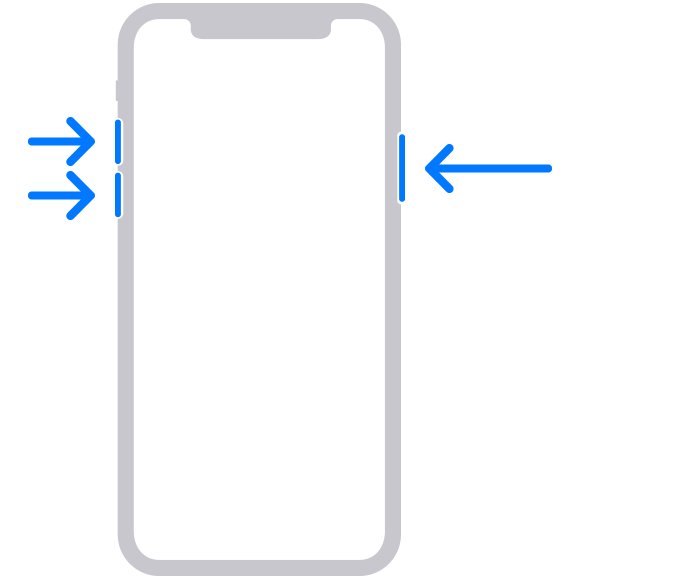
- Put the iPhone into recovery mode and keep it connected until the Connect to computer screen appears.
- Select the iPhone, then choose Restore when the Update or Restore options appear.
- Let the computer download the software and finish the restore, then set up the iPhone.
Restore reinstalls iOS and erases all your data, so try Update first if the phone still has content you want to keep.
What an IPSW file contains and which devices use it
Apple's developer documentation describes a restore image as "a file with a .ipsw file extension" that installs an operating system. Each file is built for a specific device family and software version.
| Device | Operating system in the IPSW | Tool that installs it |
|---|---|---|
| iPhone | iOS | Finder, Apple Devices app or Apple Configurator |
| iPad | iPadOS | Finder, Apple Devices app or Apple Configurator |
| Apple TV HD or later | tvOS | Apple Configurator |
| Apple Vision Pro | visionOS | Apple Configurator with a Developer Strap |
| Mac virtual machine on Apple silicon | macOS | Apps built on Apple's Virtualization framework |
| Mac with Apple silicon or a T2 chip | macOS firmware and system | Finder on a second Mac, in DFU mode |
IPSW is unrelated to Ipswich, the English town and football club, and to Ipswitch, a software company. The shared letters are a coincidence.
When you need an IPSW file vs an automatic download
| Your situation | What to use | Why |
|---|---|---|
| iPhone or iPad stuck on the Apple logo or recovery screen | Finder or Apple Devices app restore | The computer fetches the right IPSW for you |
| Updating to the current public release | Settings on the device, or Finder or Apple Devices | No manual file needed |
| IT team updating many iPhones or iPads | Apple Configurator with a downloaded .ipsw | One file can be dragged onto several devices or a Blueprint |
| Installing Apple beta software on a test device | Apple Configurator with the beta .ipsw | Apple Configurator accepts a beta file dragged onto the device |
| Updating Apple Vision Pro from a developer restore image | Apple Configurator 2.17 or later on macOS 14 or later | The visionOS image is dragged onto the device icon |
| Mac with Apple silicon will not start | Revive or restore from a second Mac in DFU mode | Finder handles the firmware restore |
| Creating a macOS virtual machine | A macOS restore image loaded by a virtualization app | The VM installer needs the image as installation media |
How to install an IPSW file on iPhone or iPad with Apple Configurator
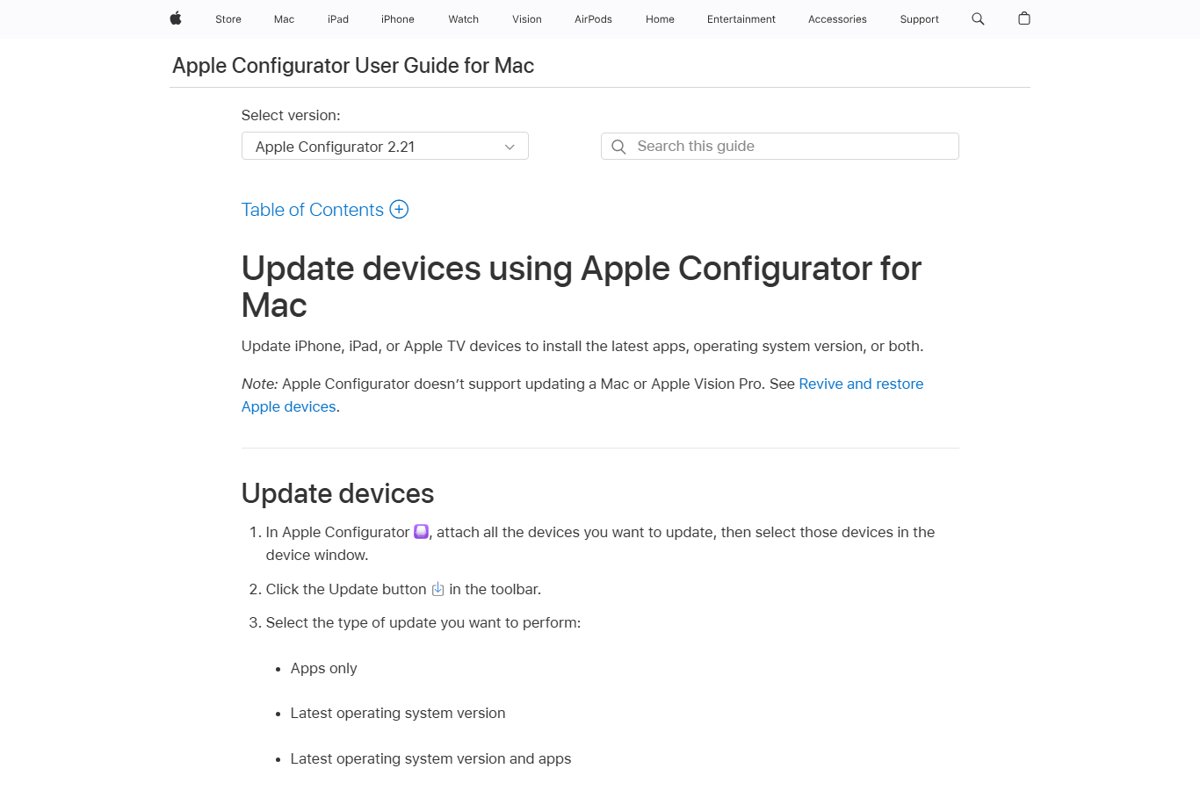
Apple Configurator is Apple's free Mac app for setting up and updating iPhone, iPad and Apple TV. Version 2.21 needs a Mac with macOS 15.7 or later.
- Open Apple Configurator on your Mac and connect the iPhone or iPad with a cable.
- Trust the computer on the device if it asks.
- Select the device in the Apple Configurator window.
- Drag the .ipsw file onto the device.
- Choose to Update or Restore the device when Apple Configurator asks.
- Wait for the installation to finish and the device to restart.
Restoring to an older version can cause problems, and Apple Configurator warns that the operating system may not function properly on the device. You can also drag the .ipsw file onto a Blueprint so the update or restore runs when that Blueprint is applied.
How to install a visionOS IPSW restore image on Apple Vision Pro
- Download the latest visionOS restore image from developer.apple.com.
- Connect Apple Vision Pro to a Mac running macOS 14 or later with a Developer Strap.
- Open Apple Configurator version 2.17 or later.
- Select Trust Computer on Apple Vision Pro when prompted.
- Drag the downloaded image onto the Apple Vision Pro icon in Apple Configurator.
- Confirm the prompt that all contents on the device will be erased, then select Restore.
How to restore a Mac with Apple silicon from a second Mac
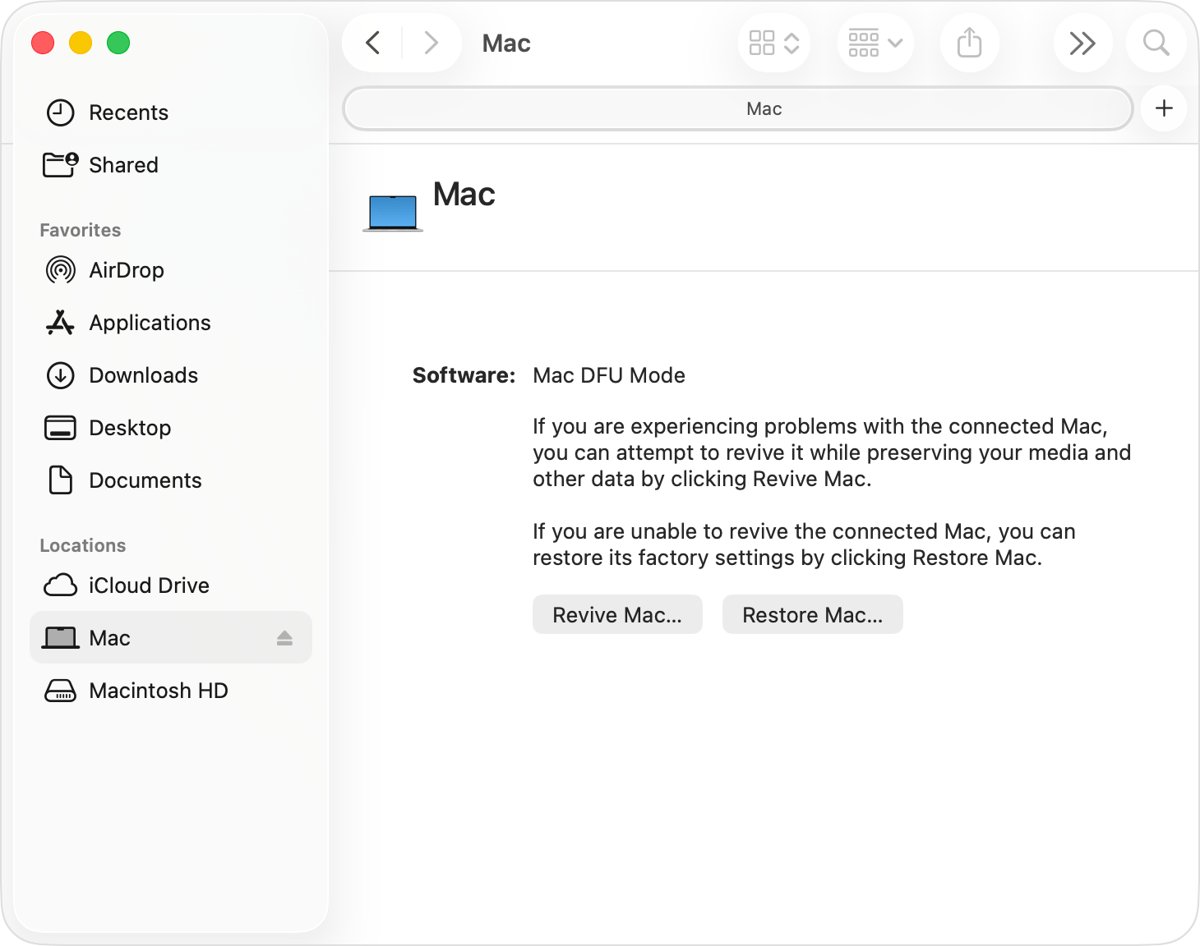
A Mac with Apple silicon or an Apple T2 Security Chip can be revived or restored from another Mac in DFU (device firmware update) mode. Try reviving first, because a revive does not erase data the way a restore or a Mac factory reset does.
- Connect the two Macs with a USB-C cable; the working Mac needs macOS 14 or later.
- Put the affected Mac into DFU mode.
- In the DFU window in Finder, click Restore Mac.
- Click Restore and Update to confirm, and keep the host Mac awake while the progress bar runs.
- Wait for the affected Mac to restart automatically, then choose a Wi-Fi network if asked.
- Finish setup in the setup assistant on Apple silicon, or install macOS from Recovery on a T2 Mac.
IPSW signing: why older iOS versions will not install
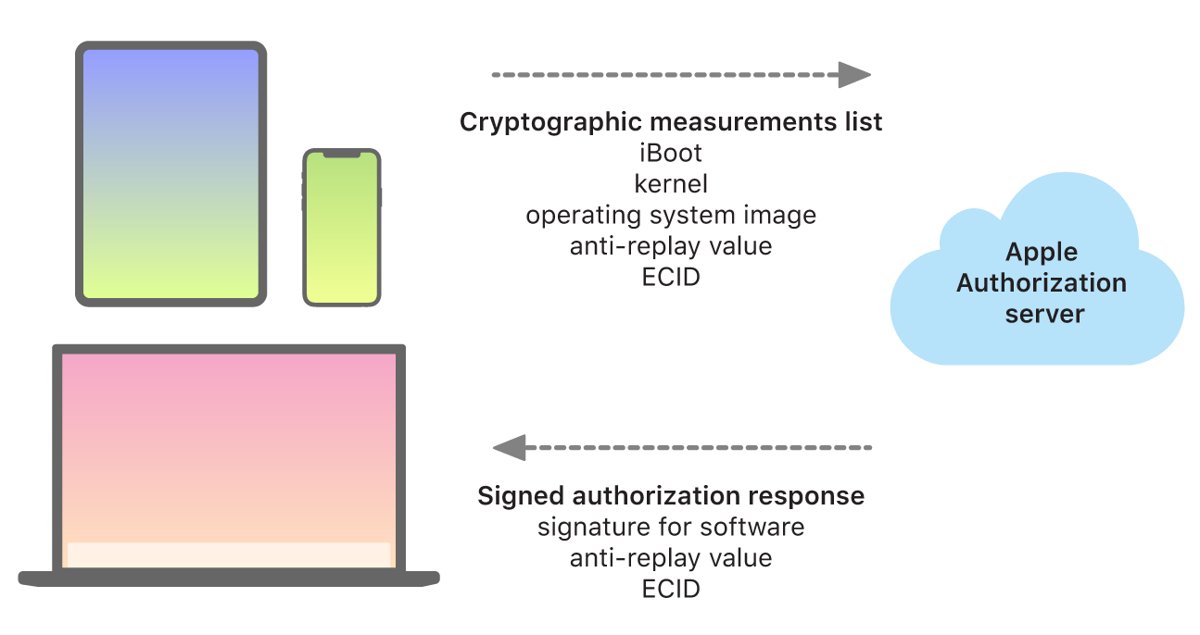
Having an IPSW file on disk does not mean a device will accept it. During every update or restore, the device sends details of the software to Apple's installation authorization server.
| Signing fact | What it means for you |
|---|---|
| The server approves only known-good software | A modified or custom IPSW is not approved and will not install |
| Approval includes the device's ECID | The signature is personal to one device and cannot be reused on another |
| Apple can stop signing older versions | Once Apple stops signing a release, a device cannot go back to it |
| The Secure Enclave also blocks downgrades | Firmware rollbacks are refused even with an old file |
| Signing happens on Apple's servers | There is no way for a user to sign an IPSW file |
To return from a beta to an earlier release, Apple's documented route is to restore the backup you made before installing the beta.
How to check the iOS version after an IPSW restore
- Finish the setup assistant on the iPhone or iPad.
- Open Settings and tap General.
- Tap About and read the iOS Version line.
- Open Settings > General > Software Update to see whether a newer release is offered.
IPSW restore problems and fixes
iPhone leaves the Connect to computer screen during the download
The software download took longer than 15 minutes, so recovery mode timed out.
- Let the download on the computer finish.
- Put the iPhone back into recovery mode with the button sequence for your model.
- Choose Restore again in Finder or the Apple Devices app.
An IPSW file will not install or is refused
Apple no longer signs that version, or the file was modified.
- Restore through Finder or the Apple Devices app so the current signed version downloads.
- Delete IPSW files obtained from unofficial sites.
- For betas, download the restore image again from developer.apple.com.
Apple Configurator says the operating system may not function properly
You are restoring an older version than the device shipped with or last ran.
- Cancel the restore if you do not need that version.
- Use the latest release instead, or restore a backup made before the change.
Mac with Apple silicon will not start after an update
The Mac firmware is damaged.
- Connect it to a second Mac running macOS 14 or later.
- Try a revive first, which keeps your data.
- If reviving fails, choose Restore Mac in the Finder DFU window.

IPSW file FAQ
What is an IPSW file for iPhone?
It is the restore image for iOS, a single .ipsw file holding the full operating system for a specific iPhone model. Finder and the Apple Devices app download it automatically during a restore, and Apple Configurator lets you drag one onto a connected iPhone.
How do I open an IPSW file in Windows?
You do not open it like a document. On Windows, the Apple Devices app uses the restore software when you choose Restore for a connected iPhone or iPad, and it downloads the correct version for you.
How do I install an IPSW file manually?
Open Apple Configurator on a Mac, select the connected device, drag the .ipsw file onto it and choose Update or Restore. The device must accept the file, so it has to be a version Apple still signs.
Can I install an IPSW file from a PC?
A Windows PC restores an iPhone or iPad through the Apple Devices app, which fetches the signed software from Apple. Dragging a chosen .ipsw file onto a device is a feature of Apple Configurator, which runs only on Mac.
How do I sign an IPSW file?
You cannot. Apple's installation authorization server signs each installation for one device's ECID at the time of the update or restore, and it stops signing older releases once they are replaced.
How do I make a custom IPSW?
A custom IPSW will not install on a current Apple device. The authorization server approves only known-good software measurements, so a modified file fails the check and the device refuses it.
Can I edit IPSW files on Windows?
Editing an IPSW file serves no purpose for installation, because any change breaks the measurements Apple's server approves. An edited file is refused when you try to restore with it.
Is an IPSW download safe?
Restore images from Apple are safe, and Finder or the Apple Devices app downloads them for you. Beta and visionOS restore images come from developer.apple.com. Avoid files from unofficial sites.
Does restoring with an IPSW file erase my iPhone?
A restore does. Apple states that Restore reinstalls iOS and erases all your data, while Update keeps your content. Back up the device first if you can still reach it.
Downloading an IPSW file: final recommendation
Let Finder or the Apple Devices app download the IPSW for you, and only handle .ipsw files yourself for Apple Configurator, beta testing or macOS virtual machines. Apple signs every installation per device, so only current signed versions install, and the automatic route always picks the correct file.