A text is likely a scam if the sender does not match the company it claims to be, the link points to a different website, or it asks for a password, card number or code.
This guide covers the warning signs, how to check a link without opening it, and how to report, block and filter scam texts on iPhone.
Is this text a scam? Quick test on iPhone
Run these checks before you tap anything in the message.
- Compare the sender's number or email address with the company's real contact details.
- Touch and hold the link, without tapping it, to preview the full web address.
- Check whether that address matches the company's official website exactly.
- Treat any request for a password, card number or verification code as a scam sign.
- Contact the company through its own app or website, never through the text, if you are still unsure.
- Tap Report Spam under the message, then tap Delete and Report Spam if it fails any check.
Scam text message warning signs
Apple lists these as the signs of a phishing message. One sign is enough reason to stop.
| What you see | What it means | What to do |
|---|---|---|
| Sender number or email does not match the company | The message is probably not from that company | Do not reply; report it |
| Contact details differ from the ones you gave the company | The sender does not have your real account | Contact the company directly |
| Link looks right but the address is different | A fake site copying the real one | Do not open the link |
| Message looks unlike the company's usual texts | A copied or invented template | Compare with an older genuine message |
| Asks for a card number, password or code | An attempt to take over an account or payment | Never send it |
| Unsolicited message with an attachment | Possible harmful file | Do not open the attachment |
Check a link in a text message without opening it
A link preview shows the real address before the page loads.
- Open the message in the Messages app.
- Touch and hold the link instead of tapping it.
- Read the full web address shown in the preview.
- Lift your finger away from the menu to close it without opening the page.
- Type the company's real website into Safari yourself if you need to check your account.
An address with extra words, odd spellings or a different ending from the real site is a fake.
Report a scam text message on iPhone
Reports on iMessage conversations go to Apple with the sender's details. Depending on your carrier and region, reporting SMS, MMS or RCS spam shares it with your carrier.
- Open the Messages app.
- If you have not opened the message, swipe left on it, tap the delete button, then tap Delete and Report Spam.
- If you have opened it, tap Report Spam at the bottom of the message.
- Tap Delete and Report Spam to confirm.
- For a text that pretends to be Apple, take a screenshot and email it to [email protected].
- In the U.S., report fraud to the Federal Trade Commission at reportfraud.ftc.gov.
You cannot report a message after you have replied to it. If Report Spam never appears for SMS, contact your carrier.
Block a scam text number on iPhone
Reporting does not stop the sender. Blocking does, and the sender is not told.
- Open the conversation in Messages.
- Tap the person's icon at the top.
- Tap Info, scroll down, then tap Block Contact.
- To review the list later, open Settings > Privacy & Security > Blocked Contacts.
A block in Messages also blocks the number in Phone, FaceTime, Mail and Calendar.
Filter unknown senders in iPhone Messages
Screening moves texts from numbers you do not know into a separate folder, so scam texts stop reaching your main list.
- Open the Messages app.
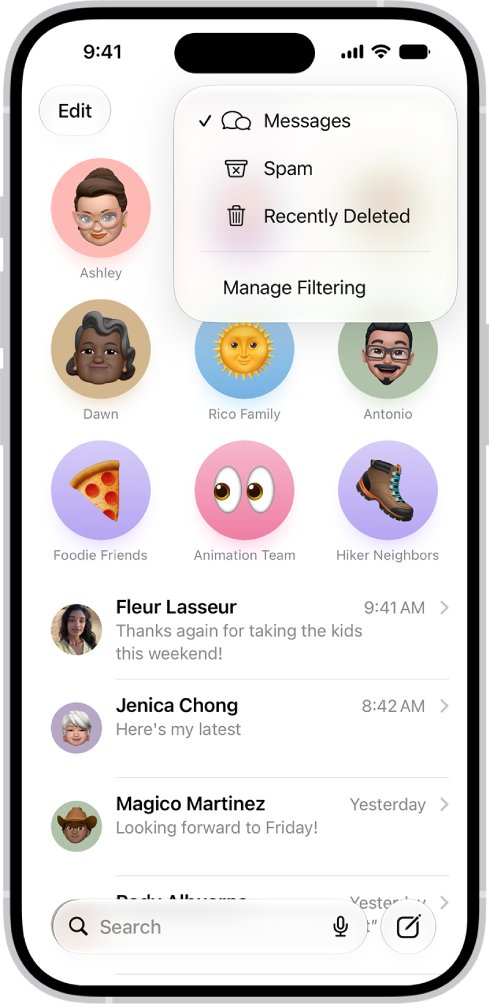
- In the conversation list, tap the filter button, then tap Manage Filtering.
- Turn on Screen Unknown Senders.
- Tap Allow Notifications and turn on categories such as verification codes if you still want alerts for them.
- Confirm that Filter spam is on; it is on by default.
Links in screened messages stay inactive and images stay blurred until you tap Mark as Known.
Find texts moved to the Spam or Unknown Senders folder
- In Messages, tap the filter button in the conversation list.
- Tap Spam or Unknown Senders to see filtered texts.
- If a genuine text landed in Spam, tap it, tap Not Spam, then tap Move to Messages.
- If a known sender landed in Unknown Senders, tap the message, then tap Mark as Known.
I responded to a scam text: what to do now
You entered your Apple Account password on a fake page
The scammer may now have your sign-in details.
- Change your Apple Account password straight away.
- Make sure two-factor authentication is turned on.
- Never approve a sign-in prompt you did not start, and report the problem to Apple Support if you cannot get back in.
You shared a card number or bank details
The details can be used for unauthorised payments.
- Call your bank using the number on your card, not one from the text.
- Report the fraud at reportfraud.ftc.gov in the U.S., or to local law enforcement.
The Report Spam link is missing
You replied to the sender, or your carrier does not support SMS reporting.
- Block the number from the conversation's Info screen.
- Contact your carrier about spam reporting for SMS.
Scam text message FAQ
Is this text a scam or legit?
Check three things: whether the sender matches the company's real contact details, whether the link address matches the company's site, and whether it asks for a password, card number or code. Failing any one means you should treat it as a scam.
What is the text scam called?
A scam text is a form of phishing, often called smishing when it arrives by SMS. It tries to get you to tap a fake link or hand over personal or payment details.
What are the latest text scams?
Scams change constantly, but the pattern stays the same: a fake company or delivery message, urgency, and a link or request for details. Apple also warns about messages and calls that spoof trusted companies and claim your account is under attack.
Is this email legit or a scam?
Use the same checks as for texts. Compare the sender address with the company's, hover over or touch and hold links to see the real address, and never send passwords. Forward suspicious emails that look like Apple to [email protected].
Does Apple ever text asking for my password or code?
No. Apple says it will never ask you to share a verification code, approve a two-factor prompt for someone, or turn off a security feature. Any message asking for that is a scam.
Does reporting a text block the sender?
No. Reporting deletes the message and sends details to Apple or your carrier, but the sender can still text you. Block the number from the conversation's Info screen to stop future messages.
Is this website legit or a scam?
Type the company's address yourself instead of following a link from a text. If a page arrived through an unexpected message and asks you to sign in or pay, close it and open the company's site or app directly.