To patch CVE-2026-109618 in cPanel, the server must run PHP 8.5.12, 8.4.27, 8.3.36 or 8.2.35, and each domain must use one of those branches in MultiPHP Manager.
This guide covers the cPanel user steps, the WHM steps a server administrator runs to install the patched packages, PHP-FPM, and how to confirm the exact version a site now runs, as part of the wider round of PHP security updates.
Fastest way to update the PHP version in cPanel
Changing the version in cPanel only switches a domain between PHP branches that the server already has installed. The patch itself arrives when the server's PHP packages are updated to the fixed point releases.
- Log in to cPanel and open Software » MultiPHP Manager.
- Select the checkbox for the domain you want to change.
- Choose a supported branch (8.2, 8.3, 8.4 or 8.5) from the PHP Version menu.
- Click Apply. If PHP-FPM is on for the domain, cPanel updates the FPM version to match.
- Confirm the exact version string with the check in the verify section below. It must read 8.5.12, 8.4.27, 8.3.36 or 8.2.35 or later.
- If the string is older, ask the host or server administrator to install the patched packages, as described further down.
PHP 8.1 and older no longer get fixes from the PHP project, so moving a domain off 7.4 or 8.1 is part of the fix, not an optional extra.
cPanel PHP version change: which route fits your account
| Your situation | Use this | Why |
|---|---|---|
| Shared hosting, cPanel shows MultiPHP Manager | cPanel » MultiPHP Manager | Switches the domain to an installed branch; the host supplies the patched packages |
| Shared hosting, cPanel shows Select PHP Version | Your host's CloudLinux PHP selector, then a host ticket | The selector is a CloudLinux tool, not part of cPanel's MultiPHP Manager |
| You own the server and have WHM root access | WHM » System Update, then WHM » MultiPHP Manager | System Update updates every installed package, including the ea-php packages |
| Domain still on PHP 7.4 or 8.1 | Move it to 8.2 or newer in MultiPHP Manager | The PHP project does not release fixes for 8.1 and older |
| Server runs LiteSpeed Web Server | Ask the host | WHM's MultiPHP Manager settings cannot be edited while LiteSpeed is active |
Which PHP versions patch CVE-2026-109618
The PHP project released the fixes on 21 October 2026. The same releases also fix CVE-2026-109619.
| PHP branch | Patched release | Status |
|---|---|---|
| 8.5 | 8.5.12 | Supported |
| 8.4 | 8.4.27 | Supported |
| 8.3 | 8.3.36 | Supported |
| 8.2 | 8.2.35 | End of life on 31 December 2026 |
| 8.1, 8.0, 7.4 | No release from the PHP project | Minimal source backports only; ask your vendor or upgrade |
Every PHP installation that serves web requests is at risk, including PHP-FPM, Apache mod_php, php-cgi and LiteSpeed. The CVE-2026-109618 fix overview lists the downloads for each branch.
Check your PHP version in cPanel
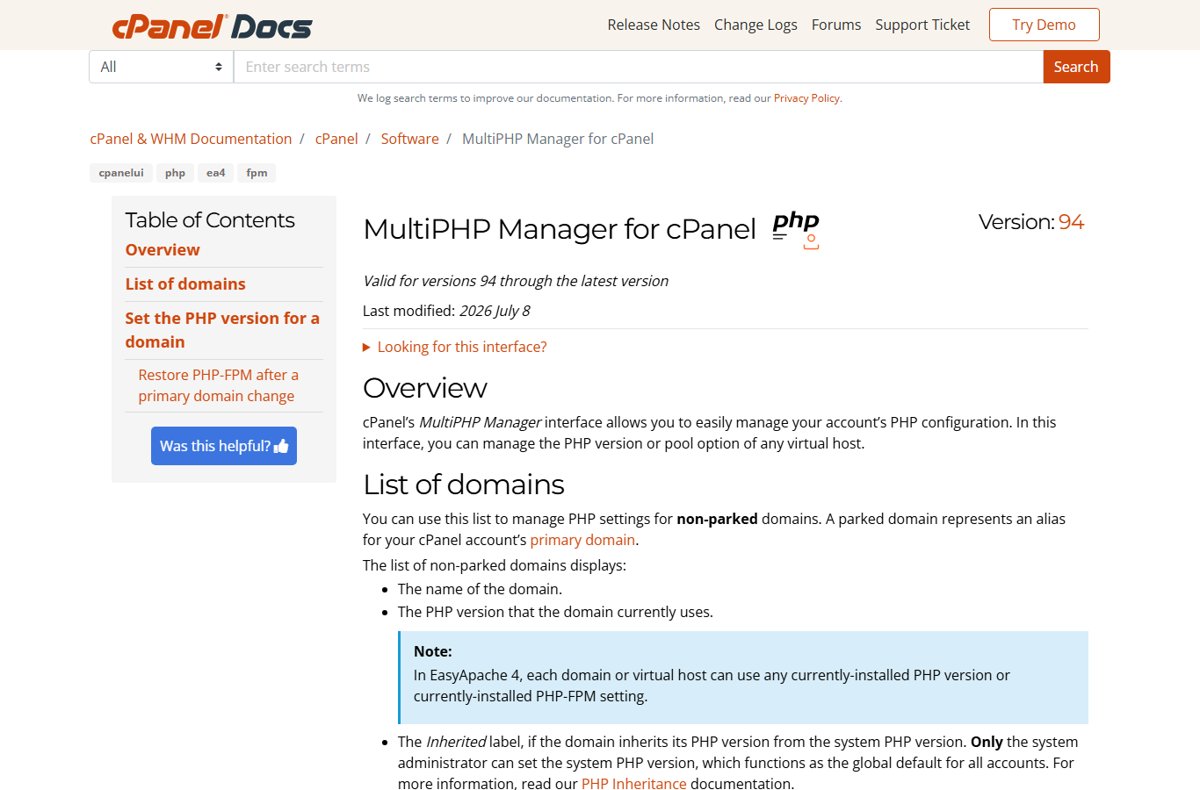
MultiPHP Manager shows the branch each domain uses, but not the point release. You need both to know whether a site is patched.
- Open Software » MultiPHP Manager in cPanel.
- Find the domain in the list and read its PHP version.
- Note an Inherited label: that domain follows the system default PHP version the administrator sets.
- Note the PHP-FPM indicator, which shows whether the domain runs through PHP-FPM pools.
- Read the exact point release with the PHP_VERSION check in the verify section.
A separate walkthrough shows how to check whether your PHP version is vulnerable on servers without cPanel.
Change the PHP version with MultiPHP Manager
- In cPanel, open Software » MultiPHP Manager.
- Use the Search box to find the domain by domain name or account name.
- Select the checkbox next to the domain.
- Open the PHP Version menu and pick the branch you want. Versions the administrator recommends carry a Recommended label.
- Click Apply.
- Load the site and check the version string, as shown in the verify section.
If the branch you want is missing from the menu, it is not installed on the server or not available to your account. Only the administrator can add it, through WHM's EasyApache 4 interface.
Selecting inherit makes the domain follow the system default, and PHP-FPM cannot be enabled while a domain inherits. Parked domains are aliases of the primary domain and do not appear in the list.
Update ea-php packages in WHM System Update (server administrators)
On a server you control, cPanel's PHP builds are packages whose names start with ea-. WHM's System Update interface updates all installed packages at once.
- Log in to WHM as root.
- Open Home » Software » System Update.
- Leave Include kernel packages cleared unless you also want a kernel update, which may need a reboot.
- Click Proceed to update all packages.
- Open Home » Software » MultiPHP Manager and confirm each domain uses a supported branch.
- Check the exact version string on a site from each branch.
The EasyApache 4 home page also has a Run system update link to the same interface. To add a branch that is not installed, open EasyApache 4, click Customize on the current profile, select the PHP version, then Review and Provision.
Check cPanel's change log or release notes for the ea-php package that carries 8.5.12, 8.4.27, 8.3.36 or 8.2.35. If no updated package is listed yet, System Update cannot install it.
Set the PHP version for many domains in WHM MultiPHP Manager
- In WHM, open Home » Software » MultiPHP Manager.
- On the System Settings tab, choose a supported version in PHP Version to set the default for new accounts and every account that inherits.
- Switch to the User Domain Settings tab.
- Select the checkboxes for the domains still on 8.1 or older.
- Choose Set PHP Version and pick 8.2 or newer.
- Click Apply to confirm.
Changing the system default does not touch accounts with their own version set; only inheriting accounts move. WHM shows a warning before you apply a deprecated version.
Change PHP version with Select PHP Version (CloudLinux)
Some hosts run CloudLinux and show a Select PHP Version icon in cPanel in place of, or next to, MultiPHP Manager. That selector belongs to CloudLinux, so cPanel's documentation does not cover its steps.
| Question | Answer |
|---|---|
| Does switching branches in Select PHP Version patch the CVE? | Only if the host has installed the patched builds for that branch |
| Where do the patched builds come from? | The host or CloudLinux, not the PHP project directly |
| What about PHP 7.4 or 8.1 on CloudLinux? | cPanel points legacy-version users to TuxCare Extended Lifecycle Support from CloudLinux |
| How do you confirm the result? | Check the PHP_VERSION string on the site, exactly as on MultiPHP Manager accounts |
Ask your host for patched PHP builds
On shared hosting, the update to 8.5.12, 8.4.27, 8.3.36 or 8.2.35 is the host's job. PHP's advisory states that Linux distributions and LTS vendors received the patches in advance.
- Read the exact PHP version string your site reports.
- Open a support ticket and quote CVE-2026-109618 and CVE-2026-109619.
- Ask when the server will run 8.5.12, 8.4.27, 8.3.36 or 8.2.35 for your branch.
- Ask whether PHP-FPM workers were restarted after the update.
- If the site still runs 8.1 or older, ask which supported branch you can move to.
Until the host updates, the PHP mitigations for CVE-2026-109618 reduce exposure but do not make the site safe. PHP's advisory is explicit that only the update is a complete fix.
Check PHP-FPM settings in cPanel
PHP-FPM keeps pools of workers running between requests, so workers must restart onto the patched binary. cPanel users can see the FPM status; only WHM can change it.
| Where | What it shows or changes |
|---|---|
| cPanel » MultiPHP Manager | Whether PHP-FPM is enabled or disabled for each domain |
| WHM » MultiPHP Manager » System Settings » PHP-FPM | The default FPM state for new accounts; Manage Settings opens system pool and INI settings |
| WHM » MultiPHP Manager » User Domain Settings | Per-domain FPM toggle and the PHP-FPM Settings button |
| PHP-FPM Pool options | Max Requests (default 20), Max Children (default 5), Process Idle Timeout (default 10 seconds) |
| PHP-FPM INI Settings | Block domain from changing the setting writes the directive with php_admin_value instead of php_value |
| Validate Settings / Update | Checks the FPM configuration, then saves it |
PHP's mitigation advice for CVE-2026-109618 prefers php_admin_value in the FPM pool so applications cannot override it, which is what the Block domain checkbox does. After the packages update, restart PHP-FPM so no worker keeps running the old build.
Verify the site after changing PHP
PHP_VERSION is a core PHP constant that holds the running version as a string. Reading it from the web server shows what the site actually runs, not what a menu says.
- In cPanel File Manager, create a file named
phpver.phpin the domain's document root. - Add the single line
<?php echo PHP_VERSION;and save it. - Open
https://yourdomain/phpver.phpin a browser. - Confirm the output is 8.5.12, 8.4.27, 8.3.36, 8.2.35 or a later release of the same branch.
- Delete
phpver.phpso it does not stay public. - Load the site's main pages and admin area and check that forms and logins still work.
On a WordPress site, Site Health also reports the PHP version; the WordPress PHP check walks through it.
Fix cPanel PHP version change problems
The PHP version you want is missing from the menu
That branch is not installed on the server or not available to your account.
- Ask the administrator to install it in WHM » EasyApache 4.
- If the administrator limited your domain's PHP version, MultiPHP Manager cannot change it; ask them to lift the limit.
The version string is still older than the patched release
The server's ea-php packages have not been updated yet, or FPM workers still run the old build.
- Ask the administrator to run WHM » System Update.
- Ask them to restart PHP-FPM, then check PHP_VERSION again.
The PHP-FPM toggle is unavailable
The domain inherits its PHP version.
- Select a specific PHP version instead of inherit.
- Click Apply, then enable PHP-FPM, or ask the administrator to enable it in WHM.
PHP-FPM turned off after renaming the primary domain
cPanel disables FPM on the new domain name.
- Ask the system administrator or host to re-enable PHP-FPM for the new domain.
php.ini changes stopped applying after the switch
The DSO handler does not read configuration changes after a major-version switch, and DSO is not supported on PHP 8.0 and later.
- Open Software » MultiPHP INI Editor.
- Select the domain, edit the directives again and click Apply or Save.
WHM MultiPHP Manager settings cannot be edited
An active LiteSpeed Web Server sets the handler to lsphp.
- Update PHP through the host's LiteSpeed setup, or ask the host which lsphp builds they run.
cPanel PHP version and CVE-2026-109618 FAQ
How do I update the PHP version in cPanel?
Open Software, then MultiPHP Manager, select the domain, choose a version from the PHP Version menu and click Apply. This switches branches only; the patched point release must already be installed on the server by the host or administrator.
Where do I see the cPanel PHP version?
MultiPHP Manager lists the PHP branch each domain uses and marks domains that inherit the system default. For the exact point release, such as 8.4.27, echo the PHP_VERSION constant from a temporary file in the domain's document root.
What is the latest PHP version in cPanel?
cPanel's documentation states EasyApache 4 supports PHP 7.4 and PHP 8.1 through 8.5. The patched releases are 8.5.12, 8.4.27, 8.3.36 and 8.2.35; whether a given server has them depends on its ea-php package updates.
Does changing the PHP version in cPanel fix CVE-2026-109618?
Only when the version the domain runs is 8.5.12, 8.4.27, 8.3.36, 8.2.35 or later. Moving off PHP 8.1 or older helps, but the target branch still needs the patched build installed on the server.
How do I change the PHP version in GoDaddy cPanel?
If your GoDaddy plan uses cPanel, the cPanel steps apply: open MultiPHP Manager, or Select PHP Version if shown, and pick the branch. Ask GoDaddy support which patched builds their servers run, because the host installs them.
Is PHP 8.1 in cPanel patched for CVE-2026-109618?
The PHP project does not release fixes for 8.1 and older. It published minimal source backports, and some vendors ship backported fixes, so ask your host. Moving the domain to PHP 8.2 or newer is the direct route.
Do I need to restart PHP-FPM after a cPanel PHP update?
Yes. PHP-FPM workers keep running between requests, so they must restart to load the patched build. Ask the host, or as administrator restart the PHP-FPM service, then check PHP_VERSION again.
What does Inherited mean in MultiPHP Manager?
The domain follows the system default PHP version that the server administrator sets in WHM. Changing that default moves every inheriting domain. PHP-FPM cannot be enabled on a domain while it inherits.
Bottom line: patching CVE-2026-109618 on cPanel
Put every domain on PHP 8.2 or newer in MultiPHP Manager, get the host or WHM System Update to install 8.5.12, 8.4.27, 8.3.36 or 8.2.35, and confirm with PHP_VERSION. The cPanel menu only picks a branch. The fix is the point release running in every worker, and only a version check proves it.