Roblox has no ban history page, so you check past bans through Violations & Appeals, your moderation notices, your Roblox messages and emails, and a Right to Access data report.
This guide covers each of those records, how to tell a Roblox ban from a ban inside one experience, how developers read ban history in their own experience, and what to do with a past ban you find.
How to check Roblox ban history in five minutes
Start with the places Roblox itself uses to tell you about moderation. Together they cover current violations, appeal status and the data Roblox holds on your account.
- Sign in to your account at roblox.com.
- Open Violations & Appeals at roblox.com/report-appeals and review any violation listed there.
- Open your Roblox Messages inbox at roblox.com/my/messages and read any moderation or appeal messages.
- Search the email inbox linked to your Roblox account for mail from Roblox.
- If you need the fullest record, request a Right to Access Report from your privacy settings (steps below).
Nothing on this list shows a ban issued by an experience creator. Those bans live inside that experience and only its creator can see or lift them.
What Roblox ban history means
"Ban history" covers several different records, and each one sits in a different place.
| Type of action | Who issues it | Ban duration | Where it shows |
|---|---|---|---|
| Warning | Roblox | No restriction; it is a recorded warning | A moderation notification on your account |
| Timeout or suspension | Roblox | Temporary; a timeout can be as short as 20 minutes | The moderation notice when you sign in, plus Violations & Appeals for eligible categories |
| Account deleted (terminated) | Roblox | Permanent unless an appeal succeeds | The moderation notice; appeal through the support form or Violations & Appeals |
| Removed or blocked content | Roblox | Most content cannot be restored once moderated | A notification explaining why the asset failed moderation |
| Ban from one experience | The experience creator | Set by the creator, from a short ban to a permanent one | An error such as Error Code 267 or 600 when you try to join that experience |
Roblox escalates repeat violations: a warning, then a timeout, then a suspension, and so on. It also weighs your past behaviour on the platform when it decides on a new consequence.
During a Roblox suspension or termination you can lose access to Robux, experience access and items on the account, and any alternate accounts you created can be suspended or terminated too. A ban from one experience does not stop you from joining other experiences.
Why Roblox issues bans
Roblox suspends or terminates accounts that break its Terms of Use or Community Standards. Moderators and automated systems look for violations, and user reports through Report Abuse add to them.
| Rule area | Examples that lead to moderation |
|---|---|
| Safety | Child exploitation, extremism, harassment, discrimination, encouraging self-harm, harmful off-platform behaviour |
| Civility | Gore, sexual content, illegal or regulated goods, profanity, real-world sensitive events |
| Integrity | Cheating and exploits, scams, misleading content, intellectual property violations, unapproved advertising |
| Security | Sharing personal information, directing users off-platform, misusing Roblox systems |
| Stolen accounts, items or Robux | Every account involved in the theft is deleted, including accounts that received the items |
| Unauthorized payments | Roblox can suspend an account with unauthorized charges or block its purchases and trades |
| Modified apps | A temporary suspension, then a permanent ban if it happens again |
A few account rules sit outside the Community Standards. A player under the age of majority needs a parent or guardian to read and consent to the Roblox Terms, and trading items is limited to members with a Roblox subscription.
Can you see your full Roblox ban history?
No. Roblox does not offer a single list of every warning, suspension and ban on an account, so you rebuild the history from Violations & Appeals, your moderation notices, messages, emails and a Right to Access Report. Violations & Appeals lists eligible violations you can appeal, not every past action. The Right to Access Report covers the personal data Roblox links to your account, but Roblox does not say it includes a moderation log.
Check your current Roblox ban status
Roblox notifies you whenever it restricts your account or content, so an active Roblox ban shows up as a moderation notice when you sign in.
- Sign in at roblox.com in a web browser, or open the Roblox app on your phone or tablet.
- Read the moderation notice if one appears. It states the action taken and the appeal options open to you.
- Select the Violations & Appeals link in the notice if it has one.
- Find the violation in the list and check its current status.
- If no notice appears and you can join experiences, your account has no active Roblox-level ban.
A short timeout that has already ended cannot usefully be appealed, since the restriction is already lifted.
Understand the Roblox moderation notice
| Part of the notice | What it tells you |
|---|---|
| Action taken | Whether this is a warning, a timeout, a suspension or an account deletion |
| Reason | Why Roblox moderated the account or content |
| Appeal route | Whether you appeal in Violations & Appeals or through the Roblox support form |
| Violations & Appeals link | Appears only when your violation category can be appealed there |
Take a screenshot of the full notice before you close it. It is the only record of the exact wording, and you need the details for an appeal.
Check emails from Roblox
Roblox requires appeals to come from a valid email address on the account, so your appeal correspondence and data-report notices sit in that inbox.
- Open the email account that is verified on your Roblox account.
- Search for Roblox and include your spam and archive folders.
- Look for appeal replies, support ticket threads and Right to Access Report notices.
- Note the date, the action described and any ticket reference in each message.
- Ignore any email that asks for your password or 2-Step Verification code. Roblox employees never ask for either.
Check Roblox messages and notifications
Roblox also writes to your account inbox. The Right to Access Report arrives there, and official promotions appear in the Notifications tab of the Messages section.
- Sign in at roblox.com.
- Open Messages at roblox.com/my/messages.
- Read the Inbox for messages from Roblox about moderation, appeals or data requests.
- Open the Notifications tab and scroll back through older entries.
- Screenshot anything that mentions a warning, removed content or a ban.
Check whether an asset, game, or upload was moderated
Uploads go through moderation before other users can see them, usually within a few hours of import. If an asset fails, Roblox sends you a notification explaining why it cannot stay on the platform.
- Sign in to the Creator Hub at create.roblox.com.
- Open the Creator Dashboard and select Creations.
- Find the item. An approved Marketplace item is marked Ready To Sell.
- Check your Roblox messages and notifications for a moderation notice about the asset.
- If the item appears in Violations & Appeals, select Appeal there.
- If it does not, file a content appeal through the support form with your username, the asset ID and a link to the content.
Most moderated content cannot be restored, even after a successful appeal. Roblox can also take down experiences or terminate accounts that deliberately publish non-compliant assets.
Check appeal history through Roblox Support
Your appeals are part of your ban history. Where each one lives depends on the route you used.
- Open Violations & Appeals at roblox.com/report-appeals to monitor the status of appeals you filed there.
- Search your email for replies to appeals sent through the support form at roblox.com/support.
- Record the outcome of each appeal next to the action it concerned.
- Do not resubmit an appeal that Roblox has already reviewed. Duplicate appeals for the same action are not reviewed.
Roblox Support only accepts appeals from the account owner. It also cannot remove bans that experience creators issue.
Request your Roblox account data
A Right to Access Report contains the personal information Roblox links to your account, such as account details, login history and payment history. It is the closest thing to a full account record you can get.
- Make sure your Roblox account has a verified email address.
- Open your Roblox privacy settings at roblox.com/my/account#!/privacy.
- Under Account data, deactivation & deletion, select Request next to Request Account Data.
- Complete any identity check Roblox asks for.
- Wait for the message in your Roblox inbox and at your verified email address.
- Open the link within 7 days. After that it expires and you must request a new report.
You cannot pick a time period, and the report includes only your own data. If the request option does not work for you, use the Roblox support form instead.
Check for experience-specific bans
Experience creators can ban players from their own experience. These bans are not issued by Roblox, and you can still use every other experience and feature.
| What you see | What it means | What to do |
|---|---|---|
| Error Code 267 when joining one experience | The creator banned your account from that experience | Contact the creator; Roblox Support cannot lift it |
| Error Code 600 when joining one experience | The creator banned your account from that experience | Contact the creator through messages, their community wall or their listed social links |
| A message with remaining ban time and a reason when joining | A ban set through the experience's ban system, with the reason the creator wrote | Note the time left and the reason, then contact the creator |
| A notice on sign-in that blocks the whole site | A Roblox account-level action, not an experience ban | Use Violations & Appeals or the support form |
Custom experience rules are set by each creator. Appeals against those bans go to the creator, not to Roblox.
For developers: check bans in your own experience
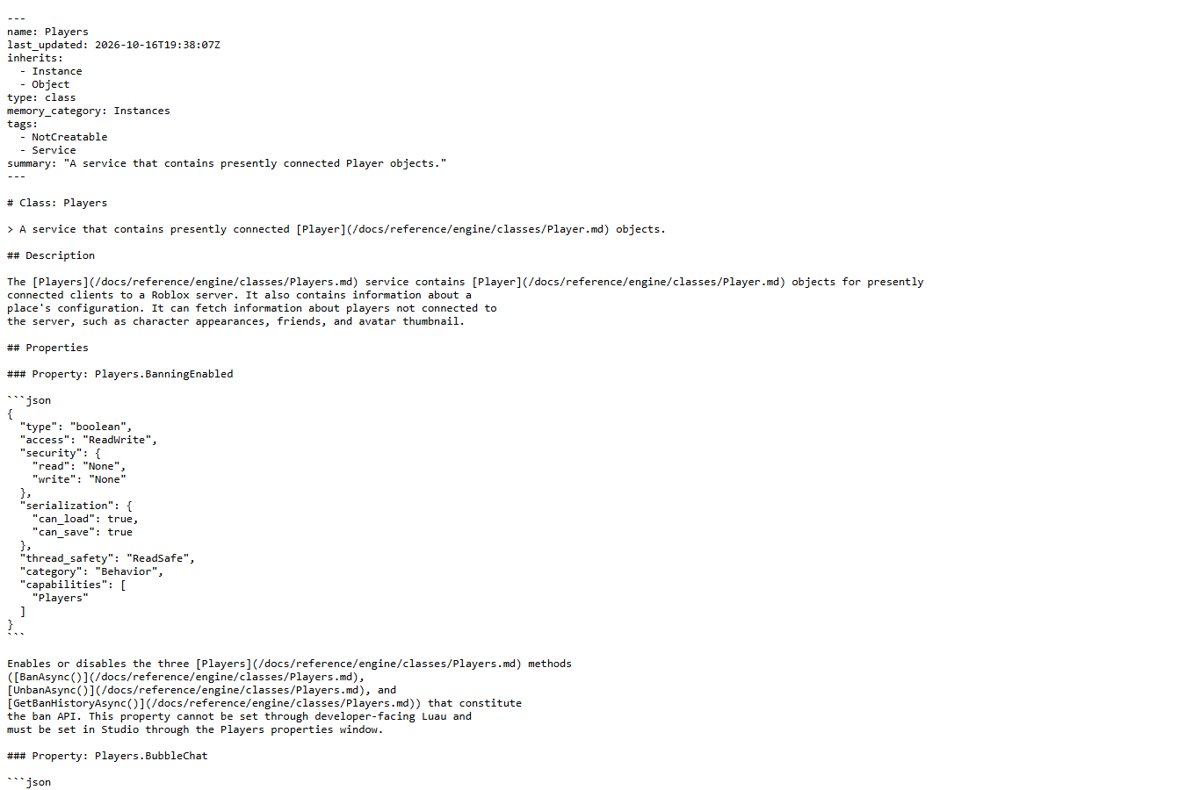
If you own an experience, Players:GetBanHistoryAsync() returns the full ban and unban history of any user in your universe. It works only on production servers, not in Roblox Studio or on the client.
local Players = game:GetService("Players")
local ok, pages = pcall(function()
	return Players:GetBanHistoryAsync(userId)
end)
if ok then
	while true do
		for _, entry in pages:GetCurrentPage() do
			print(entry.Ban, entry.StartTime, entry.Duration, entry.DisplayReason, entry.PrivateReason, entry.PlaceId)
		end
		if pages.IsFinished then break end
		pages:AdvanceToNextPageAsync()
	end
end
Each entry has Ban (true for a ban, false for an unban), StartTime in ISO 8601 format, Duration in seconds (-1 for permanent), DisplayReason (what the player saw), PrivateReason (your internal note) and PlaceId (-1 when the action applied to the whole universe).
You should see: The server output lists one line per ban or unban for that user, oldest pages first until IsFinished is true.
Bans set with Players:BanAsync() also try to ban the player's alternate accounts unless you set ExcludeAltAccounts to true. The same history is available through the User Restrictions Open Cloud API, and bans can be lifted from the Creator Hub or with Players:UnbanAsync().
Warning: avoid fake Roblox ban checkers
Roblox offers no public tool that looks up anyone's ban history. Sites and in-game forms that claim to do so are built to take accounts.
| Red flag | Why it is a scam |
|---|---|
| Asks for your password, cookies, 2SV code or backup codes | Roblox employees never ask for any of these |
| Asks you to log in on a site that is not roblox.com | Only enter login details on roblox.com or the official Roblox apps |
| A browser extension that shows ban status | Roblox does not make browser extensions |
| A downloadable checker or unban program | Exploit and cheat downloads are a common way to spread keyloggers |
| An experience that asks for login details | Leave it and report it with Report Abuse on its details page |
How to keep your own Roblox ban history record
Because Roblox does not keep a list for you, a simple log of your own is the most reliable ban history you will have.
- Create a note or spreadsheet with columns for date, action, reason, content involved, appeal route and outcome.
- Screenshot every moderation notice before you close it.
- Save or export each Roblox email about moderation or appeals to a separate folder.
- Add a row whenever Violations & Appeals shows a new status.
- Download each Right to Access Report within 7 days and store it with the log.
What to do if you find a past Roblox ban
| Situation | What to do | Deadline or limit |
|---|---|---|
| The ban is over | Keep the record and review the rule it cites; past violations count when Roblox weighs new ones | An expired timeout usually has nothing left to appeal |
| The ban is active and you think it is wrong | Appeal in Violations & Appeals or through the support form, as the notice directs | 30 days from the action, or 6 months in the EU |
| The ban is active and the appeal was already reviewed | Accept the outcome; a reviewed moderation cannot be reviewed again | No second review |
| The account was hacked when the violation happened | Remove unknown downloads and browser extensions, reset the password, turn on 2-Step Verification, then contact Roblox Support from the original email | Contact Roblox within 30 days of the compromise for inventory help |
| You live in the EU and disagree with the final decision | Use a certified out-of-court dispute settlement body or seek judicial redress | Rights under the Digital Services Act |
After a hacked-account recovery, check your Roblox purchase history for Robux spending you did not make.
How to appeal a Roblox ban
The moderation notice tells you which route your case uses. Appeal within 30 days of the action, or within 6 months in the EU, and send it from the account owner's verified email.
For appeals via Violations & Appeals
Your notice has a direct Violations & Appeals link, so the violation category can be appealed there.
- Select the Violations & Appeals link in the notice, or go to roblox.com/report-appeals.
- Find the violation and select Appeal.
- Explain briefly why the decision should be looked at again.
- Return to Violations & Appeals to monitor the status.
For appeals via support form
The notice points to the support form, or the violation is not listed in Violations & Appeals.
- Open the Roblox support form at roblox.com/support.
- For an account appeal, give your username and a short statement of why you are appealing.
- For a content appeal, also add the asset ID and a link to the content on the Roblox website.
- Submit once and wait for the reply by email; duplicate appeals for the same action are not reviewed.
An appeal is a second look, not a guaranteed reversal, and a moderation that has already been reviewed cannot be appealed again.
How to confirm a Roblox ban has been lifted
- Sign out of Roblox on every device, then sign back in at roblox.com.
- Confirm that no moderation notice appears and the home page loads.
- Join any public experience to confirm you can play.
- Open Violations & Appeals and check that the violation shows its updated status.
- For an experience ban, try joining that experience again; Error Code 267 or 600 means the creator's ban is still in place.
Roblox ban screen and appeal problems
Banned from one game but everything else works
The experience creator issued the ban, not Roblox.
- Note the error code (267 or 600) and any reason shown.
- Open the experience's page and find the creator or community.
- Message the creator, post on their community wall or use their listed social links.
- Do not file a Roblox appeal for it; Roblox Support cannot remove creator bans.
The violation is not listed in Violations & Appeals
Only some violation categories can be appealed there.
- Open the support form at roblox.com/support.
- For an account appeal, include your username and a short reason for the appeal.
- For a content appeal, also include the asset ID and a link to the content.
- Send it from a valid email address on the account, within 30 days of the action.
A "modified version of Roblox" warning appears
Roblox detected an unofficial Roblox app on a device you played on; continued use leads to more restrictions.
- Uninstall the modified version on every device.
- Download Roblox from its official site on Windows or macOS, or from the official app store on phones, consoles and Quest.
- Close other applications while you play.
- If the warning returns on Windows, start the PC in Safe Mode; if Roblox works there, a background app is changing it and should be uninstalled.
Banned for using scripts or exploits
Exploiting and cheating break the Roblox Terms of Use and lead to account deletion.
- Remove the exploit software and run a full antivirus scan, since many exploits carry keyloggers.
- Reset your Roblox password and turn on 2-Step Verification.
- Appeal only through the route named in your moderation notice.
Best practices to avoid future Roblox bans
| Practice | Why it matters |
|---|---|
| Read the Roblox Community Standards | They are the rules moderators apply to content and reports |
| Use only the official Roblox app | Anti-cheat blocks modified apps, emulators without edit access and rooted or jailbroken devices |
| Never use exploits or cheats | Exploiting leads to account deletion |
| Respect each experience's custom rules | Creators can ban you from their experience |
| Turn on 2-Step Verification | Stops someone else from breaking rules on your account |
| Upload only content you own | Assets are scanned for IP infringement and harmful content |
Quick checklist for Roblox ban history
| Check | Where |
|---|---|
| Active ban or moderation notice | Sign in at roblox.com |
| Appealable violations and appeal status | roblox.com/report-appeals |
| Moderation and data-report messages | roblox.com/my/messages, Inbox and Notifications |
| Appeal replies and support tickets | The email inbox on your Roblox account |
| Moderated uploads | Creator Dashboard > Creations, plus asset notifications |
| Full account data | Privacy settings > Request Account Data |
| Bans from one experience | Error Code 267 or 600 on joining; ask the creator |
Common questions about Roblox ban history
How do Roblox bans work?
Roblox moderators and automated systems enforce the Community Standards. Depending on severity, Roblox issues a warning, removes content or restricts the account, and repeat violations escalate from warning to timeout to suspension. Roblox notifies you of each decision and tells you how to appeal.
Does Roblox show old warnings?
Not in one list. Violations & Appeals shows eligible violations you can appeal, and older warnings survive only in your Roblox messages, emails or your own screenshots. A Right to Access Report holds the data Roblox links to your account.
Can other players see my ban history?
Roblox offers no public ban lookup for other players. The one exception is an experience creator, who can read the ban and unban history of any user inside their own experience through the Roblox ban API.
Can a past ban affect future moderation?
Yes. Roblox considers a user's historical behaviour and whether they have repeatedly broken its policies, and repeat violations raise the severity of the next consequence.
Is a warning the same as a ban?
No. A warning is the lightest consequence and does not stop you playing. Repeated violations move on to a timeout, then a suspension, and serious or repeated breaches can end in account deletion.
How long do I have to appeal a Roblox ban?
You must appeal within 30 days of the moderation action. Users in the EU have 6 months. Once Roblox has reviewed an appeal, it will not review the same action again.
Does Roblox ban alt accounts?
Experience bans set through the Roblox ban API try to ban the player's alternate accounts by default, unless the creator turns that off with ExcludeAltAccounts. For Roblox-level bans, Roblox deletes all accounts involved in account or item theft.
Does Roblox ban you for using scripts?
Yes, for exploit scripts. Exploiting or cheating violates the Roblox Terms of Use and leads to account deletion. Using a modified Roblox app can bring a temporary suspension, and a permanent ban if it keeps happening.
Is there a working Roblox ban checker?
No official one exists. Roblox does not publish ban lookups or browser extensions, and any site that asks for your password, cookies or 2-Step Verification code to check a ban is trying to steal the account.
Bottom line: can you check Roblox ban history?
Check Violations & Appeals and your Roblox messages first, then request a Right to Access Report and keep your own log from now on. Roblox spreads moderation records across notices, messages, emails and appeals instead of keeping one history page, and experience bans stay with each creator. A personal log is the only complete record you control.