Microsoft stopped offering the Windows Live Mail download on January 10, 2017, when the Windows Essentials 2012 suite reached end of support, so there is no official installer for Windows 10 or Windows 11.
This guide explains what still works if Windows Live Mail is already installed, why the free download sites are a risk, and how to install new Outlook and move your old messages into it.
Is Windows Live Mail still available to download?
Windows Live Mail shipped inside Windows Essentials 2012, alongside Movie Maker, Photo Gallery, Live Writer, Family Safety and the OneDrive desktop app. Microsoft removed the whole suite from its download pages when support ended.
Do not hunt for a Windows Live Mail installer. Install the free new Outlook for Windows from the Microsoft Store instead, then import your old messages. Microsoft no longer distributes Windows Live Mail, says the free download sites offering Essentials apps are not offering Microsoft products, and Outlook.com stopped accepting the old password-only sign-in on September 16, 2024.
How to get the Windows Live Mail download
Every route to a Windows Live Mail installer today ends in one of the rows below. Only the last one leaves you with a supported mail app.
| Source | What you actually get | Safe to use? |
|---|---|---|
| Microsoft download pages | Nothing. Windows Essentials 2012 has been unavailable for download since January 10, 2017. | Not applicable |
| Microsoft's archived Windows Live Essentials 2011 article | A support page whose download link points back to a support topic, not an installer. The 2011 suite listed Windows Vista SP2 and Windows 7 as its supported systems. | No installer to run |
| Third-party "free download" sites | Repackaged files that Microsoft says are not Microsoft products and may contain viruses or hidden costs. | No |
| A copy already installed on your PC | Windows Live Mail keeps working as it does today, with no updates and no support. | Use only to export your mail |
| Microsoft Store: new Outlook for Windows | Microsoft's current free mail and calendar app for Windows 11 and Windows 10. | Yes |
Microsoft's own advice for these apps is to keep Windows Security running and download software only from trusted sources such as the Microsoft Store app.
Windows Live Mail replacement for Windows 10 and Windows 11
| Your situation | What to do | Why |
|---|---|---|
| You use Outlook.com, Hotmail or Live.com addresses | Install new Outlook and add the account | It signs in with Modern Authentication, which Outlook.com now requires |
| You use Gmail, Yahoo or iCloud | Install new Outlook and add the account | New Outlook supports these, though the provider may ask for an app password |
| Windows Live Mail is still installed and holds old messages | Save the messages as .eml files, then bulk import them into new Outlook | New Outlook imports a folder of .eml files in one pass |
| You only read mail occasionally | Use Outlook.com in a browser | Nothing to install and nothing to keep updated |
| You used Windows Mail and Calendar, not Live Mail | Export from Mail and Calendar, then import into new Outlook | Support for Windows Mail, Calendar and People ended on December 31, 2024 |
Install new Outlook for Windows from the Microsoft Store
New Outlook is free with Windows. Microsoft built it for Windows 11 and brought it to Windows 10 through updates in early 2025. With a Microsoft 365 subscription, you can install classic Outlook instead.
- Open Microsoft Store from the Start menu.
- Type Outlook into the search box at the top and press Enter.
- Select Outlook for Windows published by Microsoft Corporation.
- Select Get or Install and wait for the download to finish.
- Select Open, then sign in with your email address when Outlook asks for an account.
If Windows Mail and Calendar is still on your PC, its Open Outlook button reaches the same app. For files that used to live in the Essentials OneDrive app, install OneDrive on Windows 11 or 10 separately.
Add your Hotmail or Outlook.com account to new Outlook
- In new Outlook, select the View tab and then View settings.
- Select Accounts, then Your accounts.
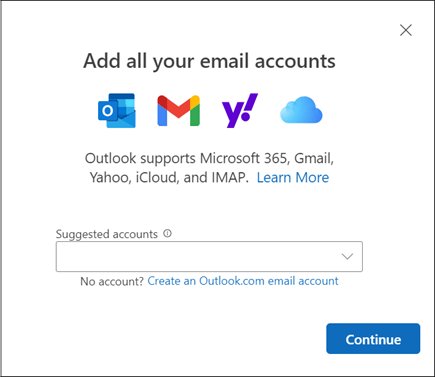
- Under Email accounts, select Add Account.
- Pick a suggested account from the list, or type the address you used in Windows Live Mail, and select Continue.
- Enter the account password if asked and select Done.
Gmail, Yahoo and iCloud may need a setting changed on the provider's website first. If Outlook asks for an app password, create one in that provider's account settings and use it instead of your normal password.
How to import Windows Live Mail emails to Outlook
New Outlook imports old messages saved as .eml files. Gather the messages you want to keep from Windows Live Mail into one folder on your PC before you start.
- Move every .eml file into a single top-level folder, because files inside subfolders are skipped.
- Check that no single message is larger than 14 MB, the per-file import limit.
- In new Outlook, open Settings (the gear icon) and select Import, listed under Files or General depending on your version.
- Select Start import and browse to the folder that holds the .eml files.
- Choose the destination account and folder.
- Select Import and repeat for each additional folder of messages.
Windows Live Mail limitations on Windows 10 and Windows 11
| Area | Status today |
|---|---|
| Support and updates | Ended January 10, 2017; the last Windows Live Mail 2012 update is no longer offered |
| Download | Not available from Microsoft |
| Existing installs | Keep running as they do today, without official support |
| Outlook.com, Hotmail and Live.com accounts | Require Modern Authentication (OAuth2) since September 16, 2024; a client without it cannot connect |
| Windows 11 | Never released or supported for Windows 11; Microsoft points Windows 11 users to new Outlook |
| Security fixes | None, so a mail client that opens attachments and web content stays unpatched |
Other retired Microsoft desktop programs hit the same wall, and Microsoft Works on Windows 11 has the same missing-download problem.
What's new in Outlook for Windows compared with Windows Live Mail
New Outlook still receives feature updates, which Windows Live Mail has not had since 2017. These are the tools a Windows Live Mail user notices first.
| New Outlook feature | What it does |
|---|---|
| Supported accounts | Outlook.com, Hotmail, work or school accounts, Gmail, Yahoo, iCloud and other IMAP accounts in one app |
| .eml files | Opens single .eml messages and bulk imports a folder of them |
| Pin | Right-click a message and select Pin to keep it at the top of the inbox |
| Snooze | Right-click a message and select Snooze to have it re-delivered at a time you pick |
| Schedule send | Select the arrow next to Send and choose Schedule send |
| Categories | Shows category names and colors on messages; select one to see everything tagged with it |
| Copilot | Drafts a message, summarizes an email thread and offers coaching on tone |
Microsoft lists a Microsoft 365 Personal, Family or Premium subscription as the requirement for Copilot features in its Microsoft 365 apps, so a free account gets the other features in the table without Copilot.
Open your Windows Live Mail account in Microsoft Edge
Outlook.com in a browser needs no download and signs in with the Modern Authentication method Outlook.com now requires, so it works the moment Windows Live Mail stops.
- Open Microsoft Edge from the Start menu or taskbar.
- Go to outlook.com and select Sign in.
- Enter the Outlook.com, Hotmail or Live.com address you used in Windows Live Mail and select Next.
- Complete the password or verification prompt; your server mail appears in Inbox.
Gmail and Yahoo accounts open on their own providers' websites instead. Messages that exist only on your PC, in Windows Live Mail's local folders, do not appear online until you import them into new Outlook.
Check your old Windows Live Mail messages arrived in Outlook
- Open the destination folder you picked during the import in new Outlook.
- Sort by date and confirm the oldest message from Windows Live Mail is there.
- Open a message that had an attachment and confirm the attachment opens.
- Send a test email to yourself and confirm it arrives in Inbox, which proves the account is signed in with a working connection.
Windows Live Mail not working or not sending email
Windows Live Mail stopped working with an Outlook.com or Hotmail account
Outlook.com ended Basic Authentication on September 16, 2024, and now accepts only Modern Authentication.
- Install new Outlook from the Microsoft Store.
- Add the same address under Accounts > Your accounts > Add Account.
- Sign in when prompted; mail already on the server appears without an import.
Windows Live Mail is not sending email
Outgoing mail to Outlook.com now goes through smtp-mail.outlook.com on port 587 with STARTTLS and OAuth2, which an unsupported client cannot complete.
- Send from Outlook.com in a browser to confirm the account itself works.
- Move the account to new Outlook or another app with an Outlook.com sign-in option.
- For a non-Microsoft provider, ask that provider which apps it still accepts.
Another mail app shows IMAP errors on the same Outlook.com account
Outlook.com can flag IMAP sign-ins from several clients as unusual activity.
- Sign in at account.live.com/activity in a browser.
- Under Recent activity, expand the matching Session Type event.
- Select This was me, then retry the connection.
A third-party app cannot connect over POP or IMAP
POP and IMAP are off by default on Outlook.com.
- Sign in to Outlook.com in a browser and open Settings.
- Select Mail > Forwarding and IMAP.
- Turn on the protocol you need and select Save.
Windows Live Mail download FAQ
What is Windows Live Mail?
Windows Live Mail was Microsoft's free desktop email client, shipped in the Windows Essentials suite with Movie Maker, Photo Gallery and Live Writer. Its last version was Windows Live Mail 2012, which lost support and left Microsoft's download pages on January 10, 2017.
Is Windows Live Mail still supported?
No. Microsoft ended support for Windows Essentials 2012, including Windows Live Mail, on January 10, 2017. Copies already installed keep running, but they receive no updates, no security fixes and no help from Microsoft support.
Is Windows Live Mail still available?
Not from Microsoft. Windows Essentials 2012 has been unavailable for download since January 10, 2017. Sites still offering it are not distributing a Microsoft product, and Microsoft warns those files may contain viruses or hidden costs.
Does Windows Live Mail still work?
An installed copy still opens, but Outlook.com, Hotmail and Live.com accounts have required Modern Authentication since September 16, 2024, and Windows Live Mail has had no update since 2017 to add it. It is useful today mainly for saving old messages before you switch.
Does Windows Live Mail work with Windows 10?
Microsoft stopped supporting Windows Essentials 2012 on Windows 10 on January 10, 2017. An existing install may still launch, but it gets no fixes, and Microsoft's free replacement on Windows 10 is new Outlook from the Microsoft Store.
Can I install Windows Live Mail on Windows 11?
Microsoft never released or supported Windows Live Mail for Windows 11, and offers no installer for it. On Windows 11, install the free new Outlook for Windows from the Microsoft Store and import your old .eml messages into it.
How do I import Windows Live Mail to Outlook?
Put your saved Windows Live Mail .eml files in one top-level folder, then in new Outlook open Settings, select Import and Start import. Pick the folder, the destination account and folder, and select Import. Each file must be 14 MB or smaller.
Why has Windows Live Mail stopped working?
Usually because Outlook.com ended Basic Authentication on September 16, 2024, so password-only clients can no longer sign in. Microsoft also withdrew the last Windows Live Mail 2012 update, so no fix is coming. Move the account to new Outlook.
Why can't I send emails in Windows Live Mail?
Outlook.com now sends through smtp-mail.outlook.com on port 587 with STARTTLS and OAuth2 sign-in, and Windows Live Mail has had no update since 2017 to add that sign-in. Send from Outlook.com in a browser or from new Outlook instead.
How do I get Windows Live Mail?
You cannot get it from Microsoft anymore. The supported way to get a free desktop mail app on Windows 10 or 11 is to open Microsoft Store, search for Outlook, and install Outlook for Windows published by Microsoft Corporation.
Bottom line: should you install Windows Live Mail on Windows 10?
No. Leave any existing copy in place only long enough to save your old messages, then switch to new Outlook from the Microsoft Store. There is no official download, no security updates since 2017, and Outlook.com now requires a sign-in method the 2012 client never gained, so a downloaded copy adds risk without restoring your mail.