To use the Microsoft News app on Windows 11 or Windows 10, install Microsoft News from the Microsoft Store, sign in with your Microsoft account, and follow the topics and publishers you want in your feed.
This guide covers installing the app, shaping the feed, putting news on the taskbar with Widgets or news and interests, and fixing the app when it will not start.
Install and open the Microsoft News app on Windows 11/10
The app is free in the Microsoft Store. Microsoft's support pages now call the service MSN News, and the Store listing they link to is the Microsoft News app.
- Select Start and open Microsoft Store.
- Type
Microsoft Newsin the search box at the top and press Enter. - Select the Microsoft News app published by Microsoft.
- Select Get (or Install) and wait for the download to finish.
- Select Open, or find Microsoft News in the Start menu app list.
- Sign in with your Microsoft account so your followed topics sync across devices.
If the Store itself is missing from the PC, reinstall the Microsoft Store app first.
Microsoft News app, Widgets or MSN News online: which to use
Windows offers the same MSN news feed in several places. They share your Microsoft account preferences, so choose by where you want to read.
| Your situation | Use this | Why |
|---|---|---|
| You want a full-window news reader on the PC | Microsoft News app from the Microsoft Store | A dedicated app with topic and publisher controls |
| You want headlines one click away on Windows 11 | Widgets (Windows key + W) | Built into the taskbar; no install needed |
| You are still on Windows 10 | News and interests on the taskbar | The weather button opens the news feed |
| You read on several devices or browsers | MSN News online at msn.com/news | Works in any browser and syncs when you sign in |
| You use a Mac | MSN News widget in Microsoft Edge | Shows Top Stories in the macOS notification tray |
Follow news topics in the Microsoft News app
Following topics is how the feed learns what to show you. Changes may take a little while to appear.
- Open the Microsoft News app or MSN News.
- Select Browse all topics in the left pane.
- Search for a topic, such as a sport, a city or a technology.
- Select the add icon next to the topic to follow it.
- Or select a category in the top navigation rail and select + Follow.
Follow or block publishers in Microsoft News
Publisher controls decide which outlets fill your feed. Blocking removes a source you never want to see.
- To follow a publisher, select Browse all publishers in the left pane.
- Search for the publisher and select the add icon.
- Alternatively, select a publisher's name on any story and select + Follow.
- To block a publisher, select the More icon (three dots) next to one of its stories.
- Select Block.
Unfollow topics and personalize your Microsoft News feed
Prune the feed when it fills with topics you no longer care about.
- Select a followed category in the top navigation rail.
- Select Following to unfollow it.
- Or select Personalize in the top navigation bar.
- Search for the topic you want to drop.
- Select the checkmark icon next to it to unfollow.
How do I get Microsoft News on my taskbar in Windows 11?
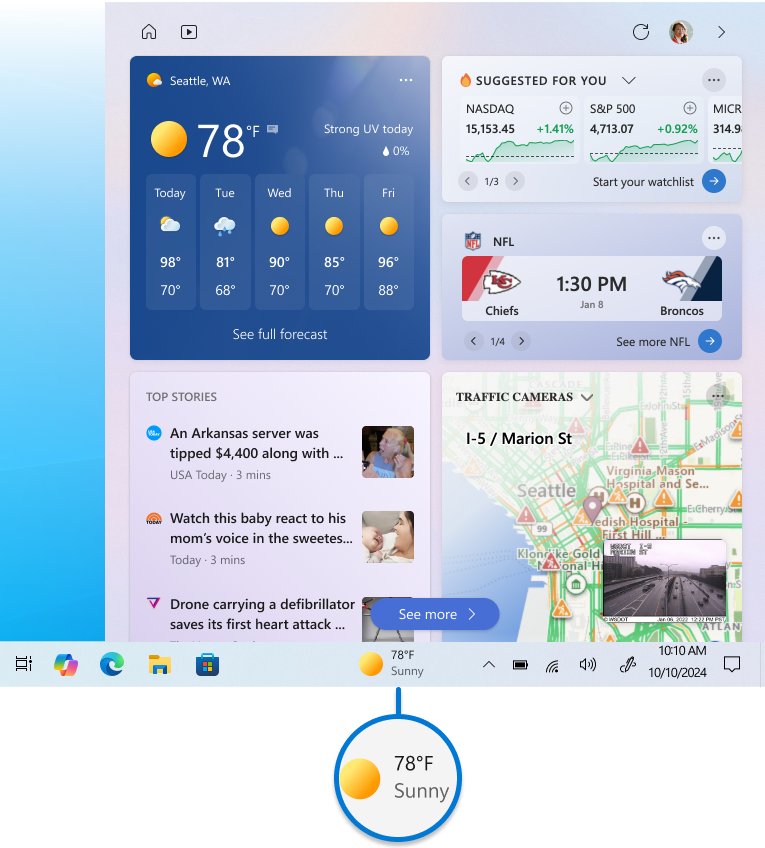
Windows 11 shows MSN news in Widgets, opened from the left of the taskbar. If the Widgets button is gone, turn it back on in taskbar settings.
- Right-click an empty part of the taskbar and select Taskbar settings.
- Under Taskbar items, turn the Widgets switch On.
- Select the Widgets area on the taskbar, or press Windows key + W.
- Select Discover in the Widgets navigation bar to see the news feed.
- To add a news widget or another widget, select + to open the widget picker and choose an installed widget.
Turning the switch Off only hides the button; Windows key + W still opens the board.
Personalize the news feed in Windows 11 Widgets
The Widgets Discover feed has its own follow and block lists, tied to your Microsoft account.
- Press Windows key + W and select Discover.
- Select your user account button.
- On the Discover tab, select topics or publishers to follow.
- Use the Following tab to review or unfollow them.
- Use the Blocked tab to unblock a topic or publisher.
- On individual stories, use More like this or Fewer like this, or select the close button to hide a story.
Change the feed's language and region from the Region and Language drop-down under the same user account button.
Use news and interests on the Windows 10 taskbar
Windows 10 shows the news feed behind the weather button on the taskbar. Microsoft notes that Windows 10 support has ended.
- Right-click an empty area of the taskbar and select News and interests.
- Select Show icon and text, or Show icon only to save space.
- Hover over or select the weather button to open the feed.
- Select the user account icon and choose Manage interests to follow topics and publishers.
- Choose Information cards under the same icon to turn cards such as weather or traffic on or off.
- Select Refresh feed next to the user account icon to load your changes.
Clear Open on hover in the same right-click menu if the feed keeps opening by accident, or disable news and interests to remove it from the taskbar.
Check that your Microsoft News settings sync
MSN syncs your data across the MSN website and MSN apps when you use the same Microsoft account.
- Follow one new topic in the Microsoft News app.
- Open msn.com/news in Microsoft Edge on the same or another device.
- Select the circle sign-in icon in the top right and sign in with the same Microsoft account.
- Select Personalize and confirm the topic appears in your followed list.
- Open Widgets on Windows 11 and look for stories from that topic in Discover.
The app didn't start in the required time on Windows 11: fix Microsoft News
The app didn't start in the required time when opening Microsoft News
A pending Windows or Store update, or damaged app data, stops the app launching in time.
- Close the app with the Close (X) button and open it again.
- Select Start > Settings > Windows Update > Check for updates and install anything offered.
- Open Microsoft Store, select Library > Get updates to update the app.
- Restart the PC and open Microsoft News again.
Microsoft News app not working or closes straight away
The app's local files or settings are corrupted.
- Select Start > Settings > Apps > Installed apps.
- Select the More icon next to Microsoft News and choose Advanced options.
- Select Repair and test the app.
- If it still fails, return to Advanced options and select Reset.
- On Windows 10, go to Settings > Apps > Apps & features, select the app and choose Advanced options instead.
Microsoft News still will not open after a reset
The installation itself is damaged.
- Uninstall Microsoft News from Settings > Apps > Installed apps.
- Open Microsoft Store and select Library.
- Find Microsoft News and select Install.
- On Windows 10, run Settings > Update & Security > Troubleshoot > Windows Store apps > Run the troubleshooter.
News feed shows topics you did not choose
You are signed out, or signed in with a different Microsoft account, so default preferences load.
- Sign in with the Microsoft account you used to follow topics.
- In Widgets, select your user account button > Manage accounts to switch accounts.
- Give the feed time to update; personalization improves over time.
What is the Microsoft News app?
Microsoft News is Microsoft's free news reader for Windows, built on the MSN News service.
| Question | Answer |
|---|---|
| What it shows | A personalized MSN News feed of stories from publishers you can follow or block |
| Price | Free in the Microsoft Store |
| Account | Optional; signing in with a Microsoft account syncs your topics and publishers |
| Where else the same feed appears | msn.com/news, Windows 11 Widgets, Windows 10 news and interests |
| Current name in Microsoft support | MSN News; the Store listing is titled Microsoft News |
Microsoft News app for Windows FAQ
What is the Microsoft News app?
Microsoft News is a free Windows app that shows a personalized MSN News feed. You follow topics and publishers, block sources you dislike, and sign in with a Microsoft account to sync those choices with msn.com and other devices.
What is the news app on Windows 11?
Windows 11 shows news in Widgets, opened from the taskbar or with Windows key + W. The Discover feed draws on MSN News and your Microsoft account preferences. The separate Microsoft News app is optional and comes from the Microsoft Store.
How do I download the Microsoft News app for PC?
Open Microsoft Store, search for Microsoft News, and select Get or Install. The app is free. Once installed it appears in the Start menu, and you can pin it to the taskbar or Start for quick access.
Can I read Microsoft News online without the app?
Yes. MSN News is available at msn.com/news in any browser. Sign in with the circle icon in the top right to load the topics and publishers you follow, so the feed matches the Windows app.
Is there a Microsoft News app for desktop on Windows 10?
Yes. The Microsoft News app installs from the Microsoft Store on Windows 10 as well as Windows 11. Windows 10 also has news and interests on the taskbar, though Microsoft has ended support for Windows 10.
Why is the Microsoft News app not working?
An outdated app or Windows build, or corrupted app data, is the usual cause. Update Windows, select Library > Get updates in Microsoft Store, then use Repair or Reset under the app's Advanced options in Settings. Reinstall the app if those fail.
How do I add a news widget on Windows 11?
Open Widgets with Windows key + W and select + to open the widget picker. Choose an installed widget to pin it. New widgets come from the Widgets page in the Microsoft Store, and more options lets you resize or remove a widget.
How do I stop the news feed from opening on hover in Windows 10?
Right-click an empty part of the taskbar, select News and interests, and clear Open on hover. The feed then opens only when you select the weather button. Choose Turn off in the same menu to remove it entirely.
Bottom line: is the Microsoft News app worth installing?
Install the Microsoft News app if you want a full-window reader, and rely on Widgets for quick headlines on Windows 11. Both use the same MSN News preferences, so following topics once with your Microsoft account shapes the app, Widgets and msn.com together.