To type a backslash (\), press the key marked \ and | on your keyboard, or copy it from this page; on Windows you can also hold Alt and type 92 on the numeric keypad.
This guide covers where the backslash key sits on US and UK keyboards, how to type it on Windows, Mac, iPhone and Android, the HTML codes, and why it sometimes shows up as a yen sign.
In a hurry? Type the backslash in one step
The backslash is \ and leans to the left. Use whichever of these fits the keyboard in front of you.
- On a US keyboard, press the \ | key at the right end of the Q-W-E-R-T-Y row, just after the ] key. Press it alone for \ and with Shift for |.
- On a UK or European ISO keyboard, press the \ | key between left Shift and Z.
- On Windows with a numeric keypad, turn Num Lock on, hold Alt, type 92 on the keypad and release Alt.
- If none of those work, copy the backslash here: \
Copy and paste the backslash
Select the character in the first column of the table, copy it, and paste it where you need it. The table also lists the doubled form that code and network paths use.
| Copy this | What it is | Where you use it |
|---|---|---|
| \ | Single backslash, Unicode U+005C | Windows folder paths such as C:\Users, everyday text |
| \\ | Two backslashes | Start of a network (UNC) path such as \\Server\Share, or one literal backslash inside a C, C#, JavaScript or Python string |
| | | Vertical bar (pipe), the Shift character on the same US key | Command-line pipes and tables |
Press Ctrl + C to copy and Ctrl + V to paste on Windows, or copy and paste on a Mac with Command + C and Command + V. The full set of keyboard copy and paste shortcuts works for symbols too.
How to type the backslash on any device
Find your device and keyboard in the first column. The key name in the middle column is printed on the key itself.
| Device or keyboard | How to type \ | Notes |
|---|---|---|
| Windows PC, US (ANSI) keyboard | Press the \ | key, right of ] | Shift on the same key gives | |
| Windows PC, UK or European ISO keyboard | Press the \ | key between left Shift and Z | Microsoft calls this the Backslash and Pipe key on the European ISO keyboard |
| Any Windows PC with a numeric keypad | Hold Alt, type 92 on the keypad | The number row above the letters does not work for Alt codes |
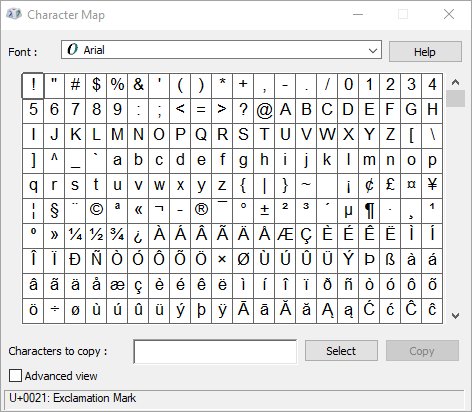
| Windows, any keyboard | Press Windows key + . (period), select Symbols, pick \ | Works on laptops without a keypad |
| Microsoft Word | Type 5C, then press Alt + X | Word converts the Unicode code into the character |
| Mac, US keyboard | Press the \ | key, right of ] | Or open Edit > Emoji & Symbols and search for backslash |
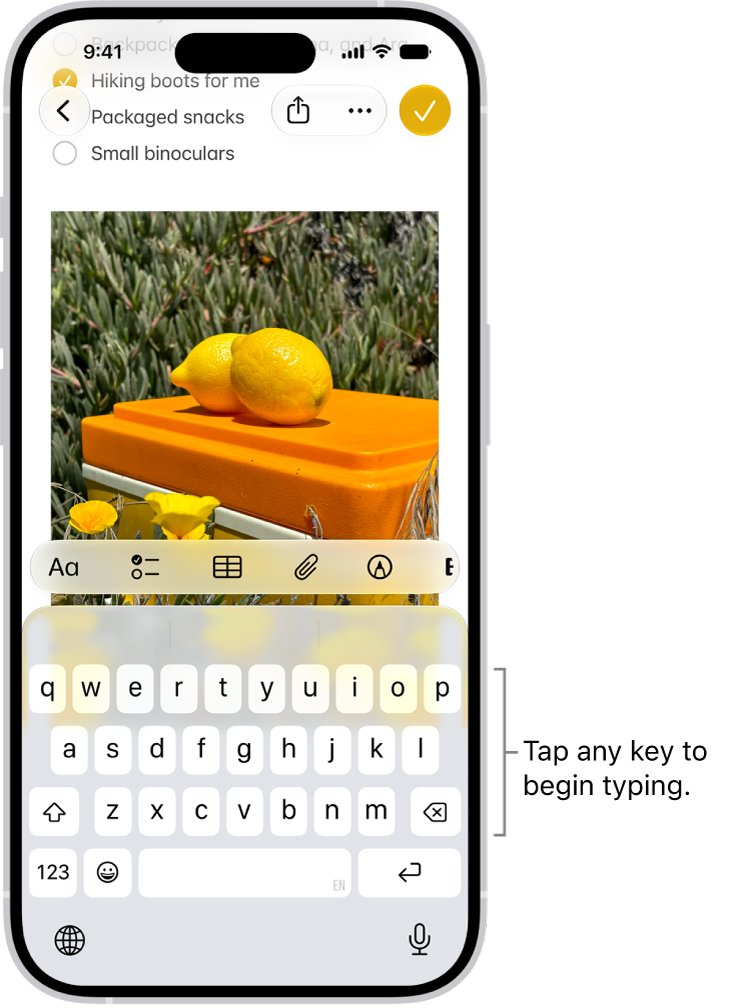
| iPhone or iPad | Tap 123, then #+=, then \ | The backslash sits on the second symbols page |
| Android with Gboard | Tap ?123, then =\<, then \ | Other Android keyboards keep it on a symbols page too |
| Linux desktop | Press the \ | key for your layout | The key position follows the same US or ISO layout as Windows |
Type the backslash on Windows without the backslash key
Use these routes when the key is missing, broken, or produces another character. The Windows emoji panel works on every Windows 11 and Windows 10 PC, with or without a numeric keypad.
- Click where you want the backslash to go.
- Press Windows key + . (period) to open the emoji panel.
- Select Symbols, then scroll the punctuation group to the backslash.
- Click \ to insert it.
- On a keyboard with a numeric keypad, you can instead turn on Num Lock, hold Alt, type 92 on the keypad and release Alt.
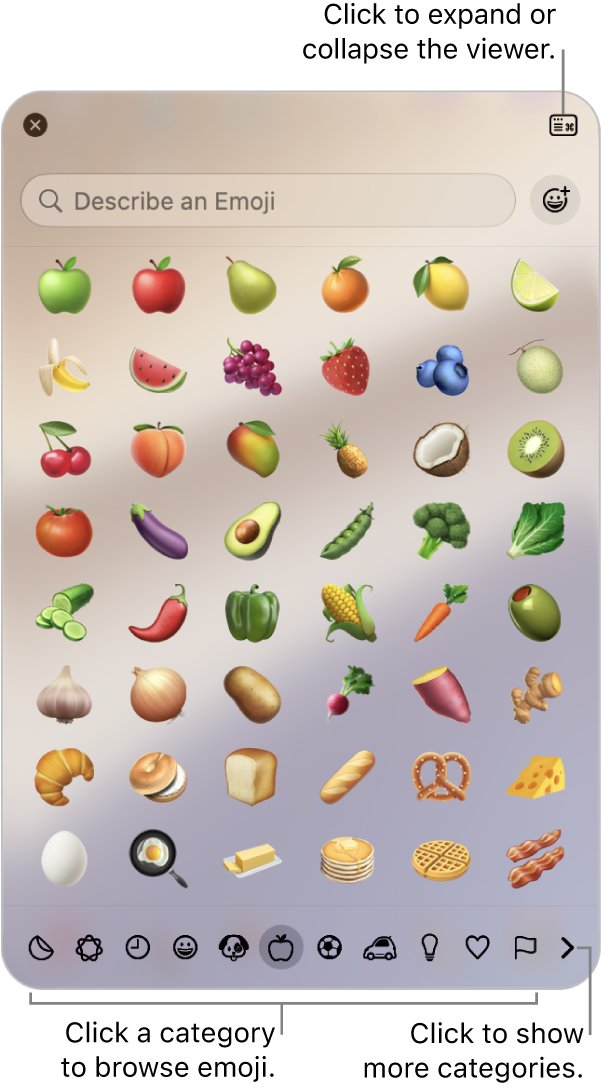
Type the backslash on Mac with Character Viewer
A US Mac keyboard has the same \ | key as a US PC keyboard. When your layout hides it, the Character Viewer finds it by name.
- Click in the text where the backslash should go.
- Choose Edit > Emoji & Symbols from the menu bar, or press the Globe (Fn) key and E.
- Type backslash in the search field.
- Click the \ character to insert it. If the viewer is expanded, double-click it instead.
Backslash vs forward slash: which is which
The two slashes lean in opposite directions and have different jobs. Typing the wrong one is the most common backslash mistake.
| Backslash | Forward slash | |
|---|---|---|
| Character | \ (top leans left) | / (top leans right) |
| Unicode name | REVERSE SOLIDUS, U+005C | SOLIDUS, U+002F |
| US keyboard key | \ | key, right of ] | / ? key, left of right Shift |
| Main use | Windows folder paths, escape character in code | Web addresses, macOS and Linux paths, dates, fractions |
| Example | C:\Users\Public | https://techdows.com/ |
The forward slash on a PC keyboard leans the other way and sits on a different key.
Usage rule of thumb: type a backslash for a Windows folder path or an escape sequence in code, and a forward slash for a web address, a macOS or Linux path, a date or a fraction.
Was the backslash invented for computers?
The backslash has no job in ordinary written English. Every use it has today is in computing: folder paths, escape sequences in code, and markup.
That is why it carries the same code values in every character standard computers use. These are the identifiers worth knowing.
| Identifier | Value for \ |
|---|---|
| Unicode code point | U+005C |
| Unicode name | REVERSE SOLIDUS |
| ASCII decimal code | 92 (the Alt code) |
| Hexadecimal | 5C |
| Windows virtual-key code for the US key | VK_OEM_5 (0xDC), the Backslash and Pipe key |
| Windows virtual-key code for the ISO key | VK_OEM_102 (0xE2) |
| URL percent-encoding | %5C |
| HTML named character reference | \ |
Use this technical data when a form, editor or search box asks for the character by code: U+005C in Unicode tools, 92 as an Alt code, and %5C inside a web address.
The backslash as an escape character
In most programming languages, a backslash inside a string changes the meaning of the next character. That sequence is an escape sequence, and it counts as one character.
Because the backslash is the escape character, a literal backslash has to be written as two of them.
| Escape sequence | Means | Languages |
|---|---|---|
| \\ | One literal backslash | C, C++, C#, JavaScript, Python, CSS strings |
| \n | New line | C, C++, JavaScript, Python |
| \t | Horizontal tab | C, C++, JavaScript, Python |
| \" and \' | A quote mark that does not end the string | C, C++, JavaScript, Python, CSS |
| \x5C | The backslash written as a hex escape | C, C++ |
| \5C | The backslash written as a CSS hex escape | CSS |
| Backslash at the end of a line | Continue on the next line | C preprocessor, CSS strings |
Python raw strings, written with an r prefix such as r"C:\Temp", treat backslashes as literal characters. A raw string still cannot end in a single backslash.
Backslash in Windows file paths (and why the web uses /)
Windows uses the backslash as its directory separator. Web addresses, macOS and Linux use the forward slash instead, so a path copied from one world often breaks in the other.
Windows itself accepts forward slashes in most paths: during path normalization it converts every / into the standard \ separator.
| Path type | Example | What the backslashes do |
|---|---|---|
| Absolute path | C:\Documents\Newsletters\Summer2018.pdf | Separate the drive's folders and the file name |
| Path from the root of the current drive | \Program Files\Custom Utilities | A leading \ means start at the drive root |
| Relative path | ..\Publications\TravelBrochure.pdf | .. means the parent folder |
| Network (UNC) path | \\Server2\Share\Test\Foo.txt | Two leading backslashes mark a server name |
| Device path | \\?\C:\Test\Foo.txt | Skips path normalization |
Why the backslash turns into a yen or won sign
On Japanese-language Windows, the code page puts the yen sign (¥) at the position where other code pages have the backslash. Japanese fonts therefore draw that character as ¥, and Windows maps both the backslash and the yen sign to that same code.
The won sign (₩) is tied to the backslash in a similar way: Microsoft's Korean alternate sort order treats the backslash as equal to the won currency symbol (U+20A9).
| Where you see ¥ or ₩ | What is underneath | What to do |
|---|---|---|
| File paths on a Japanese-language PC | The same code as the backslash | Nothing; the path works as written |
| Text in a document or web page | Usually a backslash drawn by an East Asian font | Change the font to a Western font such as Arial or Segoe UI; a real backslash then shows as \ |
| A Word document | A backslash, displayed as ¥ by a compatibility setting | The stored character is still U+005C, so copying the text out keeps the backslash |
The backslash in URLs and code
A backslash is not a path separator in a web address; URLs use the forward slash. When a URL must carry a literal backslash, encode it as %5C, which JavaScript's encodeURIComponent() does automatically.
In code, decide first whether the backslash is a path separator or an escape character. The table shows the safe way to write a Windows path in common languages.
| Language | Write C:\Temp\file.txt as | Why |
|---|---|---|
| C or C++ | "C:\\Temp\\file.txt" | Each \\ produces one backslash |
| C# | @"C:\Temp\file.txt" | A verbatim string keeps backslashes as typed |
| Python | r"C:\Temp\file.txt" | A raw string keeps backslashes as typed |
| JavaScript | "C:\\Temp\\file.txt" | \\ is the escape for one backslash |
| URL | %5C | Percent-encoding of byte 5C |
Copy-paste HTML codes for the backslash
In HTML, a plain \ displays correctly, so you rarely need a code. Use one when a template or CMS strips or escapes raw backslashes.
| Code | Type | Result |
|---|---|---|
| \ | Named character reference | \ |
| \ | Decimal character reference | \ |
| \ | Hexadecimal character reference | \ |
| "\\" or "\5C" | CSS content string | \ |
Backslash keyboard troubleshooting
The backslash key types # instead (keyboard backslash is hash)
Windows is using the United Kingdom layout on a US keyboard; that key shares its scan code with the UK # ~ key.
- Press Windows key + Spacebar to cycle to the correct keyboard layout, or select the input language icon in the system tray.
- To remove the wrong layout on Windows 11, open Settings > Time & language > Language & region.
- Select the … next to your language, choose Language options, select … next to the unwanted keyboard and choose Remove.
My keyboard has no backslash key
Some compact and regional layouts move the backslash onto a modifier combination or leave it off the keycaps.
- Press Windows key + . and pick \ from Symbols.
- On a keyboard with a numeric keypad, hold Alt and type 92.
- Or add the US keyboard layout under Language options > Add a keyboard and switch to it with Windows key + Spacebar.
Keyboard backslash not working at all
The wrong input layout is active, or the key is physically faulty.
- Try the key in Notepad to rule out the app.
- Check the input language icon in the system tray and switch layouts with Windows key + Spacebar.
- If no layout produces a character from that key, use the emoji panel or Alt code until the keyboard is repaired.
I keep typing / when I mean the backslash
The two slash keys sit in different places, and / is next to right Shift on a US keyboard.
- Look for the leaning direction: \ leans left, / leans right.
- On a US keyboard, the backslash is the key after ], not the one before right Shift.
My backslash shows up as ¥ or ₩
An East Asian font or code page is displaying the backslash code as a currency sign.
- Change the font of the affected text to a Western font.
- If you switched the Windows display language recently, add or switch back to your usual keyboard layout in Language options.
My Windows path breaks in code
The language treats each backslash as the start of an escape sequence, so \n or \t become a new line or a tab.
- Double every backslash in the path.
- Or use a raw or verbatim string: r"…" in Python, @"…" in C#.
- Or use forward slashes, which Windows file APIs convert to backslashes.
Backslash keyboard FAQ
Where is the backslash on a keyboard?
On a US keyboard, the backslash shares a key with the vertical bar (|) at the right end of the Q-W-E-R-T-Y row, just after the ] key. On UK and other European ISO keyboards, the backslash key sits between the left Shift key and Z.
How do you make a backslash on a keyboard?
Press the \ | key without Shift. On Windows you can also hold Alt and type 92 on the numeric keypad, or press Windows key + period, select Symbols and click the backslash. On a Mac, open Edit > Emoji & Symbols and search for backslash.
Why is there no backslash on my keyboard?
Some compact and regional keyboards put the backslash on a secondary combination or leave it off the keycaps. Type it with Alt + 92 on the keypad, the Windows emoji panel's Symbols tab, or by switching to the US layout with Windows key + Spacebar.
What is the backslash keyboard shortcut on Windows?
The Alt code for the backslash is Alt + 92, typed on the numeric keypad with Num Lock on. In Microsoft Word, you can also type 5C and press Alt + X to convert the code into a backslash.
Where is the backslash on a UK keyboard?
On a UK keyboard, the backslash and vertical bar share the key between the left Shift key and Z. If pressing it gives a different character, Windows may be set to another layout; switch with Windows key + Spacebar.
What is the difference between \ and /?
The backslash (\) leans left and separates folders in Windows paths and escapes characters in code. The forward slash (/) leans right and separates parts of web addresses and macOS or Linux paths.
Why is the backslash used to escape characters?
In C and the languages that copied its string rules, the backslash marks the start of an escape sequence. A backslash followed by a letter, such as \n for a new line, forms an escape sequence that counts as one character.
Why does my backslash look like a yen sign?
Japanese-language code pages put the yen sign (¥) at the same code position as the backslash, so Japanese fonts draw a backslash as ¥. The character is still a path separator. Changing the font to a Western one shows it as \ again.
How do I write a backslash in HTML or a URL?
In HTML, type \ directly or use \, \ or \. In a URL, a literal backslash must be percent-encoded as %5C; use the forward slash for the address path itself.