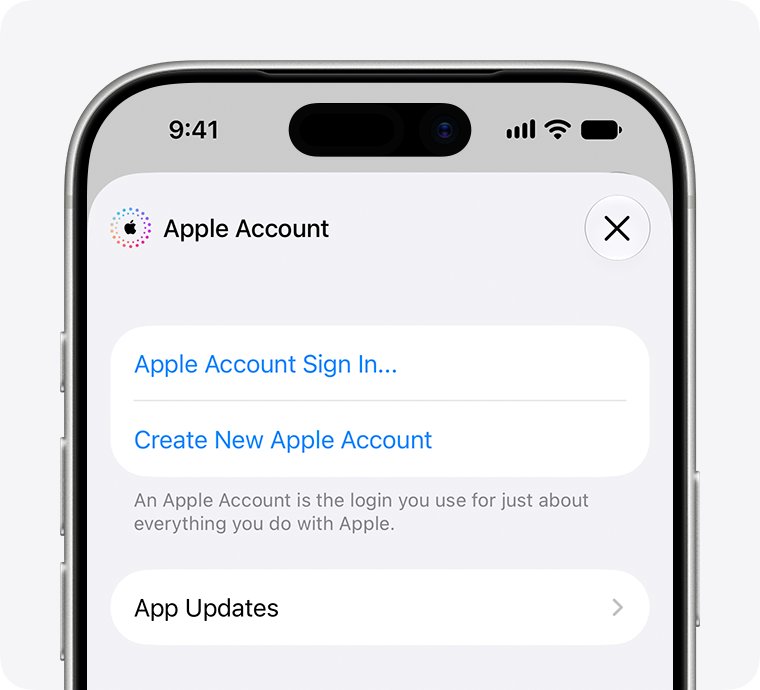
Yes, an Apple ID, now called an Apple Account, can use a @gmail.com address: enter your Gmail address when you create the account, verify it from the email Apple sends, and use it to sign in to iCloud, the App Store and every other Apple service.
This guide covers creating a new Apple Account with Gmail, switching an existing account to a Gmail address, and what to do when Apple says the address is unavailable or the verification email never arrives.
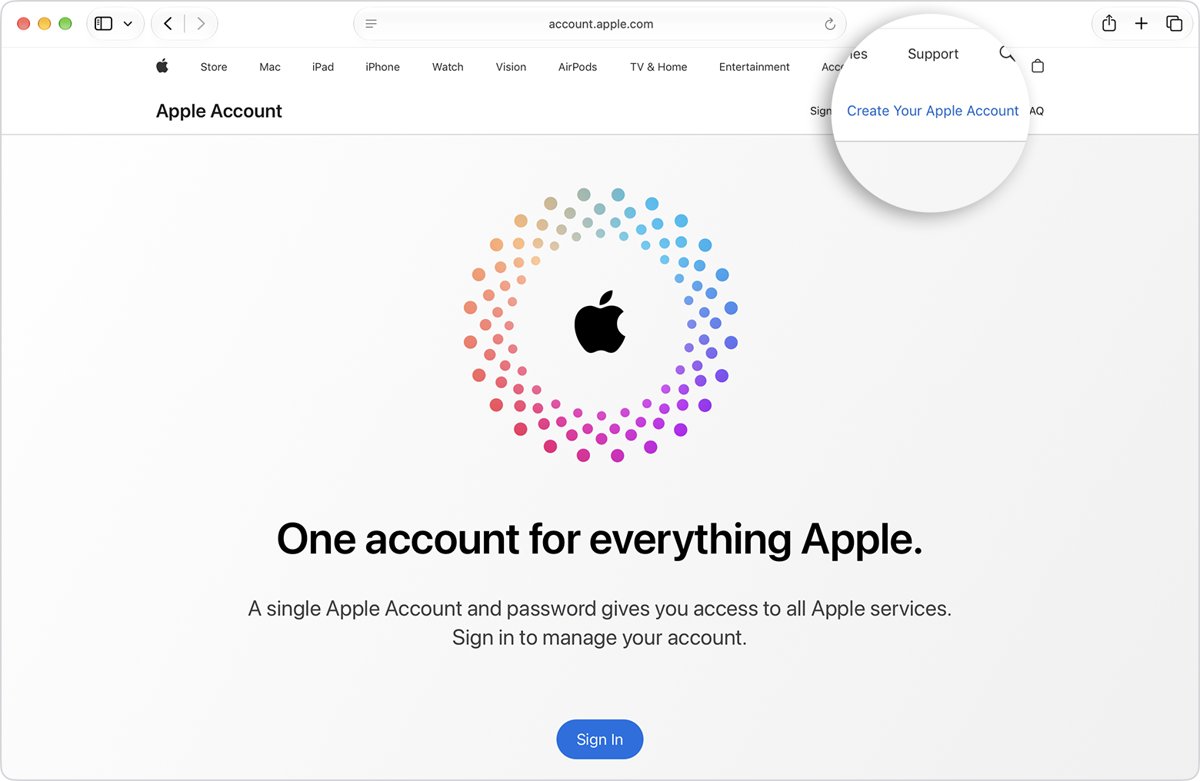
Create an Apple ID with a Gmail address on the web
The web route works from any browser, including on Windows or Android. The account itself is free.
- Go to account.apple.com and select Create Your Apple Account.
- Enter your full Gmail address, such as [email protected], and create a password.
- Enter your birthday and a phone number you can always access.
- Open Gmail and find the verification email sent from Apple.
- Verify the Gmail address from that email, then verify your phone number.
- Sign in with your Gmail address and the new password.
Your Gmail password and your Apple Account password are separate. Changing one never changes the other, so when you change your Apple Account password, Gmail keeps its own.
Gmail Apple ID setup options by device
| Where you are | Route | Where you enter the Gmail address |
|---|---|---|
| New iPhone or iPad during setup | Tap Forgot password or don't have an account? > Create a Free Apple Account | After your birthday and name |
| iPhone already set up, signed out of iCloud | App Store > My Account > Create New Apple Account | First screen, with password and country or region |
| Mac | System Settings > Sign in > Don't Have an Account? | After your birthday |
| Windows PC | Apple Music or Apple TV app > Sign In > Create New Apple Account | With your password |
| Any browser, Android included | account.apple.com > Create Your Apple Account | First screen |
| Existing Apple Account, new Gmail address | Settings > your name > Sign-In & Security | As a new primary email address |
Gmail address requirements for an Apple Account
| Requirement | Detail |
|---|---|
| A working Gmail inbox | Apple sends a verification email before the new account can be used |
| Address not used by another Apple Account | Apple refuses an address already linked to a different account, including a family member's |
| Address not removed from an account in the last 30 days | A removed non-iCloud address cannot join another Apple Account for 30 days |
| A phone number | Used to verify identity and recover the account; the web route requires one |
| Two-factor authentication | Set up during account creation, or later from Settings |
| Gmail username rules | Gmail usernames are 6 to 30 characters of letters, numbers and periods; Google ignores the dots |
If you do not have a Gmail address yet, create a Google account first: sign out of any current Google Account, open the Google Account sign-in page, choose to create an account and pick personal use.
Create an Apple ID with Gmail on iPhone or iPad
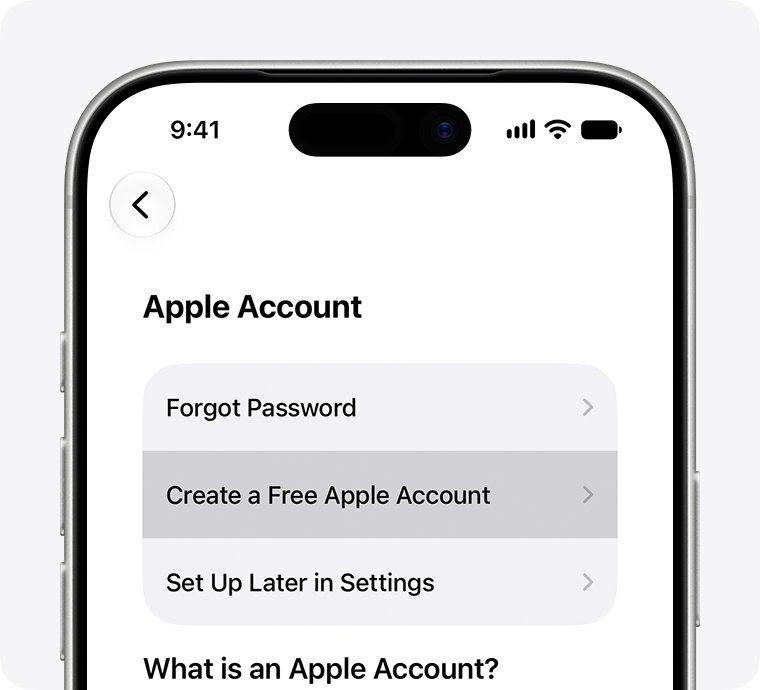
- During device setup, tap Forgot password or don't have an account?.
- Tap Create a Free Apple Account.
- Select your birthday, enter your name and tap Continue.
- Enter your Gmail address; this becomes the address you sign in with.
- Follow the onscreen steps to verify the Gmail address, create a password, set your country or region and set up two-factor authentication.
- Sign in to iCloud and the App Store with the new account.
On an iPhone that is already set up, open the App Store, tap My Account and tap Create New Apple Account. If that option is missing, sign out of iCloud first. You can choose None for the payment method, and you are not charged until you buy something.
Create an Apple ID with Gmail on Mac or Windows PC
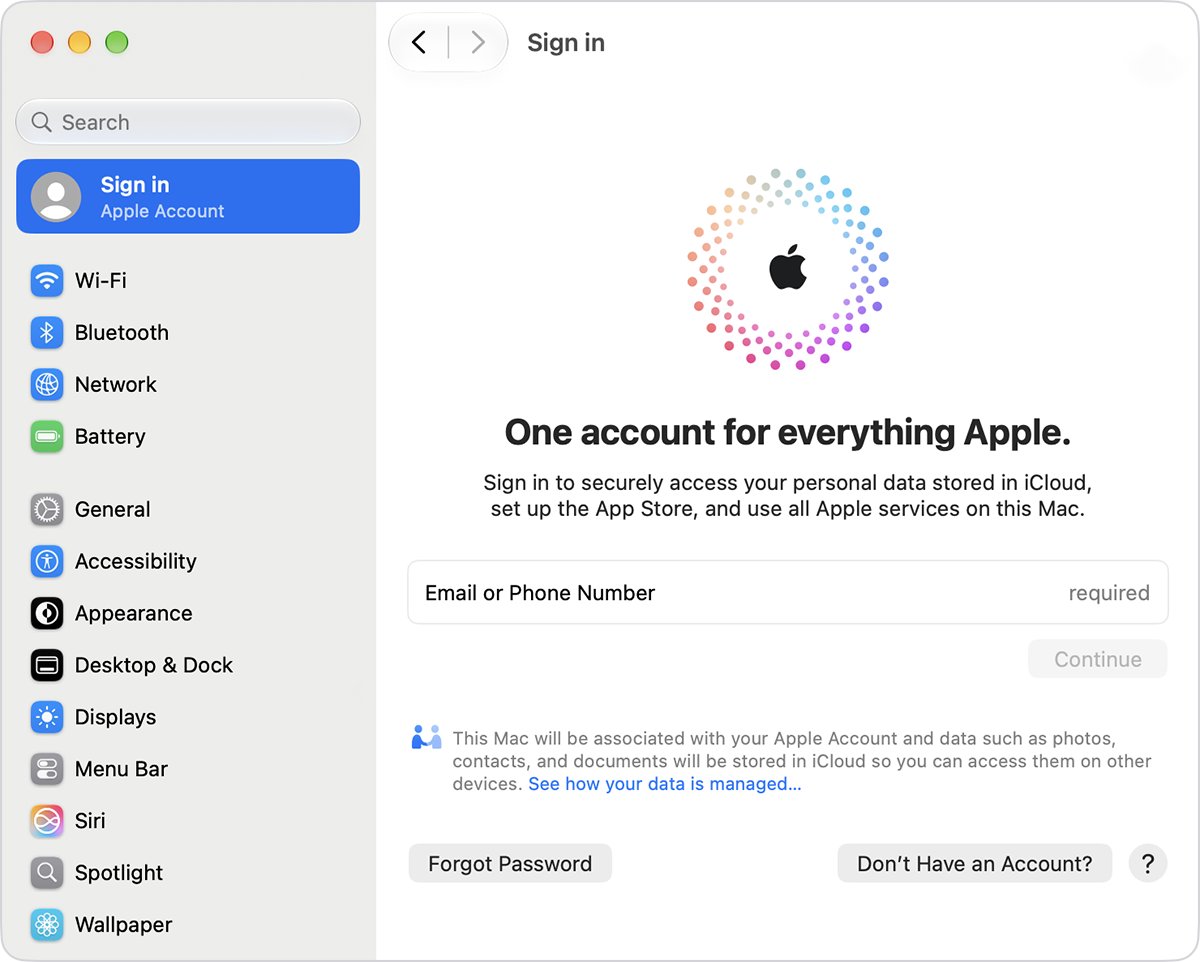
- On a Mac, open System Settings, click Sign in, then click Don't Have an Account?.
- On a Windows PC, open the Apple Music or Apple TV app, click Sign In, then Create New Apple Account.
- Enter your birthday if asked, then your Gmail address and a password.
- Complete the remaining onscreen steps.
- Check Gmail for the verification email from Apple and verify the address.
- Sign in with your Gmail address.
Change your Apple ID email to a Gmail address
Changing the primary email keeps your contacts, purchases and other account data. Any email address on the account can be used to sign in.
- On iPhone, iPad or Mac, open Settings or System Settings and choose your name.
- Tap or click Sign-In & Security.
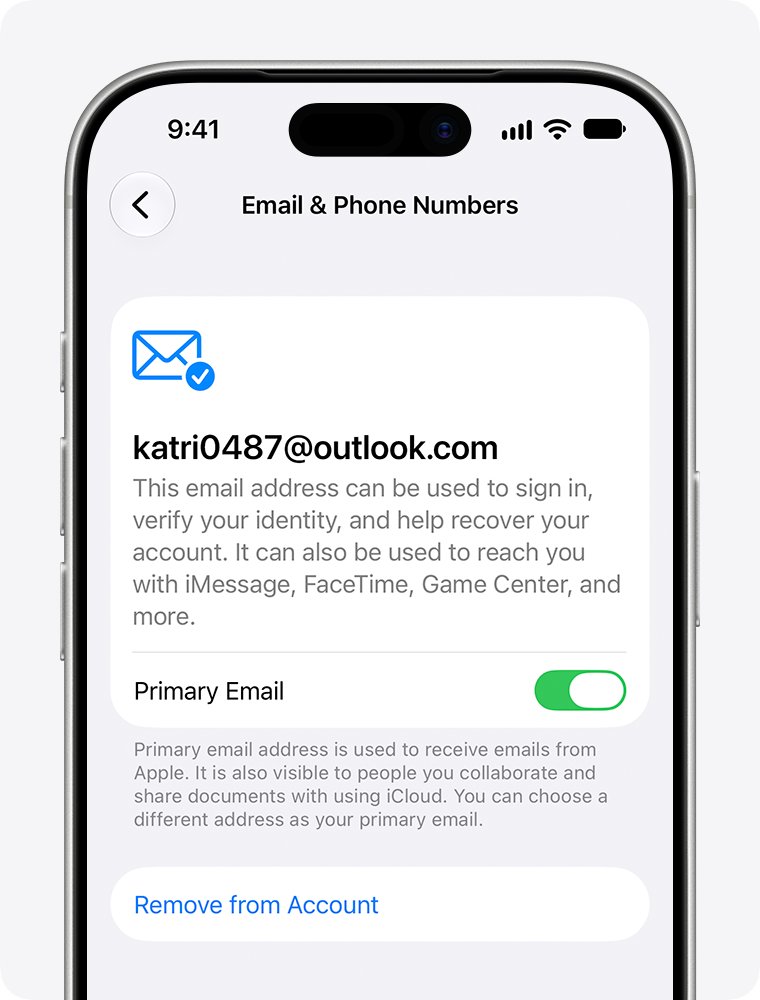
- Tap or click your current primary email address.
- Select Remove from Account, or turn off Primary Email to keep the old address as a secondary one.
- When prompted, add a new primary email address and enter your Gmail address.
- Follow the onscreen steps to verify the Gmail address with the code Apple sends.
Without a trusted device, sign in at account.apple.com, open Sign-In and Security and choose Email & Phone Numbers. Your App Store purchases stay on the account after the change.
Add Gmail as an extra email address on your Apple Account
An additional address helps people find you in FaceTime, Messages, Photo Sharing and Find My, and it can also be used to sign in.
- Sign in at account.apple.com.
- Select Sign-In and Security.
- Choose Email & Phone Numbers, then select the Add button.
- Enter your Gmail address.
- Enter the verification code Apple sends to Gmail and select Continue.
To remove it later, return to Email & Phone Numbers and click Remove next to the address.
Check which email your Apple ID uses
- Open Settings and tap your name at the top.
- Tap Sign-In & Security and confirm your Gmail address is listed as the primary email.
- Sign out of the App Store and sign in to the App Store again with the Gmail address.
- Check Gmail for account notices from Apple; they go to the primary email address.
Apple email domains vs Gmail: @icloud.com, @me.com and @mac.com
An Apple Account does not need an Apple email domain. Apple's own addresses come from iCloud Mail, and a Gmail-based account can still have one.
| Address type | Who has it | Sign in with it? |
|---|---|---|
| @gmail.com | Anyone who verifies their Gmail address on the account | Yes, as the primary or an additional address |
| @icloud.com | iCloud accounts created on or after September 19, 2012 | Yes |
| @me.com | iCloud accounts created before September 19, 2012, or moved from MobileMe before August 1, 2012 | Yes |
| @mac.com | Working @mac.com users as of July 9, 2008 who moved to iCloud before August 1, 2012 | Yes |
| iCloud email alias | Created inside iCloud Mail | No; sign in with the main address |
| Custom domain with iCloud+ | iCloud+ subscribers who add a domain they own | No; a custom domain address cannot sign in to an Apple Account |
If the only email on your account is an iCloud address, Apple shows Change Email Address instead of Remove from Account, and that option only swaps the iCloud address. Adding Gmail to the iPhone Mail app is a separate step from using it as your Apple Account.
Gmail Apple ID problems and fixes
"This email address is not available" or already in use
Another Apple Account, possibly yours or a family member's, already uses the Gmail address.
- Try signing in with the Gmail address, or reset that account's password if it is yours.
- Ask a family member who uses the address to remove it from their account.
- Wait 30 days after removal, then add the address again.
- Otherwise, use a different email address.
Apple verification email never arrives in Gmail
A filter moved it, or the address was typed wrong.
- Search Gmail for messages from Apple.
- Check the Spam, Trash and Archive folders.
- Allow messages from email.apple.com in your Gmail filters.
- Sign in at account.apple.com and check the address is spelled correctly.
- Click Resend next to the Gmail address to get another email.
"Your account cannot be created at this time"
Outdated software, a connection problem, or too many accounts created on one device.
- Create the account on an Apple device in Settings or System Settings, or at account.apple.com on Windows or Android.
- Update iOS, iPadOS, macOS or the Apple apps on Windows.
- Switch to mobile data or another Wi-Fi network and try again.
- Check Apple's System Status page for an outage.
Gmail username shows "Username not allowed"
Gmail usernames accept only letters, numbers and periods.
- Remove hyphens, underscores, plus signs and apostrophes.
- Keep it between 6 and 30 characters.
- Avoid two periods in a row or a period at the start or end.
- Pick another name if the username is taken, too similar to an existing one, or was used before.
Apple ID with Gmail FAQ
Can you make an Apple ID with Gmail?
Yes. Enter your Gmail address when you create the Apple Account on an iPhone, Mac, Windows PC or account.apple.com, then verify it from the email Apple sends. The Gmail address becomes your sign-in and contact address.
Is an Apple ID an email?
Usually, yes. In most cases the address you sign in with is also the account's primary email address. Apple ID is now called Apple Account, and some accounts sign in with a phone number instead of an email.
What is the domain for Apple email?
Apple's iCloud Mail addresses end in @icloud.com. Older accounts may also have @me.com or @mac.com addresses, depending on when the iCloud or MobileMe account was created.
Is gmail.com a domain?
Yes. gmail.com is Google's email domain, the part after the @ sign. A Gmail address such as [email protected] works as an Apple Account sign-in like any other email address you own.
What is a Gmail ID?
A Gmail ID is your full Gmail address, such as [email protected], which is also your Google Account username. It is separate from your Apple Account, even when both use the same address.
Can I use a hyphen (-) in a Gmail ID?
No. Gmail usernames allow only letters, numbers and periods, and dashes are on Google's list of disallowed characters. Usernames must be 6 to 30 characters long.
How do I make a Gmail ID?
Sign out of any current Google Account, open the Google Account sign-in page and choose to create an account. Pick personal use, choose an available username and follow the on-screen steps.
Can I create an Apple ID for free with Gmail?
Yes. Creating an Apple Account is free. On the App Store route you can choose None as the payment method, and Apple does not charge you until you make a purchase.
Does changing my Apple ID to Gmail delete my purchases?
No. Changing the primary email address keeps your contacts, purchases and other account information. Tell people who reach you on Messages or FaceTime at the old address.
Using Gmail for your Apple ID: final recommendation
Use your Gmail address for your Apple Account if Gmail is the inbox you check most, and add a phone number and two-factor authentication so recovery never depends on email alone. Apple sends account notices and verification codes to the primary email, and a Gmail address works with every Apple service while keeping your sign-in independent of iCloud Mail.

![Adjusting volume balance settings in Windows 11 and 10 [Easy steps]](https://techdows.com/wp-content/uploads/2026/10/Adjusting-Volume-Balance-Settings-in-Windows-11-and-10-500x338.jpg)