Microsoft Entra is Microsoft's family of identity and network access products, and its core product, Microsoft Entra ID, is the new name for Azure Active Directory (Azure AD or AAD).
This guide maps every Entra product, the old Azure AD names to the new ones, the license tiers, the admin tools, and how to check whether a Windows PC is joined to Entra ID.
What does AAD mean in Azure?
AAD stands for Azure Active Directory, the cloud identity service behind every Microsoft 365, Azure and Dynamics 365 sign-in. Microsoft announced the rename on July 11, 2023, and started changing names in its products on August 15, 2023.
Read AAD, Azure AD and Azure Active Directory as Microsoft Entra ID. It is the same service with the same features, licenses, prices, sign-in URLs, APIs and PowerShell cmdlets. Microsoft renamed the product to reflect its multicloud scope, to end confusion with Windows Server Active Directory, and to place it inside the wider Microsoft Entra product family. Only the name changed.
Microsoft discourages acronyms for the new name. Where space forces one, its guidance is ME-ID, which is not an official abbreviation.
How does Microsoft Entra ID work?
Microsoft Entra ID is a cloud identity and access management (IAM) solution. Every Microsoft 365, Azure and Dynamics 365 organization gets a Microsoft Entra tenant, which holds its users, groups, devices and app registrations, and each sign-in to a connected app passes through that tenant.
| Stage | What happens in Microsoft Entra ID |
|---|---|
| 1. Sign-in request | A user opens an app connected to Entra ID, such as Outlook, Teams, the Azure portal or a SaaS app, and signs in with a work or school account. |
| 2. First-factor check | Entra ID checks the password or passwordless method against the account in the tenant. |
| 3. Conditional Access signals | Policies evaluate the user or group, IP location, device platform and compliance state, the app requested, and real-time risk from ID Protection. |
| 4. Access decision | Block access, grant access, or grant it only after multifactor authentication, a compliant or hybrid joined device, or a password change. |
| 5. Logging | Sign-in and audit logs record the result, so admins can review who signed in, from where and which policy applied. |
Conditional Access policies work as if-then statements: if a user wants Microsoft 365, then they must complete MFA. Policies run after first-factor authentication, which is why Microsoft calls Conditional Access its Zero Trust policy engine.
Microsoft Entra product family
Microsoft Entra covers identity, access, governance and security for employees, customers, partners, workloads and AI agents. Microsoft Entra ID is the foundation; the other products build on it.
| Product | What it does | Typical use |
|---|---|---|
| Microsoft Entra ID | Cloud identity and access management: authentication, policy enforcement and protection for users, devices and apps | Sign-in for Microsoft 365, Azure and thousands of cloud apps |
| Microsoft Entra Domain Services | Managed group policy, LDAP and Kerberos/NTLM authentication in the cloud | Legacy apps that cannot use modern authentication |
| Microsoft Entra Private Access | Access to private apps and corporate networks without a VPN | Reaching an office printer or internal app from home |
| Microsoft Entra Internet Access | Secures access to internet resources, SaaS apps and Microsoft 365 | Web content filtering by category or domain |
| Microsoft Entra ID Governance | Automates access requests, assignments, reviews and identity lifecycle | Granting a new hire's accounts and removing them at exit |
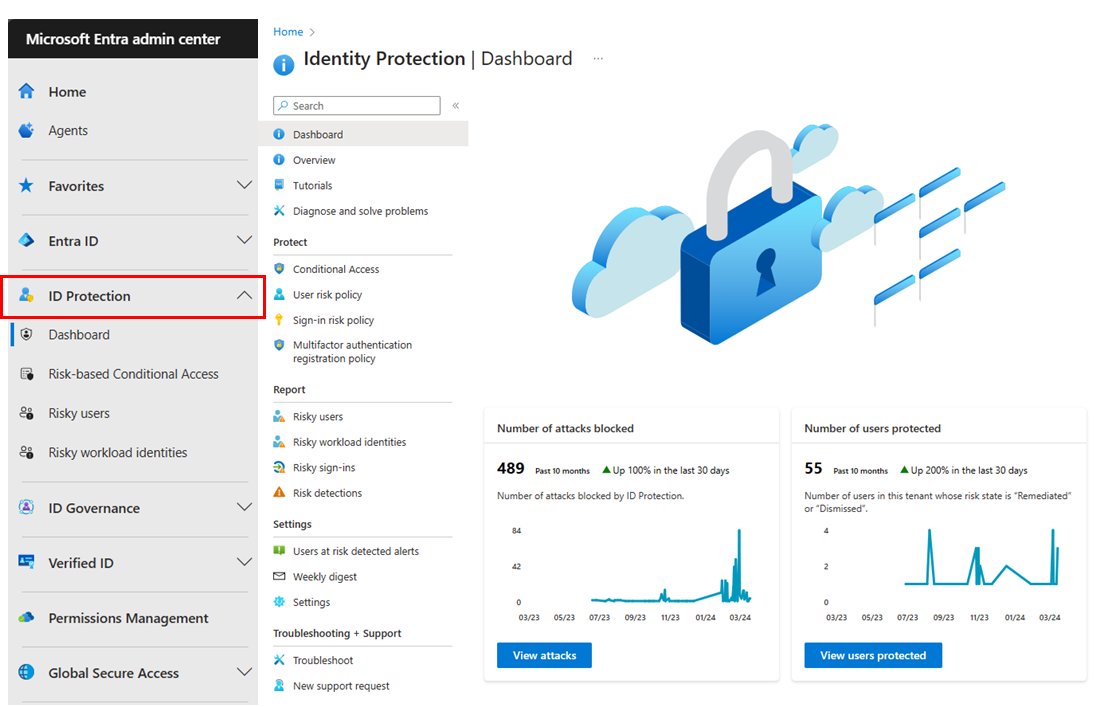
| Microsoft Entra ID Protection | Detects and reports identity-based risk, with automatic remediation | Requiring MFA when sign-in risk is medium or high |
| Microsoft Entra Verified ID | Issues and checks verifiable credentials based on decentralized identity (DID) standards | A digital diploma an employer can verify |
| Microsoft Entra External ID | Identity for partners, guests and customers (CIAM) | Customer sign-up with one-time passcodes or Google and Facebook accounts |
| Microsoft Entra Workload ID | Identities and policies for apps, services and containers | GitHub Actions deploying to an Azure subscription |
| Microsoft Entra Agent ID | Governed identities for AI agents, with least-privilege access and audit trails | AI agents reading company data on a user's behalf |
| Microsoft Entra Suite | A bundle of network access, identity protection, governance and identity verification: Private Access, Internet Access, ID Governance, ID Protection and premium Verified ID | Organizations that want unified identity and network access in one license |
Microsoft groups these under Zero Trust access controls, secure access for employees, secure access for customers and partners, secure access in any cloud, and secure access for AI agents. Entra also works with Security Copilot to investigate identity risk.
Global Secure Access is the umbrella name for Entra Internet Access and Entra Private Access, Microsoft's Security Service Edge (SSE). It has its own area in the Microsoft Entra admin center, uses Conditional Access signals for network policies, and runs from Microsoft's wide area network of more than 190 edge locations.
Key features of Microsoft Entra ID
These are the features that protect identities and secure access day to day, and the license tier each one needs.
| Feature | What it does for admins | Minimum license |
|---|---|---|
| Single sign-on (SSO) | One work account signs in to Microsoft 365, Azure and unlimited SaaS apps | Free |
| Multifactor authentication (MFA) | Adds a second check to sign-ins; security defaults turn it on for every tenant | Free |
| Users, groups and directory sync | Manages cloud users and groups and syncs an on-premises directory through Microsoft Entra Connect | Free |
| Conditional Access | Grants, blocks or challenges sign-ins based on user, location, device, app and risk | P1 |
| Self-service password reset with writeback | Lets users reset their own passwords and writes the change back to on-premises AD | P1 |
| ID Protection | Detects risky users and sign-ins and applies risk-based policies automatically | P2 |
| Privileged Identity Management (PIM) | Gives admins just-in-time role access that expires automatically, with approval and alerts | P2 |
| Access reviews and lifecycle workflows | Reviews who still needs access and automates joiner, mover and leaver tasks | ID Governance |
For Entra admins, the business benefit is one place to manage identity, access and security for every app, instead of a separate sign-in system per service. The same policies cover employees, guests, devices and workloads.
Azure AD new name: old and new Microsoft Entra names
| Old name | New name |
|---|---|
| Azure Active Directory, Azure AD, AAD | Microsoft Entra ID |
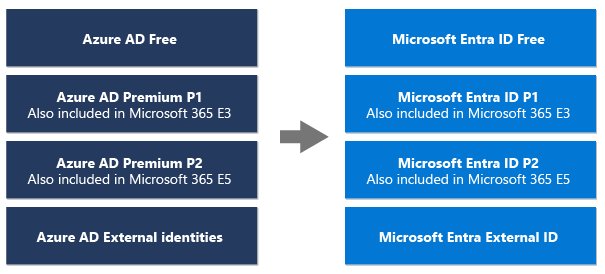
| Azure AD Free / Premium P1 / Premium P2 | Microsoft Entra ID Free / P1 / P2 |
| Azure AD Connect | Microsoft Entra Connect |
| Azure AD Conditional Access | Microsoft Entra Conditional Access |
| Azure AD joined / Hybrid Azure AD joined | Microsoft Entra joined / Microsoft Entra hybrid joined |
| Azure AD tenant | Microsoft Entra tenant |
| Azure AD External Identities | Microsoft Entra External ID |
| Azure AD Identity Governance | Microsoft Entra ID Governance |
| Azure AD Identity Protection | Microsoft Entra ID Protection |
| Azure AD Verifiable Credentials | Microsoft Entra Verified ID |
| Azure AD Domain Services | Microsoft Entra Domain Services |
| Azure AD B2C | Unchanged; no longer sold to new customers since May 1, 2025 |
Hybrid organizations still sync on-premises users through Microsoft Entra Connect, the renamed Azure AD Connect. DirSync and Azure AD Sync no longer work and must be upgraded to it.
Microsoft Entra ID vs Active Directory
| Microsoft Entra ID | Windows Server Active Directory | |
|---|---|---|
| Where it runs | Microsoft's cloud | Your own domain controllers |
| Former name | Azure AD | Unchanged: Active Directory, AD DS, AD FS |
| Typical sign-in | Work or school account for Microsoft 365, Azure and SaaS apps | Domain account on PCs and servers in a corporate network |
| Device state on Windows | Microsoft Entra joined | Domain joined |
| Both together | Microsoft Entra hybrid joined, synced by Microsoft Entra Connect | Microsoft Entra hybrid joined, synced by Microsoft Entra Connect |
Microsoft continues to support Windows Server Active Directory, and part of the reason for the rename was to stop people mixing the two up.
Prepare your environment for Microsoft Entra
Microsoft publishes architecture guidance, deployment plans, an operations reference and recommended security configurations to work through before a rollout. The first practical decision is licensing, because features unlock by tier.
| License | How you get it | What it adds |
|---|---|---|
| Microsoft Entra ID Free | Included with Microsoft cloud subscriptions such as Azure and Microsoft 365 | Users, groups, automated user provisioning to SaaS apps, security defaults with MFA, self-service password reset, audit and sign-in logs |
| Microsoft Entra ID P1 | Standalone, or in Microsoft 365 E3, E5, F1, F3, Business Premium and EMS E3 | Conditional Access, MFA for on-premises apps, SSPR with writeback, application proxy, custom roles |
| Microsoft Entra ID P2 | Standalone, or in Microsoft 365 E5 and EMS E5 | ID Protection risk-based policies and Privileged Identity Management (PIM) |
| Microsoft Entra Suite | Standalone (needs P1) or in Microsoft 365 E7 | Private Access, Internet Access, ID Governance, ID Protection and premium Verified ID |
| Microsoft Entra External ID | Pay as you go | Core features free for the first 50,000 monthly active users |
| Microsoft Entra Workload ID | Per workload identity, per month | Policies for apps and service principals |
To compare the flexible purchase options: Entra ID can be bought standalone or as part of a Microsoft 365 plan. Microsoft Entra pricing for the standalone options is $7.00 per user per month for Entra ID P1, $10.00 for P2 and $12.00 for the Entra Suite, each paid yearly on an annual commitment. P1, P2 and the Suite also have free trials, and Microsoft offers special Suite pricing to P2 and Microsoft 365 E5 customers.
Microsoft 365 plans, which also bundle the Microsoft Office suite apps, include at least Entra ID Free. User and group license assignments are managed in the Microsoft 365 admin center.
Manage and develop with Microsoft Entra
| Tool | Who uses it | What it is for |
|---|---|---|
| Microsoft Entra admin center (entra.microsoft.com) | Administrators | One web portal for every Entra product: users, groups, Conditional Access, ID Protection, governance and Global Secure Access |
| Azure portal | Administrators | Also manages Microsoft Entra ID alongside Azure resources |
| Microsoft Graph API | Administrators and developers | Automates tasks such as license deployment and user lifecycle management |
| Microsoft Graph PowerShell | Administrators | The recommended module for scripting Entra ID; Azure AD PowerShell is deprecated |
| Microsoft identity platform and MSAL | Developers | Builds sign-in into web, desktop and mobile apps; ADAL is deprecated in favour of MSAL |
How to open the Microsoft Entra admin center and find your tenant ID
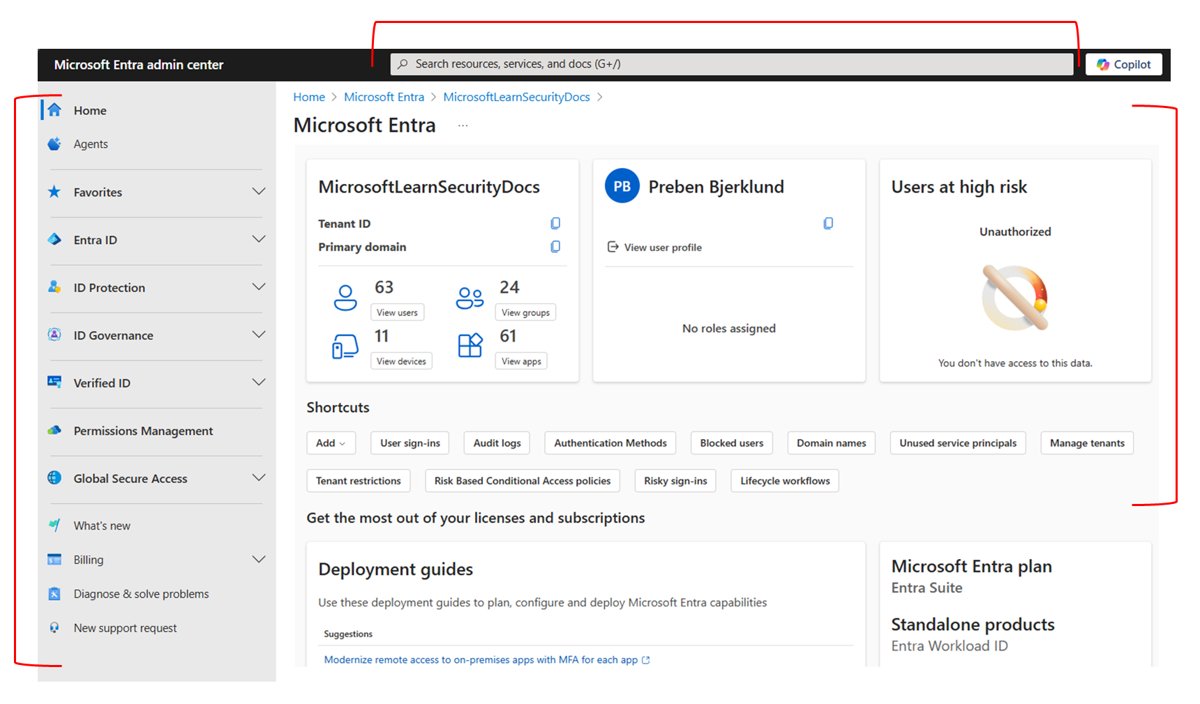
- Open a browser and go to entra.microsoft.com.
- Sign in with your work or school account.
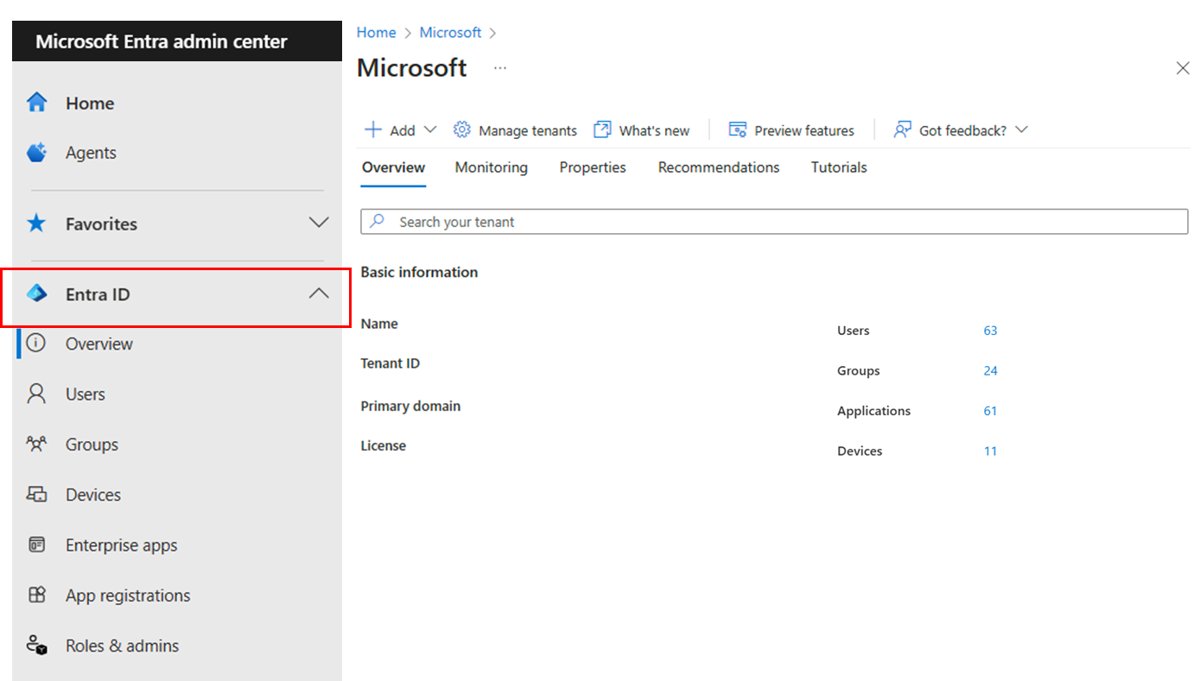
- On Home, look at Tenant overview for your tenant name, tenant ID and license information.
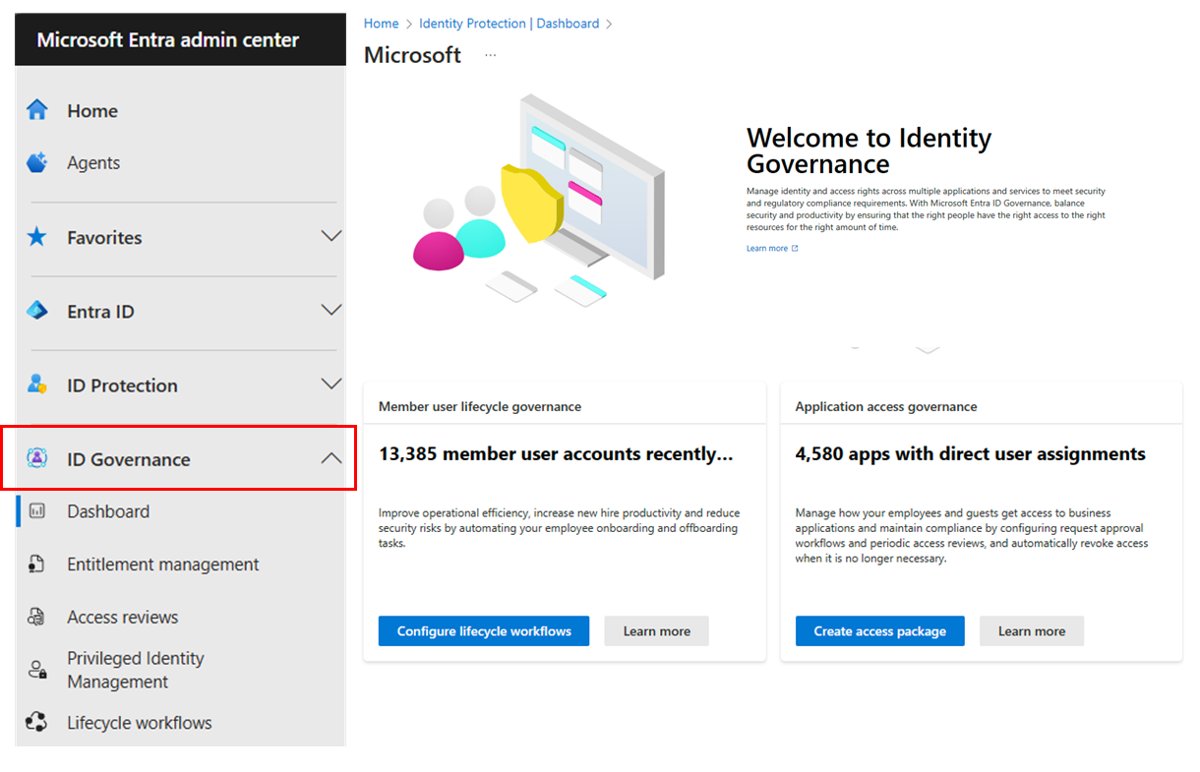
- Use the left-hand menu to open Entra ID, ID Protection, ID Governance, Verified ID or Global Secure Access.
- Type a setting name into the search bar at the top to jump straight to it.
Every new tenant gets an initial domain such as contoso.onmicrosoft.com, and admins can add the organization's own domain names.
To get started with Microsoft Entra ID without an existing subscription, create a free Azure account or sign up for Microsoft 365; either one creates a tenant with Entra ID Free, and the person who signs up becomes its first Global Administrator.
Check if a Windows PC is Microsoft Entra joined with dsregcmd
Run this in Command Prompt or PowerShell as the signed-in user, not from an elevated window, so the user sections report correctly.
dsregcmd /statusPrints the device's join state, device details, tenant details and the signed-in user's sign-in state. Under Device State, AzureAdJoined YES with DomainJoined NO means Microsoft Entra joined; both YES means Microsoft Entra hybrid joined; AzureAdJoined NO with DomainJoined YES means domain joined only.
You should see: AzureAdJoined : YES, plus a Tenant Details section showing your TenantName and TenantId.
A personal PC that only has a work account added shows WorkplaceJoined : YES under User State, which is the Microsoft Entra registered state.
Best practices for managing Microsoft Entra ID in your organization
Microsoft's own recommendations for Entra roles focus on keeping admin access small, short-lived and protected.
- Apply least privilege: give each admin the narrowest built-in or custom role, at the smallest scope, for the shortest time. Find roles under Entra ID > Roles & admins > All roles.
- Use Privileged Identity Management so admins are eligible for a role and activate it only when needed; the access is removed when the time window ends.
- Turn on multifactor authentication for every administrator account through Conditional Access or PIM role settings.
- Keep Global Administrator assignments to fewer than five people, and privileged role assignments to fewer than 10.
- Create two cloud-only emergency access (break glass) accounts with permanent Global Administrator rights for lockout situations.
- Schedule recurring access reviews to remove role assignments people no longer need.
- Assign roles to groups instead of individual users when an external governance system already manages those groups.
Microsoft says an account is 99.9% less likely to be compromised with MFA turned on. The Entra Overview page shows an alert card once five or more Global Administrator assignments exist.
Microsoft Entra and Azure AD FAQ
Common questions about Microsoft Entra ID, the old Azure AD name and the Azure acronyms that get mixed up with it.
Is Microsoft Entra replacing Azure AD?
Yes, in name. Azure AD became Microsoft Entra ID in 2023, and Microsoft Entra is the wider family that also includes ID Governance, External ID, Verified ID and Global Secure Access. Existing Azure AD tenants, settings and licenses carried over unchanged.
What is Microsoft Entra ID?
Microsoft Entra ID is Microsoft's cloud identity and access management service, formerly Azure AD. It signs users in to Microsoft 365, Azure and connected apps, and enforces MFA and Conditional Access policies.
What is AAD in Azure?
AAD is short for Azure Active Directory, Microsoft's cloud identity and access management service. Microsoft renamed it Microsoft Entra ID in 2023. The features, licenses, prices, sign-in URLs and APIs stayed the same; only the name changed.
What does AAD mean?
In Microsoft and IT contexts, AAD means Azure Active Directory, the identity service that signs users in to Microsoft 365, Azure and connected apps. Its current name is Microsoft Entra ID, and Microsoft now discourages using the AAD acronym.
What is Azure AD?
Azure AD was the name of Microsoft's cloud directory and sign-in service for work and school accounts. Since 2023 it is called Microsoft Entra ID. Every Microsoft 365, Azure and Dynamics 365 tenant is automatically a Microsoft Entra tenant.
Is Azure AD going away?
No. Only the name Azure AD went away. The service continues as Microsoft Entra ID, and existing deployments, configurations and integrations keep working without any action from administrators.
Is Microsoft Entra ID free?
Microsoft Entra ID Free is included with Microsoft cloud subscriptions such as Azure and Microsoft 365. Features such as Conditional Access need P1, and ID Protection and Privileged Identity Management need P2.
What is the difference between Microsoft Entra and Microsoft Entra ID?
Microsoft Entra is the product family name. Microsoft Entra ID, formerly Azure AD, is one product inside it, alongside ID Governance, ID Protection, External ID, Verified ID, Workload ID, Agent ID, Private Access and Internet Access.
What is an AAD user in Azure DevOps?
It is a user who signs in to Azure DevOps with a Microsoft Entra ID work account instead of a personal Microsoft account. Connecting a DevOps organization to Entra ID adds single sign-on, central user management and Conditional Access.
What is AFD in Azure?
AFD is Azure Front Door, Microsoft's cloud content delivery network and global load balancer for web apps and APIs. It is a networking service, not part of Microsoft Entra, though both appear in Azure.
What is azd in Azure?
azd is the Azure Developer CLI, an open-source command-line tool that provisions and deploys app resources on Azure using templates. On Windows it installs with winget install microsoft.azd. It is unrelated to Azure AD.
Where do I manage Microsoft Entra ID?
Manage it in the Microsoft Entra admin center at entra.microsoft.com, or in the Azure portal. Microsoft Graph and Microsoft Graph PowerShell handle automation, while license assignment happens in the Microsoft 365 admin center.