idp.generic is a generic detection name that Avast and AVG antivirus show when a file matches a broad suspicious pattern, and on Windows 10 you remove it by deleting the file from your antivirus quarantine.
This guide explains what the label means, how to tell a false positive from real malware, how to delete or restore the file in Avast, AVG and Norton, and how to confirm the PC is clean.
The fastest way to handle an idp.generic alert on Windows 10
Most idp.generic alerts end with the file already in quarantine, so nothing on the PC can run it. The job is to decide whether it stays there or comes back.
- Leave the file in quarantine and do not run it again.
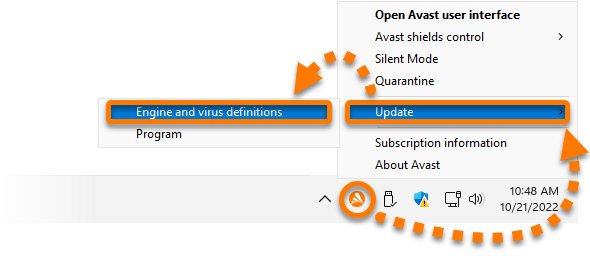
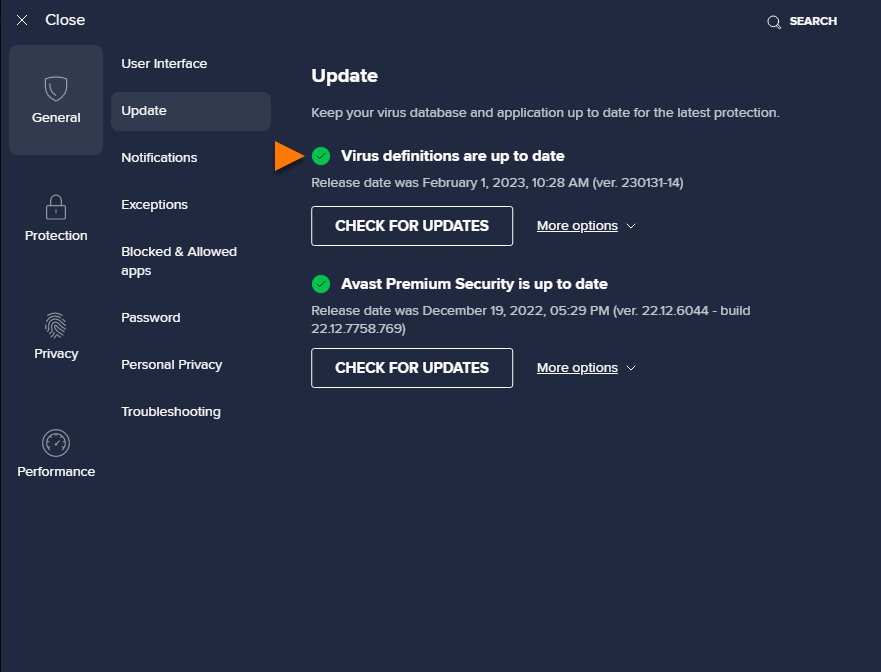
- Right-click the Avast icon in the taskbar notification area and select Update > Engine and virus definitions, then click Check for updates if the check does not start.
- Wait for the status Virus definitions are up to date, and restart the PC if asked.
- Run a full scan of the PC with your antivirus.
- If you do not recognise the flagged file, or it came from an unofficial download, open Protection > Quarantine, tick the file and click Delete.
- If the file belongs to a program you installed from its official publisher, send it for analysis as a False positive instead of deleting it.
Deleting from quarantine is permanent and cannot be undone, so decide before you click.
What is idp.generic?
The name describes how the file was caught, not what the file is. It is not the name of one virus family, which is why the same label appears on game mods, developer tools and real trojans alike.
| Part of the alert | What it tells you |
|---|---|
| IDP | The detection came from a protection layer that judges files by what they look like or do, not by an exact signature match. Avast does not publish an official expansion of the prefix. |
| Generic | The file matched a broad pattern shared by many threats. No specific malware family was named. |
| Where it appears | Avast Antivirus, Avast One and AVG AntiVirus alerts, usually with the file path and an action such as moved to Quarantine. |
| What happens to the file | By default it is moved to Quarantine, an isolated area where it cannot run or touch other files. |
| Is it a virus | Sometimes. A generic detection is a suspicion, so it can be real malware or a safe file flagged by mistake (a false positive). |
What causes idp.generic warnings?
Avast's Behavior Shield monitors installed programs for suspicious behavior that may indicate malicious code, and generic detections come from that kind of pattern and behavior analysis. These are the usual triggers.
| Trigger | Why it gets flagged | Usual outcome |
|---|---|---|
| A brand-new or rarely used program | Few other users have run it, so there is little reputation data to clear it | Often a false positive |
| Game mods, trainers and RGB or overlay tools | They inject into or hook other processes, the same technique malware uses | Often a false positive, but check the source |
| Developer tools and self-built programs | Unsigned or freshly compiled files look unfamiliar to a heuristic engine | Often a false positive |
| Outdated virus definitions | An old rule may misfire on a file that a newer definition set already clears | Fixed by updating definitions |
| Cracked software, keygens and unofficial installers | These are a common way to bundle trojans and info-stealers | Treat as real malware |
| Email attachments and unknown downloads | Unexpected files that run scripts or change system settings match malware behavior | Treat as real malware |
When is idp.generic not a false positive?
Match your case to a row. When two rows fit, follow the more cautious one.
| Your situation | Likely verdict | What to do |
|---|---|---|
| The file came from a crack, keygen, torrent or unofficial mirror | Real threat | Delete it from quarantine and run a full scan plus an offline scan |
| You did not install the program and do not recognise the file name | Real threat | Delete it and check installed apps for anything you did not add |
| The alert keeps returning after updates and rescans | Real threat until proven otherwise | Run an offline scan to catch a component that reinstalls it |
| Browser homepage changed, new toolbars, or pop-ups appeared at the same time | Real threat | Delete it, then remove unknown browser extensions |
| The file belongs to a program you installed from the publisher's own site | Probably a false positive | Update definitions, rescan, and send it for analysis as a false positive |
| The detection appeared right after the program updated itself | Probably a false positive | Report it and wait for a definitions fix before restoring |
| The alert disappears after a definitions update | False positive | Restore only if the program now fails to run |
How do I remove idp.generic on Windows 10?
In Avast Antivirus the flagged file sits in Quarantine. Deleting it there removes it from the PC for good.
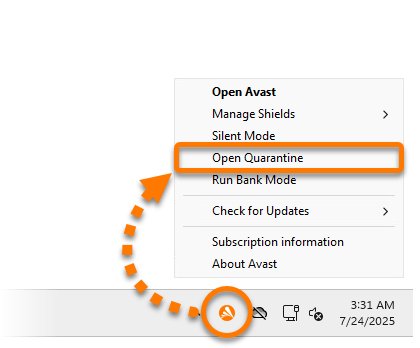
- Open Avast Antivirus and go to Protection > Quarantine. You can also right-click the Avast icon in the notification area and select Open Quarantine.
- Find the entry with the idp.generic detection and check its original file path.
- Tick the box next to the file.
- Click Delete at the bottom of the Quarantine screen.
- Open Settings > Apps in Windows 10 and uninstall the program the file belonged to if you do not trust it.
- Run a full scan in Avast to check nothing else was flagged.
Remove idp.generic in AVG AntiVirus
AVG AntiVirus also moves the flagged file to Quarantine, but its menu labels differ from Avast's.
- Open AVG AntiVirus and go to ☰ Menu > Quarantine.
- Tick the box next to the idp.generic file.
- Click Delete selected at the bottom of the screen.
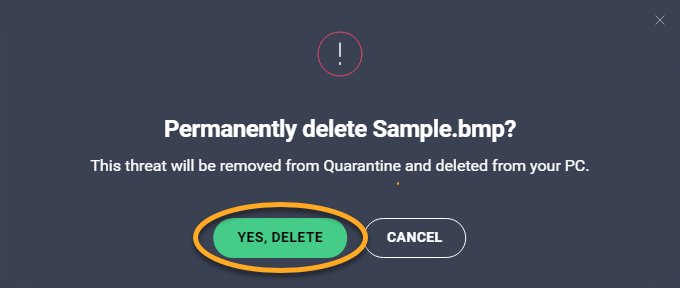
- Click Yes, delete to confirm.
- Run a full computer scan in AVG afterwards.
Scan Windows 10 for idp.generic leftovers with Microsoft Defender Offline
If the alert keeps coming back, an undetected component may be reinstalling the file at each restart. An offline scan runs before Windows loads, so that component cannot hide.
Microsoft Defender Antivirus turns itself off when a compatible third-party antivirus such as Avast is installed. If these options are unavailable, run your antivirus's own full scan instead.
- Save and close any open files, because the PC restarts.
- Open Start > Settings > Update & Security > Windows Security > Virus & threat protection.
- Under Current threats, select Scan options.
- Choose Microsoft Defender Offline scan and select Scan now.
- Let the PC restart and finish the scan in the recovery environment. It restarts again on its own.
- Open Windows Security > Protection history to read the results.
Report an idp.generic false positive and restore the file
Restoring a quarantined file is a high security risk, so report it first and restore only a file you are sure is safe. Reporting gets the detection fixed for everyone, which is better than a permanent exception.
Avast's Steam false positive from 2015 is a good example: the right move was to restore Steam from the Virus Chest only after confirming the file was genuine.
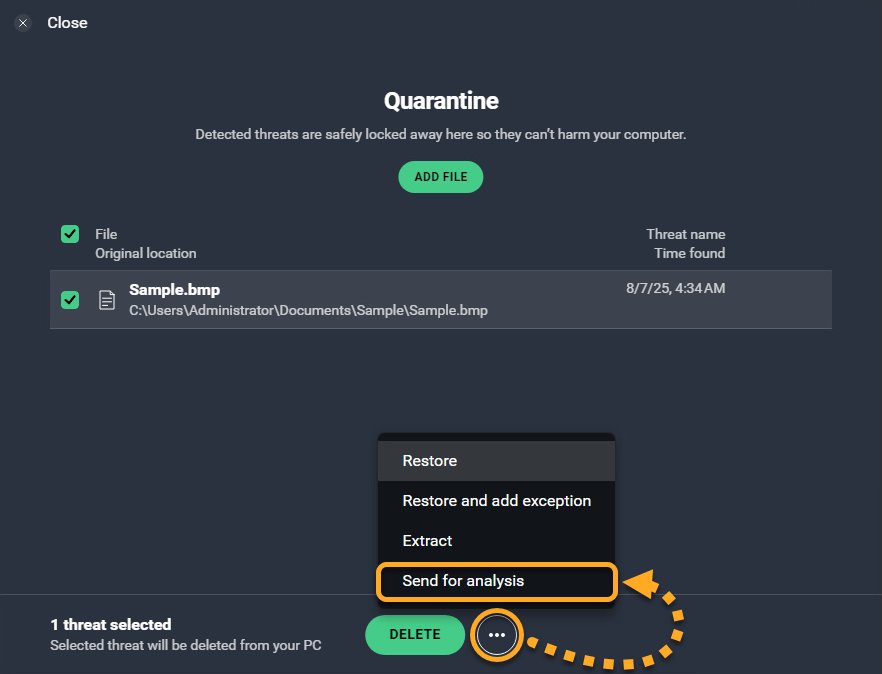
- Open Avast and go to Protection > Quarantine, then tick the flagged file.
- Click … (More options) and select Send for analysis.
- Choose False positive, fill in Program name, Program publisher, Program version number and why the file should not be detected, then click Send.
- For a file that is not in quarantine, use the False positive form at avast.com/submit-a-sample and include the detection name and alert ID.
- Update virus definitions and rescan the file over the next few days.
- If the program must run before a fix arrives, click … > Restore and add exception. This excludes the file from all Avast scans and shields.
In AVG the same option is … > Send for analysis > False positive inside ☰ Menu > Quarantine.
In Norton, run LiveUpdate, then report the file through Norton's false-positive submission page. Norton says updated definitions that address a confirmed false positive are released within 48 hours. An exclusion lives under Security > Advanced Security > Computer > Antivirus > Exclusions > Add.
How to check idp.generic is gone from Windows 10
- Update virus definitions and confirm the status reads Virus definitions are up to date.
- Run a full scan and confirm it finishes with no threats found.
- Open Quarantine and confirm the idp.generic entry is gone if you deleted it.
- Restart Windows 10 and use the PC normally for a day. No new idp.generic alert should appear.
- If you restored a reported file, rescan it after the next definitions update. A fixed false positive no longer triggers an alert.
Fix idp.generic alerts that keep coming back
idp.generic returns after every restart
An undetected component reinstalls the flagged file when Windows starts.
- Update definitions and run a full scan.
- Run a Microsoft Defender Offline scan, or your antivirus's boot-time scan.
- Uninstall any program you do not remember installing from Settings > Apps.
- Scan again and check that the alert stays away after two restarts.
idp.generic on a game, mod or trainer
Game tools hook into other processes, which looks like malware behavior to a generic rule.
- Check where the file came from. Delete it if it came from anywhere other than the game's or tool's official site.
- If it is the official file, send it to your antivirus vendor as a false positive.
- Wait for a definitions update and rescan before restoring it.
idp.generic on SignalRGB or another trusted app
Apps that control hardware or inject overlays often trip generic rules after an update.
- Confirm you installed the app from its publisher's own site.
- Report the file as a false positive with the app name, publisher and version.
- Use Restore and add exception only if you need the app before the fix arrives.
Norton flags a file as idp.generic that you trust
Norton's definitions may not have cleared the file yet.
- Run LiveUpdate until no more updates install.
- Run a Full Scan.
- Report the file through Norton's false-positive page and rescan after the definitions update.
Restore fails or the file is quarantined again
The detection is still active in your current definitions.
- Use Restore and add exception rather than Restore in Avast.
- In Norton, add the file under Exclusions before restoring or running it.
- Remove the exception once a definitions update stops flagging the file.
How can I prevent idp.generic threats?
After a cleanup, these habits keep your device from getting re-infected and cut down on false alarms.
| Habit | What it prevents |
|---|---|
| Download programs only from the publisher's own site or the Microsoft Store | Bundled trojans that ride along with repacked installers |
| Never run cracks, keygens or license patchers | The most common source of real generic detections |
| Keep automatic definition and program updates turned on | Old rules that misfire, and missed new threats |
| Keep Windows 10 updated through Windows Update | Malware that exploits known, already-patched flaws |
| Report false positives instead of turning shields off | Leaving the whole PC unprotected to run one program |
| Clear old installers and temp files regularly | Flagged leftovers that resurface in later scans |
You can delete temporary files in Windows 10 to clear old setup files that scans keep picking up.
idp.generic FAQ
Is idp.generic harmful?
It can be. idp.generic is a suspicion, not a confirmed infection, so it may be real malware or a safe file flagged by mistake. Keep the file in quarantine, update definitions and rescan, then delete it unless it came from a trusted publisher.
What is an idp.generic threat?
An idp.generic threat is a file that Avast or AVG flagged because it matched a broad suspicious pattern or behavior rather than a known malware signature. The label does not name a specific virus family.
What does idp.generic mean?
The Generic part means the detection is non-specific: the file looks or behaves like many known threats. The IDP prefix refers to the protection layer that caught it. Avast does not publish an official expansion of the prefix.
Is idp.generic dangerous?
It is dangerous if the file came from a crack, keygen, unknown download or email attachment. It is often a false positive when the file belongs to a program you installed from its official site. Judge it by where the file came from.
Is idp.generic a virus?
Not necessarily. idp.generic is a detection label, not a virus name. Some flagged files are trojans, while many are legitimate programs that behave in an unusual way. Updating definitions and rescanning helps settle which one you have.
Should I ignore an idp.generic alert?
Do not ignore it, but do not panic either. A quarantined file cannot run, so the PC is safe while you decide. Update definitions, rescan, and then delete the file or report it as a false positive based on where it came from.
What is idp.generic in games?
In games, idp.generic usually flags a mod, trainer, launcher or overlay that hooks into other processes. Delete the file if it came from an unofficial source; otherwise report it to your antivirus vendor as a false positive.
Why does Avast show idp.generic?
Avast shows idp.generic when its protection layers judge a file suspicious by pattern or behavior. Avast's Behavior Shield, for example, monitors installed programs for suspicious behavior that may indicate malicious code.
What should I do if I am infected with idp.generic?
Leave the file in quarantine, update virus definitions, and run a full scan. Delete the file if you do not trust its source, then run an offline scan if the alert returns after a restart.
Bottom line: should you delete or restore an idp.generic file?
Delete the file unless it belongs to a program you installed from its official publisher; in that case report it as a false positive and restore it only after a definitions update or when you truly need it. A generic detection cannot tell you on its own whether the file is malicious, but its source can, and reporting fixes the rule without leaving the file unscanned for good.