The Windows 11 October 2026 Update is a set of three security updates released on Tuesday, October 13, 2026: KB5127648 for versions 24H2, 25H2 and 26H2, KB5126653 for 23H2, and KB5127646 for 26H1.
This review covers which package your PC gets, the features carried over from the September preview, every fix Microsoft lists, the open known issues, the end of updates for 24H2 Home and Pro, and whether to install it now.
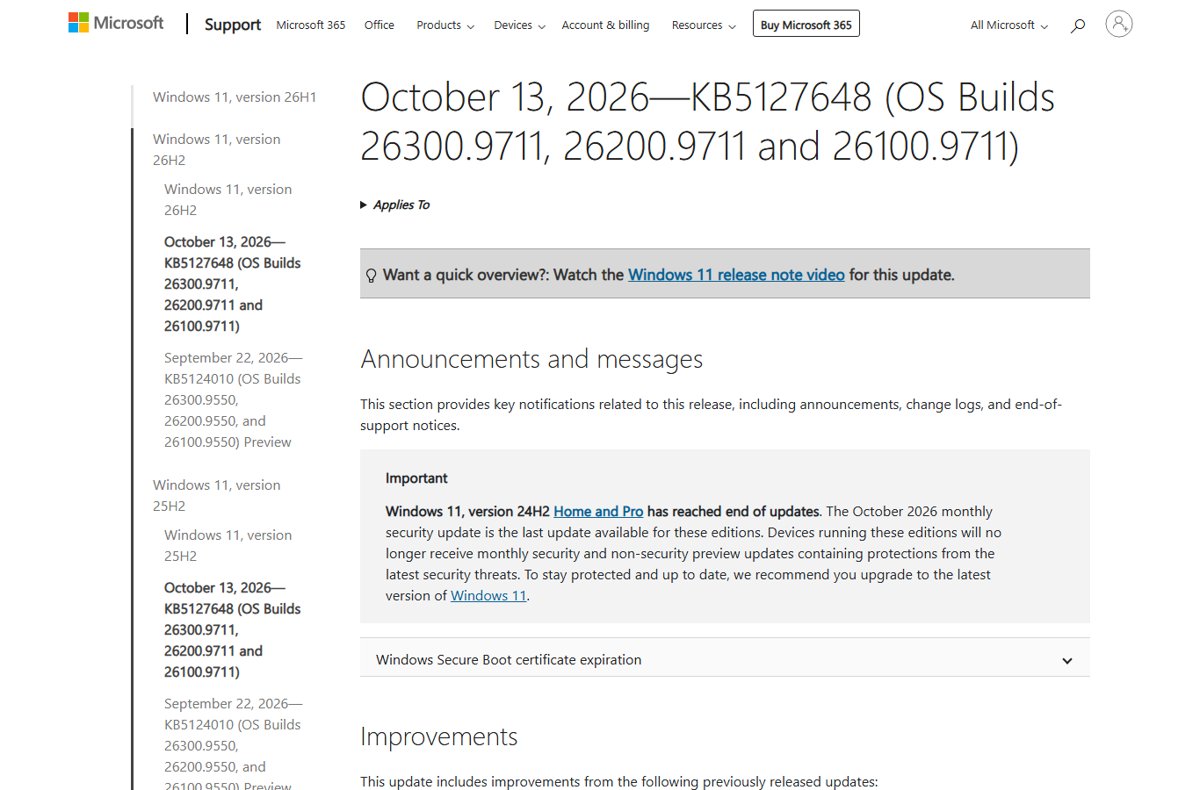
The three October 2026 packages
Find your Windows 11 version in the first column. Windows Update offers the matching package automatically, so most people only need to restart when prompted.
| Your Windows 11 version | October 2026 package | OS build after install | What to do |
|---|---|---|---|
| 26H2 | KB5127648 | 26300.9711 | Install from Windows Update, or manually from the Microsoft Update Catalog |
| 25H2 | KB5127648 | 26200.9711 | Install from Windows Update |
| 24H2 Enterprise and Education | KB5127648 | 26100.9711 | Install; these editions stay supported until October 12, 2027 |
| 24H2 Home and Pro | KB5127648 | 26100.9711 | Install, then upgrade: this is the last update for these editions |
| 23H2 Enterprise and Education | KB5126653 | 22621.7652 | Install; one more update follows in November 2026 |
| 26H1 (select new devices only) | KB5127646 | 28000.3231 | Install from Windows Update |
All three are cumulative security updates. Microsoft's KB pages say each one downloads and installs automatically from Windows Update and Microsoft Update.
Windows 11's new features arriving in October
KB5127648 includes the improvements from the September 22, 2026 preview update KB5124010, so the features listed in that preview now reach everyone on 24H2, 25H2 and 26H2 through the security update.
Microsoft marks these features as a gradual rollout, which it defines as delivering an update in phases so features reach devices over time instead of all at once. Installing KB5127648 does not guarantee every item appears on day one.
| Area | What changes | Where to find it |
|---|---|---|
| File Explorer changes | Web-downloaded HTML files get a Preview anyway button in the preview pane, and other files such as PDFs preview automatically. Home remembers expanded or collapsed sections, and Details pane thumbnails for cloud files are more reliable. | File Explorer |
| Open apps maximized feature | A new accessibility setting maximizes app windows as they open. | Settings > Accessibility > Visual effects |
| Magnifier refresh | The Magnifier toolbar gets updated icons and spacing; Magnifier behaves the same way. | Magnifier |
| Touchpad controls | Extra gestures for precision touchpads, including single-finger scrolling from either edge and automatic scrolling near the edge. | Settings > Bluetooth & devices > Touchpad |
| Copilot key remap new options | You can remap the Copilot key to act as the Right Ctrl key or the Context Menu key. | Keyboard settings |
| Widgets with new Tips widget | A Tips widget shows short Windows guidance on the Widgets board or the lock screen. | Widgets board |
| Emoji 17.0 | New emoji from Emoji 17.0 plus refined designs for several existing ones. | Emoji panel |
| Bluetooth | The volume flyout shows during calls on Bluetooth Classic accessories, plus better microphone compatibility, a fix for a streaming crash (0x139) and improved LE Audio and shared audio. | Quick settings and Bluetooth & devices |
| Personalization | DIB images work as desktop backgrounds, and slideshow wallpapers now work across multiple desktops. | Settings > Personalization > Background |
| Camera roll backup | Back up your camera roll to OneDrive, set up from Settings Home or Accounts; availability depends on device and market. | Settings Home or Accounts |
| Other changes | Installed apps shows version numbers for packaged apps, the time picker follows your 12/24-hour setting, kiosk mode blocks some shortcuts, and PC-to-PC Migration is removed in favour of Windows Backup. | Settings |
WinRE with Wi-Fi support is not part of this release. Microsoft's change log says WinRE reusing saved Wi-Fi profiles will roll out at a future date. The WinRE item that did ship is a recovery remote management plug-in for MDM providers.
Many of these features first appeared in the 26H2 feature update; the wider Windows 11 26H2 feature list puts them in context.
Enable new October 2026 features on Windows 11
There is no single switch for the October features. Turning on the early-updates toggle puts your PC at the front of the gradual rollout, which is the closest official route.
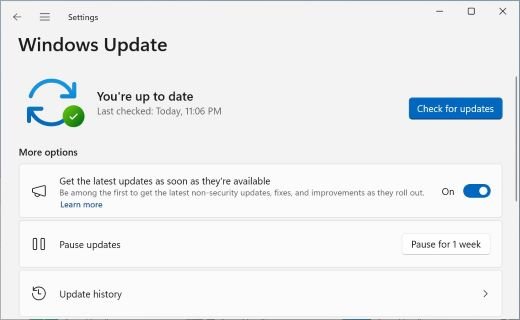
- Select Start > Settings > Windows Update.
- Turn on Get the latest updates as soon as they're available.
- Select Check for updates and install KB5127648 if it is listed.
- Restart the PC when Windows asks.
- Open Settings > Accessibility > Visual effects to turn on Open apps maximized once it appears.
- Open Settings > Bluetooth & devices > Touchpad to try the new touchpad gestures.
Microsoft says security updates install whether this toggle is on or off, and your PC may restart more often with it on. On a work PC, an administrator can control the toggle through the AllowOptionalContent policy.
KB5127648: what Microsoft fixed
These are the fixes Microsoft lists for 24H2, 25H2 and 26H2. The full list of every bracketed item, grouped, sits in the complete KB5127648 changelog alongside the download links.
| Area | What KB5127648 fixes or adds |
|---|---|
| Windows Explorer | Explorer.exe failing to start or crashing after sign-in in multi-user setups such as Azure Virtual Desktop and FSLogix, which caused a black screen |
| Audio | AC-3 audio playback in some applications |
| Always On VPN | Connections stuck on Connecting, or the error "The specified port is already in use", after KB5124008 when automatic protocol selection or fallback was set |
| Storage Spaces | Tiered Storage Spaces Direct virtual disks failing to come online |
| Printing | Printing failures with RAW or Generic Text Only printer drivers after the August 2026 security update |
| Gaming | Mouse input stutter in some games |
| Windows Hello | Fingerprint sign-in not working after a cold boot on some devices |
| Date and Time | New (UTC-05:00) Manitoba time zone for the November 1, 2026 change |
| Servicing stack | KB5127647 (build 26100.9703) improves the reliability of update installs |
| AI components | Image Search, Content Extraction, Semantic Analysis and Settings Model move to version 1.2608.951.0 on Copilot+ PCs |
Secure Boot and ReFS changes
Two security changes in the October 2026 Update work in the background and matter most to administrators.
| Change | What Microsoft says | Action needed |
|---|---|---|
| Secure Boot certificates | Deployment of the updated Secure Boot certificates continues, using high-confidence targeting data to pick devices that are ready. Devices without the newer certificates still start and still get standard updates. | None for home PCs; Windows Update delivers the certificates |
| ReFS security | Adds auditing and optional policy controls for ReFS volumes on externally attached storage. Auditing is on by default; enforcement is off by default (KB5130741). | Admins can review audit events before future hardening |
| Installation media (boot.stl) | If you apply dynamic updates to a Windows image, the boot.stl file must be on the media, or devices can fail to start with error 0xc0430001. | Use the Update WinPE script, or copy boot.stl from Windows\Boot\EFI |
KB5127646: Windows 11 26H1 October 2026 update
Windows 11 26H1 is a hardware-optimized release that ships preinstalled on select new devices; Microsoft does not offer it through Windows Update to existing PCs. KB5127646 moves it to build 28000.3231.
| Item | KB5127646 detail |
|---|---|
| Includes | September updates KB5124012, KB5129194 and the September 22 preview KB5124006 |
| Fixes | Explorer black screen on Azure Virtual Desktop and FSLogix, Always On VPN connections, tiered Storage Spaces Direct disks, mouse stutter in games |
| Security | Monthly security fixes, more Secure Boot certificate targeting data, ReFS auditing controls |
| Known issue | USB audio devices might fail to start or produce no sound |
| Catalog size | 3,947.8 MB (x64), 3,434.5 MB (ARM64) |
Direct links are on the KB5127646 download page, and the open problems for 26H1 are tracked in KB5127646 issues.
KB5126653: Windows 11 23H2 October 2026 update
KB5126653 moves 23H2 to build 22621.7652. Only Enterprise and Education editions still receive it, because 23H2 Home and Pro reached end of updates on November 11, 2025.
| Item | KB5126653 detail |
|---|---|
| Includes | Fixes from KB5122880 (September 8) and out-of-band KB5129242 (September 14) |
| Fixes | File History failing to back up or showing "Reconnect your drive", tiered Storage Spaces Direct disks |
| Date and Time | Permanent daylight saving time for British Columbia and Alberta, new Manitoba time zone |
| Security | Monthly security fixes, Secure Boot certificate deployment, ReFS auditing controls |
| Servicing stack | KB5126652 (22621.7641) |
| Catalog size | 1,166.3 MB (x64), 1,321.5 MB (ARM64) |
The KB page says Microsoft is not aware of any issues with this update, but the 23H2 release health page still lists the USB audio problem as mitigated. The KB5126653 download page has the .msu files, and KB5126653 issues weighs that gap.
End of support for two groups after the October 2026 Update
October 2026 is the final month for one group and the second-to-last for another. Check your edition under Settings > System > About > Windows specifications.
| Version and edition | Status | What to do |
|---|---|---|
| 24H2 Home and Pro | Reached end of updates; October 2026 is the last update | Upgrade to 26H2 or 25H2 to keep getting security fixes |
| 23H2 Enterprise and Education | End of updates on November 10, 2026 | Plan the move to a supported version this month |
| 24H2 Enterprise and Education | Supported until October 12, 2027 | No action yet |
| 25H2 and 26H2 | Supported | Keep installing monthly updates |
The steps for staying protected on 24H2 Home and Pro are in what to do now that 24H2 updates have ended. When you are ready, upgrade to Windows 11 26H2 from Windows Update.
Windows 11 October 2026 Update known issues
This is the state of Microsoft's release health pages on October 13, 2026. The October 2026 Update issues roundup tracks every entry with its workaround, and the KB5127648 known issues page covers 24H2, 25H2 and 26H2 in depth.
USB audio device shows Code 10 or produces no sound (all versions, Mitigated)
A change in the September 8 updates affects some USB Audio Class 1.0 devices; the September 14 out-of-band update fixed only the 8-channel and 3D audio symptoms.
- Open Device Manager and check whether the device shows "This device cannot start (Code 10)".
- Try the device in standard stereo (2-channel) mode if it fails in a multichannel mode.
- Use the Get Help app for home PCs; IT administrators can contact Microsoft Support for Business for a workaround.
Remote Desktop fails with error 0xC000000D for non-admin users (24H2, 25H2, 26H2, 26H1, Mitigated)
KB5124010 and later updates break non-admin Remote Desktop connections to hosts with Administrator protection turned on.
- Confirm the remote host has Administrator protection enabled; Windows security baselines turn it on by default.
- Have an IT administrator temporarily reset the User Account Control Type Of Admin Approval Mode policy in Intune or Group Policy.
- Install the future Windows update Microsoft says will fix it, then turn the protection back on.
Black screen after sign-in on Azure Virtual Desktop with FSLogix (Resolved)
Explorer.exe failed to start for some existing user profiles after earlier updates.
- Install KB5127648 (or KB5127646 on 26H1), which resolves it.
- Until then, press Ctrl + Shift + Esc, select Run new task, type
explorer.exeand select OK.
Apps that decode AC-3 (Dolby Digital) audio close unexpectedly (Resolved)
The September 22 preview broke the Windows AC-3 decoder that some legacy games and media players rely on.
- Install KB5127648, which resolves it on 24H2, 25H2 and 26H2.
- Restart the app after the PC restarts.
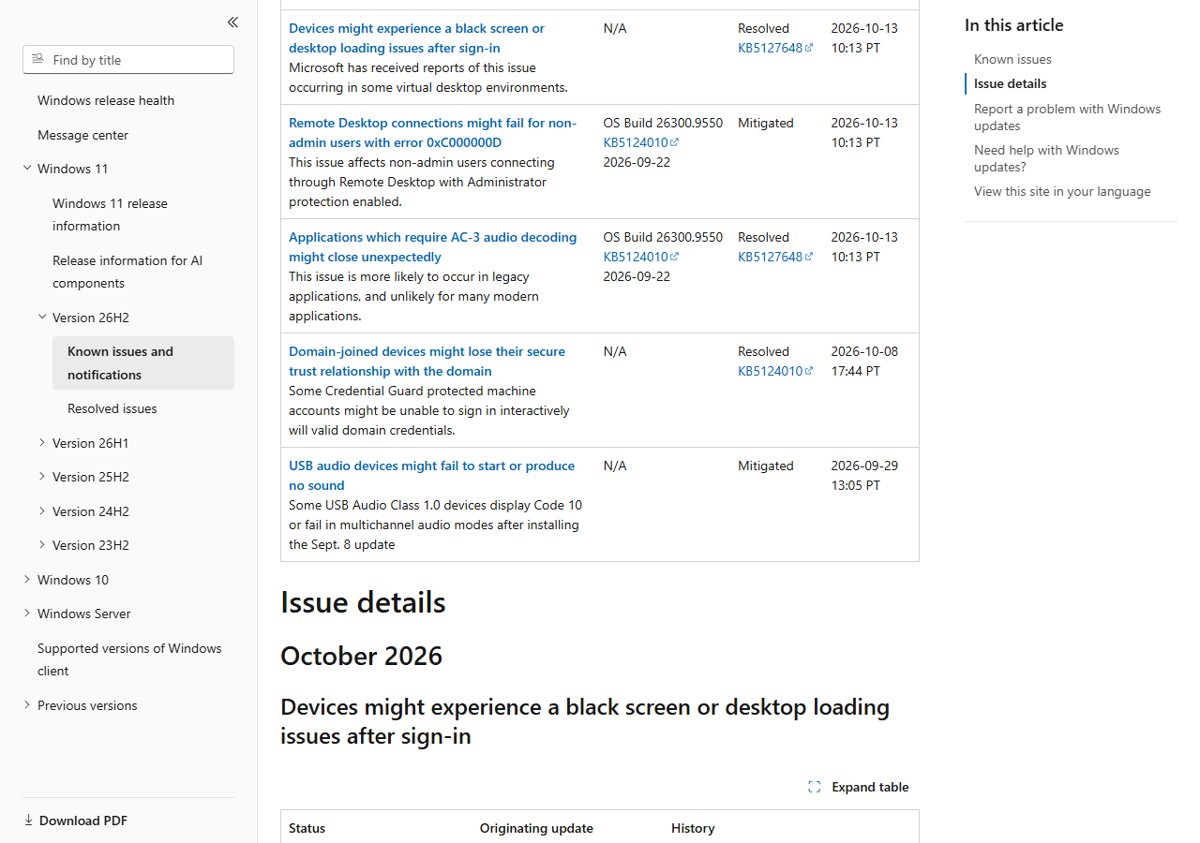
Are the USB audio bugs fixed in the October 2026 patches?
No. Reports that the remaining USB audio bugs were fixed in the October patches are not backed by Microsoft. The KB5127648 and KB5127646 pages both still list "USB audio devices might fail to start or produce no sound" as a known issue.
Treat the USB Audio Class 1.0 problem as open: status Mitigated, with Microsoft still working on the Code 10, no-output, volume and Sound settings symptoms. Microsoft's release health pages, last updated for this issue on September 29, 2026, say only the multichannel symptom was resolved, by the September 14 out-of-band updates, and that more information will follow in a future update.
If your USB headset or DAC stopped working, the USB audio Code 10 fix walks through the driver steps Microsoft supports.
Availability: how to get the Windows 11 October 2026 Update
The October 2026 Update has been available since October 13, 2026 through Windows Update, Windows Update for Business, the Microsoft Update Catalog and WSUS.
- Select Start > Settings > Windows Update.
- Select Check for updates.
- Wait for the 2026-10 Cumulative Update for your version to download and install.
- Select Restart now, or let Windows restart outside your active hours.
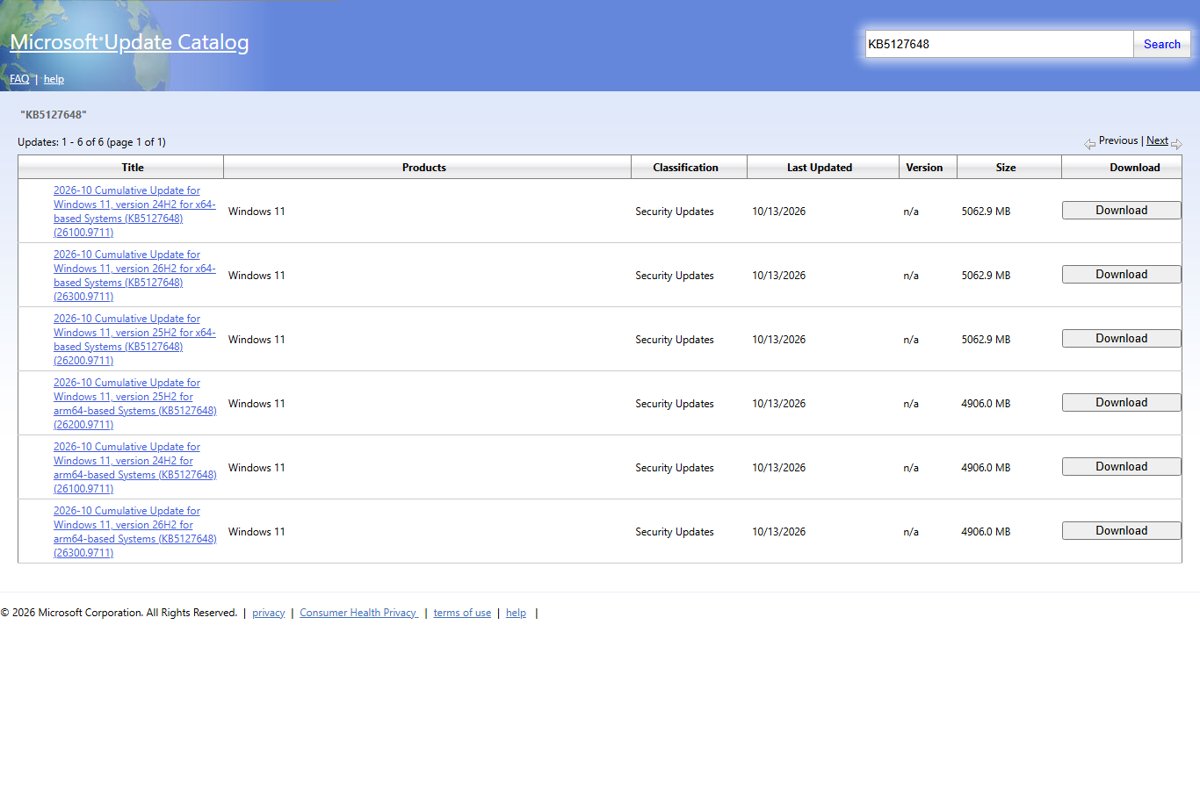
For a manual install, the Microsoft Update Catalog lists KB5127648 at 5,062.9 MB for x64 and 4,906.0 MB for ARM64. Its download dialog also returns checkpoint update KB5043080; Microsoft says to install checkpoint cumulative updates first, or to run DISM against a folder holding both files so it installs them in order.
Deployment notes for admins on the October 2026 Update
| Your situation | What to do | Why |
|---|---|---|
| Managed fleet on 24H2 Home or Pro | Schedule upgrades to 25H2 or 26H2 | No further security updates for these editions |
| Remote Desktop hosts with Administrator protection | Expect non-admin RDP failures; apply the policy workaround if users are blocked | Known issue 0xC000000D is mitigated, not fixed |
| AVD hosts with FSLogix on an older update | Deploy KB5127648 instead of the Known Issue Rollback policy | The black screen issue is resolved by the October update |
| Servicing offline images | Include boot.stl and use the Update WinPE script | Missing boot.stl causes error 0xc0430001 |
| External ReFS volumes | Review the new audit events | Enforcement controls are off by default for now |
| 23H2 Enterprise or Education | Finish upgrades before November 10, 2026 | November 2026 is the last 23H2 update |
Administrators weighing the RDP issue can compare it with what Administrator protection blocks before turning it off.
Check if the October 2026 Update is installed
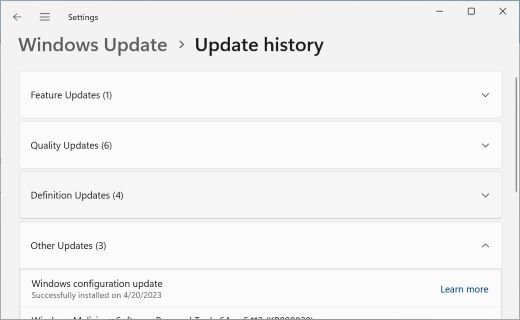
- Select Start > Settings > Windows Update.
- Select Update history under More options.
- Look for KB5127648, KB5126653 or KB5127646 in the list of installed updates.
- Open Settings > System > About and check Windows specifications for your version.
- Match your build to the table at the top: 26300.9711, 26200.9711, 26100.9711, 22621.7652 or 28000.3231.
Other ways to check your Windows version also show the build number.
Uninstall the October 2026 Update if it causes problems
Removing a security update also removes its protections, so do it only when the update breaks something you cannot work around. Some updates cannot be uninstalled.
- Select Start > Settings > Windows Update.
- Under More options, select Update history.
- Under Related settings, select Uninstall updates.
- Find the October 2026 update in the list and select Uninstall.
- Restart the PC when prompted.
When Settings will not open, there are other ways to roll back a Windows 11 update.
Windows 11 October 2026 Update FAQ
What is the Windows 11 October 2026 Update?
It is the October 13, 2026 Patch Tuesday release: KB5127648 for 24H2, 25H2 and 26H2, KB5126653 for 23H2, and KB5127646 for 26H1. Each is a cumulative security update that also carries fixes and, for KB5127648, the features from the September preview.
When was the Windows 11 October 2026 Patch Tuesday update released?
Microsoft released it on Tuesday, October 13, 2026. The Microsoft Update Catalog lists all three packages as Security Updates last updated on 10/13/2026, and Windows Update began offering them the same day.
Where can I download the Windows 11 October update?
Windows Update installs it automatically. For a manual install, the Microsoft Update Catalog has .msu files for x64 and ARM64 PCs. KB5127648 is about 5 GB for x64 and comes with checkpoint update KB5043080, which installs first.
What new features are in the Windows 11 October update?
KB5127648 brings the September preview features: File Explorer preview pane changes, Open apps maximized, a refreshed Magnifier toolbar, new touchpad gestures, Copilot key remapping, a Tips widget, Emoji 17.0 and Bluetooth improvements. They roll out gradually, so some may appear later.
What is the latest Windows 11 update in 2026?
As of October 14, 2026, the latest Windows 11 updates are the October 13 releases: KB5127648 (builds 26300.9711, 26200.9711 and 26100.9711), KB5126653 (22621.7652) and KB5127646 (28000.3231). The newest feature update is version 26H2.
Is the October 2026 Update the last one for Windows 11 24H2?
It is the last update for 24H2 Home and Pro. Microsoft says these editions no longer receive monthly security or preview updates after it. 24H2 Enterprise and Education keep receiving updates until October 12, 2027.
Does the October 2026 update fix the USB audio problem?
No. Microsoft still lists USB Audio Class 1.0 devices failing with Code 10 or producing no sound as a known issue, with status Mitigated. Only the multichannel symptom was fixed, by the September 14 out-of-band update.
Why do I not see the new features after installing KB5127648?
The features use a gradual rollout, so they reach devices over time. Turning on Get the latest updates as soon as they're available in Settings > Windows Update puts your PC earlier in that rollout.
Can I skip the October 2026 Update?
You can pause updates for a while, but it carries this month's security fixes, so skipping it leaves known vulnerabilities open. Security updates install even when the early-updates toggle is off.
Should you install the October 2026 Update now?
Why it matters: this release carries the month's security fixes for every supported Windows 11 version, fixes four problems introduced in August and September, and is the final update for 24H2 Home and Pro.
Install the October 2026 Update now on most PCs. Hold off only on Remote Desktop hosts with Administrator protection that non-admin users connect to, and keep the uninstall steps ready if you rely on a USB Audio Class 1.0 device. Microsoft documents no new problem caused by the October packages themselves: the open issues came from the September updates and exist whether you install or not, while KB5127648 resolves the Explorer black screen and AC-3 audio crashes.

![Allow apps to access your microphone Windows 11 [tutorial]](https://techdows.com/wp-content/uploads/2026/10/Windows-10-Privacy-Microphone-page-with-the-apps-access-switch-on.jpg)
Windows 11 KB5127646 issues: Should you install the update? - Techdows
[…] Install KB5127646 through Windows Update as soon as it is offered, unless you rely on a USB Audio Class 1.0 device that already stopped working after the September updates and you are waiting for Microsoft's full fix. The update is cumulative, so it carries every September fix plus the October security patches, and neither open issue is caused by it. The October 2026 changes for every Windows 11 version are in the October 2026 Update review. […]