Yes, install KB5127646 on your Windows 11 version 26H1 PC: it carries the October 13, 2026 security fixes, fixes the black screen after sign-in, and adds no new known issue of its own.
Two older problems remain open on 26H1, a USB audio fault and a Remote Desktop error for non-admin users, so this guide covers who they affect, what the update fixes, how to uninstall or pause it, and fixes when it fails to install.
Should you install KB5127646 now?
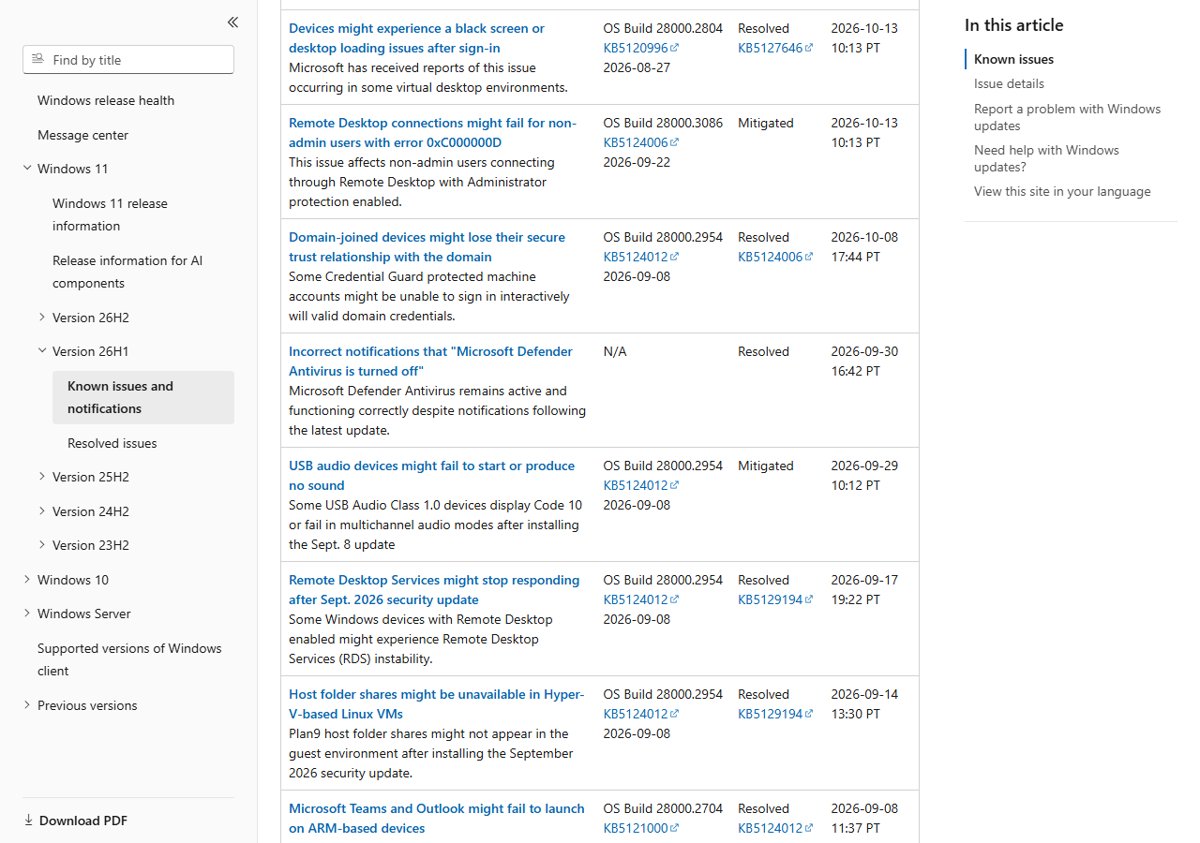
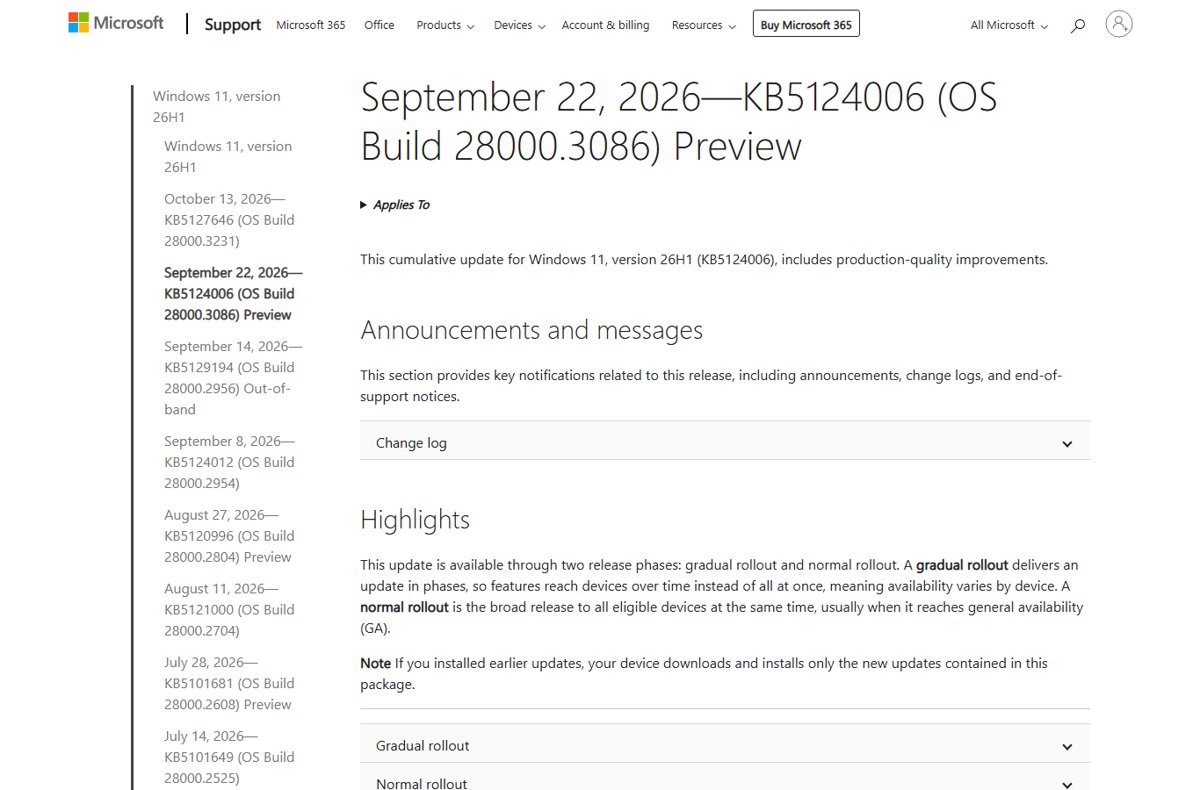
KB5127646 is the October 2026 security update for Windows 11, version 26H1, and it moves the PC to OS build 28000.3231. Microsoft's release health page marks one issue as resolved by this exact update and opens no new issue against it.
Both open issues on 26H1 started with September updates, so skipping KB5127646 does not avoid them. It only leaves the PC without October's security fixes.
Install KB5127646 through Windows Update as soon as it is offered, unless you rely on a USB Audio Class 1.0 device that already stopped working after the September updates and you are waiting for Microsoft's full fix. The update is cumulative, so it carries every September fix plus the October security patches, and neither open issue is caused by it. The October 2026 changes for every Windows 11 version are in the October 2026 Update review.
Who should install KB5127646 and who should wait
| Your situation | What to do | Why |
|---|---|---|
| A home or work PC on 26H1 with no update problems | Install KB5127646 now | It adds October's security fixes and no new known issue |
| Black screen or Explorer crashes after sign-in on Azure Virtual Desktop with FSLogix | Install KB5127646 now | Microsoft lists this update as the fix for that problem |
| A USB Audio Class 1.0 device shows Code 10 or plays no sound since September | Install it, but expect the audio fault to remain | The issue is still listed as mitigated, not resolved, on the KB5127646 page |
| Remote Desktop hosts with Administrator protection that non-admin users connect to | Install it and keep Microsoft's admin workaround in place | The 0xC000000D error started with the September 22 preview and is still open |
| Always On VPN set to automatic protocol selection or fallback | Install KB5127646 now | It fixes connections stuck in a Connecting state after KB5124008 |
| Clusters with tiered Storage Spaces Direct virtual disks | Install KB5127646 after normal testing | It fixes virtual disks that failed to come online after earlier security updates |
| Your PC runs 24H2, 25H2, 26H2 or 23H2, not 26H1 | Ignore KB5127646 | Those versions get KB5127648 or KB5126653 instead |
KB5127646: Windows 11 26H1
Windows 11, version 26H1 is a hardware-optimized release that ships preinstalled on select new devices. Microsoft does not offer it as a feature update to existing PCs, which is why few people see KB5127646 at all. The 26H1 vs 26H2 differences explain which PCs run which version.
| Detail | KB5127646 |
|---|---|
| Release date | Tuesday, October 13, 2026 |
| Applies to | Windows 11, version 26H1 |
| OS build after install | 28000.3231 |
| Update type | Cumulative security update, combined with servicing stack update KB5127645 (build 28000.3225) |
| Includes | KB5124012 (September 8), out-of-band KB5129194 (September 14) and preview KB5124006 (September 22) |
| Delivery | Downloads and installs automatically from Windows Update; also on Windows Update for Business, WSUS and the Microsoft Update Catalog |
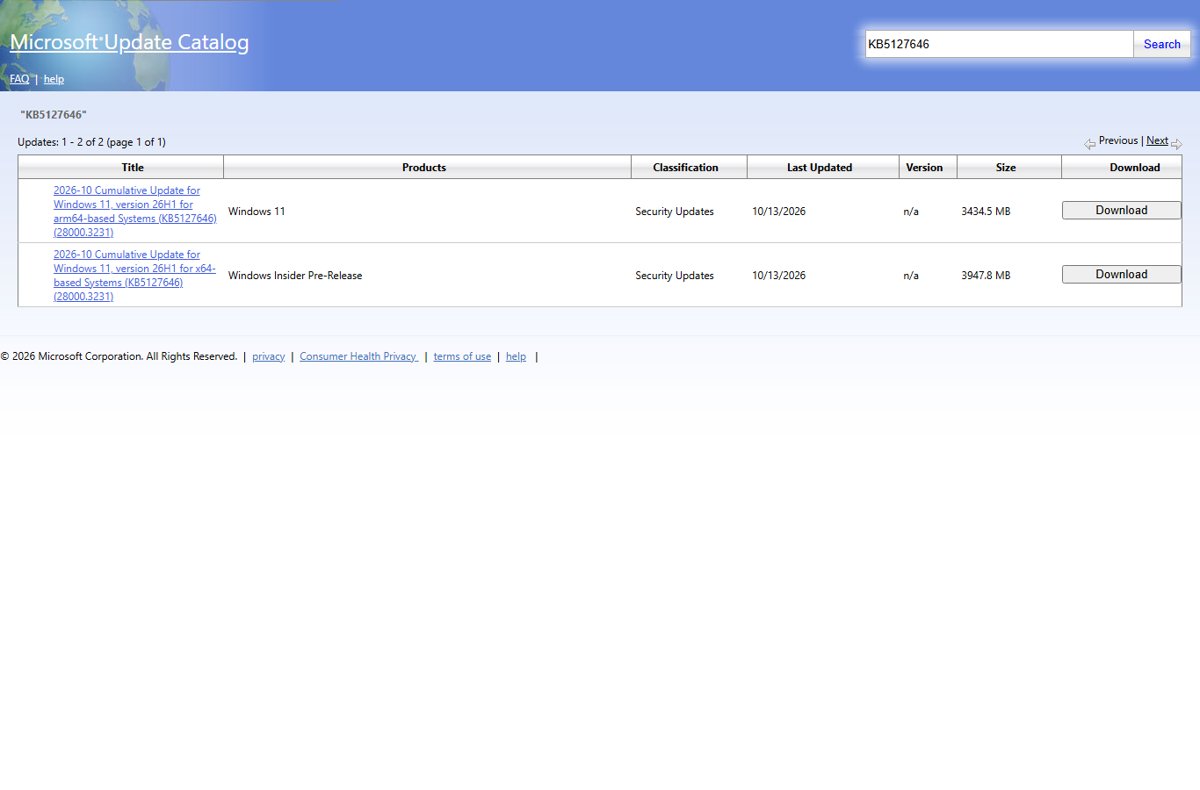
| Catalog size | 3,947.8 MB for x64 and 3,434.5 MB for ARM64 |
| AI components | Image Search, Content Extraction, Semantic Analysis and Settings Model move to version 1.2608.951.0 on Copilot+ PCs only |
To install it offline, download the KB5127646 .msu files for x64 or ARM64 from Microsoft's catalog server.
KB5127646 known issues
Microsoft's release health page for 26H1 tracks every confirmed problem. This table shows each issue, the update that started it, and its status on October 14, 2026.
| Issue | Started with | Status | Microsoft's workaround or fix |
|---|---|---|---|
| USB Audio Class 1.0 devices show Code 10, play no sound, or have unresponsive volume and Sound settings | KB5124012 (September 8) | Mitigated, still open | KB5129194 fixed 8-channel and 3D audio modes; other symptoms remain. Businesses can contact Microsoft Support for Business |
| Non-admin Remote Desktop connections fail with error 0xC000000D, "The token that was passed to the function is invalid" | KB5124006 (September 22) | Mitigated, still open | IT admins can reset the User Account Control Type Of Admin Approval Mode policy to turn off Administrator protection on affected hosts until a fix ships |
| Black screen or desktop loading failure after sign-in, mainly on Azure Virtual Desktop with FSLogix | KB5120996 (August 27) | Resolved by KB5127646 | Install KB5127646; no workaround needed after that |
| Domain-joined devices lose their trust relationship with the domain | KB5124012 (September 8) | Resolved by KB5124006 | Included in KB5127646 |
| Remote Desktop Services stops responding | KB5124012 (September 8) | Resolved by KB5129194 | Included in KB5127646 |
| Plan9 host folder shares missing in Hyper-V Linux VMs, including WSL | KB5124012 (September 8) | Resolved by KB5129194 | Included in KB5127646 |
| Microsoft Teams and new Outlook fail to launch on ARM-based devices | KB5121000 (August 11) | Resolved by KB5124012 | Included in KB5127646 |
| False "Microsoft Defender Antivirus is turned off" notifications | Defender update 4.18.26070.9 | Resolved | Fixed in Defender update 4.18.26080.4, not by a Windows update |
Other Windows 11 versions have their own October 2026 update issues, several of them shared with 26H1.
Changes in KB5127646
Microsoft lists these quality fixes for 26H1 on the KB5127646 page. Every item below is a fix or a security change, not a new feature.
| Area | What changed |
|---|---|
| Security updates | Security fixes for the vulnerabilities listed in Microsoft's Security Update Guide for October 2026 |
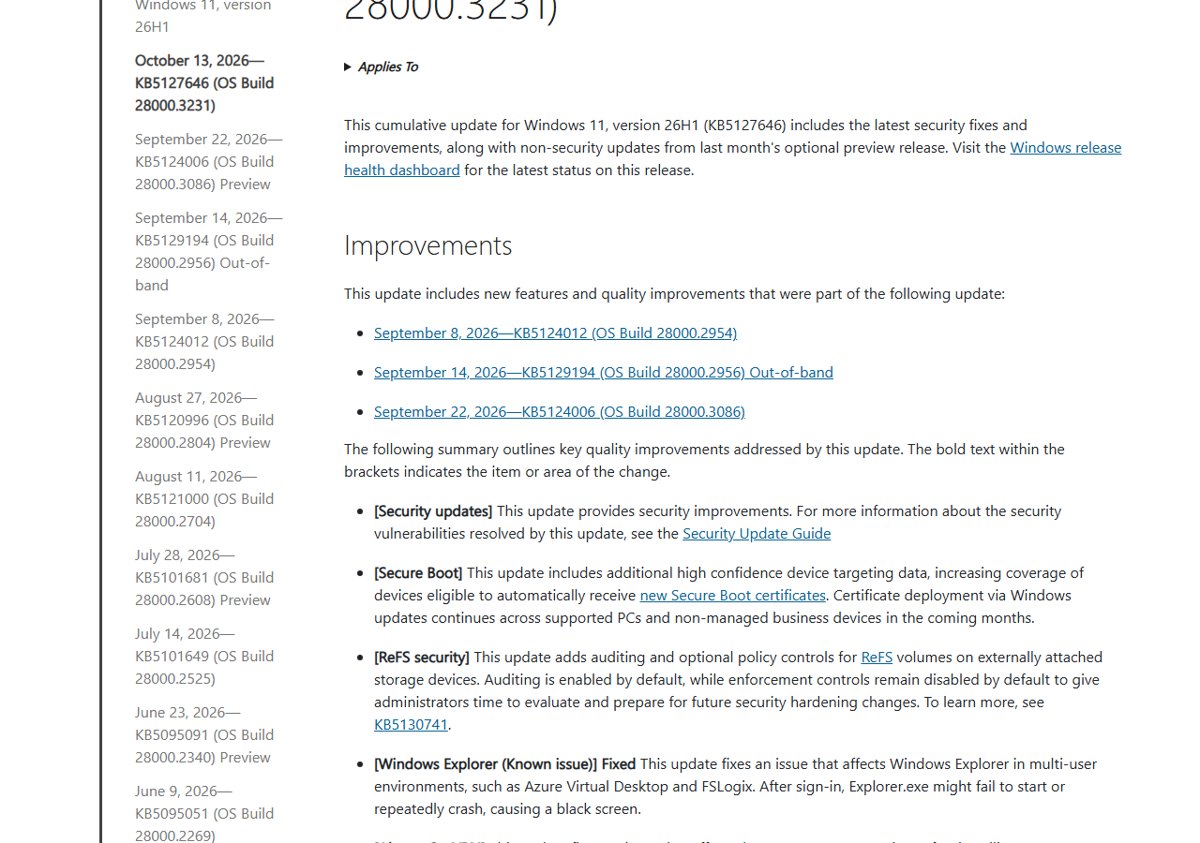
| Windows Explorer | Fixes Explorer.exe failing to start or crashing repeatedly after sign-in in multi-user setups such as Azure Virtual Desktop and FSLogix, which left a black screen |
| Always On VPN | Fixes connections stuck in a Connecting state after KB5124008 when automatic protocol selection or fallback is set, including the error "The specified port is already in use" |
| Storage Spaces Direct | Fixes tiered virtual disks that failed to come online after certain security updates, which took clustered workloads offline |
| Gaming | Fixes mouse input stutter in some games |
| Secure Boot | Adds more device targeting data for automatic Secure Boot certificate updates |
| ReFS security | Adds auditing and optional policy controls for ReFS volumes on external storage |
Secure Boot and ReFS changes in KB5127646
| Change | What it does | Action needed |
|---|---|---|
| Secure Boot certificate targeting | Adds high confidence device targeting data, so more PCs qualify to receive the new Secure Boot certificates automatically | None on home PCs; Microsoft continues the certificate rollout through Windows Update over the coming months |
| ReFS auditing on external drives | Audits ReFS volumes on externally attached storage, turned on by default | None; review the audit data before later hardening changes |
| ReFS enforcement policies | Optional policy controls for the same volumes, turned off by default | Admins can evaluate them now; Microsoft documents them in KB5130741 |
Features from the September preview arrive too
KB5127646 includes the September 22 preview update KB5124006, so its changes reach every 26H1 PC with this security update. Microsoft releases most of them through a gradual rollout, so a feature can appear later on one PC than on another.
| Area | Change from the September preview, now in the security update |
|---|---|
| Taskbar | Place the taskbar on any screen edge and use a smaller size |
| Start menu | Small or large size, "Recommended" renamed to "Recent", and an option to hide your name and picture |
| Windows Search | A simpler search home, clearer result sources and a setting for web and Store suggestions |
| File Explorer | Home opens faster, and the Recommended carousel scrolls by touch |
| Administrator protection | Just-in-time admin privileges with profile separation, off by default |
| Windows Update | A PC you put to sleep manually goes back to sleep after an update |
| WMIC | The WMIC command-line tool is removed from 26H1; WMI itself is still supported |
| File History | Fixes backups and restores to external or network drives that failed with a false reconnect message |
Is the USB audio bug fixed in KB5127646?
No. Claims that the remaining USB audio bugs were reportedly fixed in the October 13 patches do not match Microsoft's documentation. The KB5127646 page still lists "USB audio devices might fail to start or produce no sound" under its known issues.
| USB audio symptom | Status after KB5127646 |
|---|---|
| Fails only in 8-channel or 3D multichannel modes | Fixed since KB5129194 on September 14, and included in KB5127646 |
| "This device cannot start (Code 10)" in Device Manager | Still open |
| No audio output | Still open |
| Volume controls stuck at zero or unresponsive Sound settings | Still open |
The issue is limited to USB Audio Class 1.0 devices. If a headset or DAC still shows the error, fix USB audio Code 10 with the driver and rollback steps Microsoft documents.
The three October 2026 packages
Microsoft shipped one cumulative update per Windows 11 servicing branch on October 13, 2026. Only one of them applies to any given PC.
| Package | Windows 11 version | OS build | Notes |
|---|---|---|---|
| KB5127646 | 26H1 | 28000.3231 | The update covered on this page |
| KB5127648 | 24H2, 25H2 and 26H2 | 26100.9711, 26200.9711, 26300.9711 | Microsoft fixed VPN, Azure Virtual Desktop and storage issues; download KB5127648 with its full change list |
| KB5126653 | 23H2 | 22621.7652 | Windows 11 23H2 has its own KB5126653 known issues |
End of support for two Windows 11 groups
Neither deadline touches 26H1, but both are announced on the October 2026 update pages.
| Group | Last update | What it means |
|---|---|---|
| Windows 11, version 24H2 Home and Pro | October 2026 security update (KB5127648) | No more monthly security or preview updates; Microsoft recommends upgrading to the latest Windows 11 version |
| Windows 11, version 23H2 Enterprise and Education | November 2026 security update, on November 10, 2026 | No more monthly security updates after that date |
Owners of affected PCs should upgrade from 24H2 Home or Pro to a supported version before the next Patch Tuesday.
KB5127646 deployment notes for admins
| Channel or task | What Microsoft states |
|---|---|
| Windows Update for Business | Installs automatically according to your configured policies |
| WSUS | Syncs automatically with Product set to Windows 11 and Classification set to Security Updates |
| Microsoft Update Catalog | Standalone .msu files must be installed in a specific order: all together with DISM or Add-WindowsPackage, or one at a time in order |
| Servicing stack | The SSU (KB5127645) and the cumulative update ship as one package |
| Updating installation media with Dynamic Update | Include the boot.stl file, or devices can fail to start from the media with error 0xc0430001; Microsoft recommends the Update WinPE script |
| Remote Desktop hosts with Administrator protection | Plan for the open 0xC000000D issue; Windows security baselines turn Administrator protection on by default |
| ReFS on external storage | Auditing is on by default; enforcement controls stay off until you enable them |
How to install KB5127646 from Windows Update
- Save your work and plug a laptop into power.
- Select Start > Settings > Windows Update.
- Select Check for updates.
- Wait for 2026-10 Cumulative Update for Windows 11, version 26H1 to download and install.
- Select Restart now, or Schedule the restart to pick a convenient time.
Active hours and the other Windows Update settings decide when the restart happens if you ignore the prompt.
How to check KB5127646 is installed
- Select Start > Settings > Windows Update > Update history.
- Look for KB5127646 under Quality Updates with a successful install date.
- Open Settings > System > About.
- Confirm OS build under Windows specifications reads 28000.3231 or higher.
You can also check your Windows version with winver to confirm the build.
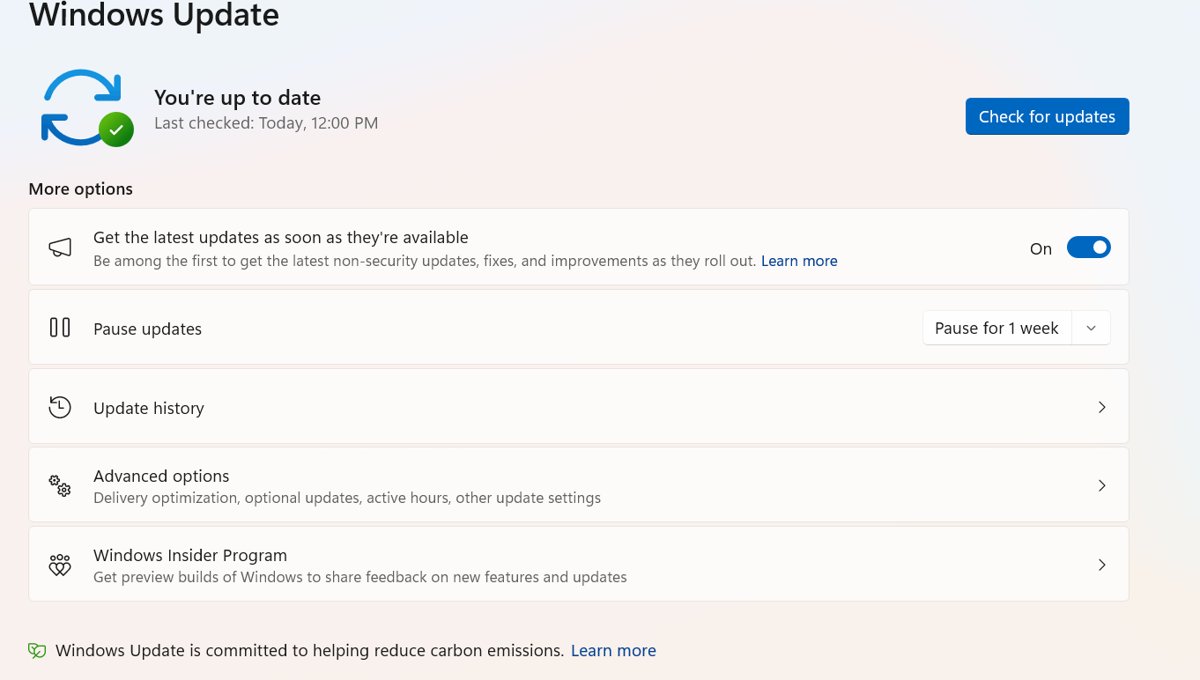
How to pause updates to delay KB5127646
Pausing delays the download; it does not skip the update. Once the pause limit is reached, Windows installs the latest updates before you can pause again.
- Select Start > Settings > Windows Update.
- Find Pause updates.
- Open the drop-down next to it and choose how long to pause.
- Select Resume updates on the same page when you are ready to install.
How to uninstall KB5127646
Microsoft advises understanding the risks before removing a security update, because uninstalling KB5127646 also removes October's security fixes. Some updates cannot be uninstalled.
- Select Start > Settings > Windows Update.
- Under More options, select Update history.
- Under Related settings, select Uninstall updates.
- Find KB5127646 in the list and select Uninstall.
- Restart the PC when asked, then pause updates so Windows does not reinstall it straight away.
- If Windows no longer starts, open the Windows Recovery Environment and select Troubleshoot > Advanced options > Uninstall Updates > Uninstall latest quality update.
The same Settings page lets you uninstall problematic Windows updates from earlier months too.
KB5127646 failed to install or causes problems
KB5127646 failed to install with no clear reason
A damaged download, a stopped update service or a pending restart blocks the install.
- Restart the PC and select Check for updates again.
- Select Start > Settings > System > Troubleshoot > Other troubleshooters.
- Find Windows Update and select Run, then follow the prompts of the Windows Update troubleshooter.
- Disconnect external drives, docks and other hardware the PC does not need, then try again.
Error 0x8007000d or 0x80070002
Corrupt files in the Windows Update cache.
- Press Win + R, type
services.mscand press Enter. - Right-click Windows Update and select Stop.
- Open
C:\Windows\SoftwareDistributionand delete everything inside it. - Right-click Windows Update in Services again and select Start.
- Run Check for updates again.
Error 0x800f0922
Not enough free disk space, or a VPN connection interfering with the install.
- Free up space until the system drive has at least 20 GB available on a 64-bit PC.
- Disconnect from any VPN.
- Run Check for updates again.
Error 0x80070057, 0x80080005 or a repeated failure after the steps above
Damaged Windows system files.
- Search for Command Prompt, right-click it and select Run as administrator.
- Run
DISM.exe /Online /Cleanup-image /Restorehealthand wait for "The restore operation completed successfully". This DISM image repair can take several minutes. - Run
sfc /scannowand let it reach 100%. - Restart and install the update again.
Update stuck at the same percentage
A slow connection, low disk space or another app holding the process.
- Leave it for a while, since a package of nearly 4 GB takes time on a slow connection.
- Restart the PC and check Settings > Network & Internet for a working connection.
- Run Check for updates again or run the Windows Update troubleshooter.
No sound or Code 10 on a USB audio device after updating
The open USB Audio Class 1.0 issue that started with the September 8 update, not KB5127646 itself.
- Open Device Manager and check the device for "This device cannot start (Code 10)".
- If the device uses 8-channel or 3D audio, confirm KB5127646 installed, since that symptom is already fixed.
- For other symptoms, use the Get Help app or contact Microsoft Support; removing KB5127646 does not remove the September change.
Remote Desktop error 0xC000000D for non-admin users
The open Administrator protection issue from the September 22 preview.
- Confirm the remote host has Administrator protection turned on.
- Ask the IT admin to apply Microsoft's mitigation: reset the User Account Control Type Of Admin Approval Mode policy in Intune or Group Policy.
- Check the 26H1 release health page for the permanent fix.
KB5127646 FAQ
Should I install KB5127646?
Yes, for nearly every Windows 11 26H1 PC. It carries October 2026 security fixes and fixes the black screen after sign-in on Azure Virtual Desktop. Its two open issues, USB audio and a Remote Desktop error, began with September updates, so skipping it does not avoid them.
What is KB5127646?
KB5127646 is the October 13, 2026 cumulative security update for Windows 11, version 26H1. It moves the PC to OS build 28000.3231 and includes the September updates KB5124012, KB5129194 and KB5124006, plus servicing stack update KB5127645.
What are the known issues in KB5127646?
The KB5127646 page lists one known issue: some USB Audio Class 1.0 devices fail to start or produce no sound. The 26H1 release health page also lists an open Remote Desktop error 0xC000000D for non-admin users connecting to hosts with Administrator protection.
Why did KB5127646 fail to install?
Microsoft does not list an install failure specific to KB5127646. General causes are a corrupt update cache, low disk space, a VPN or a damaged system file. Run the Windows Update troubleshooter, clear the SoftwareDistribution folder, free space, then run DISM and sfc before retrying.
How do I uninstall KB5127646?
Open Settings > Windows Update > Update history > Uninstall updates, select KB5127646 and choose Uninstall. If Windows will not start, use Uninstall latest quality update in the Windows Recovery Environment. Removing it also removes October's security fixes.
Does KB5127646 fix the USB audio Code 10 problem?
Only partly. The 8-channel and 3D audio failure was fixed in September and is included, but Code 10, no audio output and stuck volume controls remain open. Microsoft still lists the issue as mitigated on the KB5127646 page.
Why don't I see KB5127646 in Windows Update?
KB5127646 applies only to Windows 11, version 26H1, which ships preinstalled on select new devices. PCs on 24H2, 25H2 or 26H2 get KB5127648, and 23H2 PCs get KB5126653 for the same October 2026 release.
Can I stop KB5127646 from installing?
You can delay it but not skip it. Select Settings > Windows Update and choose a length next to Pause updates. When the pause ends, Windows installs the latest updates before it lets you pause again.

![Allow apps to access your microphone Windows 11 [tutorial]](https://techdows.com/wp-content/uploads/2026/10/Windows-10-Privacy-Microphone-page-with-the-apps-access-switch-on.jpg)