Students get Microsoft Word free by signing in to Office 365 Education with their school email address, which includes Word for the web at no cost.
This guide covers the free school plan, how to install desktop Word when your school licenses it, the free Word for the web route, the college student discount, and what happens when you graduate.
Fastest way to get Microsoft Word with a school email
Many schools already give students a Microsoft 365 account. If you have a school email that ends in your school's domain, try signing in with it before you sign up for anything.
- Open your browser and go to Microsoft365.com.
- Select Sign in and enter your school email address and password.
- Select Word from the app list on the left.
- Create a blank document or open a file from your school OneDrive.
- If the sign-in fails because your school has no account for you, use the Office 365 Education sign-up in Option 1 below.
Which method should you choose?
| Your situation | Use this | Cost | Desktop Word? |
|---|---|---|---|
| Your school already uses Microsoft 365 | Sign in with your school account | Free | Yes, if your school licenses the desktop apps |
| You have an eligible school email but no account yet | Office 365 Education (A1) sign-up | Free | No, A1 is the web version |
| Your school is not eligible or you have no school email | Word for the web with a personal Microsoft account | Free | No |
| You are in college and need desktop Word you keep after graduating | Microsoft 365 college student offer | Discounted or promotional | Yes |
| You only edit on a phone | Microsoft 365 Copilot mobile app | Free on small screens | No |
Option 1: Get free Word through your school account
Microsoft donates Office 365 A1 to eligible schools, and students with an eligible education email address can get it free. A1 includes Word, Excel, PowerPoint, OneNote and Outlook for the web.
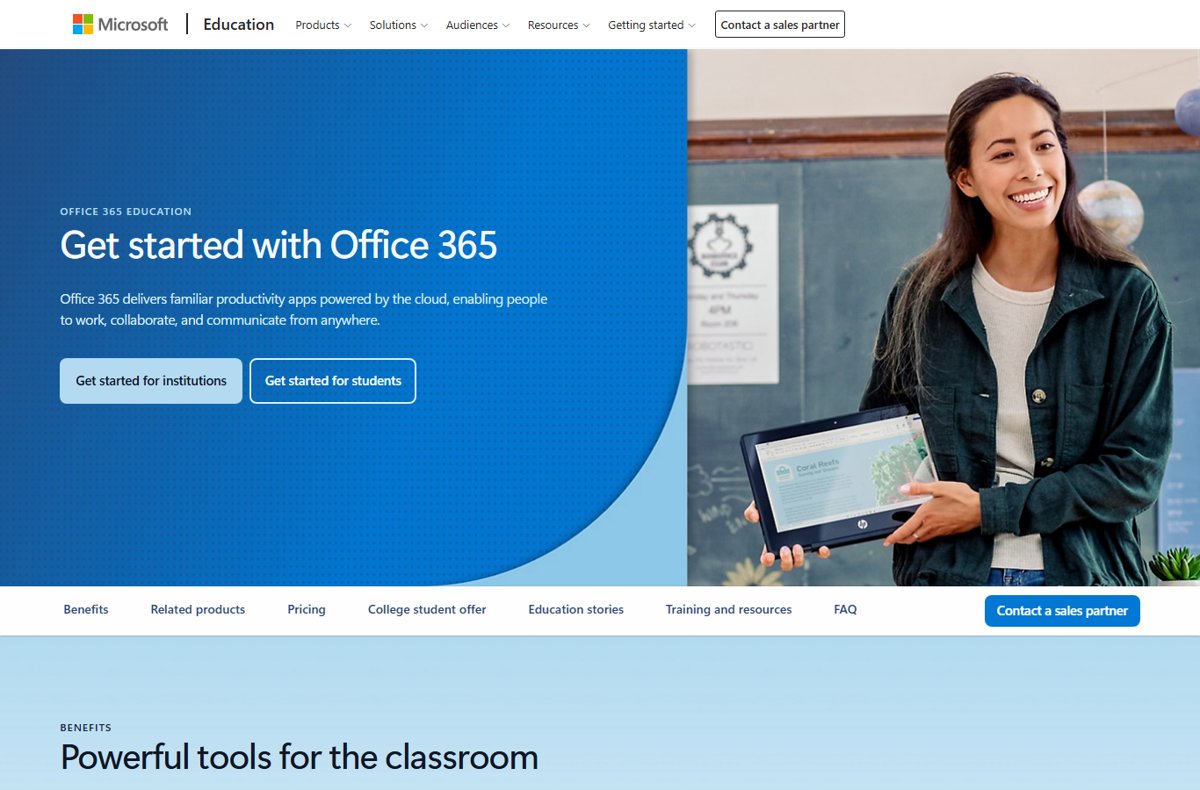
- Go to microsoft.com/education/products/office in your browser.
- Select Get started for students.
- Enter your school email address when asked and continue.
- Open the verification email in your school inbox and finish the sign-up.
- Sign in at Microsoft365.com with the school account and select Word.
The A1 plan also lists PC-only versions of Publisher and Microsoft Access. Desktop Word, Excel and PowerPoint come with the paid A3 plan, which your school buys, not you.
Office 365 A1 vs A3 for students: what each plan includes
| Plan | Who pays | Word you get | Install limits |
|---|---|---|---|
| Office 365 A1 | Free, donated by Microsoft | Word for the web, plus web Excel, PowerPoint, OneNote and Outlook | Browser only for Word |
| Office 365 A3 | Your school, $3.25 per user per month | Everything in A1 plus the full desktop Office apps | Up to five PCs or Macs, five tablets and five phones per user |
| Office 365 A5 | Your school, $8.00 per user per month | Everything in A3 plus advanced security and analytics | Same as A3 |
How to check whether your school gives you desktop Word
The install button on your Microsoft 365 home page tells you which plan your school assigned. No button means your license covers the web apps only.
- Go to m365.cloud.microsoft/apps and sign in with your school account.
- Look for the Install apps option on the home page, or under Apps in the left pane.
- If you see Install apps, your school licenses desktop Word.
- If it is missing, go to aka.ms/office-install to open the Microsoft 365 Software page.
- If no install option appears there either, ask your school IT desk whether a desktop license can be assigned to you.
Install desktop Word with a school account on Windows or Mac
Use these steps only after the check above shows an install option. The installer adds the whole Microsoft 365 suite, and the 64-bit version installs by default on Windows.
- Sign in at m365.cloud.microsoft/apps with your school account.
- Select Install apps and then Microsoft 365 apps to download the installer.
- On Windows, run the downloaded file and wait for You're all set! Office is installed now.
- On a Mac, open Downloads in Finder, double-click the .pkg file, then select Continue, Agree and Install.
- Open Word from the Start menu on Windows, or from Launchpad on a Mac.
- Accept the license agreement, or select Get Started on a Mac, and sign in with the same school account to activate Word.
Once Word is open, the Word ribbon basics help you find formatting, layout and review tools quickly.
Option 2: Use Word free without a school account
Word for the web is free for anyone with a personal Microsoft account, so students at ineligible schools still have a legal free option. It includes 5 GB of OneDrive storage, and files are saved in and shared from OneDrive.
- Go to Microsoft365.com in Edge, Chrome, Safari or Firefox.
- Select Sign up for free and create a Microsoft account with any personal email address, or sign in with an existing one.
- Select Word from the app list.
- Choose a blank document or a template.
- Rename the file, then use Share to send it to a teacher or a group project partner.
The same free account opens Excel and PowerPoint for the web, so the steps to get PowerPoint for free for class presentations work the same way. On a phone, the free Microsoft 365 Copilot app handles basic Word editing on screens of 10.1 inches or smaller.
Option 3: Pay less for the desktop version as a student
College students can buy Microsoft 365 Personal at 50% off after verifying their student status. The subscription sits on a personal Microsoft account, so your files and license stay with you after graduation.
Microsoft's education page also advertises a limited-time offer of 12 months of Microsoft 365 Premium for students who sign up with a college email. Check the current terms on the student offer page before you subscribe.
- Go to microsoft.com/microsoft-365/college-student-pricing.
- Select Sign up and sign in with a personal Microsoft account, not your school EDU account.
- Enter or update your payment information.
- Provide your EDU email address or other student information when asked to verify that you are in college.
- After approval, install the Microsoft 365 apps from your account and open Word.
During the discount period the subscription renews automatically at the discounted monthly price unless you turn off recurring billing in your Microsoft account. For the full-price options, compare Microsoft Word pricing before you choose.
How long does school verification take?
Verification for Office 365 Education is often instant through Microsoft's automated check. When your school itself has to be verified, confirming eligibility can take up to a month.
| Situation | Typical wait | What to do |
|---|---|---|
| Your school domain is already verified | Instant | Sign in at Microsoft365.com straight away |
| Your school still needs to be verified | Up to a month | Use free Word for the web with a personal account in the meantime |
| Your 30-day trial is ending without approval | Not approved yet | Contact Microsoft Education support |
| College discount verification | Varies | Keep your EDU email inbox open, or have other student information ready |
What happens when your student access ends?
You can use Office 365 Education while you are enrolled, and Microsoft may re-verify your eligibility at any time. When the plan ends or your school reclaims the license, Word stops editing and school online services shut off.
| What changes | Result | How to prepare |
|---|---|---|
| Installed desktop Word | Reduced functionality: you can view documents but cannot edit or create new ones | Activate a personal Microsoft 365 plan, or switch to free Word for the web |
| School OneDrive | Access ends with the school account | Copy your files to a personal OneDrive, a local drive or a USB drive before you leave |
| Word for the web with the school account | Stops working | Sign in with a personal Microsoft account instead |
| School email | Ends unless your school assigns an alumni mailbox | Ask your school whether it offers Exchange Online for Alumni |
| Extending access | Possible if you are still eligible | Re-verify your student status, or move to a personal plan |
Documents you move to a personal OneDrive stay editable in free Word for the web after you graduate.
Fix Microsoft Word not opening or not available as a student
Why can't I get Microsoft Word for free with my school email?
Your school is not eligible for Office 365 Education, or it has not been verified yet.
- Try signing in at Microsoft365.com with your school email first, in case your school already set up an account.
- If the education sign-up rejects your email, ask your school IT desk whether it uses Microsoft 365.
- Use free Word for the web with a personal Microsoft account while you wait.
Why can't I get Microsoft Word on my computer?
Your school license covers the web apps only, or no license has been assigned to you.
- Sign in at m365.cloud.microsoft/apps and look for Install apps.
- Try aka.ms/office-install if the button is missing.
- If neither shows an install option, ask your school admin to assign a license that includes the desktop apps.
- If your sign-in is blocked, contact your school IT team, because a security policy is the likely cause.
Why can't I get Microsoft Word to open?
A damaged Microsoft 365 installation stops Word from starting.
- Close Word and restart it, then restart the PC if it still fails.
- Right-click Start and open the installed apps list (Apps and Features on Windows 10).
- Select your Microsoft 365 product and select Modify.
- Choose Online Repair and select Repair, then follow the prompts.
Word opens but says it is unlicensed or view-only
Your school license ended, or Word is signed in with a different account.
- Select your profile picture in Word and check which email address is signed in.
- Sign out and sign back in with your school account.
- If you have graduated, activate a personal Microsoft 365 plan or use Word for the web.
Microsoft Word for students FAQ
Can I get the full desktop version of Word free with a student email?
Only if your school licenses it. The free Office 365 A1 plan gives you Word for the web, while desktop Word comes with the A3 plan your school pays for. Sign in at m365.cloud.microsoft/apps and look for Install apps to check.
Is Microsoft 365 Education really free for students?
Yes. Microsoft donates Office 365 A1 to eligible schools, and students with an eligible education email address pay nothing. It includes Word, Excel, PowerPoint, OneNote and Outlook for the web for as long as you are enrolled.
Can I use Word online without being a student?
Yes. Word for the web is free for anyone with a personal Microsoft account at Microsoft365.com. It includes 5 GB of OneDrive storage, and you can create, edit and share documents in any current browser.
How do I get Microsoft Word and Excel for free?
Sign in at Microsoft365.com with a free Microsoft account or your school account, then pick Word or Excel from the app list. Both web apps are free, and students with an eligible school email get them through Office 365 Education.
How do I get the Microsoft Word app on my desktop or laptop?
Install it from m365.cloud.microsoft/apps with Install apps if your school licenses desktop apps. Otherwise you need a Microsoft 365 subscription, such as the college student offer. You can also download Microsoft Word from your account once you have a license.
How do I install Word if my school provides Microsoft 365?
Sign in at m365.cloud.microsoft/apps with your school account, select Install apps and then Microsoft 365 apps. Run the installer, open Word and sign in with the same account to activate it.
What happens to my Word files when I graduate?
Files in your school OneDrive become unavailable once your school account ends. Move them to a personal OneDrive, a local drive or a USB drive before you leave, and you can keep editing them in free Word for the web.
Why can't I get Microsoft Word for free?
The free school plan needs an eligible education email, and the free desktop version does not exist outside a school license or trial. Word for the web stays free for everyone with a Microsoft account, so use that if your school is not eligible.
Why do people use Microsoft Word?
Schools and employers use Word for essays, reports, résumés and letters because it handles formatting, spelling and grammar checks, and co-editing in one file. Most teachers accept .docx files, which makes Word the default format for coursework.
Bottom line: the best way to get Microsoft Word as a student
Sign in at Microsoft365.com with your school email first; it costs nothing and often already includes desktop Word. If your school only provides the web apps and you need desktop Word you keep after graduating, use the college student offer on a personal Microsoft account. The school plan is free but ends when you leave, while a personal subscription keeps your license and files after graduation. Free Word for the web covers everyone else.