The 0.0.0.0 IP address is a placeholder, not a real device: it means "any local address" on a listening server, "no address yet" on a device that has not been configured, and "every destination" when written as 0.0.0.0/0 in a route or firewall rule.
This guide decodes each case, shows the Windows commands that reveal which one you are looking at, and covers the fixes when 0.0.0.0 signals a real problem.
What 0.0.0.0 Means in IPv4
0.0.0.0 belongs to the reserved 0.0.0.0/8 block, which RFC 6890 lists as "this host on this network". It is never assigned to a device as a working address.
Its meaning depends entirely on where it appears. Match your screen to a row below.
| Where you see 0.0.0.0 | What it means | Do you need to act? |
|---|---|---|
netstat Local Address, or a server config such as 0.0.0.0:8080 |
The program accepts connections on every network interface | Only if the service should stay private |
| ipconfig IPv4 address, or a router's WAN IP | The adapter has no working address | Yes, the connection is broken |
| route print destination with netmask 0.0.0.0 | The default route: every destination not matched elsewhere | No, this is normal |
| Next hop or gateway of 0.0.0.0 in a route | The destination is on the local subnet, so no router is needed | No, this is normal |
Firewall or cloud rule source of 0.0.0.0/0 |
Any IPv4 address on the internet | Check it, especially for admin ports |
| A hosts file line or a DNS answer of 0.0.0.0 | The name is deliberately blocked | No, unless a site you need is blocked |
When 0.0.0.0 Means “All Network Interfaces”
A program that binds to 0.0.0.0 (INADDR_ANY in code) accepts connections on every interface the machine has. That includes localhost, the LAN adapter and any public address, on both Windows and Unix systems.
| Bind address | Who can connect | Typical use |
|---|---|---|
0.0.0.0 |
This PC, other devices on the LAN, and the internet if a firewall or router allows it | Servers meant to be reached from other machines |
127.0.0.1 |
Only programs on the same computer | Local development and admin panels |
A single LAN address, such as 192.168.1.20 |
Only traffic arriving on that one adapter | Machines with several adapters |
The key difference in 0.0.0.0 vs 127.0.0.1: 127.0.0.1 is the loopback address and never leaves the machine, while 0.0.0.0 opens the port on every adapter. A dev server listening on 0.0.0.0 is reachable from your phone on the same Wi-Fi; one on 127.0.0.1 is not.
When 0.0.0.0 Means “No IP Address Assigned”
RFC 1122 allows 0.0.0.0 as a source address only while a host is still obtaining its own address. A DHCP client sends its first DHCPDISCOVER from 0.0.0.0 for exactly that reason.
| What you see | What it tells you | Next step |
|---|---|---|
| 0.0.0.0 as the adapter's IPv4 address | The adapter holds no usable address | Renew the lease, then check the cable or Wi-Fi link |
| 169.254.x.x as the IPv4 address | Windows could not get an address from the router and assigned itself an APIPA link-local address | Restart the modem and router, then run ipconfig /renew |
0.0.0.0 after running ipconfig /release |
The lease was released on purpose, which disables TCP/IP on that DHCP adapter | Run ipconfig /renew |
| 0.0.0.0 as the WAN or Internet IP on a router status page | The router has no address from your ISP | Restart the modem, then the router; call the ISP if it persists |
To see your working addresses once the problem is fixed, find your IP address on Windows.
When 0.0.0.0 Means the Default Route
In a routing table, destination 0.0.0.0 with netmask 0.0.0.0 is the default route. Written in CIDR form it is 0.0.0.0/0, an IP block that contains every possible IPv4 address.
Routers pick the longest matching prefix, and /0 is the shortest prefix possible. So the default route only carries traffic that no more specific route claims.
| Field | Value you see | Meaning |
|---|---|---|
| Destination / netmask | 0.0.0.0 / 0.0.0.0 | The default route, used for any address with no better match |
| Gateway of the default route | Your router's address, for example 192.168.1.1 | The default gateway that forwards traffic off your subnet |
| Next hop on another route | 0.0.0.0 | The destination is on the local subnet; no router is needed |
PowerShell DestinationPrefix |
0.0.0.0/0 (IPv4) or ::/0 (IPv6) | The NextHop on that route is the default gateway |
Microsoft's own route reference uses this form to add a default route: route add 0.0.0.0 mask 0.0.0.0 192.168.12.1.
Show the default route on Windows
Open Command Prompt from the Start menu and run the command below.
route print 0.*route print lists the IP routing table, and the 0.* wildcard limits it to destinations that start with 0, which is the default route. netstat -r prints the same table. In PowerShell, Get-NetRoute -DestinationPrefix "0.0.0.0/0" returns the same route, and its NextHop is your default gateway.
You should see: A line with destination 0.0.0.0, netmask 0.0.0.0 and your router's address as the gateway. No such line means Windows has no default gateway and cannot reach the internet.
When 0.0.0.0/0 Appears in Firewall and Cloud Rules
In a firewall, security group or cloud route, 0.0.0.0/0 means every IPv4 address. It is the "everywhere" value, and ::/0 is the IPv6 equivalent.
| Where | What 0.0.0.0/0 does | How to make it safer |
|---|---|---|
| AWS security group, inbound rule | Allows the chosen port from any IPv4 address | Use the narrowest CIDR you can, such as your office range, or reference another security group |
| AWS load balancer example | AWS itself uses 0.0.0.0/0 as the source for public HTTP and HTTPS | Keep it on the public web port only; restrict back-end servers to the load balancer's group |
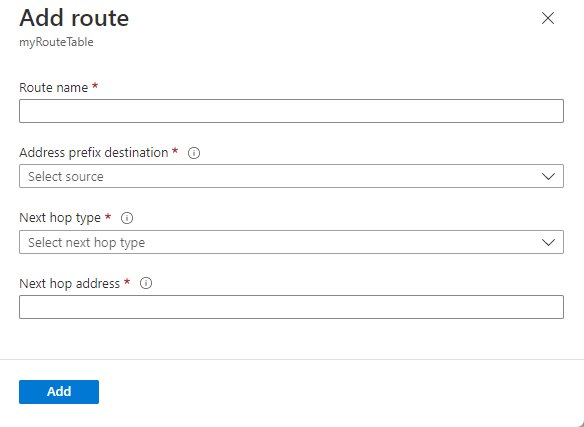
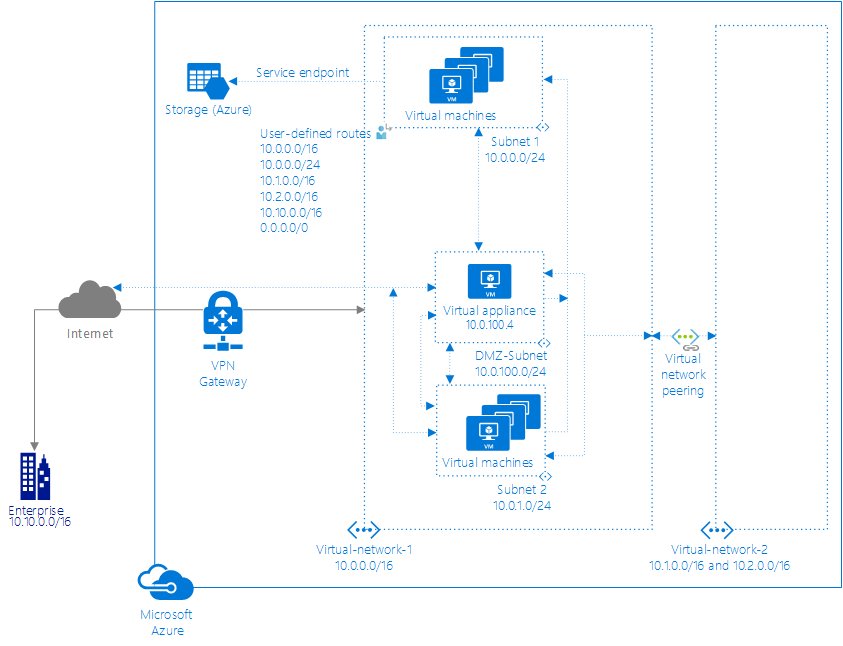
| Azure subnet route table | The system default route sends 0.0.0.0/0 traffic to the Internet next hop | Override it with a user-defined route to force traffic through a firewall appliance |
| Any rule on SSH (22) or RDP (3389) | Exposes a remote-login port to the whole internet | Replace it with a specific /32 address or a VPN range |
A new AWS security group allows no inbound traffic until you add rules, so a 0.0.0.0/0 inbound rule was always added by someone. Its outbound rule allows all traffic by default.
Is 0.0.0.0 a Security Risk?
0.0.0.0 itself is harmless, but a service listening on 0.0.0.0 or a 0.0.0.0/0 inbound rule exposes more than you may intend. Audit both, and bind development tools to 127.0.0.1 unless another device must reach them. Binding to 0.0.0.0 publishes a port on every interface, and Docker's documentation states that publishing container ports is insecure by default for this reason. Browsers were also affected: in August 2024 researchers disclosed "0.0.0.0 Day", where a web page could send requests to services listening on 0.0.0.0, exposing local APIs.
A 0.0.0.0 default route, a 0.0.0.0 next hop or a 0.0.0.0 hosts entry carries no security risk. They are normal routing and blocking values.
0.0.0.0 in Hosts Files and Ad Blocking
Blocklists map unwanted names to 0.0.0.0 so connections fail before they start. A line such as 0.0.0.0 ads.example.com sends that name nowhere useful.
| Source of the 0.0.0.0 answer | How to confirm it | How to undo it |
|---|---|---|
| A line in your hosts file | ipconfig /displaydns lists entries preloaded from the Hosts file |
Delete the line, then clear the cache |
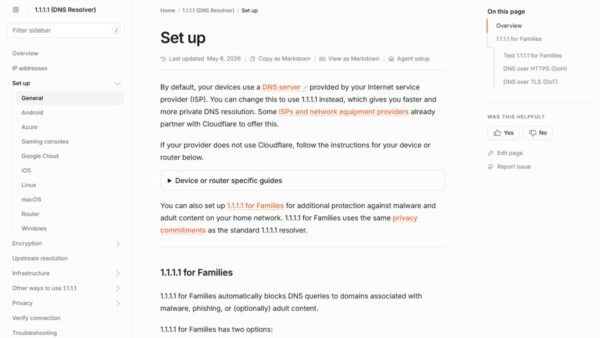
| A filtering DNS resolver such as Cloudflare 1.1.1.1 for Families | Cloudflare returns 0.0.0.0 when it classifies a domain as malicious | Switch to an unfiltered resolver if the block is wrong |
| A stale cached answer | ipconfig /displaydns still shows the old record |
Run ipconfig /flushdns |
Operating systems treat a connection to 0.0.0.0 differently, so this blocking method has no single defined behaviour. It works because the request never reaches the real server.
Clearing the cache is covered in flushing the DNS cache at the Command Prompt. Changing resolvers is covered in changing DNS settings on Windows.
0.0.0.0 in Docker, Containers, and Virtual Machines
When you publish a container port without a host address, the Docker daemon binds it to all host addresses, 0.0.0.0 and [::]. So docker run -p 8080:80 nginx makes port 8080 reachable from other machines.
| Docker setting | Result |
|---|---|
-p 8080:80 |
Published on 0.0.0.0 and [::], on every host interface |
-p 127.0.0.1:8080:80 |
Only the Docker host can reach the port |
-p '[::1]:8080:80' |
IPv6 localhost only |
"ip": "127.0.0.1" in daemon.json |
Changes the default bind address for published ports on the default bridge network |
Docker warns that in releases older than 28.0.0, hosts on the same L2 segment, such as the same switch, can still reach ports published to localhost. Update Docker Engine if you rely on 127.0.0.1 binding.
0.0.0.0 in App Configuration Files
Web servers and dev tools often default to every interface. The table shows what the common directives do and how to limit them.
| Software | All interfaces | Local only |
|---|---|---|
nginx listen |
listen 8000; or listen *:8000; (the default is *:80, or *:8000 without superuser rights) |
listen 127.0.0.1:8000; |
Apache httpd Listen |
Listen 80 listens on the port on all interfaces |
Listen 127.0.0.1:80 |
Python http.server |
python -m http.server binds to all interfaces by default |
python -m http.server --bind 127.0.0.1 |
| Any app with a host setting | 0.0.0.0 |
127.0.0.1 or localhost |
Python's documentation also states that http.server is not recommended for production. Use it for quick local tests bound to 127.0.0.1.
0.0.0.0 vs :: in IPv6
IPv6 has the same idea with a shorter notation. The all-zeros address :: is the unspecified address and plays the role of 0.0.0.0.
| Meaning | IPv4 | IPv6 |
|---|---|---|
| Unspecified or any address | 0.0.0.0 | :: |
| Every destination, default route | 0.0.0.0/0 | ::/0 |
| Loopback, this machine only | 127.0.0.1 | ::1 |
| nginx wildcard listen | listen *:8000; |
listen [::]:8000; |
In nginx, [::] accepts only IPv6 by default because ipv6only defaults to on. Set ipv6only=off to let one socket take both IPv4 and IPv6.
Common Places You Might See 0.0.0.0
| Place | How it appears | Normal? |
|---|---|---|
netstat -an output |
Local Address 0.0.0.0:445 or similar, in a listening state |
Yes |
route print or netstat -r |
Destination 0.0.0.0, netmask 0.0.0.0 | Yes |
ipconfig output |
IPv4 address 0.0.0.0 | No |
| Router status page | WAN IP 0.0.0.0 | No |
| Hosts file or DNS lookup | 0.0.0.0 next to a domain name | Yes, if the block is intended |
| AWS, Azure or firewall rule | Source or destination 0.0.0.0/0 | Depends on the port |
| Docker, nginx, Apache or app config | Bind or listen address 0.0.0.0 | Depends on who should connect |
Quick check: what is listening on 0.0.0.0?
This finds every program that accepts connections on all interfaces and names the owner.
- Search for command prompt, select Run as administrator, then select Yes.
- Run
netstat -ano -p tcpto list TCP connections and listening ports with numeric addresses and the process ID. - Look for rows whose Local Address starts with
0.0.0.0:and note the port and the PID in the last column. - Run
netstat -anobto see the executable behind each listening port; the -b switch fails without administrator rights. - Match a PID to its app in Task Manager, or run
Get-NetTCPConnection -State Listen -LocalAddress 0.0.0.0in PowerShell. - Stop or reconfigure any listener you do not recognise or do not need on the network.
How to check your PC has a real IP address
- Open Command Prompt.
- Run
ipconfig /all. - Find the section for the adapter you use, Wi-Fi or Ethernet.
- Confirm the IPv4 address is neither 0.0.0.0 nor 169.254.x.x.
- Confirm a Default Gateway is listed, usually your router's address.
- Run
pingfollowed by that gateway address; replies prove the local link works.
How to Fix 0.0.0.0 on a Windows PC or Router
ipconfig shows 0.0.0.0 or 169.254.x.x on a Windows PC
Windows could not get an address from the router's DHCP server.
- Restart the modem and router, and wait at least 30 seconds after they come back.
- Open Command Prompt as administrator.
- Run
ipconfig /release, thenipconfig /renew. - If the address is still wrong, run
netsh winsock reset,netsh int ip reset,ipconfig /release,ipconfig /renewandipconfig /flushdns, one at a time. - Restart the PC.
- As a last resort on Windows 11, open Settings > Network & internet > Advanced network settings > Network reset and select Reset now.
A home router's WAN page shows 0.0.0.0
The router has not received an address from your ISP.
- Check that the cable from the modem or ONT sits in the router's WAN or Internet port.
- Turn off the router and the modem.
- Turn on the modem first and wait until its status lights settle.
- Turn on the router and reload its status page.
- Contact your ISP if the WAN address stays at 0.0.0.0; the fault is upstream of your home network.
A site will not load and resolves to 0.0.0.0
A hosts entry, a filtering DNS resolver or a stale cache is blocking the name.
- Run
ipconfig /displaydnsand look for the domain. - Remove any matching line from the hosts file if you added one.
- Run
ipconfig /flushdns. - If your DNS resolver filters domains, switch to an unfiltered resolver for a test.
A service listening on 0.0.0.0 is not reachable from another device
Something between the devices is blocking the port, or the app actually listens on 127.0.0.1.
- Run
netstat -ano -p tcpand confirm the Local Address is0.0.0.0:and not127.0.0.1:. - Allow the app or port through Windows Defender Firewall for the network you use.
- Connect from the other device with the PC's LAN address, not
0.0.0.0orlocalhost. - For Docker, check the
-pmapping includes the host port you are testing.
On a Mac, check the address first with the Mac IP address methods; the router and modem steps above apply unchanged.
What You Should Do When You See 0.0.0.0
Act only in two cases: when 0.0.0.0 is your adapter's or router's own IP address, fix the connection; when it is a listen address or a 0.0.0.0/0 inbound rule on something private, narrow it to 127.0.0.1 or a specific range. In routing tables, next hops, hosts-file blocks and filtering DNS answers, 0.0.0.0 is a normal placeholder and changing it breaks things. The address only signals trouble when it stands in for a missing address or an unintended exposure.
Frequently Asked Questions
What is the difference between 0.0.0.0 and 127.0.0.1?
127.0.0.1 is the loopback address, so only programs on the same computer can use it. A server bound to 0.0.0.0 listens on every interface, including loopback, the LAN adapter and any public address, so other devices can connect.
Can you open 0.0.0.0 in a browser?
You should not rely on it. 0.0.0.0 is not a destination address, and operating systems handle connections to it differently. To reach a local server, use 127.0.0.1 or localhost on the same machine, or the machine's LAN address from another device.
Why does my IP address show 0.0.0.0?
Your adapter has no working address, usually because it could not reach a DHCP server or the lease was released. Restart the modem and router, then run ipconfig /release and ipconfig /renew in an administrator Command Prompt.
What does 0.0.0.0/0 mean?
0.0.0.0/0 is a CIDR block that contains every IPv4 address. In a routing table it is the default route, and in a firewall or AWS security group rule it means traffic from or to anywhere on the internet.
Why does netstat show 0.0.0.0 as the local address?
The program on that port is listening on all network interfaces. Add the -o switch to see the process ID, and -b in an administrator prompt to see the executable that owns the port.
What does a gateway or next hop of 0.0.0.0 mean?
It means the destination is on the local subnet, so traffic goes straight out of the interface without a router. Microsoft's Get-NetRoute documentation defines a next hop of 0.0.0.0 for IPv4, or :: for IPv6, as a route on the local subnet.
Is 0.0.0.0 a private IP address?
No. 0.0.0.0 is in the reserved 0.0.0.0/8 block that RFC 6890 describes as "this host on this network". Private ranges are 10.0.0.0/8, 172.16.0.0/12 and 192.168.0.0/16, and they can be assigned to devices.
Why do ad blockers point domains to 0.0.0.0?
Mapping a name to 0.0.0.0 makes the connection fail locally, so the ad or tracker never loads. Hosts-file blocklists use it, and Cloudflare's 1.1.1.1 for Families returns 0.0.0.0 for domains it classifies as malicious.
What is the IPv6 version of 0.0.0.0?
The IPv6 unspecified address is ::, and the IPv6 default route is ::/0. Docker publishes ports to both 0.0.0.0 and [::] by default, and nginx uses listen [::]:port for the IPv6 wildcard.

How to use Cloudflare’s 1.1.1.1 for secure DNS - Techdows
[…] 1.1.1.1 for Families blocks a domain, Cloudflare answers with 0.0.0.0, an address that points nowhere, so the device never connects. If a site is blocked by mistake, report it through Cloudflare's […]