After introducing Password Monitor on desktop Microsoft Edge almost 10 months back, Microsoft is now bringing the Password scan feature to Android as well. The feature is currently available in Edge 97 Canary for testing.
Microsoft Edge so far has the ability to generate strong and unique passwords. The browser comes with a Password Health column that shows weak or reused Passwords.
Edge even offers another security layer for saved passwords that prevent unauthorized access by requiring inputting device password to autofill passwords.
Chrome both on desktop and Android got a Password leak detection feature built-in. You just need to visit the Password management page and run the check. Whereas Micorsoft Edge on Windows and Mac periodically checks for leaked passwords and alerts if any are found.
You can run a Password scan at any time by visiting the edge://settings/passwords/PasswordMonitor page.
After desktop, Microsoft Edge on Android is getting the Password security feature.

Enable Password Monitor in Microsoft Edge for Android
- Launch Microsoft Edge browser
- Visit edge://flags
- Search for “Password Monitor“, In the dropdown for “Edge Android Password Monitor”
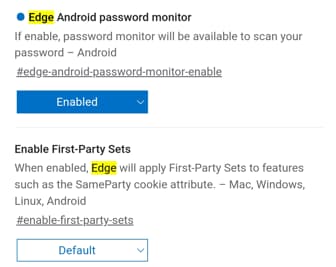
- Select Enabled and restart the browser.
Scanning for leaked passwords in Microsoft Edge on Android using Password Monitor
- Open Microsoft Edge and sign in to Micorsoft Account
- Tap on Profile icon and username,
- Tap on Passwords and select Password Monitor and tap on Scan now button
Edge shows breached Passwords if any found by comparing against known compromised Passwords list in the cloud and displays if any of your Passwords are affected and allows to change them.
In fact, Microsoft recently integrated a well-Known URL for changing Passwords support to Password Monitor on desktop.
More on Microsoft Edge:
How to mass delete Passwords on New Microsoft Edge
Microsoft Edge now lets you Edit Saved Passwords
Microsoft Edge 86 Dev update brings a new alert for compromised passwords
Microsoft Edge Chromium gets Native Password Import feature


