You can download Windows 10 free from Microsoft, but it only activates for free on a PC that already holds a Windows 10 digital license or product key.
This guide covers reinstalling with that license, the official upgrade and school routes, which old offers no longer exist, free Extended Security Updates now that Windows 10 support has ended, and the free move to Windows 11.
How to get Windows 10 free download from Microsoft
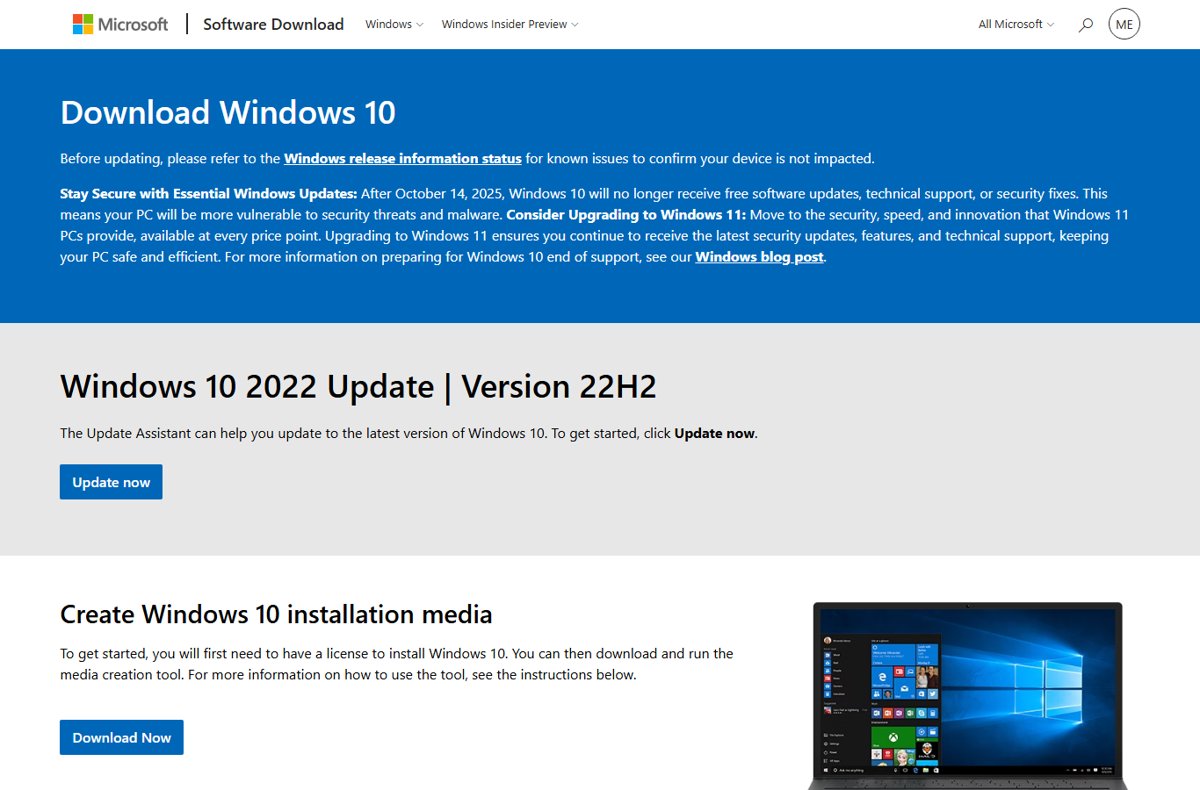
Microsoft's Download Windows 10 page offers version 22H2 at no cost. The page states that you first need a license to install Windows 10.
On a PC that ran activated Windows 10 before, the digital license reactivates Windows on its own, so no product key is needed.
- Open Microsoft's Download Windows 10 page at microsoft.com/software-download/windows10.
- Under Create Windows 10 installation media, select Download Now to get the media creation tool.
- Run the tool as an administrator and accept the license terms.
- Choose to upgrade this PC now, or create installation media on a USB flash drive of 8 GB or more, a DVD, or an ISO file.
- Pick the same language and edition the PC already uses, such as Windows 10 Home for a Home license.
- When Windows Setup asks for a product key, select I don't have a product key.
- Finish setup, connect to the internet and sign in with the Microsoft account linked to your license.
Windows activates online after setup. Creating USB media erases everything on the drive, so copy its contents elsewhere first.
Understanding Windows 10 licensing and pricing
Windows 10 activates with either a digital license or a 25-character product key. Whether it costs you anything depends on how that license reached the PC.
| How you got Windows 10 | Cost to you | Activation method |
|---|---|---|
| Free upgrade from a genuine copy of Windows 7 or Windows 8.1 | Free | Digital license |
| PC sold with Windows 10, new or refurbished | Included in the PC price | Product key on the packaging or Certificate of Authenticity (COA) |
| Windows 10 bought in the Microsoft Store app | Paid | Digital license |
| Box or digital copy from an authorized retailer | Paid | Product key on a label in the box or in the confirmation email |
| Windows 10 Pro upgrade bought in the Microsoft Store app | Paid | Digital license |
| Volume Licensing agreement or MSDN subscription | Covered by the organization's agreement | Product key from the program's web portal |
Windows 10 Home and Pro reached end of support on October 14, 2025, and version 22H2 is the final release. The PC keeps working, but free security updates now need the ESU program.
Which free Windows 10 route fits your PC?
| Your situation | Free route | What you get |
|---|---|---|
| Reinstalling a PC that ran activated Windows 10 | Media creation tool, then I don't have a product key | Windows 10 reactivates from the existing digital license |
| PC with a COA sticker or key card | Enter that product key | Activated Windows 10 at no extra cost |
| Staying on Windows 10 for now | Consumer ESU through PC settings sync | Security updates through October 12, 2027 |
| PC that passes the Windows 11 requirements | Free upgrade through Windows Update | Activated Windows 11 with continued support |
| Full-time university student | Azure for Students or your school's Dev Tools for Teaching | Windows 10 virtual machines in Azure, or software from the school |
| PC that never had a Windows license | None is free | Buy a license in the Microsoft Store app or from an authorized retailer |
Method 1: Upgrading from Windows 7, 8, or 8.1 – a no-cost option (official)
Microsoft still lists a free upgrade from a genuine copy of Windows 7 or Windows 8.1 as a source of a Windows 10 digital license. PCs that took that upgrade keep the license.
For a PC still on Windows 7 or 8.1 today, the media creation tool says you need a Windows 10 license before you upgrade. Microsoft no longer advertises a free offer for those systems.
- Back up your files from the Windows 7 or Windows 8.1 PC.
- Download the media creation tool from the Download Windows 10 page and run it as an administrator.
- Accept the license terms and choose to upgrade this PC now.
- Choose what to keep: personal files and apps, personal files only, or nothing.
- Enter your Windows 10 product key when Setup asks for it.
- Select Install, and leave the PC on while it restarts several times.
Windows 7 and 8.1 are also past end of support, so upgrading straight to Windows 11 on capable hardware gives a longer-supported result.
Method 2: Using the digital license (Microsoft account activation)
A digital license is tied to your PC's hardware and needs no product key. Linking it to your Microsoft account lets the Activation troubleshooter reactivate Windows after a major hardware change, such as a new motherboard.
- Sign in to Windows 10 with an administrator account.
- Select Start, then Settings, then Update & Security, then Activation.
- Read the status next to Activation.
- If it reads Windows is activated with a digital license, select Add an account.
- Enter your Microsoft account email and password, then select Sign in.
- Confirm the status now reads Windows is activated with a digital license linked to your Microsoft account.
When you later reinstall, choose the same edition and sign in with this account. Windows activates online without a key.
Method 3: Windows 10 Enterprise evaluation version (no longer offered)
Microsoft's Windows 10 Enterprise page on the Evaluation Center now redirects to a Windows blog post about moving to Windows 11. There is no Windows 10 evaluation to download.
The media creation tool does not offer the Enterprise edition either. Organizations get it through the Microsoft 365 admin center.
| What you wanted the evaluation for | Official route instead |
|---|---|
| Testing Windows in a lab or virtual machine | The free 90-day Windows 11 Enterprise evaluation from the Microsoft Evaluation Center |
| Enterprise edition for a business | Your organization's licensing, downloaded from the Microsoft 365 admin center |
| Developer or test images | Downloads in the Visual Studio Subscriptions portal, if you hold a subscription |
| Using Windows 10 day to day | Your own Windows 10 license, or the free Windows 11 upgrade |
Method 4: Educational and institutional offers
Schools enrolled in Azure Dev Tools for Teaching can give students Windows 10 and Windows 11 for Education at no cost, for learning and research. Students sign in to the Azure portal with school credentials.
Azure for Students is open to full-time students at accredited, degree-granting two- to four-year universities. It includes $100 of Azure credit for 12 months and lets you run Windows 10 and Windows 11 virtual machines.
- Ask your school's IT department whether it offers Windows through Azure Dev Tools for Teaching.
- If it does, sign in to the Azure portal with the school credentials it gives you.
- Open the Azure Education Hub and find Windows 10 in the Education Hub Store.
- If your school does not offer it, sign up for Azure for Students and verify your status with your school email address.
- Create a Windows 10 virtual machine in Azure and connect to it from your own PC.
- At work, ask IT about Windows Enterprise under your employer's Volume Licensing agreement.
Software from Dev Tools for Teaching is for education and non-commercial research. Azure for Students resources are decommissioned when the credit or the 12 months run out, unless you renew or upgrade.
Method 5: Microsoft's accessibility and assistive technologies offer
Older guides still describe a free Windows 10 upgrade for people who use assistive technologies. None of Microsoft's current Windows 10 download, activation or end-of-support pages lists that offer.
| What you may still find | Current status on Microsoft's pages |
|---|---|
| Assistive technologies upgrade page | Not listed on the Download Windows 10 page or the activation page |
| PC upgraded under that offer years ago | Keeps its digital license; reinstall the same edition without a key |
| Third-party sites quoting the offer | Out of date; there is no current free license route for new PCs |
| Accessibility tools on newer PCs | Microsoft's end-of-support FAQ covers accessibility needs when moving to Windows 11 |
Method 6: Participating in Microsoft Insider program
The Windows Insider Program is free to join with a Microsoft account, but it no longer gives anyone Windows 10. Microsoft's setup instructions require a licensed version of Windows 11 before you install Insider Preview builds.
| Insider question | Answer from Microsoft |
|---|---|
| Does joining give you a Windows license? | No. You need a licensed version of Windows 11 first |
| Where is the setting? | Settings > Windows Update > Windows Insider Program in Windows 11, as an administrator |
| Do Insider builds stay activated? | Yes, when Windows was activated before you moved to the new build |
| Can you switch channels freely? | Switching channels may need a clean install of Windows |
| Old Windows 10 Insider PCs | A PC that was activated before it took Windows 10 Insider builds received a digital license |
Method 7: Purchasing a new device with Windows 10 pre-installed (bundled purchase)
A PC sold with Windows 10 includes the license in its price. The key is preinstalled, included in the packaging, or printed on a Certificate of Authenticity (COA).
For a refurbished PC, the refurbisher, not Microsoft, must give you the product key. Most new PCs now ship with Windows 11 instead.
- Finish setup and connect the PC to the internet.
- Select Start, then Settings, then Update & Security, then Activation.
- If the status reads Windows is not activated, select Change product key.
- Scratch the gray coating off the COA card with a coin or fingernail to reveal the key.
- Type the 25-character key and follow the prompts.
- Select Add an account to link the license to your Microsoft account.
Method 8: Licensing via Microsoft Store and promotions
The Microsoft Store app sells Windows 10 as a digital license, so this route is paid. It suits a PC that never had Windows or one that has the wrong edition.
Microsoft keeps a record of product keys only for purchases from its online store, visible in your Microsoft account Order history.
- Install Windows 10 and select I don't have a product key during setup.
- Sign in with the Microsoft account you want the license tied to.
- Select Start, then Settings, then Update & Security, then Activation.
- Select Go to Store to open the Microsoft Store app.
- Buy the edition you installed, such as Windows 10 Home.
- Return to Activation and confirm the status changed.
A promotion is legitimate only when the license comes from Microsoft, your PC maker or an authorized retailer and activates on this page.
How to get free Windows 10 updates for a year with ESU
Windows 10 support ended on October 14, 2025. The consumer Extended Security Updates (ESU) program delivers critical and important security fixes through October 12, 2027, and you can enroll any time until then.
Enrollment is free if you sync your PC settings. The alternatives are 1,000 Microsoft Rewards points or a one-time $30 purchase plus tax, and one ESU license covers up to 10 devices.
- Confirm the PC runs Windows 10, version 22H2 Home, Pro, Pro Education or Pro for Workstations.
- Install every pending update, including the ESU Licensing Preparation Package KB5126256.
- Sign in with an administrator account that is not a child account.
- Select Start, then Settings, then Update & Security, then Windows Update.
- Select Enroll now, and sign in with your Microsoft account if prompted.
- Choose to back up your PC settings for free enrollment, or redeem Rewards points or buy instead.
- On another Windows 10 PC, select Enroll now, then Add device with the same Microsoft account.
ESU brings no new features and no technical support. Options and timing vary by region, including the European Economic Area.
How to get Windows 11 for free on Windows 10
Microsoft states that upgrades from Windows 10 to Windows 11 are free. The PC must run Windows 10, version 22H2 and meet the Windows 11 minimum hardware requirements.
The upgrade keeps your files by default, and Windows 11 activates with a digital license. Your provider may charge for the large download on a metered connection.
- Run the PC Health Check app to confirm the PC meets the Windows 11 requirements.
- Back up your files, for example to OneDrive.
- Select Start, then Settings, then Update & Security, then Windows Update.
- Select Check for updates and install any pending Windows 10 updates.
- When Windows 11 is offered, select Download and install and accept the license terms.
- Restart when prompted and sign in to Windows 11.
If Windows Update has not offered it, you can install Windows 11 free with Microsoft's tools instead. You have 10 days to go back to Windows 10 with your files kept.
Check Windows 10 activation status in Settings
- Select Start, then Settings, then Update & Security, then Activation.
- Windows is activated with a digital license linked to your Microsoft account means you are fully set.
- Windows is activated with a digital license or Windows is activated means you are activated; select Add an account to link it.
- Windows is not activated means you need a valid key or digital license; read the error shown.
- Select Update & Security, then Windows Update, to see your ESU enrollment status.
Windows 10 not activated or ESU not showing: fixes
Windows 10 is not activated after a free reinstall
A different edition was installed, or the PC never had a Windows 10 license.
- Open Settings > Update & Security > Activation and read the error.
- Reinstall the edition that matches your license, such as Home for Home.
- Sign in with the Microsoft account linked to your digital license.
- If the PC had a COA key, select Change product key and enter it.
- If the PC never had a license, select Go to Store to buy one.
Activation fails after replacing the motherboard
Windows treats a major hardware change as a new device.
- Open Settings > Update & Security > Activation.
- Run the Activation troubleshooter and sign in with the Microsoft account linked to your license.
- If your PC maker replaced the board, enter the key from the COA card it supplied.
The Enroll now link for free Windows 10 updates does not appear
The PC misses an ESU prerequisite.
- Confirm Windows 10 is version 22H2 and fully updated, including KB5126256.
- Sign in with an administrator account rather than a child account.
- Check that the PC is not in kiosk mode, domain-joined or enrolled in device management.
- Return to Windows Update and look for the enrollment link again.
Windows 10 does not get the free upgrade to 11
Pending updates, an older Windows 10 version, or hardware below the requirements.
- Install every pending update and select Check for updates again.
- Confirm the PC runs Windows 10, version 22H2.
- Run PC Health Check to see which requirement fails.
- If the PC cannot run Windows 11, enroll it in ESU instead.
Messages say Windows might not be genuine
Windows was not activated properly, or the copy is counterfeit.
- Select the notification and follow the repair steps.
- If a technician reinstalled Windows, re-enter your original product key.
- If the copy is counterfeit, buy a genuine license from Microsoft.
Special considerations and legal aspects
Activation checks that a key or digital license is valid for your hardware. Validation separately checks that Windows licensing files are intact, and some updates require it.
| Situation | What Microsoft says |
|---|---|
| Non-genuine Windows | Critical security updates still arrive, but many other updates are reserved for genuine copies |
| Keys from auction sites or unknown sellers | Copies bought this way often fail validation; buy from Microsoft or a store you trust |
| Tools that activate Windows without a license | Not a license; the copy stays non-genuine |
| Counterfeit software you already bought | File a confidential report on Microsoft's How to Tell website |
| Staying on Windows 10 without ESU | The PC works, but gets no security fixes and faces more malware risk |
| Microsoft 365 apps on Windows 10 | Security updates continue until October 10, 2028 |
Windows 10 free FAQ
Can I get Windows 10 for free?
Yes, if your PC already has a Windows 10 digital license or product key. Microsoft's download is free and reactivates on that hardware. A PC that never had a Windows license needs a paid license from the Microsoft Store app or an authorized retailer.
Is Windows 10 free to download?
Yes. Microsoft's Download Windows 10 page offers the media creation tool and version 22H2 at no cost. The page states you need a license to install it, so the download is free but activation still depends on a valid license.
Is Microsoft Windows 10 free or paid?
Windows 10 is paid for new PCs and free for PCs that already hold a license. Upgrades from genuine Windows 7 and 8.1 received free digital licenses, and those PCs can reinstall the same edition without a key.
How do I get a Windows 10 product key?
A PC sold with Windows 10 has its key on the packaging or COA sticker. Retail copies carry it in the box or confirmation email. PCs with a digital license need no key; select I don't have a product key during setup.
How do I get free Windows 10 updates for a year?
Enroll in the consumer Extended Security Updates program from Settings, Update & Security, Windows Update, and select Enroll now. It is free if you sync your PC settings, and coverage runs through October 12, 2027.
How do I get free Windows 10 support?
Microsoft no longer offers Windows 10 technical support after October 14, 2025. ESU adds security updates only, without technical support. Upgrading to Windows 11 restores full support on eligible PCs.
Does Windows 10 get a free upgrade to 11?
Yes. Microsoft states upgrades from Windows 10 to Windows 11 are free. The PC must run Windows 10, version 22H2 and meet the Windows 11 hardware requirements, which PC Health Check confirms.
How do I get Windows 11 for free on Windows 10?
Open Settings, Update & Security, Windows Update and select Check for updates. When Windows 11 is offered, select Download and install. If the offer does not appear, run PC Health Check to see which requirement fails.
Will my Windows 10 computer stop working?
No. Windows 10 keeps running after end of support, but it no longer receives security updates or technical support. Microsoft recommends upgrading to Windows 11 or enrolling in ESU to stay protected.
Final words: the best legal way to get Windows 10 free
Reinstall Windows 10 free only on a PC that already holds a license, enroll it in ESU through settings sync, and move to Windows 11 at no cost when the hardware allows. Microsoft's free download only activates on licensed hardware, and the Enterprise evaluation, Insider and assistive technology routes no longer produce a Windows 10 license. ESU keeps security fixes coming through October 12, 2027, while the Windows 11 upgrade gives a supported system for free.
Once you move, the same licensing rules decide whether you can get Windows 11 free and legally on another PC.