No, Windows 11 26H2 does not wipe or reset Group Policy settings you have configured: Microsoft says existing administrator-configured policies continue to be honored, but the update does change some defaults where no policy is set, and it makes Windows start enforcing Machine Identity Isolation settings that were already in place, which can break domain sign-in.
This guide lists every policy-related change Microsoft has documented for 26H2, the settings to pin before rollout, how to refresh your ADMX templates, and how to fix the problems admins are seeing.
What 26H2 does to your Group Policy settings
Windows 11 26H2 reached general availability on September 29, 2026 as an enablement package for 24H2 and 25H2. Because the three versions share one servicing branch, the policy engine and templates are the same code you already run. Microsoft's announcement says existing management tools, update rings, policies and deployment practices can continue to be used.
| Your policy situation | What 26H2 does | What to do |
|---|---|---|
| A policy is explicitly Enabled or Disabled | Keeps it; explicit settings are honored | Nothing |
| Windows settings backup policy is Not Configured | Backup becomes enabled by default on eligible devices | Set Enable Windows Backup to Disabled if you do not want it |
| Features held back by temporary enterprise feature control | Features Microsoft switches on with 26H2 (settings backup, app-specific taskbar actions, some File Explorer changes) turn on for commercial devices | Pilot first; use each feature's own policy where one exists |
| Machine Identity Isolation enforcement set by GPO, Intune or registry | Windows begins honoring it, which fails on domains below Windows Server 2025 functional level | Disable it with the same tool before or after upgrading |
| Scripts or policies that call WMIC | WMIC is removed from Windows 11 24H2 and later | Rewrite them before rollout |
If you manage updates centrally through WSUS, Intune or Autopatch, test on a pilot ring first.
Which defaults change when no policy is set
Microsoft's What's new page for 26H2 says the release enables capabilities that were introduced earlier but held behind temporary commercial controls. Microsoft counts a device as commercial when it is not running Windows 11 Home and is managed by IT, has a volume license key or commercial ID, or is joined to a domain.
| Feature | Before 26H2 on commercial devices | After 26H2 | Policy that controls it |
|---|---|---|---|
| Windows settings backup | Off unless an admin enabled it | On by default for eligible devices; explicit enable or disable settings are honored | Enable Windows Backup under Computer Configuration\Administrative Templates\Windows Components\Sync your settings |
| Windows settings restore | Off | Still off; restore stays admin-controlled | Enable Windows Restore, same folder |
| App-specific actions from the taskbar | Behind temporary commercial control | Enabled by default | Microsoft has not named a dedicated policy on the 26H2 pages |
| Some File Explorer enhancements | Behind temporary commercial control | Enabled by default | Microsoft has not named a dedicated policy on the 26H2 pages |
The settings backup change was announced in the Windows message center on July 9, 2026 under the message title "Windows settings backup policy is becoming a new default". Backup applies to users signed in with Microsoft Entra ID on Entra joined or hybrid joined devices.
How to keep Windows settings backup off after 26H2
Pin the setting before devices upgrade, so the new default never applies. Microsoft warns not to mix GPO and CSP settings for this feature.
- Open the Group Policy Management Console and edit the GPO linked to your Windows 11 devices, or open the Local Group Policy Editor on a single PC.
- Go to Computer Configuration > Administrative Templates > Windows Components > Sync your settings.
- Double-click Enable Windows Backup.
- Select Disabled, then OK.
- In Intune instead, create a Settings catalog policy with Administrative Templates\Windows Components\Sync your settings > Enable Windows Backup set to Disabled.
If you want backup on, set the same policy to Enabled and check that EnableActivityFeed, PublishUserActivities, UploadUserActivities, EnableCDP and AllowConnectedDevices are not set to Disabled; Microsoft says backup does not run if any of them is. The steps to open Group Policy Editor are the same on 26H2.
Group Policy settings that are new or newly relevant in 26H2
26H2 also adds features that you switch on through Group Policy. None of them turns on by itself.
| Feature | Default | How to manage it |
|---|---|---|
| Administrator protection | Off | Enable through Intune or Group Policy |
| Built-in Sysmon | Off | Enable it to use it |
| Multi-App Camera and Basic Camera mode | Available | Configure through Group Policy |
| Policy-based removal of preinstalled Microsoft apps | Available | Add MSIX or APPX package family names through Group Policy |
| Secure batch file processing mode | Off | Enable administratively, including through App Control for Business policy |
| Quick machine recovery | Off on domain-joined or enterprise-managed devices | Stays off unless you enable it |
| Start menu layout | New Start menu rolling out | HideCategoryView and ConfigureStartPins policies |
| Temporary enterprise feature control | Features off on policy-managed devices | Enable features introduced via servicing that are off by default under Windows Update > Manage end user experience |
Of the new 26H2 features, Administrator protection is the one most likely to change how admins work day to day, so pilot it before a broad policy.
How to update the Central Store ADMX files for 26H2
As of September 30, 2026, Microsoft's Central Store article lists separate Administrative Templates downloads up to Windows 11 2025 Update (25H2); no 26H2 package is listed yet. Microsoft's article also allows copying PolicyDefinitions from an up-to-date Windows 11 client, which is how new 26H2 settings reach your domain.
- On a fully updated Windows 11 26H2 admin workstation, copy the
C:\Windows\PolicyDefinitionsfolder. - On the domain controller, create a new folder named for the version, such as
PolicyDefinitions-26H2, under\\yourdomain\SYSVOL\yourdomain\policies. - Paste the .admx files and the language folders (for example
en-US) into it, then merge any application or OS extension ADMX files you use. - Rename the current
PolicyDefinitionsfolder to show it is the previous version, such asPolicyDefinitions-25H2. - Rename
PolicyDefinitions-26H2toPolicyDefinitions. - Open a GPO and browse Administrative Templates to confirm the editor loads without errors.
Keep the old folder until you are sure nothing broke; Microsoft recommends this so you can revert. Replacing files in C:\Windows\PolicyDefinitions with downloaded ADMX packages is not supported; use those packages only for the Central Store.
Policies and scripts to check before rolling out 26H2
| Check | Why it matters in 26H2 |
|---|---|
| Machine Identity Isolation settings in GPO, Intune or the registry | 26H2 begins honoring existing enforcement settings; supported only with domain controllers at Windows Server 2025 domain functional level |
Startup, logon or scheduled scripts that call wmic |
WMIC is removed and is no longer available as a Feature on Demand |
| Driver deployment policies for older hardware | Default trust for cross-signed drivers is removed; Windows audits for at least 100 hours and three restarts before enforcing |
| Windows settings backup policy | Not Configured now means backup on for eligible devices |
| Feature update target version policy | A target version of 25H2 holds devices back from 26H2 until you change it |
| Known Issue Rollback policies | Microsoft ships 26H2 fixes such as the AVD black screen rollback as special Group Policy definitions |
If you need time to finish these checks, you can block the 26H2 update with the target version policy while you test.
How to check your policies still apply after 26H2
- Open Settings > System > About and confirm Version reads 26H2 and OS build starts with 26300.
- Open Command Prompt and run
gpupdate /forceto reapply all policy settings, not only the changed ones. - Run
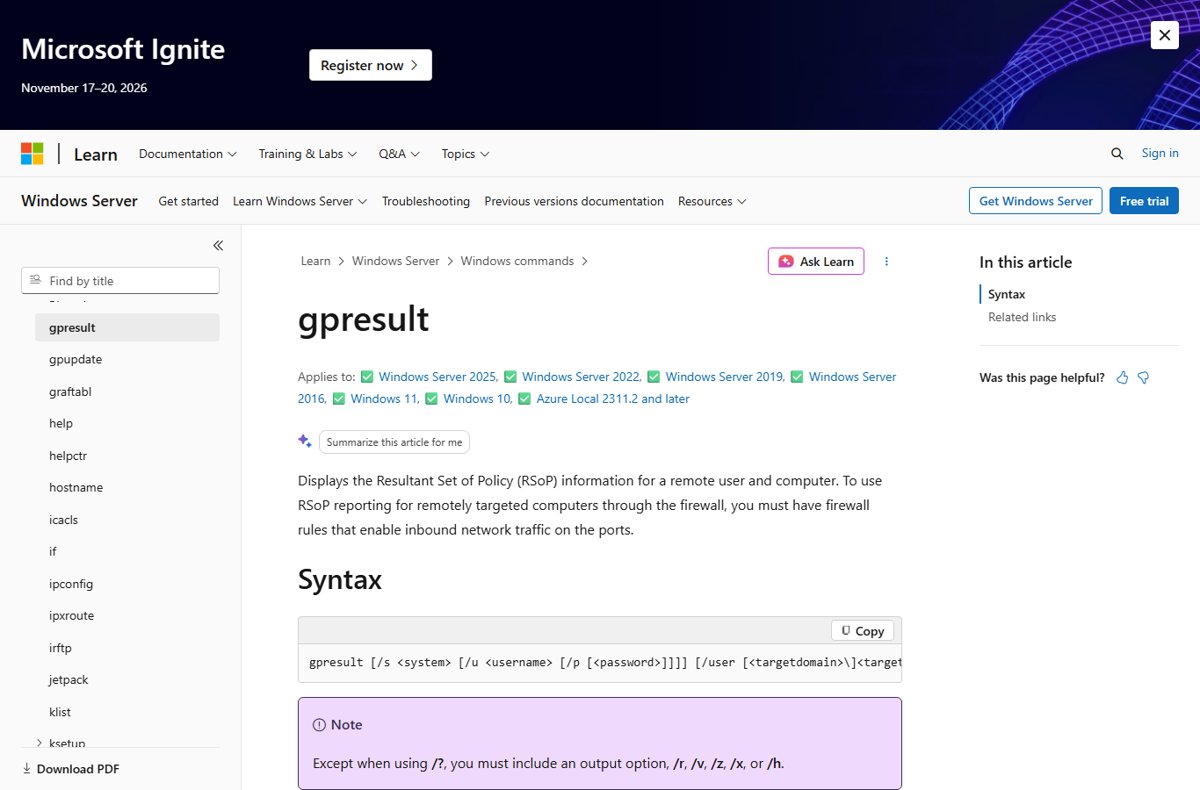
gpresult /rto see the summary of applied GPOs for the computer and the signed-in user. - Run
gpresult /h C:\Temp\gp.htmland open the report to compare individual settings with a pre-upgrade report. - Check that settings you pinned, such as Enable Windows Backup, show the value you set.
By default, domain devices pick up new policy within 90 to 120 minutes, so a forced refresh saves waiting.
Fix Group Policy problems after upgrading to 26H2
These symptoms come from Microsoft's 26H2 release health page and its Group Policy documentation. New entries appear in the 26H2 known issues list as Microsoft adds them.
Domain sign-in fails with a trust relationship message after 26H2
26H2 starts honoring Machine Identity Isolation enforcement on Credential Guard protected machine accounts, which needs Windows Server 2025 domain functional level.
- Disable Machine Identity Isolation with the same method used to enable it: Group Policy, Intune or the registry.
- For a registry setting, check
HKLM\SYSTEM\CurrentControlSet\Control\Lsa\MachineIdentityIsolationandHKLM\SOFTWARE\Policies\Microsoft\Windows\DeviceGuard\MachineIdentityIsolation, and changeMachineIdentityIsolationfrom2to0. - Restart the device.
- Run
Test-ComputerSecureChannel -Repair -Credential (Get-Credential)in PowerShell to reset the secure channel.
Black screen after sign-in on Azure Virtual Desktop with FSLogix
A known 26H2 desktop loading issue that Microsoft mitigates with a Known Issue Rollback Group Policy.
- For an immediate fix, press Ctrl + Shift + Esc, select Run new task, type
explorer.exeand select OK. - Install the KIR policy definition named KB5124010 260924_20021 Known Issue Rollback on your Group Policy management computer, and copy its .admx and .adml files to the Central Store.
- Create a GPO, open Computer Configuration > Administrative Templates, find the rollback policy, then right-click it and select Edit > Disabled > OK.
- Restart each affected device after it applies the policy.
"Namespace … is already defined" or "Resource '$(string ID=…)' … could not be found" in the Group Policy editor
Mixed old and new ADMX or ADML files in the Central Store.
- Rename the current Central Store folder back to
PolicyDefinitionsfrom your saved previous version to restore editing. - Build a fresh
PolicyDefinitionsfolder from a single up-to-date Windows 11 client, as in the Central Store section above. - Merge only the application ADMX files you still need, then swap the folder in again.
Windows settings backup started running on managed PCs
The backup policy was Not Configured, so the 26H2 default applied.
- Set Enable Windows Backup to Disabled in GPO or Intune, not both.
- Run
gpupdate /forceon a test device. - Delete already backed-up data with the Microsoft Graph APIs or the WindowsBackupAdmin PowerShell module if policy requires it.
Frequently Asked Questions
Does Windows 11 26H2 reset Group Policy settings?
No. Microsoft states that existing administrator-configured policies continue to be honored and that existing policies and management tools keep working with 26H2. What changes is the default for some settings that no policy controls, such as Windows settings backup on eligible commercial devices.
Do I need new ADMX templates for Windows 11 26H2?
As of September 30, 2026, Microsoft lists downloadable Administrative Templates only up to 25H2. Microsoft's Central Store guidance allows copying PolicyDefinitions from an up-to-date Windows 11 client, so copy them from a patched 26H2 workstation to get any new settings.
Why did domain sign-in break after the 26H2 update?
26H2 makes Windows honor existing Machine Identity Isolation enforcement settings. That feature only works with domain controllers at Windows Server 2025 domain functional level, so elsewhere devices can lose their trust relationship. Disable the setting and repair the secure channel.
Is Windows settings backup turned on by 26H2?
Yes, on eligible devices where the backup policy has not been set. Microsoft's message center said on July 9, 2026 that the default would shift from disabled to enabled with 26H2. Explicit Enabled or Disabled settings are always honored, and restore stays off.
Does 26H2 remove any tools used in Group Policy scripts?
Yes. WMIC has been removed from Windows 11 24H2 and later and is no longer available as a Feature on Demand. Startup, logon or scheduled task scripts deployed through Group Policy that call wmic need rewriting before 26H2 reaches those PCs.
How do I check which policies applied after the 26H2 update?
Run gpupdate /force to reapply all settings, then gpresult /r for a summary of applied GPOs, or gpresult /h with a file name for a full HTML report. Compare it with a report taken before the upgrade.
Can I use Group Policy to stop Windows 11 26H2 from installing?
Yes, on Pro, Enterprise and Education. Enable Select the target Feature Update version under Windows Update > Manage updates offered from Windows Update, with the product Windows 11 and the target version 25H2.
What service tells me about new 26H2 policy changes?
The Windows message center on Microsoft's Windows release health service posts each change with its date, and the Windows 11 26H2 known issues page lists problems and workarounds, including Known Issue Rollback policies for enterprise devices.
More information
- What's new in Windows 11, version 26H2 — Features enabled by default, new policies, WMIC removal
- Windows 11, version 26H2 known issues and notifications — Machine Identity Isolation and AVD workarounds
- Windows message center — The July 9, 2026 settings backup message and other dated announcements
- Windows settings backup and restore — Enable Windows Backup and Enable Windows Restore policy paths
- Enterprise feature control in Windows 11 — How temporary and permanent feature controls work
- Create and manage the Central Store — ADMX downloads and the versioned-folder method
Bottom line
Treat 26H2 as safe for existing Group Policy, but before rollout disable Machine Identity Isolation where your domain is below Windows Server 2025 functional level, pin the Windows settings backup policy to the value you want, and replace any WMIC scripts. Explicit policies survive the upgrade unchanged. The breakage Microsoft has confirmed comes from settings that were already configured but not enforced, and from defaults that change only where no policy exists.
For the wider picture on timing, the honest case for updating to 26H2 weighs the new features against these launch issues.