Download the Fubo app from the Amazon Appstore on your Fire TV device, open it, and sign in with your Fubo account to start watching.
This guide covers the install, the sign-in, what the app includes, casting and screen mirroring as a fallback, and fixes for buffering, sign-in and location problems.
Install the FuboTV App from the Amazon Appstore
The app is listed on the Amazon Appstore as Fubo: Watch Live TV & Sports, Shows, Movies & News and is free to download.
Everything below happens on the Fire TV itself, with the remote.
- Turn on the Fire TV device and go to the main menu.
- Select Find, then search for Fubo. You can also press the Alexa Voice button on the remote and say the app name.
- Select the Fubo app in the results.
- Select Get or the Shopping Cart icon to download it.
- Verify your Amazon account if the Appstore asks for it.
- Wait for the download to finish. Amazon lists the app at 14.3MB to 17.8MB and an approximate download time of less than three minutes.
- Open Fubo from the main menu once the download completes.
The listing shows Works with: Game Controllers, Fire TV Voice Remote and supports English and Spanish.
Check FuboTV and Amazon Fire TV Compatibility
Five things decide whether the app installs and plays cleanly. Check them before blaming the app.
| Requirement | What the official listing or help page states | Where to check it |
|---|---|---|
| A Fire TV device | Fubo is published in the Amazon Appstore for Fire TV and is sold by Amazon.com Services, Inc. | The app's Appstore page on amazon.com |
| Current Fire TV software | The Appstore listing gives a minimum operating system of Android 7.0, the base Fire OS is built on | Settings > My Fire TV or Devices & Software > About > Check for System Update |
| A Fubo account | The listing states sign-up includes a free trial, so the account is created before the app is useful | fubo.tv in a browser on a phone or computer |
| A high-speed internet connection | Fubo states that a high-speed connection is required to watch any live streaming service | Settings > Network, then press Play/Pause on the remote for the network status tool |
| Free storage on the device | The download is 14.3MB to 17.8MB, but a device low on space clears app caches automatically | Settings > Applications > Manage Installed Applications |
| Fire OS 7 or higher, only if you plan to cast | Amazon supports casting compatible apps to Fire TV devices running Fire OS 7 or higher | Settings > My Fire TV > About |
Fubo lists local broadcast channels with regional restrictions applied, so the exact line-up depends on the market the account is registered in.
Sign In and Start Watching FuboTV
A subscription is separate from the app. The download is free; the channels are not.
- Open fubo.tv in a browser on a phone or computer and create the account there first.
- Return to the Fire TV and open Fubo from the main menu.
- Follow the on-screen sign-in prompt and enter the email address and password from that account.
- Wait for the channel guide to load.
- Select a live channel from the guide to start watching.
- Press the Back button on the remote to return to the guide and pick another channel.
If the app rejects the password, reset it in a browser at fubo.tv, then sign in again on the Fire TV.
Watch FuboTV on Fire TV Using Casting or Screen Mirroring
Casting and screen mirroring are two different features, and Fire TV supports them on different devices. Match your phone or computer to a row first.
| What you are sending from | What Fire TV supports | Why |
|---|---|---|
| A mobile app with a Cast icon | Cast the app to the Fire TV | Amazon supports casting compatible apps to Fire TV devices on Fire OS 7 or higher |
| An Android phone or tablet that supports Miracast | Screen mirroring | Fire TV mirrors devices that support Miracast |
| An Android device older than Android 4.2 (Jelly Bean), or one without Miracast | Neither | Amazon lists these as unsupported for screen mirroring |
| An iPhone, iPad or Mac | No screen mirroring to a Fire TV streaming device | Amazon lists iOS and macOS as devices that do not support screen mirroring |
| An iPhone, iPad or Mac and a Fire TV Smart TV | AirPlay from the Apple device | Amazon points Fire TV Smart TV owners to AirPlay instead of Miracast mirroring |
| A Windows PC with Wireless Display (WiDi) | Screen mirroring | Windows devices without WiDi are listed as unsupported |
To cast, connect both devices to the same Wi-Fi network, open the app on the phone, select the Cast icon, then select the Fire TV from the list. Select the Cast icon again and choose the disconnect option to stop.
Mirror an Android Screen to Fire TV
Mirroring sends the whole phone screen, so every tap shows on the TV.
- Connect the Android device and the Fire TV to the same Wi-Fi network.
- Move the two devices within 30 ft (10 m) of each other.
- Go to Settings from the Fire TV menu.
- Select Display & Sounds.
- Select Enable Display Mirroring. If the option does not appear, that Fire TV cannot screen mirror.
- Turn on the mirroring option on the Android device, following the manufacturer's instructions.
- Follow the on-screen instructions to complete the connection.
- Press any button on the Fire TV remote to leave the Display Mirroring screen and end the connection.
Alexa is unavailable on the Fire TV while a device is mirroring to it.
How to check it worked
- Return to the Fire TV main menu and confirm Fubo now sits with your other apps.
- Go to Settings > Applications > Manage Installed Applications and confirm Fubo is in the list.
- Open Fubo and play a live channel for a minute. Picture and sound should hold without the spinner returning.
- If the picture stalls, go to Settings > Network, press Play/Pause on the remote, and select Run Speed Test on compatible devices.
Use FuboTV Features on Fire TV
These are the features Fubo publishes on its own Amazon Appstore listing.
| Feature | What the Appstore listing states |
|---|---|
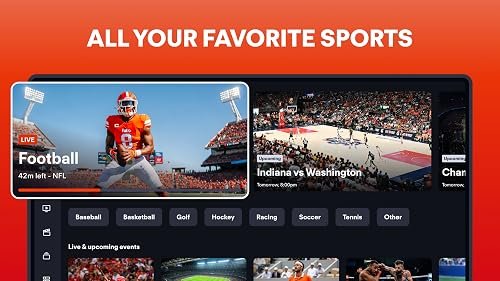
| Live channels | 350+ live channels of sports, shows, movies and news |
| Local broadcast channels | Included, with regional restrictions applied |
| Cloud DVR | Cloud DVR recording is included with the plan, with a larger allowance offered as a paid upgrade |
| Lookback | 72-hour lookback replays for previously aired events |
| On demand | Over 10,000 hours of on-demand shows and movies |
| 4K | Select events and entertainment available in 4K Ultra HD |
| Premium channels | Available as paid add-ons |
| Remote and controllers | Works with the Fire TV Voice Remote and game controllers |
| Languages | English and Spanish |
Fubo also states that recordings start on one device and finish on another, so a recording begun on a phone resumes on the Fire TV.
Troubleshoot FuboTV Problems on Amazon Fire
Fubo buffers, freezes or shows "Unable to Connect"
The Fire TV has lost a usable connection to the router, or the band it picked is too weak for a live stream.
- Select Network Diagnostics from the error message and follow the on-screen recommendations.
- Unplug the Fire TV from power, wait 10 seconds, then plug it back in.
- Go to Settings > Network, turn Wi-Fi off, then back on.
- Unplug the modem and router, wait one minute, plug in the modem first and wait about a minute, then plug in the router and wait about a minute.
- Move the Fire TV and the router closer together if the signal is weak.
- Set the router to use the same network name for its 2.4 GHz, 5 GHz and 6 GHz bands so the Fire TV picks the strongest one.
The Fubo app crashes, will not open or will not load
Stale app data or an outdated Fire TV system build.
- Restart the Fire TV from Settings, or unplug the power adapter for one minute and plug it back in.
- Go to Settings > Applications > Manage Installed Applications, select Fubo, then select Clear Cache and Clear Data.
- If it still fails, select Fubo in the same list and select Uninstall, then reinstall it from the Appstore.
- Go to Settings > My Fire TV or Devices & Software, select About, then select Check for System Update.
You cannot sign in to Fubo on the Fire TV
The app is holding an old session, or the account credentials are wrong.
- Clear the app's stored session: Settings > Applications > Manage Installed Applications > Fubo > Clear Cache, then Clear Data.
- Confirm the email address and password work by signing in at fubo.tv in a browser on a phone or computer.
- Reset the password in that browser if the sign-in fails there too.
- Reopen Fubo on the Fire TV and enter the working credentials.
- If the app still refuses, uninstall and reinstall it so the device gets the current version.
Local channels are missing or the wrong market shows
Fubo uses the device's approximate location for app functionality, and local channels carry regional restrictions and blackouts.
- Confirm the Fire TV is on the home network rather than a hotspot or a VPN-routed connection.
- Restart the Fire TV so the app requests location again.
- Clear the app cache and data, then sign in again.
- Check the channel line-up for your postcode in your Fubo account at fubo.tv.
- Contact Fubo support at [email protected] if the market is still wrong.
Casting or screen mirroring to the Fire TV fails
The two devices are on different networks, or one of them does not support the feature.
- Connect the mobile device and the Fire TV to the same Wi-Fi network.
- Restart both the Fire TV and the mobile device.
- Restart the modem and router, plugging the modem in first.
- Clear the app's cache on both the Fire TV and the mobile device.
- Update the software on both the Fire TV and the mobile device.
- For mirroring, confirm Settings > Display & Sounds > Enable Display Mirroring exists on that Fire TV. If it is absent, the device cannot mirror.
Frequently Asked Questions
How do I get Fubo on my TV?
Search for Fubo under Find on the Fire TV main menu, select the app, then select Get or the Shopping Cart icon. The app is free to download; the channels need a Fubo subscription, which you set up at fubo.tv.
How do I download FuboTV on a Fire TV Stick?
Press Find on the main menu or the Alexa Voice button on the remote, search for Fubo, then select Get. Amazon lists the download at 14.3MB to 17.8MB and an approximate download time of under three minutes.
Do I need a FuboTV subscription before using it on Fire TV?
Yes. The Amazon Appstore listing shows the app as free to download and states that sign-up includes a free trial, so the account and plan are created separately at fubo.tv before the app plays anything.
How do I subscribe to FuboTV?
Create the account at fubo.tv in a browser on a phone or computer and choose a plan there. The listing states that premium channels are available as add-ons and that a larger Cloud DVR allowance is a paid upgrade.
How do I log in to FuboTV on Fire TV?
Open Fubo from the Fire TV main menu and follow the on-screen sign-in prompt with the email address and password from your Fubo account. If it fails, confirm the same credentials work at fubo.tv in a browser.
How do I watch Fubo on 2 TVs?
Install the app on each Fire TV device and sign in with the same Fubo account on both. How many streams run at once depends on the plan, so check the plan details in your account at fubo.tv.
Does FuboTV have local channels?
Yes. The Appstore listing states that local broadcast channels are included, with regional restrictions applied. Fubo also lists regional sports networks such as YES Network, NESN, MASN and Marquee Sports Network, subject to local availability and blackouts.
Does FuboTV have NBC?
The Amazon Appstore listing names ABC, CBS and FOX among its broadcast channels and does not list NBC. Line-ups vary by market, so check the channel list for your area in your Fubo account before subscribing.
What is wrong with FuboTV today?
Amazon does not publish a Fubo status page. Rule out your own connection first with Settings > Network and Network Diagnostics on the Fire TV, then contact Fubo at [email protected] if other apps stream normally.
Can I watch FuboTV on my computer?
Yes. Fubo states that you can watch live TV from all your devices, and that a recording started on one device can be finished on another. The Appstore build covered here is only for Fire TV.
How does FuboTV offer live sports and news?
Fubo carries live sports and news channels inside the same subscription, including ESPN, FS1, NFL Network, NBA TV, MLB Network, NHL Network, SEC Network and Big Ten Network, plus 72-hour lookback replays for events that already aired.
Can I cast or mirror FuboTV to Fire TV if the app is unavailable?
Casting works for compatible apps on Fire TV devices running Fire OS 7 or higher. Screen mirroring needs a Miracast device, so iPhone, iPad and Mac cannot mirror to a Fire TV streaming device; a Fire TV Smart TV can use AirPlay instead.
Bottom Line
Install the Fubo app from the Amazon Appstore on the Fire TV itself and sign in there, rather than casting or mirroring from a phone. The installed app plays at the device's own video quality and works with the Fire TV Voice Remote, while mirroring depends on Miracast, caps out at 30 ft (10 m) and disables Alexa on the Fire TV while it runs.