To claim Robux from Microsoft Rewards, redeem your points for the Roblox Digital Card at rewards.bing.com, copy the code from Order history, and enter it at roblox.com/redeem.
This guide covers the points you need, the Xbox gift card route, how to turn Roblox Credit into Robux, and fixes for missing rewards, cancelled orders and codes that fail.
The fastest way to claim Robux from Microsoft Rewards
Microsoft does not add Robux to your Roblox account directly. It gives you a Roblox gift card code, and you redeem that code on Roblox's website.
- Sign in at rewards.bing.com with your Microsoft account and select Redeem.
- Under Gift cards, select View all and choose Roblox Digital Card.
- Redeem the reward and complete the phone verification if Microsoft asks for it.
- Go to Redeem > Order history, find the Roblox order and select Order Details at the far right to see the code.
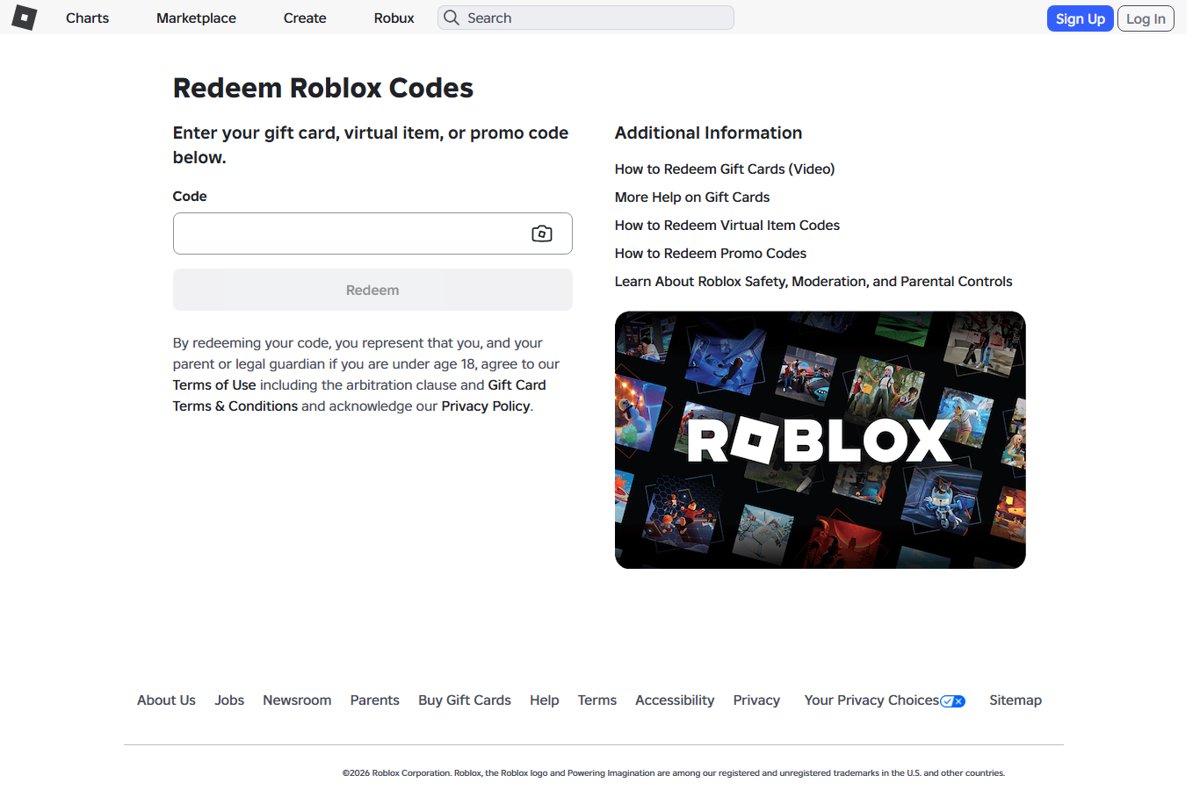
- Open roblox.com/redeem in a web browser and log in to your Roblox account.
- Enter the code in the text box and click Redeem.
- Click Get Robux to turn the added Roblox Credit into Robux, then click Buy to confirm.
The last step matters. A Roblox gift card usually lands as Roblox Credit, and the Robux only appear after you convert that credit.
What You Need Before You Start
Most failed Robux claims trace back to one of these requirements. Check them before you spend any points.
| Requirement | Why it matters | Where to check |
|---|---|---|
| A Microsoft account enrolled in Microsoft Rewards | Rewards is free and built into the Microsoft account; former Bing Rewards members moved over automatically | rewards.bing.com |
| Enough points for the Roblox listing | Rewards appear as redeemable once your balance covers them | Your balance on the Rewards dashboard |
| Rewards available in your country or region | Offers and redemption catalogs vary by region, so the Roblox card is not listed everywhere | Microsoft's Rewards regions page and your own Redeem page |
| A mobile or landline phone number | Microsoft may send a verification code when you redeem; VoIP numbers are not allowed | The verification prompt during redemption |
| No VPN or proxy, and no travel abroad | Points must be redeemed in the region you signed up in | Your network settings and current location |
| A Roblox account you can log in to | The code adds value to whichever Roblox account is logged in | roblox.com |
| A web browser | Roblox redemption does not work in the standard mobile app or on consoles; only Samsung Galaxy users can redeem inside the app | Any browser on a PC, Mac, phone or tablet |
| Parent or guardian consent if you are young | Under-13s need consent for the Microsoft account, and Roblox asks under-18s to have a parent or guardian agree to its gift card terms | Microsoft account setup and the note on roblox.com/redeem |
How Microsoft Rewards Works With Robux
Two companies handle different halves of the claim. Knowing which one owns each step tells you who to contact when something breaks.
| Stage | What happens | Handled by |
|---|---|---|
| Earning | You collect points from Bing searches, daily activities, Xbox and qualifying Microsoft Store purchases | Microsoft Rewards |
| Redeeming | You spend points on the Roblox Digital Card listed on the Redeem page | Microsoft Rewards |
| Delivery | The code or link appears under Order details in Order history, and a confirmation goes to your primary email | Microsoft Rewards |
| Code entry | You enter the code at roblox.com/redeem and the value is added to your Roblox account | Roblox |
| Credit to Robux | Gift card value is stored as Roblox Credit until you use Get Robux or Convert Credit to Robux | Roblox |
| Bonus item | Every Roblox gift card includes a free virtual item, limited to one unique item per month | Roblox |
Microsoft Rewards points have no cash value. Microsoft's own rule of thumb is about 5,000 points for something worth $5.
Step 1: Earn Enough Microsoft Rewards Points
Points come from everyday Microsoft activity while you are signed in. The Bing Rewards dashboard guide walks through every tile on the dashboard if you are new to it.
- Sign in to rewards.bing.com and open the Dashboard to see your current balance.
- Search with Bing while signed in; each search earns 3 points up to your level's daily limit.
- Complete the daily set, quizzes and other offers on the Earn page, which refresh daily.
- Search from Bing on your phone too, through the Bing app, the Microsoft Edge app or Bing set as the default search engine.
- Open the Rewards hub on Xbox, if you have one, and complete the quests listed there.
- Claim your monthly level and default search bonuses in the first days of the month, before they expire.
Points expire if your account has no earning activity for 12 months, so keep earning while you save.
Step 2: Find the Roblox Reward in Microsoft Rewards
The Roblox card sits in the gift card section of the catalog. It works the same on a computer, phone or tablet browser.
- Go to rewards.bing.com and sign in with the Microsoft account that holds your points.
- Select Redeem at the top of the page.
- Scroll to Gift cards and select View all.
- Look for Roblox Digital Card. The US catalog also lists Roblox exclusive avatar items, which are not Robux.
- Select Set a Rewards goal and choose the Roblox card if you do not have enough points yet, so the dashboard tracks your progress.
If Roblox does not appear, Microsoft says some gift cards are not always available and support staff cannot say when a card will be restocked. Check again later, and confirm your account is set to the country you actually live in.
Step 3: Redeem Microsoft Rewards Points for a Roblox Code
Stay on the same network and device you normally use. A VPN or a trip abroad can get the order cancelled after the points leave your balance.
- Open the Roblox Digital Card listing from the Redeem page.
- Select the redeem option and confirm the order.
- Enter a mobile or landline number when Microsoft asks for verification, then type the code it sends.
- Wait for the order confirmation, which also goes to the primary email on your Microsoft account.
- Go to Redeem > Order history and find the Roblox order.
- Check the Status column, then select Order Details at the far right to reveal your redemption code or link.
- Copy the code exactly, or select Resend to get the confirmation email again.
Too many wrong verification codes lock you out for 48 hours. One phone number can be used on a maximum of six Rewards accounts.
Step 4: Redeem the Roblox Gift Card Code
Roblox redemption happens in a web browser, not in the Roblox app on iPhone, standard Android or consoles.
- Open roblox.com/redeem in Chrome, Edge, Safari or any other browser.
- Log in to the Roblox account that should get the Robux.
- Paste or type the code into the Code box and click Redeem.
- Wait for the confirmation message that says the credit or item was added.
- Click Get Robux. Roblox pre-selects the largest Robux package your credit can buy.
- Click Buy, then click Buy again if Roblox offers to spend your remaining credit, or Cancel to keep it.
- Use Convert Credit to Robux on the same page to turn a leftover balance too small for a package into Robux.
On a Samsung Galaxy phone, you can instead open the Roblox app, go to More, tap the Redeem tile and enter the code there.
To choose a different package than the one Roblox pre-selects, open roblox.com/upgrades/robux after redeeming. Credit cannot be combined with another payment method for one purchase.
Alternative Method: Use a Microsoft or Xbox Gift Card for Robux
If your catalog has no Roblox card, an Xbox or Microsoft gift card is the fallback. Rewards deposits these straight into your Microsoft account balance as promotional balance, which can expire under the promotion's terms.
- On rewards.bing.com, redeem your points for a Microsoft or Xbox gift card if one is listed in your region.
- Check that the value was deposited into your Microsoft account balance.
- On an Xbox, open the Roblox app from the home menu and log in to your Roblox account.
- Go to the Robux menu and choose a Robux package.
- Complete the in-app purchase with the Microsoft account that holds the balance.
- Check My Balance in the lower left of the Robux menu for the new total.
This route has two limits. Roblox gives up to 25% more Robux when you buy on the web, on computers or with gift cards, so an Xbox in-app purchase can buy fewer Robux for the same money, and promotional balance can expire before you spend it.
Roblox card or Xbox gift card: which route to use
| Your situation | Use this | Why |
|---|---|---|
| Roblox Digital Card is listed on your Redeem page | Roblox card, redeemed at roblox.com/redeem | Gift card purchases get up to 25% more Robux, plus a free virtual item |
| No Roblox card in your region's catalog, and you play on Xbox | Xbox or Microsoft gift card, then buy Robux in the Roblox Xbox app | Roblox's Xbox app accepts in-app purchases paid from your Microsoft account |
| You want an avatar item, not Robux | A Roblox exclusive item listing, if your catalog has one | It unlocks one item and adds no Robux |
| Roblox card shows as out of stock | Set it as your Rewards goal and wait | Microsoft cannot say when cards return, and points keep while you earn |
| You are travelling or on a VPN | Wait until you are home and off the VPN | Redemptions outside your sign-up region get cancelled |
How Many Points Do You Need for Robux?
The Roblox price in points is set by Microsoft per region and changes over time. These are the figures Microsoft's US Redeem page showed in September 2026.
| Listing on rewards.bing.com (US) | Points shown | What you get |
|---|---|---|
| Roblox Digital Card | 13,400 | A Roblox gift card code, redeemed as Roblox Credit and converted to Robux |
| Roblox exclusive item: Plasma Wings | 10,000 | One avatar item, not Robux |
| Silver member redemption coupon | 100 off | A points discount on a redemption |
| Gold member redemption coupon | 200 off | A points discount on a redemption |
Microsoft's page did not state the card's dollar value next to the points, so check the listing itself before redeeming. The number of Robux you end up with depends on the Robux package your credit buys on Roblox's pricing page.
Best Way to Save Points for Robux Faster
Faster saving comes from collecting every point you already qualify for, not from searching more. Microsoft does not credit searches made by bots, macros or other automated means.
- Do the daily set first each day; a completed set shows a green checkmark.
- Use Bing for real searches you would do anyway, on both PC and mobile, until the daily counter is full.
- Check the Rewards dashboard weekly and the Earn page for new offers.
- Reach 500 points a month to move to Silver, or 750 points plus two level-up activities to reach Gold, which raises your daily search limit and monthly bonuses.
- Claim the monthly level and default search bonuses before they lapse, about 30 days after they appear.
- Save before you redeem: skip small rewards until your balance covers the Roblox card.
Streaks reset if you use a VPN or a device in a different time zone. Keep earning on your usual devices.
How to check the Robux arrived
Check both halves of the claim: Microsoft's order and Roblox's balance.
- On rewards.bing.com, open Redeem > Order history and confirm the Roblox order shows a completed status.
- On roblox.com in a browser, look at the Robux balance in the upper right corner.
- Click the Robux icon, then your Robux amount, to open My Transactions.
- Select Currency Purchases in the filter to see the Robux bought with your credit.
- Open roblox.com/redeem and look under the Redeem button: any Available Credit there has not been converted to Robux yet.
- Open the gift card page and click the virtual item's name; if it says you own it, the card was redeemed on this account.
Common Problems and How to Fix Them
The Roblox reward is missing from the Redeem page
Microsoft's catalog varies by region, and some gift cards are not always available.
- Open Redeem > Gift cards > View all rather than relying on the featured row.
- Confirm Microsoft Rewards runs in your country on Microsoft's Rewards regions page.
- Turn off any VPN and reload the page from your home country.
- Check back later; Microsoft support cannot give restock dates.
Microsoft says the reward is out of stock, or the order was cancelled
Orders are cancelled for stock problems, a VPN, a VoIP number, or redeeming outside or across regions.
- Open Order history and read the order's Status.
- Disconnect from any VPN or proxy.
- Use a mobile or landline number, not a VoIP number, for verification.
- Redeem only in the region where you signed up.
- Use the Microsoft Rewards Support Contact us form if the points did not return.
You redeemed points but did not receive a code
The code is shown in Order history; the email is only a copy.
- Go to Redeem > Order history and find the Roblox order.
- Select Order Details at the far right to see the code or link.
- Select Resend to get the confirmation email again.
- Check the primary email on your Microsoft account, including junk mail.
- Contact Microsoft Rewards Support if the order shows no details; Roblox does not issue or reissue codes from promotions run elsewhere.
Roblox says the code is invalid
A lookalike character was typed wrong.
- Copy the code from Order Details instead of typing it.
- If you typed it, swap lookalikes: 0 and O, 1 and I, 2 and Z, 5 and S, 6 and G or Q, 8 and B.
- Enter one code at a time at roblox.com/redeem.
- Contact Microsoft Rewards Support if it still fails, since Microsoft handles non-Microsoft gift cards from Rewards.
The code was redeemed on the wrong Roblox account
The browser was logged in to a different Roblox account.
- Log in to each Roblox account you use and check its Robux, credit and gift card item.
- Spend or leave the value on the account that received it; credit is not transferable.
- Contact Roblox support at roblox.com/support with your username, the code, the date and a screenshot of any error.
Your Robux did not show up after redeeming
The card added Roblox Credit, which stays credit until you buy Robux with it.
- Open roblox.com/redeem in a browser and look for Available Credit under Redeem.
- Click Get Robux and then Buy.
- Click Convert Credit to Robux for a leftover amount.
- Refresh the page to see the updated Robux balance.
Microsoft will not let you redeem points at all
Verification failed, the phone number is used on too many accounts, or you are outside your home region.
- Check the verification code matches the one sent to your phone.
- Wait 48 hours after too many failed verification attempts.
- Use a different phone number if yours is already on six Rewards accounts.
- Wait until you are back in your home country if you see a travelling message.
Safety Tips: Avoid Robux Scams
Roblox states plainly that any offer of free Robux is a scam, and that Robux generators do not exist. The only Microsoft-to-Roblox route is a code shown in your own Rewards Order history.
Redeem Roblox codes only from your own Microsoft Rewards Order history, enter them only at roblox.com/redeem, and ignore any site, video, game or person promising free Robux or a Microsoft Rewards Robux generator. Roblox says these offers aim to steal your password or account, and Roblox employees never ask for your password, browser cookies, 2-Step Verification codes or backup codes. Making false purchase claims to get free Robux breaks Roblox's rules and can get the account deleted. Report scam messages with Report Abuse, enter your password only on the official Roblox login page, and turn on 2-Step Verification. Official Roblox promotions appear on the Roblox blog, in your Messages notifications or in a banner on the site.
Microsoft also bans bots and macros for earning points. Tools that promise to farm points for you put the whole Rewards balance at risk.
Frequently Asked Questions
How do you claim Robux from Microsoft Rewards?
Redeem your points for the Roblox Digital Card on the Redeem page at rewards.bing.com. Open Order history, select Order Details to see the code, then enter it at roblox.com/redeem. Click Get Robux to convert the Roblox Credit into Robux.
How do I claim 100 Robux from Microsoft Rewards?
Claim it the same way as any Roblox reward: redeem the listing, copy the code from Order history, and enter it at roblox.com/redeem. The Roblox listings and prices depend on your region, so check Redeem > Gift cards > View all to see which Roblox options your account offers.
Can you get free Robux from Microsoft Rewards?
Microsoft Rewards is free to join, and the points come from searching and activities rather than money. Roblox itself says any other offer of free Robux, including generators and survey sites, is a scam. The Rewards code in your own Order history is the only legitimate route.
How does Microsoft give you Robux?
Microsoft does not add Robux directly. It gives you a Roblox gift card code in exchange for Rewards points. Roblox adds that value to your account as Roblox Credit when you redeem it, and you convert the credit into Robux.
Can I redeem Microsoft Rewards points directly into Robux?
No. Points buy a Roblox gift card code, not Robux. You redeem the code at roblox.com/redeem, which adds Roblox Credit, and then use Get Robux or Convert Credit to Robux on the same page.
Why did my Roblox gift card add credit instead of Robux?
Roblox stores gift card value as Roblox Credit. Open roblox.com/redeem in a browser, click Get Robux and then Buy. Only Amazon and Party Pack gift cards add Robux directly without credit.
How do you claim Robux on PC?
Open roblox.com/redeem in any browser on your PC, log in, enter the code and click Redeem. Then click Get Robux and Buy. Your balance appears in the upper right corner of roblox.com.
Can I redeem the Roblox code in the Roblox app?
Only on Samsung Galaxy phones, through More > Redeem in the Roblox app. On iPhone, other Android phones and consoles, open roblox.com/redeem in a web browser instead. Roblox Credit can also only be used in a browser.
Why can't I get Robux from Microsoft?
The Roblox card may not be offered or in stock in your region, or the redemption was blocked. Microsoft cancels or refuses redemptions made through a VPN, with a VoIP number, while travelling, or across regions. Check Order history for the status.
How do I buy Robux with Microsoft or from the Microsoft Store?
Redeem a Microsoft or Xbox gift card through Rewards, which goes into your Microsoft account balance. Then buy Robux as an in-app purchase in the Roblox Xbox app. A Roblox gift card gives up to 25% more Robux than most in-app purchases.
Is Microsoft Rewards safe for Roblox?
Yes, when you use the official sites. Redeem at rewards.bing.com, copy the code from your own Order history, and enter it only at roblox.com/redeem. Never give your Roblox password to anyone offering to redeem it for you.
Do Roblox gift card codes from Microsoft Rewards expire?
Roblox's US gift card terms say cards do not expire. Your Microsoft Rewards points do expire after 12 months without earning activity, and Microsoft or Xbox promotional balance can expire under its promotion terms.