Google is working to make Progressive Web Apps installation gets registered on Windows to ensure you can uninstall them like traditional or native Apps from Settings App, Start Menu, and Control Panel. The Chromium team is testing this PWAs integration on Windows feature in Chrome 96 Canary.

Chrome Progressive Web Apps
Chrome and Microsoft Edge support Progressive Web Apps.
To install a PWA, you need to visit its website in the address bar and click on the install icon.
The installed apps can be uninstalled or removed by visiting the edge://apps or chrome://apps page.
It’s not surprising that Web apps added to Edge, get registered for uninstallation in Windows and can be removed like any other app.
When you try to add a PWA to Microsoft Edge, the dialog confirms ” The site can be installed as an application. It will open in its own Window and
safely integrate with Windows features“.
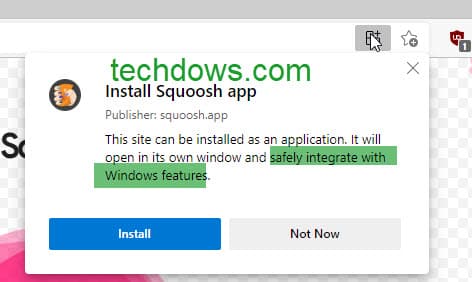
This is different with Chrome Web Apps as they don’t integrate into Windows as Edge PWAs do. The Chrome team is now working on making that possible.
The chromium team has now come up with a new flag to ensure apps installed in Chrome register as uninstallable on Windows.
Make Chrome PWAs uninstallable on Windows 11&10
- Launch Chrome
- Visit chrome://flags
- Search for “uninstallable“, in the dropdown menu for “Enable PWAs to register as an uninstallable app in Windows on the installation“, select Enabled and restart the browser.

Next time, when you add an app to Chrome, it will appear in Control Panel, Settings app, and on the right-click menu on App in start Menu for easy uninstall.
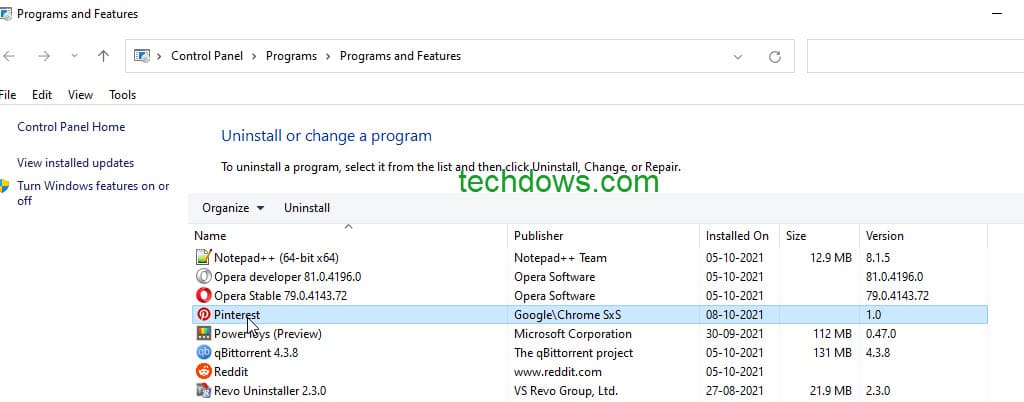
When you right-click on App on Start Menu, you’ll be taken to Control Panel Programs and Features applet for the uninstall.
We’ve tested this feature by installing the Pinterest app in Chrome Canary in Windows 11 and it worked like a charm.
Note: A year back, we reported, Google is making it easier to uninstall Chrome PWAs from Windows, this was applicable from Chrome 89 onwards. To our surprise, that is no longer working as of writing.
More on Chrome:
Chrome gets Windows 11 design improvements for Menus
Chrome on Android can now always open desktop Sites by default
Chrome Manifest V2 extensions will stop working in 2023
Chrome to warn when you download files in Incognito
