Google is working to bring sharing options available in the several context menus in Chrome browser into a single common Submenu, called Share.
Chrome maker tracks user data about utilization of browser features and UI options, the company doesn’t hesitate to remove them if they find their usage is less.
As of now, in Chrome, there are various sharing options scattered across menus, Google is aiming to remove duplicate menu items and one consistent menu for sharing needs.
Chrome recently introduced a sharing hub for a desktop version that makes sending content to various apps simple. Currently, the share option in the address bar allows you to
- copy the current page link
- capture and save the screenshot to the device
- Share the page by scanning QR code with mobile
- and send the page to various devices when you’re signed in with Chrome with the same Google account.
- cast tab, videos, and media from your computer on the TV
While these are options available to reach with a click in the address bar, some also are available in the context menu (some not present) for user convenience such as Cast, send to devices and create QR code. Google is now uniting them into one Share submenu in the context menu.
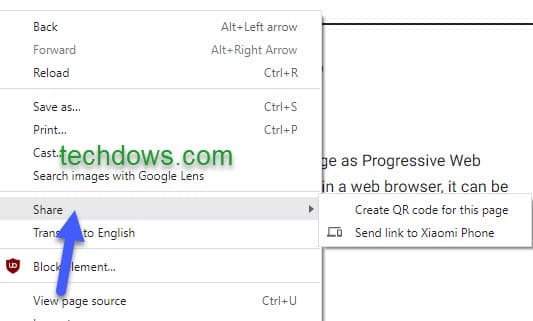
Soon, you can expect the new submenu in the context menu to display all sharing options for access when you right-click on the page or link or tab.
Enable Share submenu in the Context menu in Chrome
1. Launch Chrome 96 Canary
2. Visit chrome://flags
3. Search for “share”, in the dropdown for Share Context menu, select “Enabled” and restar the browser.

More on Chrome:
Chrome Tab Groups on Android getting significant changes after User feedback
Chrome Incognito mode gets a new design on desktop




