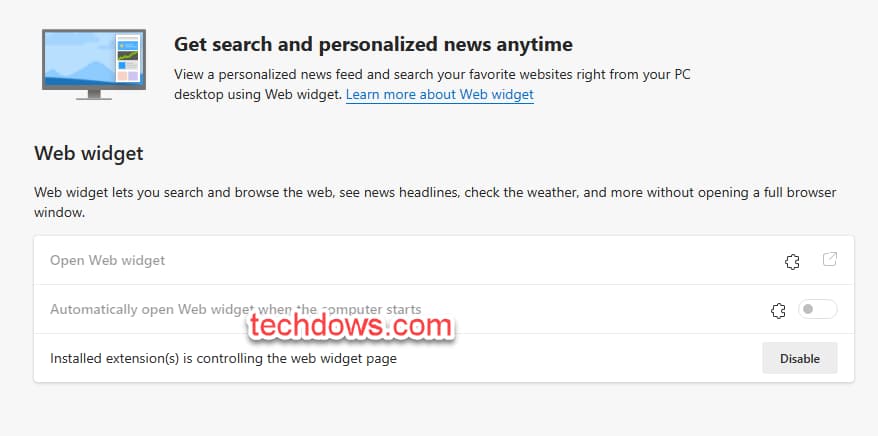
Microsoft’s Web Widget gives quick access to information such as news headlines including Weather, Stock, Traffic, and Sports without the need to fully open the Edge browser. Recent Updates to Edge grayed out its Settings page. The page shows this message at the bottom: “installed extension(s) is controlling the web widget page” and asks to disable the extension causing the issue.
What is Microsoft Edge Web Widget?
- Edge Web Widget provides access to search and personalized feed containing the latest information on news, sports, and Stocks
- You can control information cards appearing in Widget by visiting Experience Settings.
- In Edge Canary and Dev builds, you can configure its settings by going to edge://settings/webWidget. The section allows to open Web Widget and set it to launch automatically when the computer starts.
- You can change the layout between Vertical and Search only.
Installing extension(s) is controlling the web widget page issue in Edge
If you try to open Web Widget in Canary or Dev versions of Edge,
- it simply doesn’t open
- Or, you may notice options grayed out as shown in the above screenshot
- The page hints one of the installed extensions is controlling Web Widget and displays disable button to take action.
If you’ve many extensions installed, it is difficult to figure out which extension is causing this.
Key takeaways:
- We found the problem was due to Adblocker,
- Disabling the extension on edge://extensions restores options and reopens the Web Widget when you click on the respective setting.
- Techdows learned issue caused by Ad blockers installed from Chrome Web Store such as UBlock Origin and Adblock Plus.
- Installing the same extensions in Edge from Edge add-ons Store doesn’t cause this according to our testing.
There you’ve it. If Web Widget is unnecessary, then you may don’t find this as a problem.
But if you want Edge Web Widget to work,
- Click on the ellipsis icon and select Extensions
- Turn off the adblocking extension you’ve installed from Chrome Web Store. These are listed at the bottom under “From other sources” on edge://extensions page
- Visit Edge Add-ons Store, search and install the same or other adblocker.
We observed the workaround works in affected Dev and Canary versions.
It’s worth noting UBO already whitelists internal pages of Chrome, Edge, Opera, and other browsers. It’s unsure what caused Edge to trigger this warning.
Edge Web Widget, necessary or unnecessary? Let us know in the comments below.
More on Microsoft Edge:
Microsoft tests Super Duper Secure Mode in Edge, here are its details
Edge 94 allows to Immediately Put Inactive Tabs to Sleep
Microsoft Edge 92 stable for Android with Unified Codebase now available
Microsoft Edge appears in Store on Windows 11





