To reset a Roblox password without email, select Forgot Password or Username? on the login page, open the Phone tab and reset it with the phone number on the account; if the account has neither an email nor a phone number, only Roblox Customer Support can reset it.
This guide covers the phone reset, getting back into the email account, Quick Login from a device that is still signed in, what Support needs to verify ownership, the parent account question, and how to avoid a lockout next time.
The fastest way to reset your Roblox password without email
This works when a phone number is verified on the account. Roblox sends the code by SMS or WhatsApp.
- Go to the Roblox login page and select Forgot Password or Username?.
- Click the Phone tab.
- Select your country code.
- Enter your phone number in the Phone Number box and press Continue.
- Select Verify and complete the check Roblox shows. This sends a 6-digit code to your phone.
- Enter the 6-digit code you receive and press Verify.
- On the Reset Password page, pick the account if the number is linked to several, enter and confirm a new password, and press Submit.
Which Roblox recovery route can you use?
| Your situation | Use this | Why |
|---|---|---|
| A phone number is verified on the account | Forgot Password, Phone tab | Resets the password with a 6-digit code |
| The email exists but you cannot sign in to it | Recover the email account first | Then use the normal email reset |
| You know the email and can open it | Forgot Password with the email | Roblox sends a Reset Password link |
| Roblox is still signed in on a phone, tablet or PC | Quick Login, or add a phone number there | A signed-in device can approve a new login |
| No email, no phone, no signed-in device | Roblox Customer Support | Support must verify ownership before any reset |
| The account belongs to a child | The parent contacts Support | A linked parent account controls settings, not password resets |
Understanding Roblox security and account recovery
Roblox's self-service reset only works through a contact method already on the account. Roblox says every player must verify ownership of an account before it can be reset or any information changed.
| What is on the account | Self-service reset possible? | What happens |
|---|---|---|
| Verified email you can open | Yes | Reset Password email arrives at that address |
| Verified phone number | Yes | 6-digit code by SMS or WhatsApp, then Reset Password page |
| Passkey on a device | You can still log in | Log in with Face ID, Touch ID or a screen lock, then change the password |
| Device that is still logged in | Yes, indirectly | Use Quick Login or add a phone number from that device |
| None of the above | No | Contact Customer Support with ownership details |
Step 1: Try to recover access to your registered email
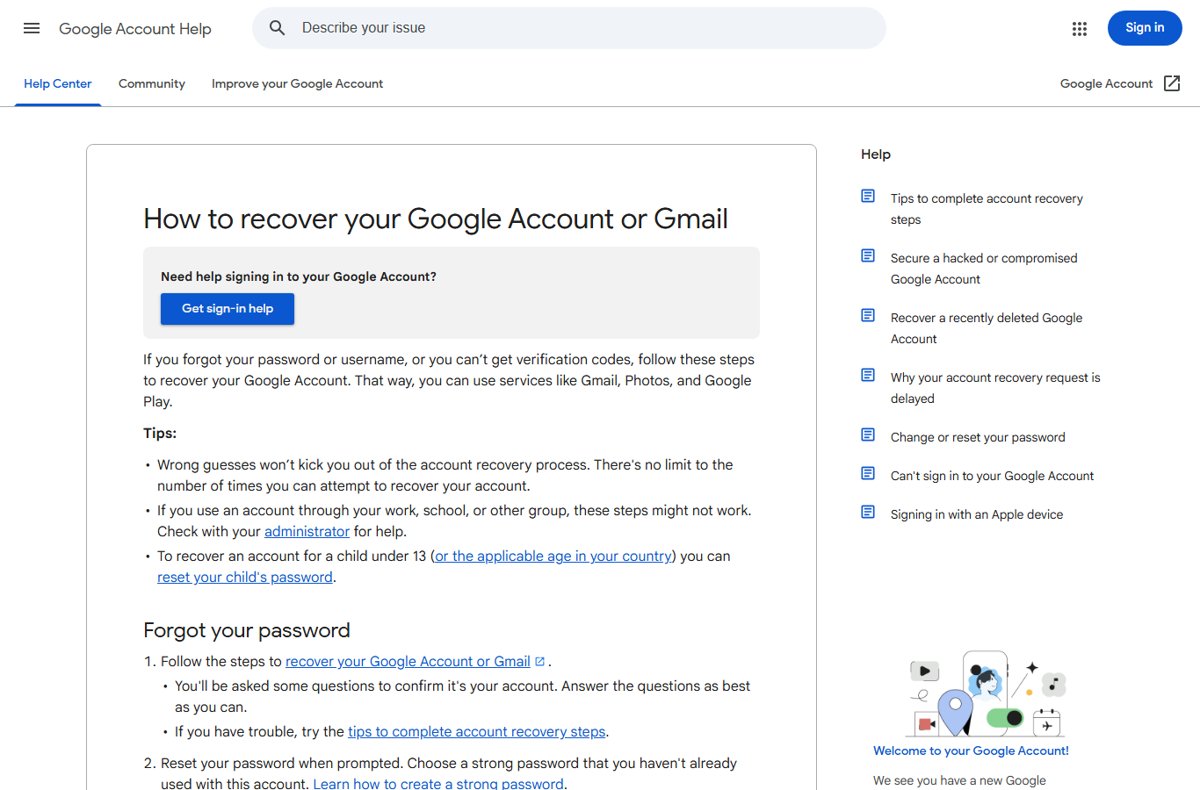
If the account has an email you can no longer open, getting that inbox back is often quicker than going through Support. Each email provider runs its own recovery process, and for a Gmail address you can recover the Google account without your old phone.
- Search old devices, password managers and other apps for the email address you used for Roblox.
- Open your email provider's account recovery page; for Gmail, go to accounts.google.com/signin/recovery.
- Answer the provider's verification questions as fully as you can.
- Set a new password for the email account when prompted.
- Return to Roblox and use the email reset in Step 2.
Step 2: Use the Roblox "Forgot Password" feature with a known email
Once you can open the inbox again, the standard reset takes a minute. The email goes to the address currently associated with the account.
- Select Forgot Password or Username? on the Roblox login page.
- Enter your email address and press Submit.
- Open the email from Roblox and press Reset Password.
- If several accounts share the email, select the one you want to reset.
- Enter and confirm your new password, then press Submit.
Step 3: Contact Roblox support directly
If you never added an email or phone number, the Forgot Password feature cannot reset your password. Roblox tells you to contact Customer Support and describe the login issue in detail.
- Open www.roblox.com/support in a browser.
- Enter a contact email you can open, and your Roblox username.
- Choose the category for account access or login problems.
- Describe the problem in detail: when you last logged in, the devices you used, and that the account has no email or phone.
- Add ownership details such as the first email added to the account or the billing email used for the first purchase.
- Submit the form and watch your contact email for Support's reply.
Providing ownership information does not guarantee recovery; Support reviews each request before changing anything.
Step 4: Verify ownership via other account associations
A device that is still logged in is the strongest proof you have. Use it before it signs out.
- On the new device, open the Roblox login page and click Log In with Another Device; a one-time code appears for 5 minutes.
- On the device that is still logged in, open Account Settings and select Quick Login.
- Enter the one-time code and click Enter.
- Review the details and select Grant Full Account Access.
- While signed in, open Settings > Account Info, select Add Phone, and verify the code so future resets work by phone.
Only enter Quick Login codes that you requested yourself. Never enter a code someone else sends you.
Quick Login works only when the two devices are near each other, is not available on Xbox, and may not be offered to every player yet. If the QR code option fails, update the Roblox app and type the six-character code instead.
Step 5: Use the parent/guardian account (for minors)
A linked parent account manages a child's privacy settings, screen time and spending limits. Roblox's help pages do not list a password reset among those controls.
| Situation | What the parent can do |
|---|---|
| Child's account has the parent's email or phone | Use Forgot Password with that email or the Phone tab |
| Child is still logged in on a family device | Approve a new device with Quick Login, or add a phone number |
| No email, phone or logged-in device | Contact Roblox Support with the child's username and the first email or first billing email |
| Parent account is linked | Manage privacy, screen time and spending; not a password reset |
How to check the Roblox password reset worked
- Log out of Roblox on the device you used.
- Log in with your username and the new password.
- Open Settings > Account Info and confirm an email or phone number is listed.
- Check the email or phone for Roblox's verification code and complete it if the entry shows as unverified.
Fix Roblox password reset problems
Can't reset Roblox password without email or phone
The account has no contact method, so the Forgot Password feature cannot verify you.
- Check every device for a Roblox session that is still logged in, and use Quick Login from it.
- If none is logged in, contact Support at www.roblox.com/support with the first email or first billing email.
The phone code never arrives
Phone verification is only available in some countries, or the wrong country code was selected.
- Go back and confirm the country code.
- Check WhatsApp as well as SMS, since Roblox can send the code through either.
- Request a new code.
The reset email goes to an address you no longer control
The email on the account is old, or someone changed it.
- Recover the email account through its provider.
- If the account may have been hacked, contact Support with the first email address added to the account.
You can't change the email because you forgot the password
Roblox asks for the current password before it updates the email.
- Reset the password by phone or Quick Login first.
- Then open Settings > Account Info > Update Email.
Step 6: Prevent future Roblox account access issues
Add more than one way back in while you are signed in. Each takes a couple of minutes, and if you lack a long-term address you can create a free Outlook email account for it.
- Open Settings (the gear icon on the web, or More in the mobile app) and select Account Info.
- Add and verify an email address you will keep long term.
- Select Add Phone, enter your number and type the one-time code.
- Under Login Methods, select Add Passkey and unlock your device to save it.
- Open Settings > Security and turn on 2-Step Verification.
Roblox account recovery: additional tips and precautions
Use only Roblox's own login page and www.roblox.com/support, and never give anyone your password, a Quick Login code or a reset code. Sites and players offering to unlock or recover accounts are a common way accounts get stolen. Roblox also advises scanning for malware and removing unknown browser extensions after any compromise, and contacting Support within 30 days if items or currency were lost.
Roblox password reset without email: frequently asked questions
Can you reset a Roblox password without email?
Yes, if a phone number is verified on the account. Select Forgot Password or Username?, open the Phone tab, and enter the 6-digit code Roblox sends. Without an email or phone, only Roblox Customer Support can reset it.
How do I reset my Roblox password without email or phone?
Use Quick Login from any device that is still signed in, then add a phone number. If no device is signed in, contact Roblox Support at www.roblox.com/support with the first email or first billing email linked to the account.
How do I reset my Roblox password?
Select Forgot Password or Username? on the Roblox login page, enter your email and press Submit, then press Reset Password in the email. Enter and confirm the new password and press Submit.
What does Roblox Support need to verify my account?
Roblox asks for details only the owner would know, such as the first email address added to the account or the billing email used for the first payment. Providing them does not guarantee recovery, but it helps Support's review.
Can a parent reset a child's Roblox password?
Roblox's parental controls cover privacy, screen time and spending, not password resets. A parent can use the email or phone on the child's account, Quick Login from a family device, or contact Roblox Support.
Can I log in to Roblox without a password?
Yes, with a passkey or Quick Login. A passkey lets you log in with Face ID, Touch ID or a screen lock, and Quick Login lets a signed-in device approve a one-time code shown on a new device.
Do I need my password to change my Roblox email?
Yes. Roblox asks for your current password when you select Update Email, and alerts the previous address. Reset the password by phone or Quick Login first if you have forgotten it.
Resetting a Roblox password without email: final word
Try the Phone tab first, then Quick Login from any signed-in device, and contact Roblox Support only when neither is available. Roblox resets passwords only through a contact method or device already tied to the account, so those routes finish in minutes while Support has to verify ownership manually.