To delete or close your Facebook account, open Settings and privacy > Settings > Accounts Center > Personal details > Account ownership and control > Deactivation or deletion, then pick Delete account or Deactivate account.
This guide covers the computer and app routes, what each choice removes, how to save your data first, how to cancel a deletion within 30 days, and extra profiles.
The fastest way to delete your Facebook account
Facebook calls this "deleting your profile", and closing an account means the same thing. Some accounts show Meta Account where others show Accounts Center, because Meta is moving people to the new name gradually.
- Click your profile picture in the top right of Facebook.
- Select Settings and privacy, then click Settings.
- Click Accounts Center (or Meta Account) in the top left.
- Click Personal details, then Account ownership and control.
- Click Deactivation or deletion.
- Choose your profile, select Delete account and click Continue.
- Follow the on-screen prompts to confirm.
The deletion starts right away but stays reversible for 30 days. Do not log in during that time unless you want to cancel it.
Deactivation vs. deletion
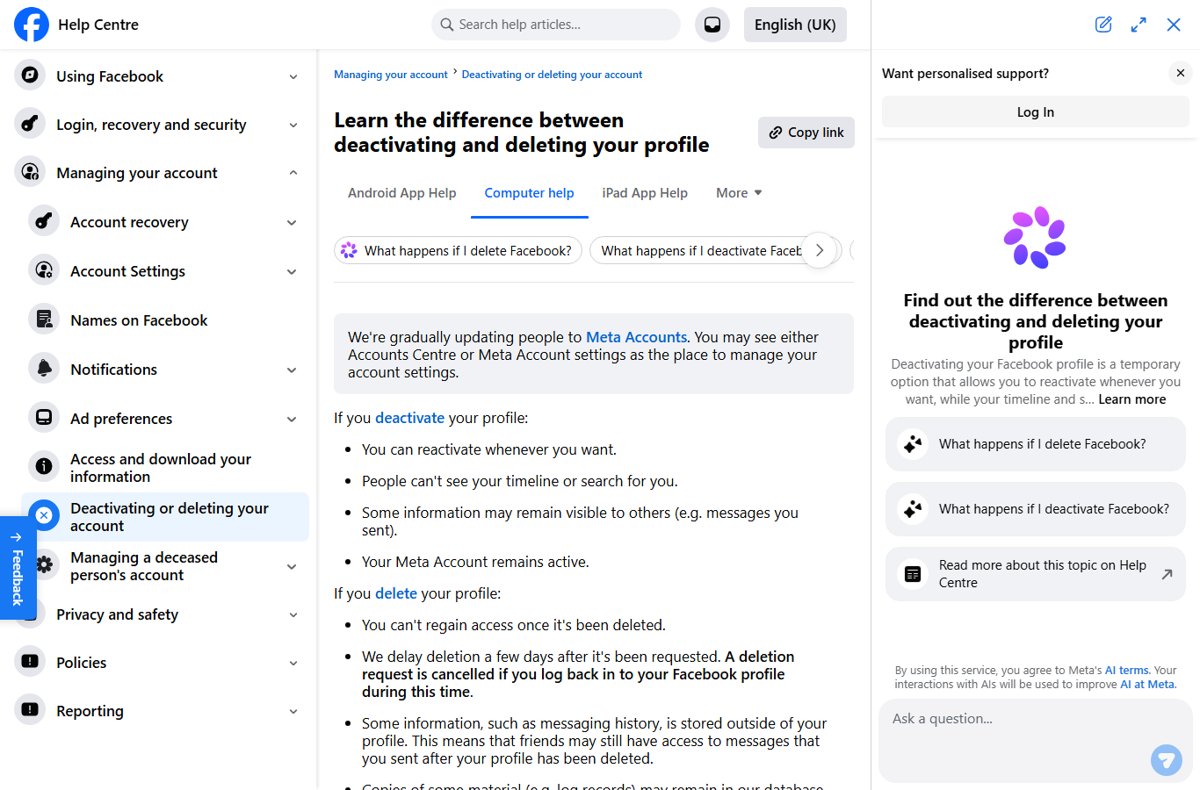
Both options sit on the same Deactivation or deletion screen. The difference is whether you can ever come back with your photos, posts and friends intact.
| Your situation | Choose this | Why |
|---|---|---|
| You want a break and may return | Deactivate account | Everything is kept, and logging back in restores the profile |
| You want to keep chatting on Messenger | Deactivate account | Messenger keeps working while Facebook is deactivated; deletion ends Messenger use |
| You want your posts, photos and videos gone for good | Delete account | Deletion removes everything you added, and it cannot be reactivated after the cancel window |
| You sign in to Meta Quest with Facebook | Deactivate, or move Quest off Facebook first | Deleting the profile also deletes Quest purchases, achievements and store credit |
| You use Log in with Facebook on Spotify, Pinterest or other apps | Deactivate, or change those logins first | After deletion, Facebook Login no longer works for those apps |
| You only want to remove a second profile | Delete or deactivate that additional profile | Your main profile and the rest of your Meta Account stay untouched |
Prepare before deleting Facebook
A deleted profile cannot be recovered, and you cannot export data from a profile that is already deactivated or scheduled for deletion. Do these first.
- Click your profile picture, then Settings and privacy > Settings > Accounts Center.
- Click Your information and permissions, then Export your information.
- Click Create export, pick your profile and select Export to device.
- Choose the information, date range, format (HTML to browse or JSON to move it to another service) and media quality, then click Start export.
- Download the file from Available downloads when the email arrives; it stays there for four days.
- Give another person full control of any Page you alone manage, or the Page is deleted with your profile.
- Switch apps that use Log in with Facebook to an email login, and check any Meta Quest headset linked to the profile.
High-quality video makes the export much larger, so check your free storage before you pick Export to device.
How to delete your Facebook account on a computer
Facebook's settings look different from account to account. Check what sits at the bottom of the Accounts Center or Meta Account page, then follow the matching path.
| What you see in Accounts Center | Click path after Settings and privacy > Settings | Final step |
|---|---|---|
| Accounts at the bottom | Meta Account > Personal details > Account ownership and control > Deactivation or deletion | Click the profile to delete, click Continue, then follow the prompts |
| Manage account at the bottom | Meta Account > Manage account > Manage > Deactivation or deletion | Click Continue, then follow the instructions to confirm |
The same menus work in a desktop browser on Windows, macOS or Linux. Log out afterwards on every browser where you stay signed in, since a later login can cancel the request.
How to delete Facebook in the mobile app
The Facebook app for Android and iPhone uses the same menu names as the website. On iPhone, Menu sits in the bottom right; on Android it is at the top of the screen.
- From your main profile, tap Menu.
- Scroll down and tap Settings and privacy, then tap Settings.
- Tap Meta Account (or Accounts Center).
- Tap Personal details, then Account ownership and control. If you see Manage account instead, tap Manage account > Manage.
- Tap Deactivation or deletion.
- Choose the profile you want to delete and tap Delete account.
- Tap Continue and follow the instructions to confirm.
Uninstalling the app does not delete anything. The account stays live until you finish these steps.
How to temporarily deactivate Facebook
If you have additional profiles, deactivating your main Facebook account deactivates every profile under it too.
- Click your profile picture in the top right of Facebook, or tap Menu in the app.
- Select Settings and privacy, then Settings.
- Open Accounts Center.
- Click Personal details > Account ownership and control, or click Manage accounts and then Manage next to the profile.
- Click Deactivation or deletion.
- Choose the account or profile and select Deactivate account.
- Click Continue, then follow the instructions to confirm.
To come back, log in to Facebook or use your Facebook account to sign in somewhere else. You need access to the mobile number or email address you log in with.
What deactivation does
| Item | While your account is deactivated |
|---|---|
| Your profile | Hidden; nobody can view your timeline or find you in search |
| Photos, posts and videos | Kept, and back as they were when you reactivate |
| Messages you sent | Still visible to the people you sent them to |
| Friends lists | Friends may still see your name in their own friends list |
| Groups | Group admins may still see your posts and comments with your name |
| Messenger | Stays active if you chose to keep it or are logged in to Messenger; using it does not reactivate Facebook |
| Pages only you control | Deactivated and hidden from search until you reactivate |
| Meta Quest | You cannot use Facebook to access Quest products or data |
| Meta Account | Remains active |
| Parental supervision | Not available |
What deletion does
Deletion runs on a timeline. The first 30 days are your safety net; after that, nothing can be restored.
| When | What happens |
|---|---|
| Day 0 to 30 | Deletion is pending; logging in and clicking Cancel deletion stops it (the number of days varies by region) |
| After 30 days | The account and all its information are permanently deleted and cannot be retrieved |
| Up to 90 days | Facebook finishes removing everything you posted; it is hidden from other users meanwhile |
| After 90 days | Copies may remain in disaster-recovery backups, or be kept for legal issues, terms violations or harm prevention |
| Permanently | Messages you sent stay in your friends' inboxes; some log records remain without personal identifiers |
| Linked services | Messenger, Facebook Login for other apps and Meta Quest data are lost; Pages only you control are deleted |
| Other profiles | Other profiles in your Meta Account are not affected |
How to check your Facebook account is deactivated or deleted
Do not log in to check a pending deletion. Use someone else's account or a logged-out view instead.
- Ask a friend to search Facebook for your name; a deactivated or deleted profile does not appear.
- Have them open your old profile link; it should no longer show your timeline.
- Open the export file you downloaded and confirm your photos and posts are in it.
- For a deactivation with Messenger kept, open Messenger and confirm your chats still load.
- Mark the date 30 days after a deletion request; past that date the deletion is final.
Cancel a Facebook deletion request
You can cancel only while the deletion is pending, which is 30 days in most regions. A deactivated account has no deadline.
- Go to Facebook in a browser or open the app.
- Log in with the email address or mobile number and password for the account.
- Click Cancel deletion when Facebook offers it.
- To reactivate a deactivated account instead, simply log in; the profile comes back as it was.
- If you manage a Page that was deactivated with your account, reactivate the Page after your account is back.
Delete or deactivate an additional Facebook profile
Additional profiles are managed from your main profile. Deleting one permanently removes its data after 30 days and leaves your main profile alone.
- From your main profile, click your profile picture in the top right.
- Click Settings and privacy, then Settings.
- Click Accounts Center, then Manage accounts.
- Click Account ownership and control, then Deactivation or deletion.
- Click the additional profile, then click Continue.
- Follow the on-screen instructions to deactivate or delete it.
To bring back a deactivated additional profile, open Account ownership and control from your main profile, click Reactivation and select the profile. Its friends can still see its name and the messages it sent while it is deactivated.
Common problems when removing Facebook
Accounts Center is missing from Facebook settings
Meta is moving accounts to the new Meta Account settings page, so the label differs between accounts.
- Open Settings and privacy > Settings.
- Click Meta Account where Accounts Center would be.
- Look for Manage account or Personal details and follow the matching path in the table above.
Facebook account reactivated by itself after deactivating
Logging in to Facebook, or signing in to another site with your Facebook account, reactivates it.
- Sign out of Facebook in every browser and app.
- Remove Log in with Facebook from other apps, or stop using it for now.
- Deactivate the account again from Deactivation or deletion.
Messenger still works after deactivating Facebook
Messenger stays active if you kept it or were logged in to Messenger when you deactivated.
- Sign out of Messenger on every phone and computer.
- Deactivate Facebook again and do not choose to keep Messenger.
- Delete the Facebook account instead if you want Messenger use to end with it.
Cannot download your information before deleting
Facebook blocks exports from profiles that are deactivated or already scheduled for deletion.
- Log in and click Cancel deletion, or log in to reactivate a deactivated profile.
- Run Export your information and wait for the download.
- Start the deletion again once the file is saved.
Your Facebook Page disappeared after deleting or deactivating
Pages that only you control are deactivated or deleted with your profile.
- Reactivate your account by logging in, or cancel the pending deletion.
- Reactivate the Page, then give another person full control of it.
- Deactivate or delete your profile again.
Cannot reactivate a deactivated Facebook account
Reactivation needs access to the email address or mobile number you use to log in.
- Use the login email or phone number you had when you deactivated.
- Recover access to that email account or number first if you have lost it.
- Log in to Facebook again to finish the reactivation.
Sources
- Permanently delete your Facebook profile — Deletion steps, timeline and cancel window
- Temporarily deactivate your Facebook profile — Deactivation steps, Messenger and reactivation
- Learn the difference between deactivating and deleting your profile — Side-by-side summary from Facebook
- Delete, deactivate or reactivate an additional Facebook profile — Extra profiles under a main profile
- Export a copy of your Facebook information — Data export steps and formats
Delete Facebook account FAQ
What is the difference between deactivating and deleting Facebook?
Deactivating hides your profile but keeps everything, and you can return at any time by logging in. Deleting removes your photos, posts and videos for good once the 30-day cancel window ends, and the account cannot be reactivated.
Can I cancel Facebook deletion after starting it?
Yes, within 30 days in most regions. Log in to the account and click Cancel deletion. After the window closes, the account and all of its information are permanently deleted and cannot be retrieved.
Will deleting Facebook delete messages I sent?
No. Copies of messages you sent are stored in your friends' inboxes, so they can still read them after your profile is deleted. Only your own copy and your profile content are removed.
Can I deactivate Facebook but keep Messenger?
Yes. Messenger stays active if you choose to keep it or are logged in to Messenger when you deactivate. Friends can still message you and see your profile picture in chats, and using Messenger does not reactivate Facebook.
How long does Facebook take to delete an account?
The account is permanently deleted 30 days after you request it. Removing everything you posted can take up to 90 days from the start, and the content is hidden from other users during that time.
Can I get my Facebook account back after deleting it?
Only during the 30-day cancel window, by logging in and clicking Cancel deletion. Once the account is permanently deleted, it cannot be reactivated and nothing you added can be retrieved, so export your data first.
What happens to my Facebook photos when I delete my account?
Your photos, posts, videos and everything else you added are permanently deleted. Download them first with Export your information in Accounts Center, choosing HTML to browse the copy or JSON to move it to another service.
Does deleting my Facebook account delete my Facebook Page?
Yes, if you are the only person with full control of the Page. Give someone else full control first and the Page survives your profile deletion or deactivation.
The bottom line on deleting or deactivating Facebook
Export your information, hand off any Page you alone manage, then choose Deactivate account if you might return or Delete account if you want everything gone. Deactivation is fully reversible, while deletion becomes permanent after 30 days and also ends Messenger, Facebook Login and Meta Quest access.
If you change your mind later, you can make a new Facebook account or view Facebook without an account. If you are leaving other networks as well, you can delete your Snapchat account with a similar 30-day window.